OAuth 2.0 Explained: Roles, Tokens & Trust Boundaries
An examination of OAuth 2.0 roles, token handling, and trust boundaries.
Imagine Alice wants to let her photo editing app, "PhotoApp," upload her vacation pictures stored on "CloudStorage." Alice does not want to give PhotoApp her CloudStorage password. She needs a way to say, "Allow PhotoApp to upload files to my folder, but do not give it my password, and revoke this access if I change my mind." This is the fundamental problem OAuth 2.0 solves: delegated authorization. It is not about proving who you are (authentication); it is about granting permission to act on your behalf.
As Part 1 of the OAuth 2.0 & OIDC Mastery Series, this guide breaks down the protocol's architecture, focusing on the distinct actors involved, the mechanism of delegation, and how tokens establish strict trust boundaries without exposing user credentials.
The Four Roles in the Flow
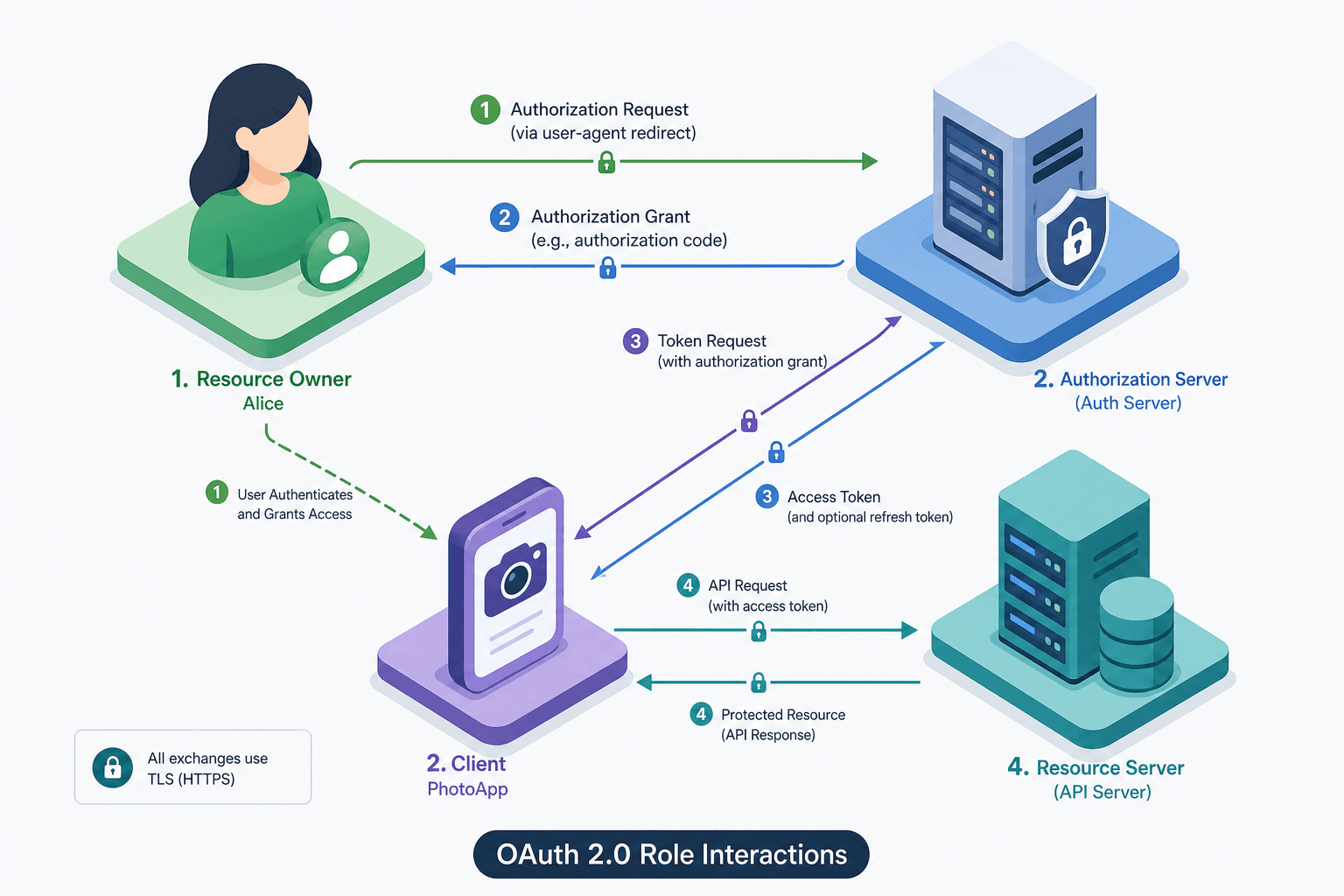
To understand the mechanism, we must map the abstract protocol to specific actors. In our scenario, there are four distinct roles interacting over HTTP.
- The Resource Owner: This is Alice. She owns the data (the vacation photos) and has the authority to grant access. In a technical implementation, the Resource Owner is usually a human user interacting with a User Agent (like a web browser).
- The Client: This is PhotoApp. It is an application requesting access to the protected resources. The Client is not trusted by the Resource Server to access data directly; it must first obtain permission.
- The Authorization Server: This is the entity that issues the tokens. It authenticates the Resource Owner and authorizes the Client. For CloudStorage, this might be
auth.cloudstorage.com. It is the source of truth for permissions. - The Resource Server: This is the API hosting the actual data, e.g.,
api.cloudstorage.com. It protects the resources and accepts Access Tokens to grant or deny access.
These roles do not all talk to each other directly. The protocol defines specific channels. The Client talks to the Authorization Server to get permission. The Client talks to the Resource Server to get data. The Resource Owner talks to the Authorization Server to approve the request. The Resource Server never talks to the Resource Owner directly.
The Delegation Mechanism: The Authorization Code Flow
How does PhotoApp get permission without seeing Alice's password? The mechanism relies on a redirect loop and a secret exchange.
When Alice opens PhotoApp, she clicks "Connect to CloudStorage." PhotoApp redirects Alice's browser to the Authorization Server at auth.cloudstorage.com. The URL includes a client_id identifying PhotoApp and a redirect_uri telling the server where to send Alice back.
At auth.cloudstorage.com, the server prompts Alice to log in. She enters her CloudStorage password. Crucially, the password is sent only to the Authorization Server, not to PhotoApp. After Alice authenticates, the Authorization Server asks her: "PhotoApp wants to read your photos. Allow?"
If Alice clicks "Allow," the Authorization Server generates a short-lived, single-use Authorization Code. It redirects Alice's browser back to PhotoApp's redirect_uri with this code attached as a query parameter (e.g., ?code=SplxlOBeZQQYbYS6WxSbIA).
Now, PhotoApp has the code, but it cannot use it yet. The Authorization Server will not accept the code unless it comes from PhotoApp itself. PhotoApp opens a direct connection to auth.cloudstorage.com/token and sends a POST request containing the code, its own client_secret, and the redirect_uri.
POST /token HTTP/1.1
Host: auth.cloudstorage.com
Content-Type: application/x-www-form-urlencoded

grant_type=authorization_code&code=SplxlOBeZQQYbYS6WxSbIA&redirect_uri=https://photoapp.example.com/callback&client_id=s6Bhd3Rqt3&client_secret=x-GZ5bW4q4
This step is the critical trust boundary. The client_secret proves that the request is coming from the legitimate PhotoApp. If a malicious actor intercepted the code from the browser redirect, they would not have the client_secret to exchange it for a token. The Authorization Server validates the secret, checks if the code is valid and unused, and then issues an Access Token.
Tokens and Trust Boundaries
The Access Token is the artifact that establishes the trust boundary. It is a string of characters (often a JSON Web Token or a random opaque string) that PhotoApp stores and sends to the Resource Server.
When PhotoApp wants to upload a file, it calls the Resource Server API:
POST /api/v1/photos HTTP/1.1
Host: api.cloudstorage.com
Authorization: Bearer mF_9.B5f-4.1J1M
Content-Type: application/json

{
  "file": "vacation.jpg",
  "folder": "2023"
}
The Resource Server receives this request. It does not know who Alice is, and it does not know PhotoApp's secrets. It only knows the Access Token. The Resource Server must validate the token.
There are two primary mechanisms for this validation, which define the trust model:
- Opaque Token: The token is just a random ID. The Resource Server must call the Authorization Server (or a dedicated introspection endpoint) to ask, "Is this token valid? Who does it belong to? What is its scope?" This creates a tight coupling but ensures the most up-to-date revocation status.
- JWT (JSON Web Token): The token is a signed JSON object containing claims like
sub(subject),scope, andexp(expiration). The Resource Server uses a public key to verify the digital signature locally. If the signature is valid, the Resource Server trusts the claims inside the token without needing to contact the Authorization Server.
The trust boundary here is the Scope. The Access Token issued in our example might contain scope: photos:write. If PhotoApp tries to delete Alice's account (scope: account:delete), the Resource Server rejects the request because the token does not grant that permission. The token limits the "blast radius" of a compromise.

Authorization vs. Authentication
A common point of confusion is treating OAuth 2.0 as an authentication protocol. It is not. OAuth 2.0 is strictly for authorization.
OAuth vs. Authentication: OAuth 2.0 answers the question "Can this client do X?" whereas authentication answers "Who is the user?". While the Authorization Server performs authentication (verifying Alice's identity) to issue a token, the resulting Access Token in standard OAuth 2.0 is primarily a permission slip, not an identity proof.
In our scenario, the Authorization Server authenticated Alice. However, the Access Token itself does not inherently prove Alice's identity to the Resource Server unless the token contains specific identity claims (which standard OAuth 2.0 does not mandate). The Resource Server only knows that "someone with this token" can write photos. It does not know that "someone" is specifically Alice unless the token payload includes a sub claim and the Resource Server trusts that claim.
If you need to know who the user is, you use OpenID Connect (OIDC), which sits on top of OAuth 2.0. OIDC adds an id_token (a specific type of JWT) that contains verified identity information. The boundary is clear: OAuth 2.0 handles delegated authorization, while OIDC extends this to provide identity verification.
The Security Tradeoff
The mechanism of OAuth 2.0 introduces specific tradeoffs. By decoupling the Client from the Resource Owner's credentials, you prevent password leakage. However, you introduce the risk of token theft. If an attacker steals an Access Token, they can act as the Client until the token expires.
This is why the client_secret cannot be used for public clients (like mobile apps), it cannot be kept secret. Instead, the PKCE (Proof Key for Code Exchange) extension is required to prevent code interception attacks, ensuring that the party initiating the request is the same party redeeming the code.
Ultimately, OAuth 2.0 creates a system where trust is delegated through tokens rather than shared secrets. The Resource Owner grants a limited window of time and scope to a Client. The Resource Server enforces these boundaries based on the cryptographic proof within the token. This architecture allows the web to function with interoperable APIs without requiring users to trust every application with their master passwords.
Conclusion
OAuth 2.0 provides an effective framework for delegated authorization by separating the identity of the user from the permissions granted to an application. By defining four distinct roles and utilizing a token-based trust model, it allows applications to access resources without ever handling user passwords. Understanding the nuances between the Authorization Code flow, token validation strategies (Opaque vs. JWT), and the distinction between authorization and authentication is essential for building secure, modern APIs. As you progress through the rest of this series, we will explore advanced flows, token refresh strategies, and the integration of OpenID Connect for comprehensive identity management.
FAQ
Is OAuth 2.0 authentication? No. OAuth 2.0 is strictly an authorization framework for delegated access. It determines what a client is allowed to do. If you need to verify who the user is, you must use OpenID Connect (OIDC), which builds on top of OAuth 2.0 to provide identity verification.
What is the difference between Access and Refresh tokens? An Access Token is used to access resources and typically has a short lifespan (e.g., 1 hour). A Refresh Token is used to obtain new Access Tokens when the current one expires, without requiring the user to log in again. Refresh tokens are generally kept secret and stored securely, as they grant long-term access.
When should I use Opaque vs JWT tokens? Use Opaque Tokens if you need immediate revocation capabilities or centralized control over token validity, as the Resource Server must check with the Authorization Server. Use JWTs if you need high performance and scalability, allowing the Resource Server to validate tokens locally without network overhead, provided you can handle the complexity of key management and revocation.
Common Pitfalls
- Storing client secrets in mobile apps: Public clients (mobile, SPAs) cannot securely store a
client_secret. Attempting to do so exposes the secret to reverse engineering. Always use PKCE instead. - Assuming OAuth proves identity: Relying solely on an OAuth Access Token to identify a user is a security flaw unless you are using OIDC. The token proves permission, not identity.
- Ignoring token expiration: Failing to implement logic to detect expired tokens or refresh them leads to poor user experience and potential security vulnerabilities if old tokens are reused indefinitely.
Practical Takeaways
- Tokens are keys, not passwords: Treat access tokens like physical house keys. They grant access to specific rooms (scopes) but do not prove who holds them unless they are signed identity tokens.
- Scope limits damage: Always request the minimum necessary permissions (scopes). If a token is compromised, the attacker can only access the specific resources defined in that scope, minimizing the blast radius.
- PKCE replaces secrets for public clients: For any client that cannot securely store a secret (like a mobile app or browser app), PKCE is the mandatory standard to ensure the token exchange remains secure.
Related posts
RFC 9700: The Mandatory Guardrails for OAuth 2.0
An examination of RFC 9700, detailing OAuth 2.0 security best current practices, including mitigation of mix-up attacks and redirect URI validation.
RFC 8693: Token Exchange, Delegation, and Impersonation
RFC 8693 defines token exchange, delegation, and impersonation mechanisms for OAuth 2.0, enabling secure identity propagation across service boundaries.
Understanding OAuth2 Multiple Response Types: A Technical Guide
An examination of OAuth2 response types including hybrid flow, OIDC response types, and authorization server configurations for beginners.