CORS Configuration That Doesn't Break Your Auth
Learn how to configure CORS in Spring Boot securely, handling preflight requests and allow-credentials without compromising authentication.
Cross-Origin Resource Sharing (CORS) is frequently misunderstood as a security feature. It is not. CORS is a browser-enforced policy that restricts how resources on a web page can be requested by another origin. The server itself does not enforce CORS; it only responds to the browser's demands. If you configure CORS incorrectly in Spring Boot, you do not just get a broken user interface—you often expose authentication mechanisms to theft or inadvertently lock out legitimate users.
The core problem arises when developers try to "allow all" origins while simultaneously allowing credentials (cookies, HTTP authentication). This combination is fundamentally forbidden by the browser specification. To build a secure backend, you must understand the mechanism of the preflight request, the strict rules around credentials, and how to integrate spring cors resolution into Spring’s security filter chain without blocking legitimate traffic.
The Mechanism of Preflight
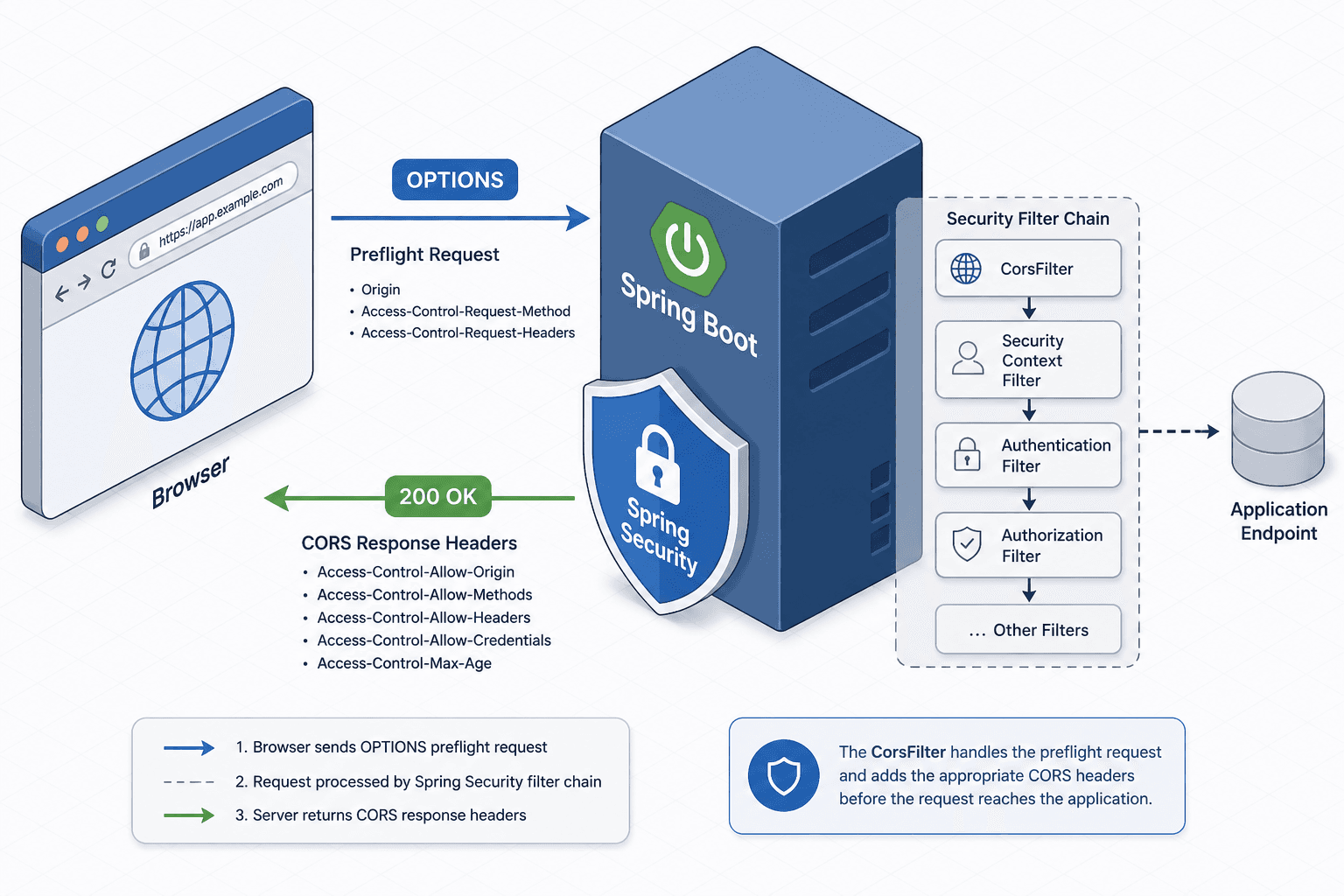
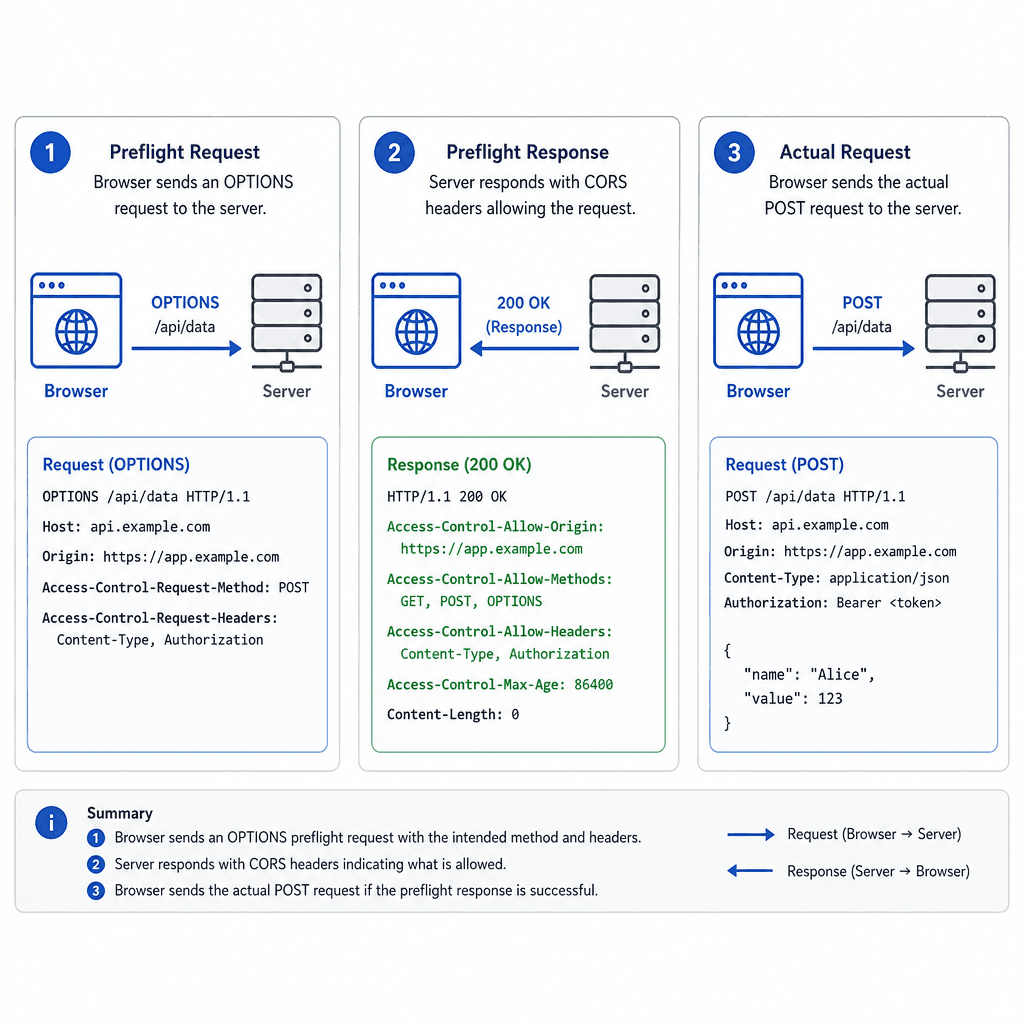
When a web application running on https://app.example.com makes a fetch request to https://api.example.com using a method like PUT or POST with custom headers, the browser does not send the actual request immediately. It first sends an OPTIONS request known as a "preflight."
This preflight asks the server: "Is it safe to send the actual POST request from my origin?"
The server must respond with specific headers:
Access-Control-Allow-Origin: The origin allowed to make the request.Access-Control-Allow-Methods: The HTTP methods permitted (e.g.,POST, GET, OPTIONS).Access-Control-Allow-Headers: The headers the actual request will include (e.g.,Content-Type,Authorization).
If the server does not respond to the OPTIONS request with these headers, the browser aborts the actual request. In Spring Boot, if you do not explicitly handle OPTIONS requests, they may fall through to your security filters. If your Spring Security configuration requires authentication for all requests, it will reject the anonymous OPTIONS preflight with a 401 Unauthorized or 403 Forbidden. The browser then blocks the actual API call, and the developer sees a vague "CORS error" in the console, even though the issue is actually an authentication block.
The Credential Trap
The most common mistake in CORS configuration involves the Access-Control-Allow-Credentials header. When a frontend application needs to send session cookies or HTTP Basic/Digest authentication tokens to the backend, it sets withCredentials: true in the fetch request.
In response, the server must set Access-Control-Allow-Credentials: true.
However, when credentials are enabled, the browser enforces a strict rule: the Access-Control-Allow-Origin header cannot be the wildcard *. It must explicitly list the specific origin making the request (e.g., https://app.example.com).
If you configure Spring Boot to return Access-Control-Allow-Origin: * alongside Access-Control-Allow-Credentials: true, the browser will silently drop the response. This breaks authentication because the frontend cannot read the response headers or body, even if the request succeeded server-side. Conversely, if you try to return a dynamic origin header in the response, you must ensure that the value matches the Origin header sent by the client exactly. To achieve this, you should validate the incoming Origin header against a whitelist of trusted domains. If the origin is valid, you set the Access-Control-Allow-Origin header to that specific origin value. If the origin is not in the whitelist, you omit the header entirely. This dynamic resolution ensures that only authorized origins can access resources with credentials, preventing unauthorized scripts from stealing sensitive data.
Programmatic Resolution in Spring Boot
Static configuration files or simple annotations often fail to handle dynamic origins securely. The robust approach in Spring Boot is to use a CorsFilter bean that programmatically resolves allowed origins. This allows you to maintain an allowlist of trusted origins and validate the incoming Origin header against it.
First, define a configuration class that holds your allowed origins. This should be externalized in application.yml or environment variables for security.
import org.springframework.beans.factory.annotation.Value;
import org.springframework.context.annotation.Bean;
import org.springframework.context.annotation.Configuration;
import org.springframework.web.cors.CorsConfiguration;
import org.springframework.web.cors.UrlBasedCorsConfigurationSource;
import org.springframework.web.filter.CorsFilter;

import java.util.List;

@Configuration
public class CorsConfig {

    @Value("${cors.allowed-origins}")
    private List<String> allowedOrigins;

    @Bean
    public CorsFilter corsFilter() {
        CorsConfiguration config = new CorsConfiguration();

        // Set allowed origins dynamically based on the configuration
        config.setAllowedOrigins(allowedOrigins);

        // Allow credentials (cookies, auth headers)
        config.setAllowCredentials(true);

        // Define allowed HTTP methods
        config.setAllowedMethods(List.of("GET", "POST", "PUT", "DELETE", "OPTIONS"));

        // Define allowed headers
        config.setAllowedHeaders(List.of("*"));

        // Expose headers that the frontend needs to read
        config.setExposedHeaders(List.of("Authorization", "Content-Type"));

        UrlBasedCorsConfigurationSource source = new UrlBasedCorsConfigurationSource();
        source.registerCorsConfiguration("/**", config);

        return new CorsFilter(source);
    }
}
This configuration ensures that only origins listed in cors.allowed-origins can make cross-origin requests with credentials. If a request comes from an unauthorized origin, Spring's CorsFilter simply omits the CORS headers from the response. The browser then enforces the block client-side, preventing the frontend from accessing the response data. This distinction is crucial: Spring handles the filtering logic, but the browser enforces the security boundary.
Integrating with Spring Security
The placement of the CorsFilter in the Spring Security filter chain is critical. By default, Spring Security applies its filters early in the servlet filter chain, before the request reaches your application's controllers. If the CorsFilter is not registered early enough, the security filters may intercept the OPTIONS preflight request and reject it due to missing authentication.
To fix this, you must ensure that the CorsFilter is applied before the SecurityFilterChain. In Spring Boot 3.x with Spring Security 6+, you can configure this in your SecurityFilterChain bean.
import org.springframework.context.annotation.Bean;
import org.springframework.context.annotation.Configuration;
import org.springframework.security.config.annotation.web.builders.HttpSecurity;
import org.springframework.security.config.annotation.web.configuration.EnableWebSecurity;
import org.springframework.security.web.SecurityFilterChain;
import org.springframework.web.cors.CorsConfiguration;
import org.springframework.web.cors.CorsConfigurationSource;
import org.springframework.web.cors.UrlBasedCorsConfigurationSource;

import java.util.List;

@Configuration
@EnableWebSecurity
public class SecurityConfig {

    @Bean
    public SecurityFilterChain filterChain(HttpSecurity http) throws Exception {
        http
            .cors(cors -> cors.configurationSource(corsConfigurationSource()))
            .csrf(csrf -> csrf.disable()) // Disable CSRF for stateless APIs if using JWT
            .authorizeHttpRequests(auth -> auth
                .requestMatchers("/api/public/**").permitAll()
                .anyRequest().authenticated()
            );
        return http.build();
    }

    @Bean
    public CorsConfigurationSource corsConfigurationSource() {
        CorsConfiguration configuration = new CorsConfiguration();
        configuration.setAllowedOrigins(List.of("https://app.example.com"));
        configuration.setAllowedMethods(List.of("GET", "POST", "PUT", "DELETE", "OPTIONS"));
        configuration.setAllowCredentials(true);
        configuration.setAllowedHeaders(List.of("*"));

        UrlBasedCorsConfigurationSource source = new UrlBasedCorsConfigurationSource();
        source.registerCorsConfiguration("/**", configuration);
        return source;
    }
}
By calling .cors(cors -> cors.configurationSource(...)), you tell Spring Security to apply the CORS filter as part of its chain. This ensures that OPTIONS requests are handled correctly before authentication checks are applied. Note that OPTIONS requests are typically exempt from authentication requirements in most CORS setups, so you may need to explicitly permit them in your authorizeHttpRequests configuration if you have strict rules.
Common Pitfalls
Even with correct code, several pitfalls can undermine your CORS configuration:
- Wildcard Origins with Credentials: Using
Access-Control-Allow-Origin: *while settingAccess-Control-Allow-Credentials: trueis invalid. Browsers will reject the response, breaking authentication flows. Always use specific origins when credentials are involved. - Missing Preflight Handling: If your security filters block
OPTIONSrequests before CORS headers are added, the browser will abort the request. Ensure CORS is processed early in the filter chain, before authentication checks. - Insecure Header Exposure: Exposing sensitive headers via
Access-Control-Expose-Headerscan leak information. Only expose headers that the frontend legitimately needs to access, such asAuthorizationor custom token headers.
Practical Takeaways
- Validate Origins: Never use wildcards with credentials. Dynamically validate and reflect the client's origin.
- Order Matters: Place CORS filters before security filters to ensure preflight requests are handled correctly.
- Test Headers: Use tools like
curlor Postman to inspect raw HTTP responses, as browser consoles often obscure underlying issues. - Minimize Exposure: Only expose necessary headers and methods to reduce the attack surface.
Related posts
SecurityFilterChain in Spring Security 6
A technical walkthrough of configuring SecurityFilterChain in Spring Security 6 using the Lambda DSL and RequestMatchers for Java developers.
SSO With Cookies Across Multiple Domains
Explore how to implement Single Sign-On using cookies across multiple domains, addressing cross-domain challenges and third-party cookie restrictions.
OIDC Dynamic Client Registration (RFC 7591)
A technical examination of RFC 7591, covering dynamic client registration, initial access tokens, and automated client management for backend systems.
