addFilterBefore and UsernamePasswordAuthenticationFilter
Learn how to use addFilterBefore to position custom filters before UsernamePasswordAuthenticationFilter in the Spring Security filter chain.
The Mechanics of Pre-Authentication: Using addFilterBefore with UsernamePasswordAuthenticationFilter
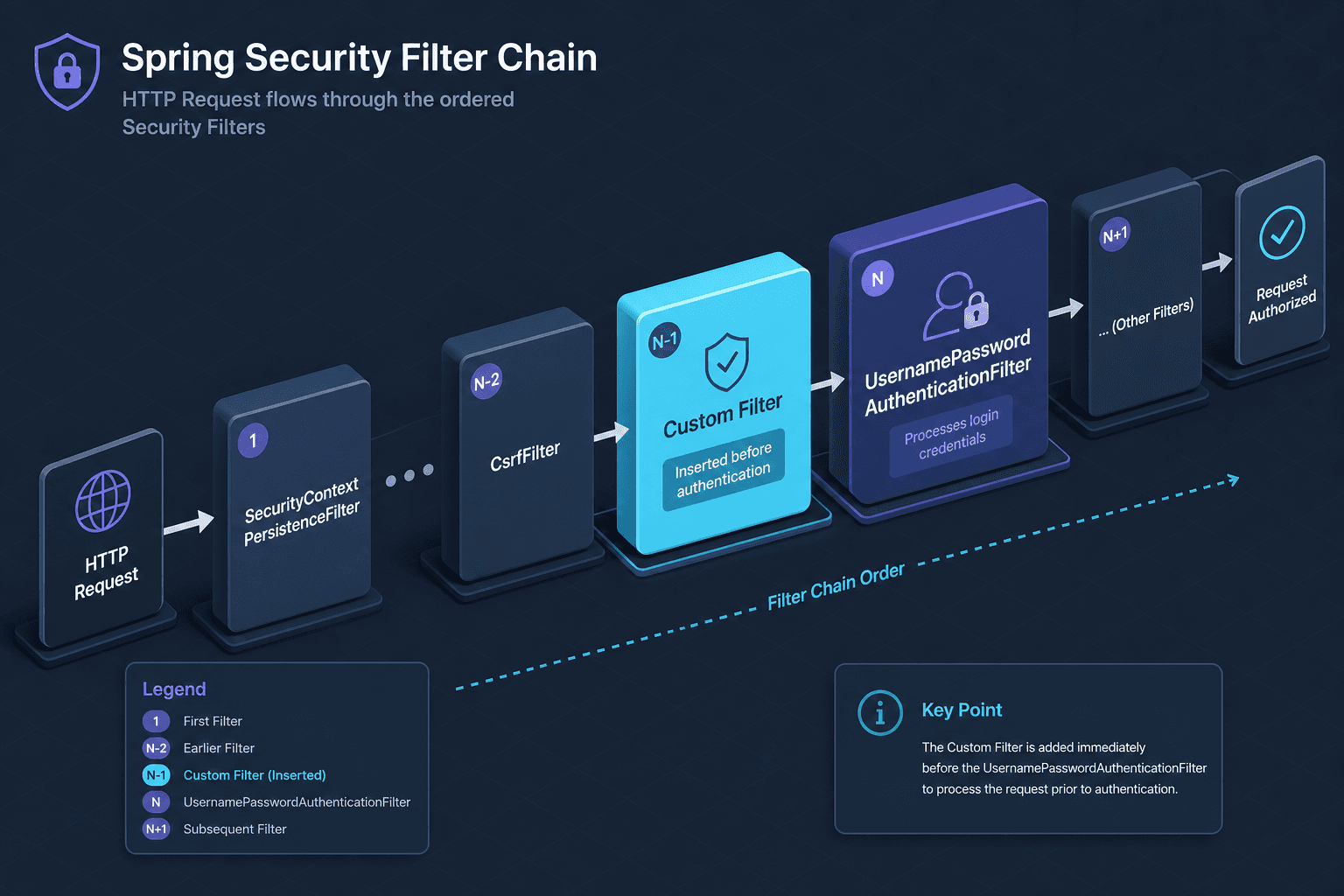
In Spring Security, the order of filters in the SecurityFilterChain is not merely aesthetic; it dictates the lifecycle of an HTTP request’s security context. A common requirement is to execute validation logic—such as IP whitelisting, rate limiting, or preliminary token validation—before the system attempts to authenticate the user using standard credentials. The mechanism for achieving this precise insertion point is addFilterBefore. This guide explains the mechanism-level details of positioning a custom filter before the UsernamePasswordAuthenticationFilter (UPAF).
The Filter Chain Topology
Spring Security processes requests through a chain of Filter instances. Each filter implements specific responsibilities. The UsernamePasswordAuthenticationFilter is responsible for parsing the username and password parameters from the request body (typically POST requests to /login) and creating an Authentication object.
If you place a custom filter after UPAF, UPAF has already attempted to authenticate. If authentication fails, the request is typically rejected, and your custom filter may never execute, or it executes in a context where the security state is already compromised. If you place it before UPAF, you can intercept and reject requests based on criteria that do not require full authentication context, such as network origin or request structure.
The entry point for most web applications is often LoginUrlAuthenticationEntryPoint or ExceptionTranslationFilter, which handles unauthorized access. UPAF sits upstream from these entry points. Therefore, any filter that needs to run before credential validation must be inserted before UPAF in the chain.
Mechanism of addFilterBefore
The SecurityFilterChain builder provides methods to insert filters relative to existing ones. The method addFilterBefore(Filter filter, Class<? extends Filter> beforeFilter) takes two arguments:
- The custom filter instance.
- The class of the filter that should come immediately after the custom filter.
Internally, Spring Security maintains an ordered list of filters. When addFilterBefore is called, the framework resolves the position of the beforeFilter class in the default chain and inserts the new filter at the preceding index. This ensures that the custom filter executes first, followed by the target filter.
It is critical to use OncePerRequestFilter as the base class for custom filters. This abstract class ensures that the filter is executed only once per request, even if the request is forwarded within the same servlet container. Without this, you risk infinite loops or redundant processing.
Worked Scenario: IP Whitelisting Before Authentication
Consider a scenario where you want to block requests from specific IP addresses before they reach the authentication endpoint. This saves resources by not attempting to parse credentials or query the database for user validation.
Step 1: Create the Custom Filter
Create a filter that extends OncePerRequestFilter. This filter will check the client's IP address. If the IP is blocked, it returns a 403 Forbidden response immediately.
import jakarta.servlet.FilterChain;
import jakarta.servlet.ServletException;
import jakarta.servlet.http.HttpServletRequest;
import jakarta.servlet.http.HttpServletResponse;
import org.springframework.security.web.authentication.UsernamePasswordAuthenticationFilter;
import org.springframework.web.filter.OncePerRequestFilter;

import java.io.IOException;
import java.util.Set;

public class IpWhitelistFilter extends OncePerRequestFilter {

    private final Set<String> blockedIps;

    public IpWhitelistFilter(Set<String> blockedIps) {
        this.blockedIps = blockedIps;
    }

    @Override
    protected void doFilterInternal(HttpServletRequest request,
                                    HttpServletResponse response,
                                    FilterChain filterChain) throws ServletException, IOException {

        String clientIp = request.getRemoteAddr();

        if (blockedIps.contains(clientIp)) {
            response.setStatus(HttpServletResponse.SC_FORBIDDEN);
            response.getWriter().write("IP Address Blocked");
            return; // Stop further processing
        }

        // Proceed to the next filter in the chain
        filterChain.doFilter(request, response);
    }
}
Step 2: Configure the Security Filter Chain
In your SecurityFilterChain configuration, use addFilterBefore to insert IpWhitelistFilter before UsernamePasswordAuthenticationFilter.
import org.springframework.context.annotation.Bean;
import org.springframework.context.annotation.Configuration;
import org.springframework.security.config.annotation.web.builders.HttpSecurity;
import org.springframework.security.config.annotation.web.configuration.EnableWebSecurity;
import org.springframework.security.web.SecurityFilterChain;
import org.springframework.security.web.authentication.UsernamePasswordAuthenticationFilter;

import java.util.Set;

@Configuration
@EnableWebSecurity
public class SecurityConfig {

    @Bean
    public SecurityFilterChain securityFilterChain(HttpSecurity http) throws Exception {

        // Create the custom filter instance
        IpWhitelistFilter ipWhitelistFilter = new IpWhitelistFilter(
            Set.of("192.168.1.100", "10.0.0.5")
        );

        http
            .authorizeHttpRequests(auth -> auth
                .requestMatchers("/public/**").permitAll()
                .anyRequest().authenticated()
            )
            // Insert the IP whitelist filter BEFORE UsernamePasswordAuthenticationFilter
            .addFilterBefore(ipWhitelistFilter, UsernamePasswordAuthenticationFilter.class);

        return http.build();
    }
}
Execution Flow
- Request arrives.
IpWhitelistFilterexecutes. It checks the IP.- If blocked, response is sent, and the chain stops. UPAF never runs.
- If allowed,
filterChain.doFilteris called, passing control to the next filter, which isUsernamePasswordAuthenticationFilter. - UPAF parses credentials and attempts authentication.
This sequence ensures that IP validation happens before any credential processing.
Common Pitfalls
Misplacing the Filter
A common mistake is using addFilterAfter instead of addFilterBefore. If you use addFilterAfter(ipWhitelistFilter, UsernamePasswordAuthenticationFilter.class), the IP check happens after authentication. This means:
- UPAF processes the credentials.
- If authentication fails, the request is rejected, and your IP filter might not run or runs in a context where the exception is already handled.
- If authentication succeeds, you have wasted resources validating an IP for a request that might have been invalid due to bad credentials.
See the Spring Security Filter Chain Documentation for more details on filter ordering.
Blocking the Security Context
Ensure that your custom filter does not interfere with the SecurityContext initialization. If your filter modifies the request or response in a way that prevents SecurityContextHolder from being populated correctly, subsequent filters (including UPAF) may fail. Always call filterChain.doFilter(request, response) if the request is valid. Refer to the Spring Security SecurityContext Javadoc for best practices on context management.
Using Incorrect Filter Classes
Do not use addFilterBefore with filters that are not part of the standard chain or that have conflicting responsibilities. For example, inserting a filter before BasicAuthenticationFilter when you are using form-based login is unnecessary and may cause confusion. Always target the specific filter that represents the stage you want to precede. See the Spring Security Authentication Providers section for guidance on authentication mechanisms.
This technique is essential for backend development teams securing API endpoints, ensuring that pre-authentication checks like IP whitelisting or rate limiting are enforced before any credential processing occurs.
Conclusion
addFilterBefore is the precise tool for injecting pre-authentication logic into the Spring Security filter chain. By understanding the position of UsernamePasswordAuthenticationFilter and using OncePerRequestFilter, you can implement strict pre-validation steps like IP whitelisting without disrupting the core authentication flow. This approach ensures that security checks are performed in the correct order, optimizing both security and performance.
For more advanced scenarios, consider combining addFilterBefore with other chain manipulation techniques to build complex, layered security architectures.
Related posts
OncePerRequestFilter: The Right Base Class for JWT
Learn why OncePerRequestFilter is the correct base class for JWT authentication in Spring Security, handling async dispatches and avoiding duplicate processing.
The Spring Security Filter Chain, Ordered
An examination of the Spring Security filter chain, focusing on filter order, DelegatingFilterProxy, and servlet architecture for backend engineers.
SecurityFilterChain in Spring Security 6
A technical walkthrough of configuring SecurityFilterChain in Spring Security 6 using the Lambda DSL and RequestMatchers for Java developers.