Passkeys: Sync, Device-Bound, and Recovery
Explore how passkeys balance device-bound security with cross-device sync and account recovery mechanisms for developers.
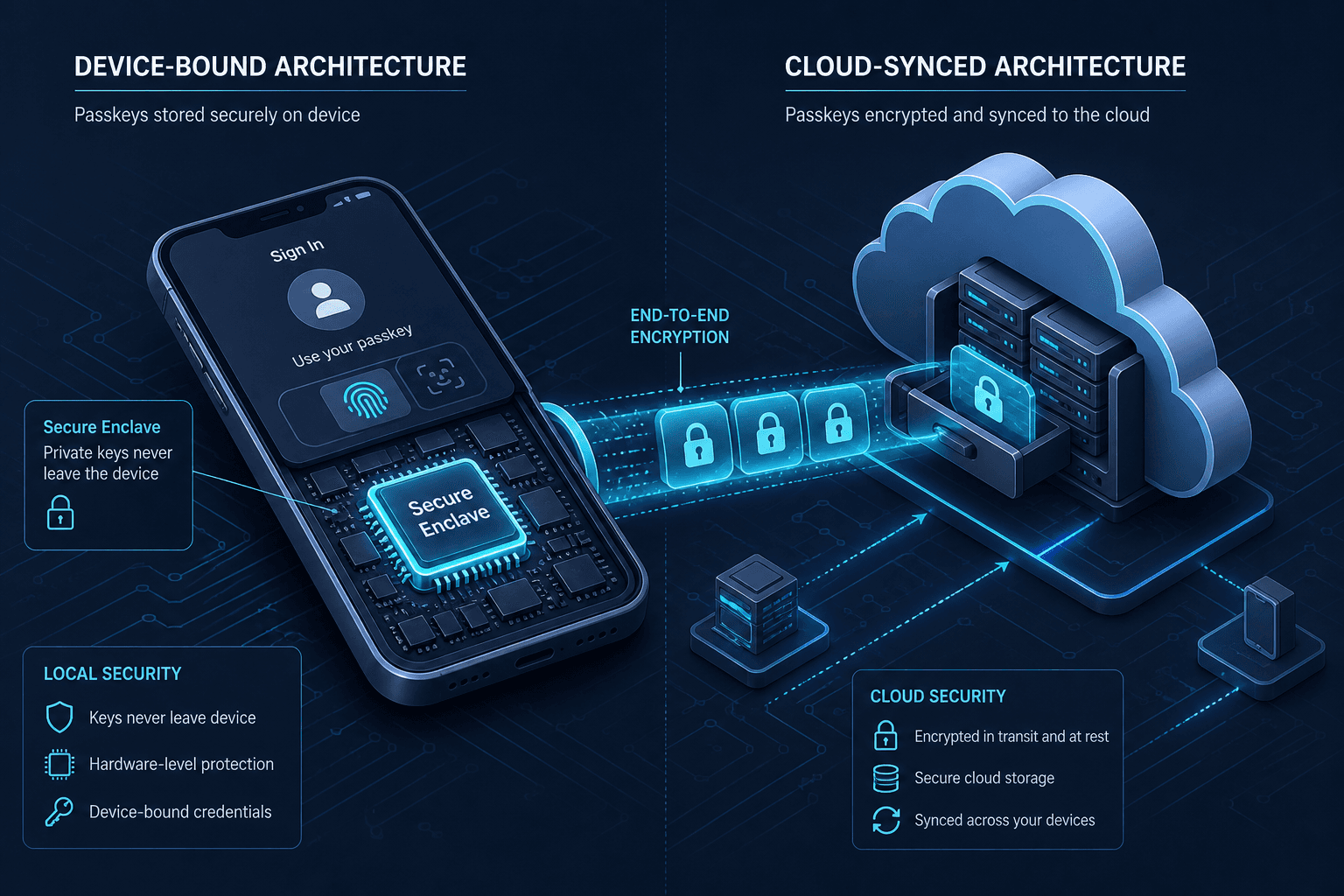
Passkeys are often marketed as a drop-in replacement for passwords, but for engineers, they represent a fundamental shift in how authentication state is stored and synchronized. The WebAuthn specification does not mandate a single storage model. Instead, it defines an interface that allows authenticators to operate in two distinct modes: device-bound and cloud-synced. Understanding the mechanism behind these modes is critical because they dictate user experience, security boundaries, and recovery strategies.
Part 4 of the Passwordless Authentication series.
The Device-Bound Mechanism
At its core, a passkey is a public-key credential. The private key never leaves the authenticator, and the public key is registered with the relying party (the website or app). In the device-bound model, the private key is stored locally on the user’s device, typically within a Trusted Execution Environment (TEE) like Apple’s Secure Enclave or a TPM on Windows.
This model relies on resident keys (also known as client-side discoverable credentials). When a user creates a device-bound passkey, the authenticator generates a key pair and stores the credential ID (a opaque identifier) locally. Crucially, the authenticator also stores the associated account information (username, display name, etc.) locally.
// Example: Creating a resident key (device-bound)
const publicKeyCredential = await navigator.credentials.create({
  publicKey: {
    rp: { name: "Example Corp" },
    user: {
      id: window.crypto.getRandomValues(new Uint8Array(16)),
      name: "user@example.com",
      displayName: "Alice"
    },
    pubKeyCredParams: [{ alg: -7, type: "public-key" }], // ES256
    authenticatorSelection: {
      authenticatorAttachment: "platform", // Restricts to platform authenticators; combined with requireResidentKey ensures local storage.
      requireResidentKey: true,           // Critical for usernameless login
      userVerification: "required"
    }
  }
});
By setting requireResidentKey: true, the developer instructs the browser to store the credential locally. This enables the conditional ui pattern, where the browser can automatically fill in the username field when the user focuses it, because the browser already knows which local passkeys exist for that domain. The flow is entirely offline until the assertion is sent to the server. If the user loses this device, the private key is lost forever, as there is no remote copy.
Cloud-Synced Architectures
Device-bound passkeys are secure but fragile. To solve the "lost device" problem, Apple and Google introduced cloud-synced passkeys. This does not change the cryptographic binding; the private key still never leaves the device during authentication. Instead, it changes how the credential is provisioned and replicated.
In the synced model, the relying party still receives only the public key. However, the authenticator now supports a credential sync protocol. When a user creates a passkey on Device A, the private key is encrypted using a key derived from the user’s account credentials (e.g., Apple ID password or Google Account password) and uploaded to the cloud provider’s secure infrastructure. Device B then downloads this encrypted payload, decrypts it using the user’s account credentials, and stores the private key locally.
Apple implements this via iCloud Keychain. An apple passkey stored in iCloud Keychain is protected by end-to-end encryption, meaning Apple cannot access the plaintext private key even if the account is compromised; Apple holds only the encrypted blob, and decryption requires a device already trusted within the user's iCloud Keychain circle. Google uses its Password Manager backend. Both use End-to-End Encryption (E2EE) for the sync channel. This means the cloud provider cannot read the private key, but they can facilitate its replication.
The security boundary shifts here. In a device bound model, the threat model is physical theft of the device. In a synced model, the threat model includes compromise of the cloud account. If an attacker gains access to the user’s Apple ID or Google Account, they can potentially enroll a new device and download the synced passkeys, provided they can pass the account’s own MFA checks. This is why account recovery is so critical.
The Recovery Problem
Traditional password reset flows rely on the user remembering a shared secret (the password) to prove identity. Passkeys eliminate the shared secret. If a user loses their only device with a device-bound passkey, they have no way to prove they own the account because the "password" was the device itself. This creates a hard lockout scenario.
Synced passkeys mitigate this by allowing access from any synced device. However, if a user loses all synced devices, or if they are locked out of their cloud account, they face the same lockout. Furthermore, even with synced passkeys, the initial enrollment of a new device requires verifying the user’s identity against the cloud provider.
Account Recovery Strategies
Developers must design for recovery from day one. The WebAuthn spec itself does not define a recovery protocol; it leaves this to the relying party and the authenticator platform. There are three primary mechanisms:
- Trusted Device Recovery: If the user has another device with the same cloud account, they can authenticate on that device to authorize the enrollment of a new device. This is the most common flow for synced passkeys.
- Account Recovery Flows: For users who lose access to all devices, relying parties must integrate with their identity provider’s recovery mechanisms. Apple provides an Account Recovery process that can take weeks but allows users to regain access to their iCloud account and, subsequently, their passkeys. Google offers similar account recovery via general Google Account recovery options.
- Backup Codes: Some relying parties allow users to generate backup codes (one-time passwords) during passkey setup. These are not passkeys but serve as a fallback. However, this reintroduces the security weaknesses of traditional passwords (phishing, reuse) and should be used sparingly.
For developers, the key takeaway is that you cannot recover a passkey if the authenticator is lost and no sync exists. You must encourage users to use synced passkeys if cross-device access is a requirement. If you must support device-bound passkeys, you must provide a robust, alternative authentication method (like a secondary password or security key) for recovery, effectively creating a hybrid system.
Conclusion
Passkeys are not a single technology but a flexible framework. Device-bound passkeys offer maximum security by keeping keys offline, while cloud-synced passkeys offer convenience and resilience at the cost of tying security to the cloud account. Developers must choose the right model for their use case and implement appropriate recovery flows. Ignoring the distinction between these models leads to poor user experiences and potential lockouts. The future of authentication is not just about removing passwords; it’s about managing the lifecycle of cryptographic credentials across multiple devices and accounts.
Related posts
Passkeys Guide: Google, Apple, Microsoft Ecosystems
A technical guide to implementing passkeys across Google, Apple, and Microsoft ecosystems using WebAuthn for cross-device synchronization.
FIDO2 and WebAuthn: Building Phishing-Resistant Authentication
An examination of FIDO2 and WebAuthn standards for implementing phishing-resistant authentication and secure credential management.
WebAuthn and FIDO2, Explained
An examination of WebAuthn and FIDO2 standards, covering attestation, user verification, and public key credentials for passwordless authentication.