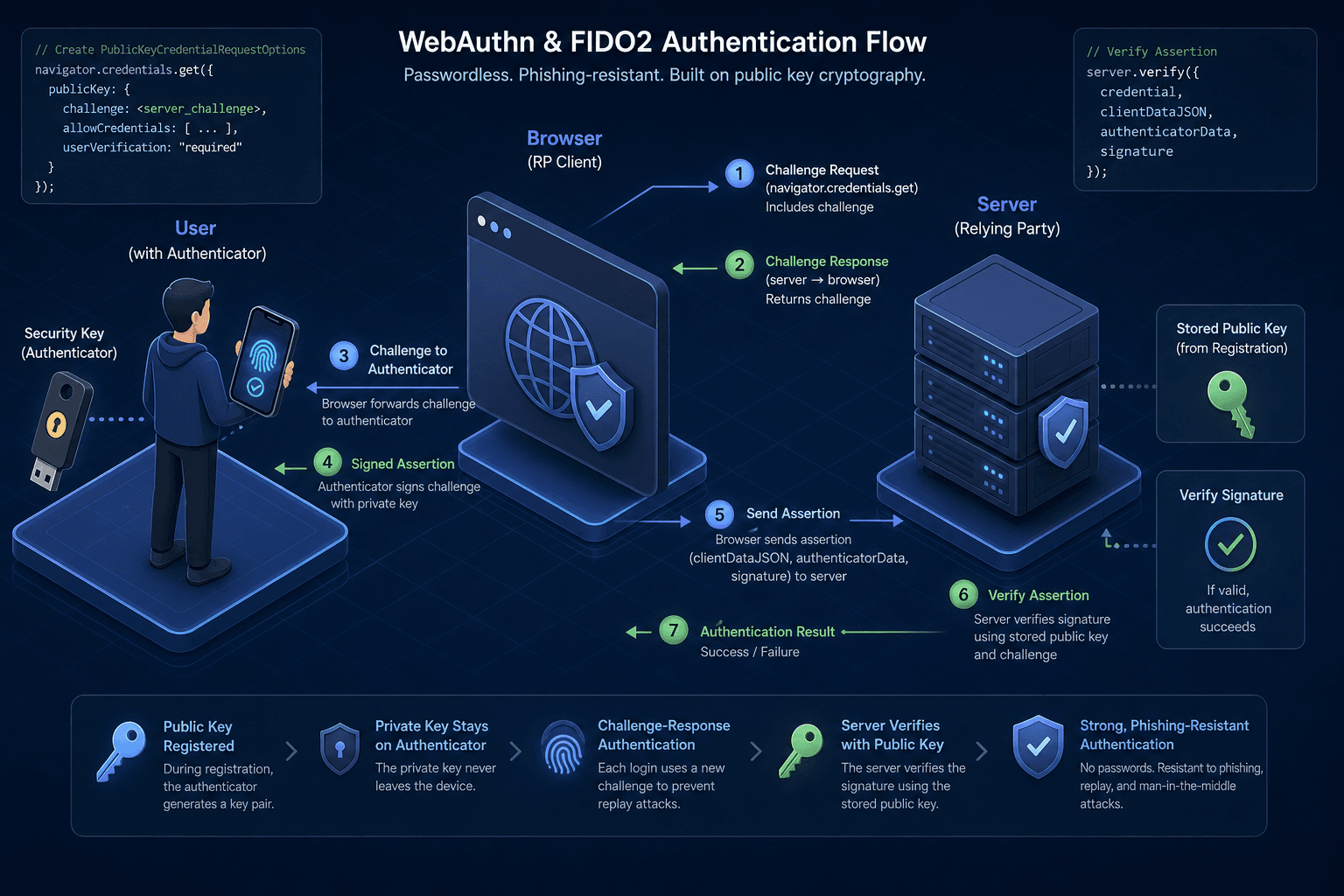
WebAuthn and FIDO2, Explained
An examination of WebAuthn and FIDO2 standards, covering attestation, user verification, and public key credentials for passwordless authentication.
Password authentication is fundamentally broken. It relies on a shared secret (the password) that must be transmitted over the network, stored on servers, and remembered by users. This creates three critical failure points: interception during transmission, insecure storage on servers, and human error (reuse, weak choices).
This article is Part 3 of the Passwordless Authentication series.
WebAuthn (Web Authentication) and FIDO2 (Fast Identity Online 2) solve this by replacing shared secrets with public key cryptography. Instead of sending a password, the client proves possession of a private key that never leaves the user’s device. The server only stores the corresponding public key. This mechanism eliminates phishing, credential stuffing, and server-side password leaks.
The Core Mechanism: Asymmetric Keys
At the heart of WebAuthn is an asymmetric key pair. The authenticator (a USB key, smartphone, or built-in platform such as TouchID or Windows Hello) generates a unique private/public key pair for each website.
The private key remains sealed inside the authenticator hardware. It is cryptographically bound to the specific relying party (the website) and the user account. The public key is sent to the server and stored in the database associated with the user’s account.
When Alice attempts to log in to example.com, she does not send a password. She sends a cryptographic signature created with her private key. Since the private key never travels across the network, an attacker intercepting the traffic sees only random bytes that cannot be used to impersonate Alice.
// Conceptual representation of key generation
const keyPair = await crypto.subtle.generateKey(
  {
    name: "ECDSA",
    namedCurve: "P-256",
  },
  true,
  ["sign", "verify"]
);
The Authentication Flow
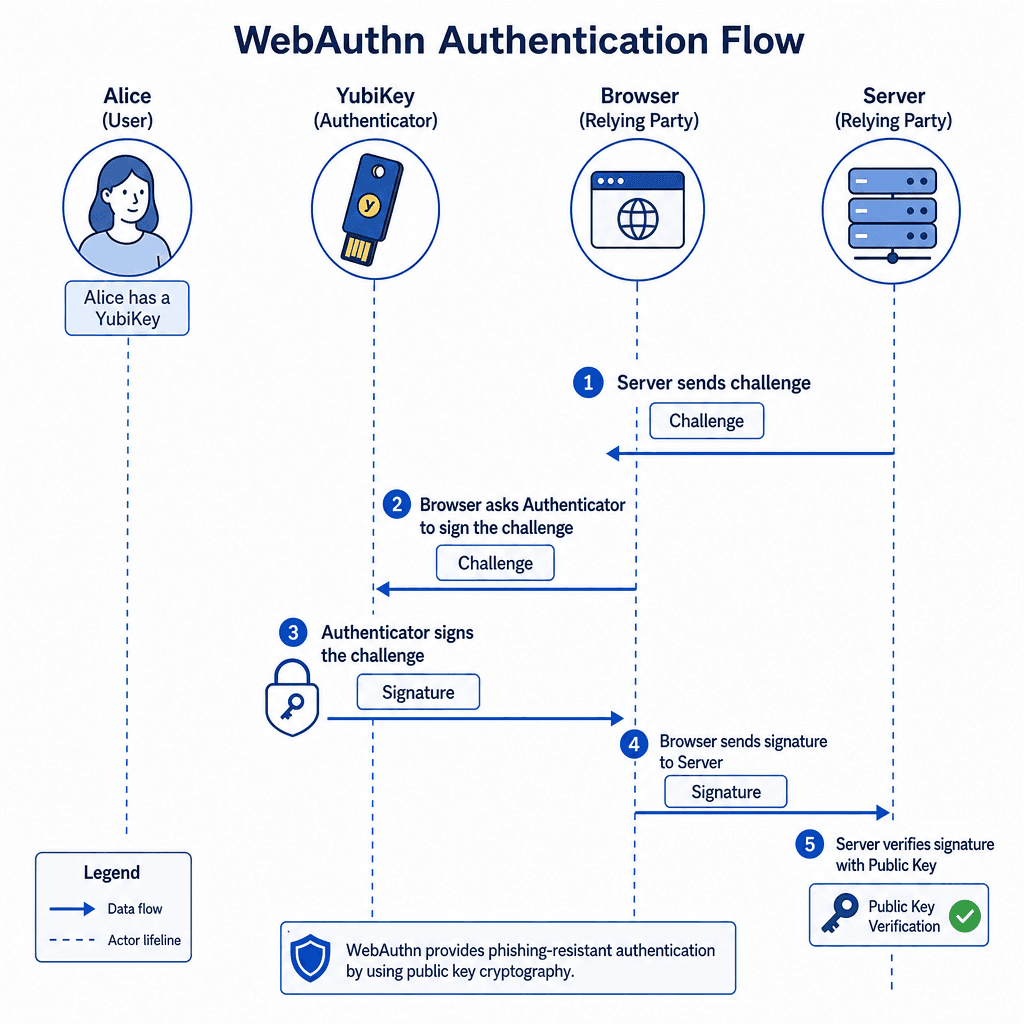
Let’s trace the mechanism with named actors: Alice (user), example.com (relying party/server), and Alice’s YubiKey (authenticator).
-
Registration: Alice visits
example.comand clicks "Sign up." The browser callsnavigator.credentials.create(). The YubiKey generates a new key pair. The public key and an attestation statement are sent to the server. The server stores the public key and verifies the attestation. -
Authentication: Alice returns later and clicks "Sign in."
- The server generates a random 32-byte challenge and sends it to the browser.
- The browser calls
navigator.credentials.get(), passing the challenge. - The browser prompts the authenticator. Alice touches her YubiKey.
- The YubiKey signs the challenge with the private key and returns the signature.
- The browser sends the signature back to the server.
- The server looks up the public key for Alice and verifies the signature against the original challenge.
If the signature is valid, Alice is authenticated. The server has no access to the private key, so it cannot reconstruct it or impersonate Alice.
// Browser-side authentication flow
const publicKeyCredential = await navigator.credentials.get({
  publicKey: {
    challenge: new Uint8Array([...serverChallenge]), // Random challenge from server
    allowCredentials: [
      {
        id: publicKeyCredentialId, // The stored credential ID
        type: "public-key",
        transports: ["usb", "nfc"],
      },
    ],
  },
});
User Verification and Attestation
Two distinct security concepts are often confused: User Verification and Attestation.
User Verification ensures that a real human is present at the device. The authenticator can use a PIN, fingerprint, or face scan. If the user fails verification, the authenticator refuses to sign the challenge. This prevents unauthorized use if the device is stolen. The server can request verification by setting userVerification: "required" in the API call. If the authenticator cannot verify the user, the authentication fails. This layer of security ensures that possession of the device alone is insufficient for authentication.
Attestation proves the authenticity of the authenticator itself. When the key is first registered, the authenticator sends an attestation statement. This statement includes:
- The public key.
- A certificate chain (if applicable) showing the manufacturer.
- A signature from the manufacturer proving the key was generated securely.
The server uses this to decide whether to trust the device. For example, a bank might reject authentication from an unverified generic USB key but accept one from a certified YubiKey. Attestation does not identify the user; it identifies the hardware.
FIDO2 vs. WebAuthn
FIDO2 and WebAuthn are related but distinct.
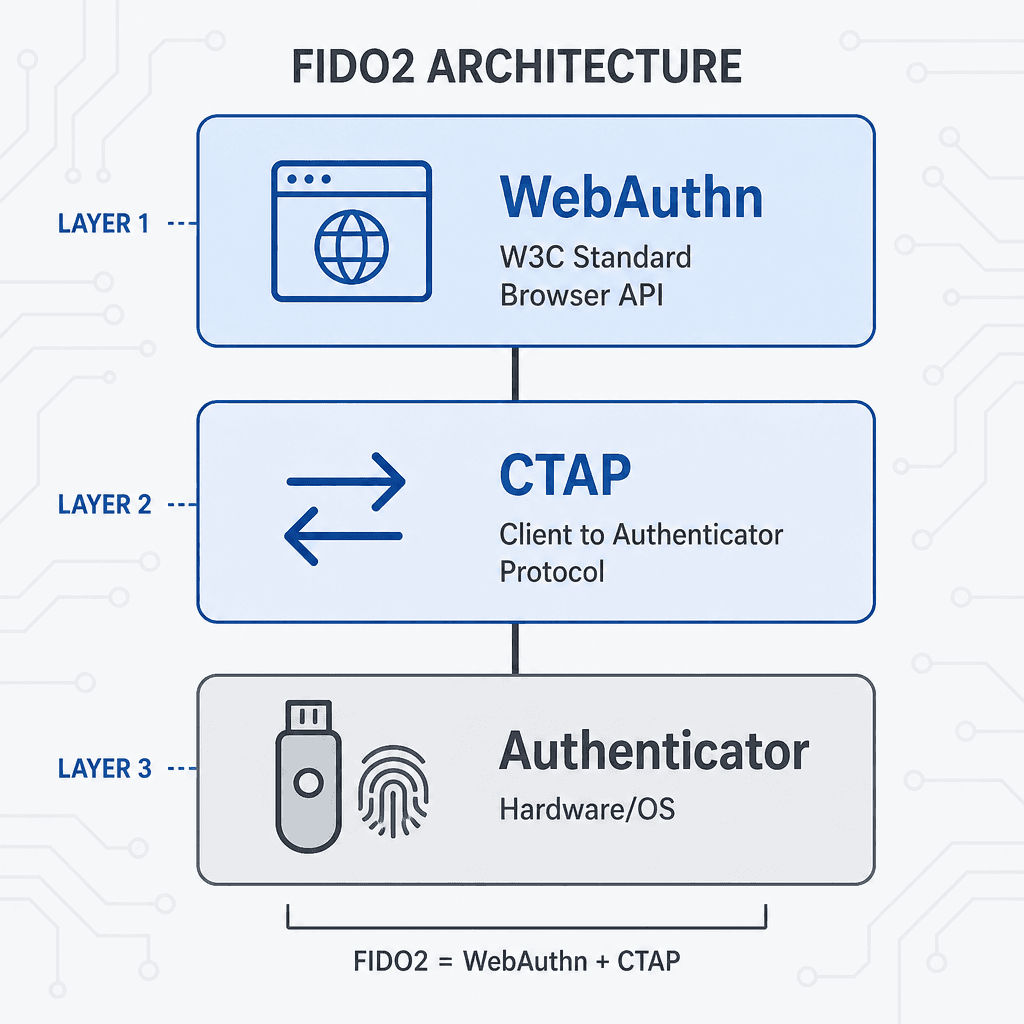
FIDO2 is the overarching standard developed by the FIDO Alliance. It consists of two components:
- CTAP (Client to Authenticator Protocol): The protocol between the client (browser/OS) and the authenticator (USB key/smartphone).
- WebAuthn: The API that allows web applications to interact with FIDO2 authenticators.
WebAuthn is a W3C standard that defines the JavaScript API (navigator.credentials) and the data structures used in the challenge-response flow. It is the browser-level implementation of FIDO2.
In practice, when developers say "FIDO2," they usually mean the entire ecosystem. When they say "WebAuthn," they refer specifically to the browser API. WebAuthn enables FIDO2 to work in browsers.
Why This Matters
Passwordless authentication reduces friction for users and increases security. Users no longer need to remember complex passwords or fall for phishing sites. Developers no longer need to store hashed passwords or worry about password reset flows.
The security model shifts from "protecting the server" to "protecting the device." The private key is stored in a secure element, isolated from malware. Even if the operating system is compromised, the attacker cannot extract the private key. The authentication relies on the user’s presence, verified by the device, and the cryptographic proof, verified by the server.
This model is not perfect. It requires user interaction (touching a key or scanning a fingerprint). It can fail if the device is lost. However, the security benefits outweigh these limitations for most applications.
As the web evolves, WebAuthn is becoming the default for secure authentication. Browsers support it natively, and major identity providers offer it. For developers, implementing WebAuthn is a critical step toward a more secure internet.
Conclusion
WebAuthn and FIDO2 represent a fundamental shift in how we handle digital identity. By leveraging public key cryptography and hardware-bound private keys, they remove the vulnerabilities inherent in password-based systems. Understanding the distinction between user verification, attestation, and the roles of FIDO2 versus WebAuthn is essential for any developer building secure, modern authentication flows.
Next Steps: Audit Your Implementation
Review your current authentication flow for passwordless readiness. Ensure you are not relying on deprecated methods like navigator.credentials.create without proper fallbacks. Verify that your server correctly validates attestation statements against the relying party's configuration. Check if your implementation handles credential rotation and user migration from legacy passwords effectively.
FAQ
What is the difference between WebAuthn and FIDO2? FIDO2 is the umbrella standard comprising CTAP (protocol) and WebAuthn (API). WebAuthn is the specific W3C standard that defines how browsers interact with FIDO2 authenticators.
Can WebAuthn be used on mobile devices? Yes. WebAuthn works on both desktop and mobile browsers. On mobile, it often leverages platform authenticators like FaceID, TouchID, or biometric PINs via the device's secure enclave.
Is WebAuthn compatible with all browsers? WebAuthn is supported by all major modern browsers, including Chrome, Firefox, Safari, and Edge. Support has been widespread since 2019, making it viable for production use in most contexts.
Practical Takeaways
- Public Key Credentials: Always generate a unique public key credential for each website to prevent cross-site tracking and reuse attacks.
- User Verification: Leverage
userVerification: "required"for high-security applications to ensure human presence at the device. - Attestation Formats: Understand the difference between Basic, Self, and AttCA attestation statements to make informed trust decisions about authenticator manufacturers.
Common Pitfalls
- Ignoring Attestation Conveyance: Developers often skip attestation verification, leaving them unable to distinguish between genuine hardware authenticators and emulators.
- Hardcoding Credential IDs: Storing credential IDs without a robust lookup strategy can lead to "credential exhaustion" if users lose their device and cannot retrieve old credentials.
- Mixing Up CTAP and WebAuthn: Confusing the low-level CTAP protocol with the high-level WebAuthn API can lead to incorrect implementation choices when integrating with external authenticators.
Related posts
Implementing WebAuthn in Keycloak: Passkey Authentication Setup
A walkthrough for configuring WebAuthn and passkeys within Keycloak to enable passwordless authentication using FIDO2 standards.
Why Passwords Are Finally Losing | WebAuthn Guide
An examination of why passwordless authentication is replacing traditional passwords due to phishing resistance and security improvements.
Passkeys Guide: Google, Apple, Microsoft Ecosystems
A technical guide to implementing passkeys across Google, Apple, and Microsoft ecosystems using WebAuthn for cross-device synchronization.