Implementing WebAuthn in Keycloak: Passkey Authentication Setup
A walkthrough for configuring WebAuthn and passkeys within Keycloak to enable passwordless authentication using FIDO2 standards.
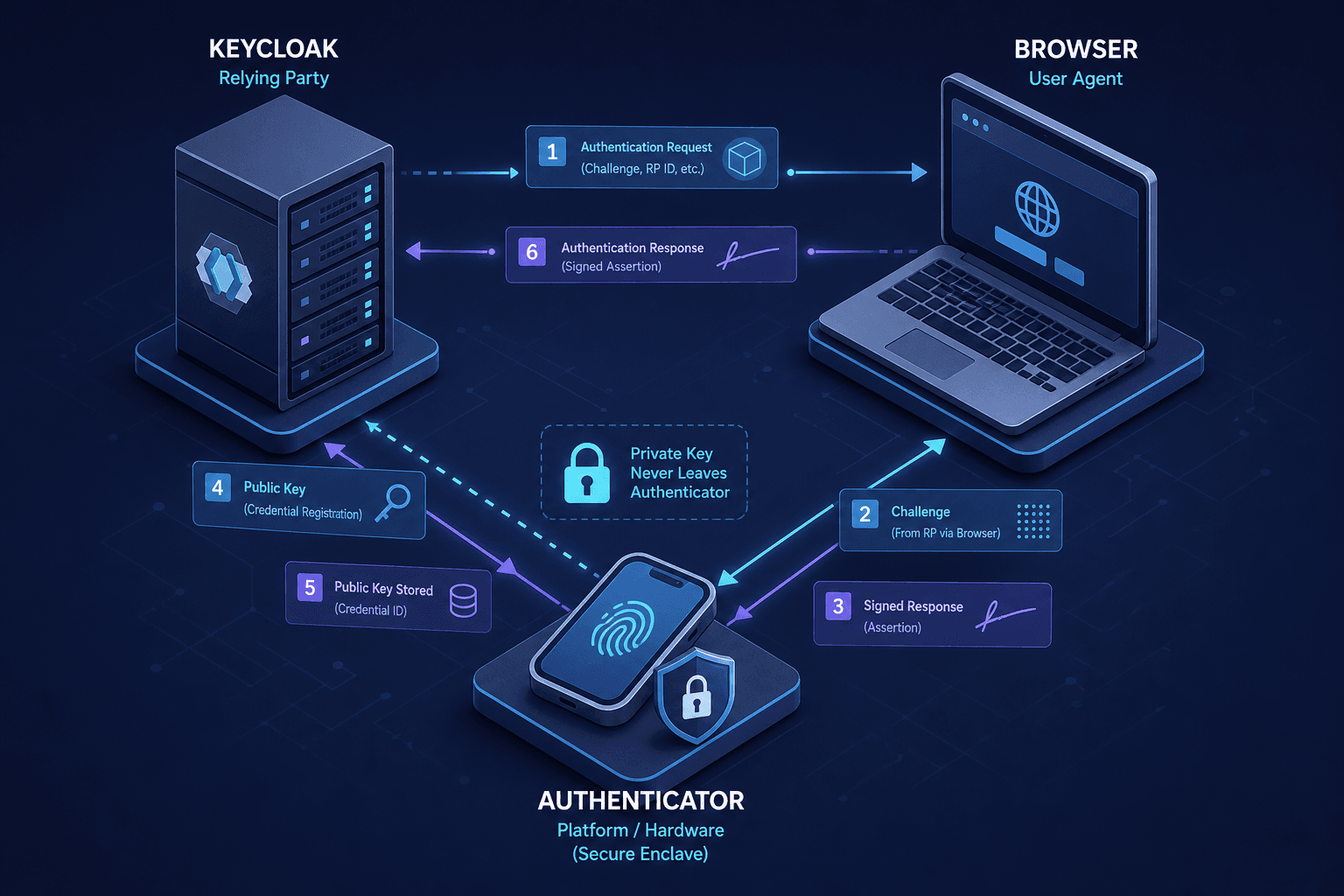
The fundamental shift in WebAuthn-based passkeys within Keycloak is not merely replacing a text field with a biometric prompt; it is a complete restructuring of the trust model from shared secrets to asymmetric cryptography. In traditional OAuth or SAML flows, Keycloak validates a password by comparing a salted hash against a stored value. With WebAuthn, Keycloak becomes a FIDO2 Relying Party (RP). It does not store a secret; it stores a public key and a unique credential ID. The mechanism relies on the browser's Credential Management API to interface with the operating system's authenticator (like Windows Hello or Apple's Secure Enclave), which holds the private key in a hardware-isolated environment.
To configure this, you must first understand that Keycloak requires a specific Authenticator Provider to handle the protocol translation. The standard "Username/Password" flow is bypassed for users who opt into passkeys, but the underlying Identity Provider configuration remains the same. The critical configuration happens in the Keycloak Admin Console under Authentication -> Browser (or the specific flow you are modifying). You must add the "FIDO2 Authenticator" execution. This native provider was introduced in Keycloak 20.0+ and handles the publicKeyCredentialCreationOptions and publicKeyCredentialRequestOptions generation automatically.
The Trust Model: Keycloak as a Relying Party
The core mechanism of WebAuthn in Keycloak is the "Relying Party" concept. Keycloak acts as the RP, managing the cryptographic challenge-response flow where the browser (client) and authenticator (device) sign a server-generated nonce. This eliminates the need for password transmission entirely.
In this architecture, trust shifts from "something you know" (a password) to "something you have" (a hardware-backed authenticator) via asymmetric cryptography. Keycloak stores the public key credential rather than a hash. When a user registers, the authenticator generates a key pair. The private key remains securely within the device's hardware enclave (e.g., TPM, Secure Enclave), while the public key is transmitted to Keycloak.
This separation ensures that even if Keycloak's database is compromised, the attacker gains only public keys, which are useless for authentication without the corresponding private key residing on the user's device.
Configuration Mechanics: Resident Keys and Attestation
When enabling the FIDO2 Authenticator provider, you are configuring the parameters that dictate how the authenticator registers the key. The most significant mechanism here is the requireResidentKey setting. This parameter dictates the storage strategy of the credential.
If requireResidentKey is set to true, Keycloak requests a resident credential. This means the authenticator stores the credential itself, often referred to as a "synced" passkey across devices. This enables a streamlined experience where a single passkey can be used across multiple devices if the user's account is synced via their cloud provider (e.g., iCloud Keychain or Google Password Manager).
If requireResidentKey is set to false, Keycloak expects a non-resident credential. Here, the authenticator generates a key pair, stores the private key, and sends only the public key and a generated credential ID back to Keycloak. For most enterprise setups requiring device-specific access, false is the standard.
Additionally, the attestation policy determines whether Keycloak verifies the specific hardware model of the authenticator.
- None: Allows any authenticator to register. Preferred for user experience.
- Direct or Indirect: Restricts access to specific approved devices, adding a layer of policy enforcement at the cost of friction.
The Registration Flow: Creating the Credential
Let's trace the registration mechanism step-by-step using a concrete scenario. Imagine a user, "Alice", attempting to register a passkey on her laptop. The browser initiates the flow by calling navigator.credentials.create() with a JSON object populated by Keycloak. This object contains the rp (Relying Party) object, specifically the id and name. In Keycloak, this rp.id is usually the realm's hostname (e.g., auth.example.com). This binding is crucial; if the rp.id changes, the credential becomes invalid for that specific domain.
{
  "rp": {
    "id": "auth.example.com",
    "name": "Example Corp"
  },
  "user": {
    "id": "dXNlcjEyMw",
    "name": "alice@example.com",
    "displayName": "Alice"
  },
  "challenge": "Y2hhbGxlbmdlX3ZhbHVlX2VuY29kZWRfaW5fYmFzZTY0",
  "pubKeyCredParams": [
    { "type": "public-key", "alg": -7 },
    { "type": "public-key", "alg": -257 }
  ],
  "timeout": 60000,
  "attestation": "direct",
  "excludeCredentials": []
}
In this payload, the challenge is a cryptographically random nonce generated by Keycloak. The pubKeyCredParams specify the algorithms supported (ES256 and RS256 are common). The authenticator receives this request. It prompts Alice for biometric verification (TouchID or FaceID). Upon success, the authenticator generates a new private/public key pair. It signs the challenge with the new private key and returns the authenticatorData and the clientDataJSON to the browser. The browser then POSTs this data back to Keycloak's /register endpoint. Keycloak verifies the signature using the newly generated public key. If valid, Keycloak stores the public key and the credential ID in its database, linked to Alice's user record.
The Authentication Flow: Challenge-Response Verification
The authentication flow mirrors registration but in reverse, relying on the challenge-response mechanism to prove possession of the private key without transmitting it. When Alice returns to log in, she selects "Passkey" as the login method. Keycloak retrieves her stored public key and generates a new challenge. It sends a navigator.credentials.get() request to the browser with the allowCredentials list containing Alice's specific credential ID.
The browser then asks the OS authenticator: "Do you have a credential matching this ID for auth.example.com?" The OS authenticator checks its secure storage. If found, it prompts Alice again for biometric verification. The authenticator signs the new challenge with its private key. The browser receives the signed assertion and forwards it to Keycloak. Keycloak uses the stored public key to verify the signature against the new challenge. If the math checks out, Keycloak establishes the session.
This mechanism provides defense-in-depth against phishing. Because the rp.id is embedded in the challenge and verified by the authenticator, a passkey registered for auth.example.com will simply refuse to authenticate if the user is tricked into visiting evil-example.com. The authenticator sees the domain mismatch and aborts the operation before any signature is even generated. This is a protocol-level guarantee, not a UI warning.
Operational Tradeoffs and Proxy Configuration
There are operational tradeoffs to consider. Managing resident keys (requireResidentKey: true) increases the storage burden on the authenticator device and requires the user to be signed into their cloud account to sync credentials. Non-resident keys are lighter but device-bound unless the user manually exports the private key, which Keycloak does not support natively for security reasons.
The integration also requires careful handling of the origin field in the WebAuthn protocol. Keycloak must be configured to accept requests from the correct origin (usually the realm's URL). If your Keycloak instance is behind a reverse proxy or load balancer, you must ensure the x-forwarded-proto and host headers are correctly propagated so Keycloak generates the correct rp.id. A mismatch here causes the browser to reject the challenge entirely.
Common Pitfalls
When implementing FIDO2 authentication, administrators often encounter specific hurdles that can disrupt the user experience or break authentication flows entirely.
- Origin and Domain Mismatches: The WebAuthn protocol strictly binds credentials to the
rp.id(relying party ID). If the Keycloak instance is accessed via a domain different from the one used during registration (e.g., accessing via an internal IP instead of the public DNS, or a mismatch betweenhttps://auth.example.comandhttps://example.com), the browser will reject the challenge. This is often caused by incorrect proxy configurations where theHostheader is not forwarded correctly. - Confusion Between Resident vs. Non-Resident Keys: Administrators sometimes assume all passkeys are "synced" across devices. This is only true if
requireResidentKeyis set totrue. If this is disabled (the default for many enterprise setups), the credential is tied to the specific device where it was created. Users losing that device will lose access unless they have registered a second credential, leading to unexpected lockouts. - Legacy vs. Native Authenticators: There is a distinct difference between the older, experimental WebAuthn authenticator and the native FIDO2 Authenticator introduced in Keycloak 20.0+. The legacy implementation often required custom scripts and had limited browser support. The modern FIDO2 Authenticator is the recommended standard, offering better compatibility and adherence to the latest FIDO specifications.
Practical Takeaways
To effectively manage WebAuthn in Keycloak, keep these mental models in mind:
- Trust Model Shift: WebAuthn moves the security boundary from the server database to the user's device hardware. The server only stores public keys; the private key never leaves the device.
- Storage Implications: Understand that "Resident Keys" (synced passkeys) require cloud synchronization and device support, whereas "Non-Resident Keys" are faster but strictly bound to the initial device unless exported (which is generally not supported for security).
- Phishing Resistance: The guarantee against phishing is mathematical, not visual. The authenticator verifies the domain origin before signing; if the domain is wrong, the signature is never created, regardless of what the user sees on the screen.
FAQ
Q: Which browsers and operating systems support this? A: Modern WebAuthn is supported by all major browsers (Chrome, Firefox, Safari, Edge) on current versions of Windows, macOS, iOS, and Android. The FIDO2 Authenticator in Keycloak 20.0+ relies on these native OS capabilities, so support depends on the user's device and browser version rather than the server configuration.
Q: What happens if a user loses their device? A: If the user has only one non-resident key registered, they will be locked out unless a fallback method (like email OTP or password) is configured in the authentication flow. To prevent this, it is best practice to require or encourage users to register a second passkey on a different device or use a backup authentication method.
Q: What is the difference between the legacy WebAuthn authenticator and the FIDO2 authenticator? A: The legacy WebAuthn authenticator was an earlier implementation that often required custom scripting and had inconsistent support across browsers. The FIDO2 Authenticator, available in Keycloak 20.0+, is the native, standardized provider that fully implements the FIDO2 specification, offering better performance, security, and cross-platform compatibility without custom code.
Conclusion
Implementing WebAuthn in Keycloak transforms the authentication landscape from shared secrets to asymmetric trust. By leveraging the FIDO2 standard, organizations can offer users a seamless, phishing-resistant login experience while significantly reducing the attack surface associated with password databases. The configuration of requireResidentKey and attestation policies allows administrators to balance security requirements with user convenience, making Keycloak a powerful platform for modern, passwordless identity management.
Related posts
Passkeys Guide: Google, Apple, Microsoft Ecosystems
A technical guide to implementing passkeys across Google, Apple, and Microsoft ecosystems using WebAuthn for cross-device synchronization.
FIDO2 and WebAuthn: Building Phishing-Resistant Authentication
An examination of FIDO2 and WebAuthn standards for implementing phishing-resistant authentication and secure credential management.
Keycloak Architecture Deep Dive: Internal Components and Data Flow
An examination of Keycloak architecture, internal components, SPI extensions, themes, and the core data model for advanced developers.