Passkeys Guide: Google, Apple, Microsoft Ecosystems
A technical guide to implementing passkeys across Google, Apple, and Microsoft ecosystems using WebAuthn for cross-device synchronization.
Implementing Passkeys: Google, Apple, and Microsoft Ecosystems
This is part 4 of the Passwordless & Next-Gen Authentication Series.
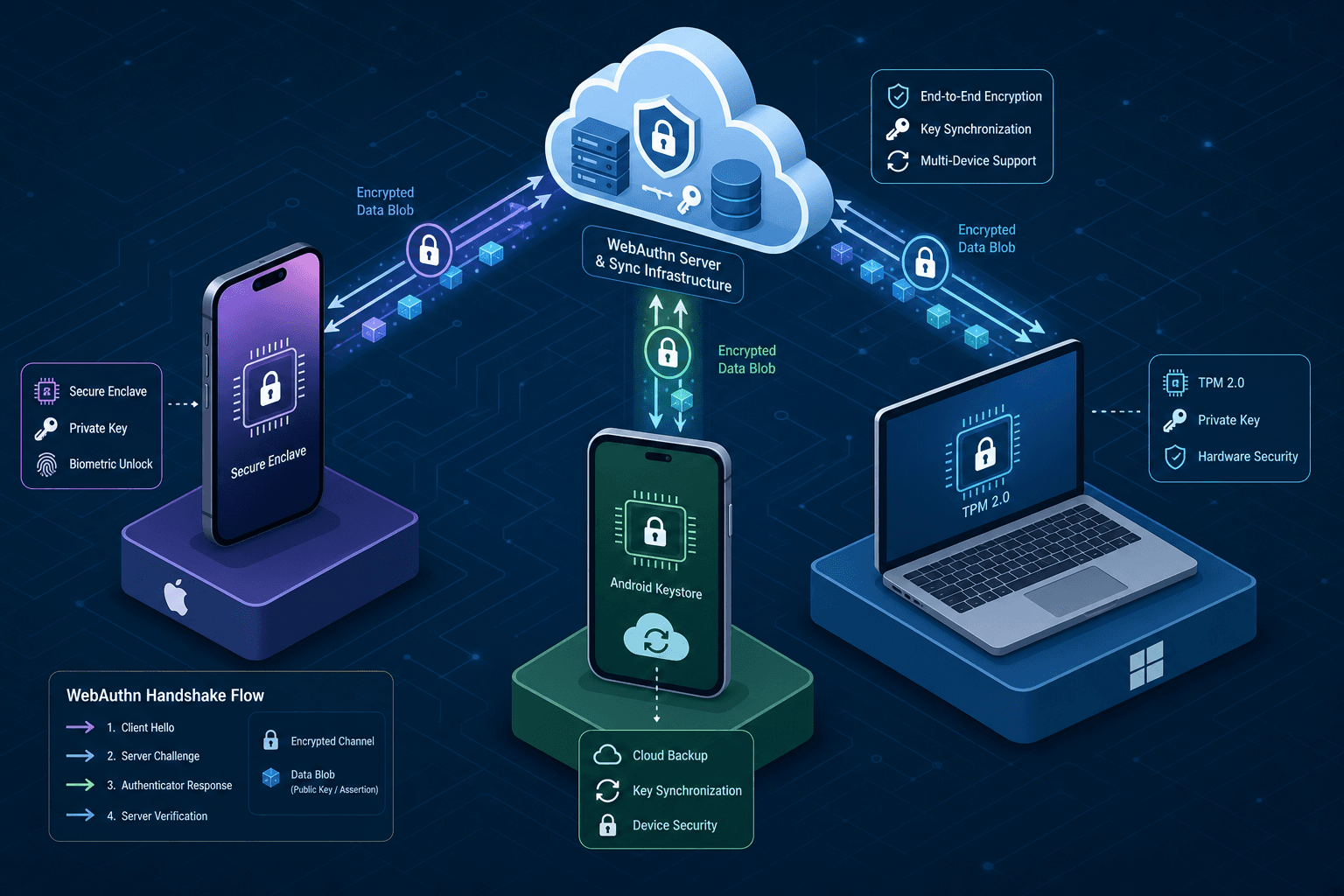
The transition from password-based authentication to passkeys represents a fundamental rearchitecture of how identity secrets are stored and transported. At the mechanism level, a passkey functions as a public-private key pair generated by a WebAuthn-compliant authenticator. The public key is transmitted to the server to establish an account, while the private key remains strictly local to the device's secure enclave or hardware security module. Syncing is a client-side orchestration problem where the private key is encrypted using a user-derived master key and transmitted exclusively to the user's own cloud infrastructure.
The WebAuthn Handshake Mechanism
To implement this correctly, one must first understand the cryptographic binding between the Relying Party (RP) and the Authenticator. When a user registers a passkey, the browser or operating system invokes the navigator.credentials.create() API. This triggers the local authenticator—such as the Secure Enclave on an iPhone or the TPM on a Windows PC—to generate a unique 256-bit elliptic curve key pair. The authenticator signs a challenge provided by the server using the private key. Crucially, the private key is never exposed to the JavaScript environment or the server.
The server receives the public key and the attestation certificate. The attestation proves the key was generated by a specific authenticator type, but the critical component for implementation is the userHandle, a unique identifier for the user that allows the server to distinguish between multiple keys belonging to the same account. For cross-device functionality, the implementation must support "resident keys," also known as "discoverable credentials," which describe the same capability where the device stores the credential internally.
Apple Ecosystem: iCloud Keychain Sync
In the Apple ecosystem, the mechanism for cross-device synchronization is iCloud Keychain. When a user enables iCloud Keychain on an iPhone or Mac, the device generates a unique "Sync Key" derived from the user's iCloud account password and a random salt. This Sync Key is used to encrypt the private keys of all passkeys before they leave the device.
When a user attempts to use a passkey on a new Mac, the device requests the encrypted blob from iCloud. The receiving device cannot decrypt this blob alone. It requires a "trusted device" already in the user's session to approve the request. This approval mechanism is a cryptographic challenge-response flow where the trusted device signs a token authorizing the release of the decryption key material to the new device. This ensures that even if iCloud servers are compromised, the attacker cannot decrypt the passkeys without physical possession of a trusted device.
// Example: Triggering the WebAuthn flow on iOS/macOS
const publicKeyOptions = {
  rp: { name: "Example Corp", id: "example.com" },
  user: {
    id: new Uint8Array([1, 2, 3, 4]), // Must be unique per user
    name: "jdoe@example.com",
    displayName: "John Doe"
  },
  challenge: new Uint8Array([...]), // Random challenge from server
  pubKeyCredParams: [
    { type: "public-key", alg: -7 } // ES256
  ],
  authenticatorSelection: {
    authenticatorAttachment: "platform", // Forces use of device biometrics/TPM
    residentKey: "required", // Ensures key is stored on device
    userVerification: "required" // Forces FaceID/TouchID
  }
};

navigator.credentials.create(publicKeyOptions)
  .then((credential) => {
    // Send credential.publicKey and credential.id to server
    // Private key stays in Secure Enclave
  });
Google Ecosystem: Google Password Manager Integration
Google implements passkeys through the Google Password Manager, which leverages the same WebAuthn standard but integrates with the broader Google Account infrastructure. The synchronization mechanism here relies on the "Google Cloud Key Sync" service. Similar to Apple, the private key is encrypted locally using a key derived from the user's Google Account credentials.
The distinct behavior in Google's implementation is the flexibility in key transport. While Apple tightly couples the sync to the "trusted device" chain, Google allows the encrypted key blob to be stored in the Google Drive storage bucket associated with the user. When a user logs into Chrome on a new desktop, the browser checks for an existing encrypted blob in the cloud. If found, it prompts the user for their Google Account password to derive the decryption key locally. This creates a slightly different trust model where the account password itself acts as the root of trust for decryption, rather than requiring a separate "trusted device" approval step for every new login, though multi-factor authentication is still enforced for the account access.
Microsoft Ecosystem: Windows Hello and Azure AD
Microsoft's approach integrates passkeys with Windows Hello and Azure Active Directory (now Entra ID). The private key is bound to the device's Trusted Platform Module (TPM). This hardware-bound binding provides a high degree of assurance that the key cannot be extracted via software emulation.
For cross-device synchronization, Microsoft relies on the Azure AD cloud identity. When a user registers a passkey on a Windows 10/11 device, the public key is uploaded to Azure AD. The private key remains on the local TPM. To access the account from a different device, such as an Android phone or a different Windows machine, the user must authenticate via the Microsoft Authenticator app or a new Windows Hello setup. The flow involves the server sending a challenge to the new device, which then queries the Azure AD cloud for the associated credential metadata. The critical mechanism here is the "Key Migration" protocol; however, Windows Hello passkeys are typically bound to the TPM and do not export the private key in a user-decryptable form. Instead, reliance is placed on the "Cross-Device" flow via the Microsoft Authenticator app or re-registration, adhering to strict enterprise Key Migration specs where available.
Cross-Device Synchronization Strategy
The most complex implementation detail is handling the scenario where a user has no active device to approve a sync request. WebAuthn provides cryptographic primitives like attestation and userVerification that enable custom synchronization flows, but it does not define the sync protocol itself.
When a user tries to register a passkey on a new device without a synced session, the browser displays a "pairing" screen. This screen generates a QR code containing a challenge and the public key. The user scans this QR code with their primary device. The primary device signs the challenge with its existing private key to authorize the transfer of the encrypted private key blob to the cloud. The new device then downloads this blob.
This "out-of-band" (OOB) transfer is the only way to securely move a private key between devices that do not share a pre-existing trust chain. The implementation must handle the challenge response from the QR code scan to ensure the request originated from the legitimate user's device. If the scan fails or the user cancels, the registration on the new device must abort immediately to prevent key leakage. This OOB flow is critical for robust cross-device authentication and sync passkeys in environments where users switch devices frequently.
# Conceptual Server Payload for WebAuthn Registration
# Note: This JSON represents the data sent to the client API.
# Fields like 'challenge', 'rp', and 'user' are top-level, not nested under 'publicKey'.
{
  "challenge": "base64_encoded_random_string",
  "rp": { "name": "MyService", "id": "myservice.com" },
  "user": { "id": "user_id_123", "name": "user@domain.com" },
  "pubKeyCredParams": [{ "type": "public-key", "alg": -7 }],
  "timeout": 60000,
  "attestation": "direct"
}
Conclusion
Implementing passkeys across these three ecosystems requires respecting the specific cryptographic constraints of each vendor's secure enclave. Apple relies on the "trusted device" chain for key distribution, Google utilizes the Google Account key for decryption, and Microsoft binds keys to the TPM and Azure AD identity. The common denominator is the WebAuthn protocol, which ensures the private key never traverses the network in plain text. Developers must design their backend logic to accept the public key and userHandle while deferring all synchronization logic to the client-side OS and cloud services. Failure to account for these specific sync mechanisms results in a poor user experience where users are forced to re-authenticate manually on every device, defeating the purpose of the passwordless security transition.
Common Pitfalls
Developers often stumble when integrating passkeys due to misconceptions about the underlying security model.
- Confusing Resident Keys: Treating "resident keys" and "discoverable credentials" as distinct features. They are synonymous terms for the same capability where the authenticator stores the credential internally.
- Assuming Server-Side Key Storage: Believing that the server holds or manages the private key for syncing. The private key must remain on the client device, encrypted by a user-derived key.
- Ignoring Hardware Binding: Overlooking that keys bound to TPMs or Secure Enclaves cannot be easily exported. Assuming a simple "export/import" workflow works universally leads to failed sync attempts on hardware-bound devices.
Practical Takeaways
To succeed with passkey integration, adopt these mental models:
- Server as a Ledger: Your backend is merely a ledger for public keys and user handles; it never sees the secret.
- Client Orchestrates Sync: Trust the OS and cloud provider to handle the encryption and distribution of the private key. Do not attempt to build custom sync logic for the private key itself.
- Hardware is the Root: Assume the device's hardware security module is the ultimate source of truth for the private key's validity.
FAQ
Q: Can I store passkeys on my server for backup? A: No. Storing the private key on your server violates the core security model of WebAuthn. Backup and sync must be handled by the user's cloud provider (iCloud, Google, Microsoft) using client-side encryption.
Q: How do I handle users who lose their only device? A: Without a synced "trusted device" or a secondary device, recovery is difficult. You must implement a fallback mechanism (like a recovery code) defined by your organization's risk policy, as the private key is likely unrecoverable.
Q: Do passkeys work across different ecosystems (e.g., Apple to Android)? A: Yes, for authentication, they work universally via WebAuthn. However, syncing the private key between ecosystems (e.g., moving a key from an iPhone to an Android) is not natively supported by the cloud providers themselves. Users typically need to re-register or use a third-party sync solution if supported by the specific application.
Related posts
Implementing WebAuthn in Keycloak: Passkey Authentication Setup
A walkthrough for configuring WebAuthn and passkeys within Keycloak to enable passwordless authentication using FIDO2 standards.
The Future of Authentication: Passkeys, AI, and Passwordless in 2025
Explore the future of authentication with passkeys, AI integration, and the shift toward a passwordless future in 2025.
FIDO2 and WebAuthn: Building Phishing-Resistant Authentication
An examination of FIDO2 and WebAuthn standards for implementing phishing-resistant authentication and secure credential management.