Biometric Auth in Web Apps: WebAuthn & Beyond
An examination of biometric authentication in web applications using WebAuthn, fingerprint authentication, Face ID, and Touch ID technologies.
Biometric Authentication in Web Applications: WebAuthn and Beyond
WebAuthn (Web Authentication API) fundamentally redefines biometric security by shifting from client-side template matching to server-side verification of asymmetric cryptographic proofs. This architecture eliminates the transmission of raw biometric data and prevents replay attacks by ensuring that biometric sensors unlock private keys rather than sending secret templates. In this article, Part 5 of the Passwordless & Next-Gen Authentication Series, we examine how the protocol binds cryptographic keys to specific domains, enabling secure logins via Face ID, Touch ID, and Windows Hello without ever exposing the private key to the web server or the network.
The Registration Flow: Binding Keys to Origins
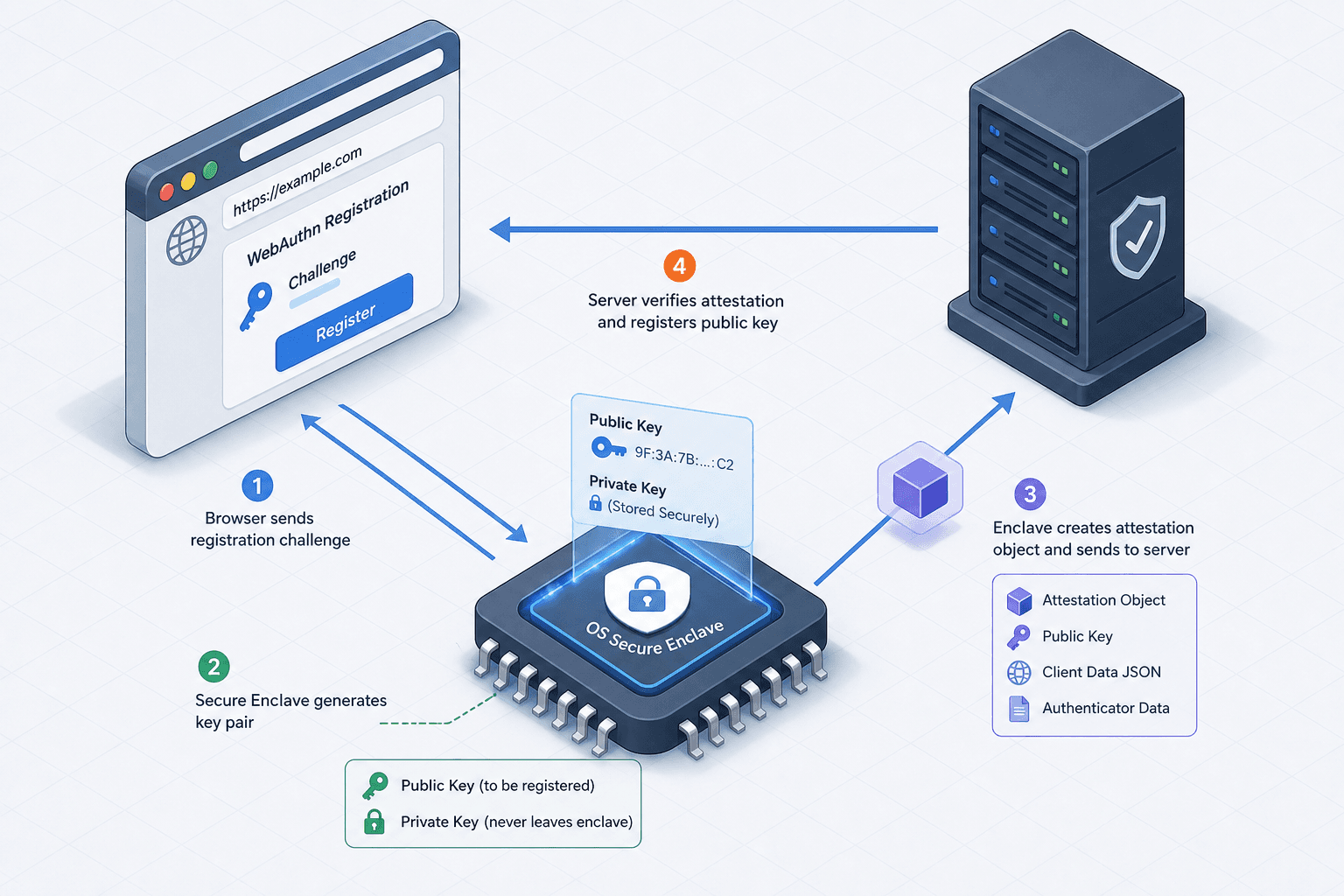
The security of the WebAuthn system begins during the registration phase, where a unique key pair is generated for a specific relying party (RP). When a user attempts to set up biometric login, the browser initiates the process by calling the navigator.credentials.create() method. The server responds with a PublicKeyCredentialCreationOptions object containing a random challenge (nonce) and the RP ID, which is typically the domain name.
The browser then queries the operating system. On macOS, the OS intercepts this request and prompts the user for Face ID; on Windows, it triggers Windows Hello. Crucially, the OS generates a new key pair specifically for this RP ID. The public key is returned to the browser, while the private key is stored securely in the hardware security module, such as the TPM, Secure Enclave, or Trusted Platform Module. The browser then packages this public key along with an attestationObject and sends it back to the server.
The attestationObject is critical because it contains a signature from the authenticator proving that the key was generated by a genuine device and not a software emulator. The server stores this public key. If a hacker steals this public key, they cannot log in because they do not possess the private key. Furthermore, the key is bound to the RP ID. If the same key pair is extracted and attempted on a different domain, the authentication will fail because the RP ID hash in the authenticatorData will not match the one expected by the server.
// Server-side logic example (Node.js) generating options
const createOptions = await generateRegistrationOptions({
  rpName: "Secure Bank",
  rpID: "secure-bank.com", // The domain binding
  userID: "user_123",
  userName: "alex@example.com",
  challenge: crypto.randomBytes(32),
  attestation: 'direct'
});

// Client-side: Browser requests biometric
const credential = await navigator.credentials.create({
  publicKey: createOptions
});
The Authentication Flow: Challenge-Response
During login, the mechanism shifts to a challenge-response protocol. A user visits the application and enters their username. The server retrieves the user's stored public key and generates a new random challenge, sending it to the client via navigator.credentials.get(). The browser again invokes the OS biometric prompt.
When the user places their finger on the sensor or looks at the camera, the OS performs two checks:
- Biometric Verification: Does the current scan match the stored biometric template?
- Context Verification: Is the request coming from the correct RP ID?
If both checks pass, the OS signs the challenge using the private key. The resulting signature is returned to the browser, which forwards it to the server. The server does not need to know the user's biometric data. It simply uses the stored public key to verify the signature against the challenge it sent. If the signature is valid, the user is authenticated.
This flow ensures that the private key is never exposed to the browser's JavaScript or the network. Even if the website is compromised, the attacker cannot extract the private key or replay the signature because the challenge is unique to every session. The authenticatorData within the assertion also includes flags indicating whether a biometric was used (UV flag) and whether the user was present (UP flag).
Anatomy of the Assertion: Data Structures and Protocol
To understand why this is resistant to phishing, one must look at the authenticatorData. This binary blob is part of the assertion and is signed by the private key. It contains:
- RP ID Hash: A SHA-256 hash of the relying party's ID. This ensures the signature is only valid for the intended domain.
- Flags: Bits indicating user presence and user verification. The
User Verified(UV) flag confirms that a biometric or PIN was used to authorize the action. - Signature Counter: A monotonically increasing number that helps detect cloned authenticators.
If a phishing site tries to trick a user into logging in, the browser detects the domain mismatch. The authenticatorData will contain the phishing site's RP ID hash. When the server for the legitimate site receives this assertion, it expects a signature over the legitimate site's challenge and RP ID hash. The verification will fail because the signature was created over a different context. This mechanism effectively neutralizes the primary vector for credential theft: the phishing site cannot trick the authenticator into signing a request for the wrong domain.
// Example of verifying an assertion (simplified logic)
function verifyAssertion(publicKeyCredential, challenge, storedPublicKey) {
  const authData = base64UrlDecode(publicKeyCredential.response.authenticatorData);

  // Check if the RP ID hash matches the server's domain
  const expectedHash = sha256(serverRPId);
  if (!authData.rpIdHash.equals(expectedHash)) {
    throw new Error("Phishing attempt detected: RP ID mismatch");
  }

  // Verify the signature against the challenge using the public key
  const isValid = crypto.verify(
    storedPublicKey,
    challenge,
    publicKeyCredential.response.signature
  );

  return isValid;
}
Beyond Passwords: The Security Tradeoffs
The shift to WebAuthn-based biometrics addresses the fundamental flaws of password-based systems. Passwords are susceptible to brute-force attacks, reuse across sites, and social engineering. Biometric data itself is not a password; it is a key to unlock a cryptographic key. This separation means that even if a database is breached, the attacker only gets public keys, which are useless without the private key.
However, this architecture introduces specific tradeoffs. Recovery becomes more complex. If a user loses their device, the private key is lost. Unlike passwords, there is no "forgot password" link that resets a biometric credential. The system relies on backup methods, such as recovery codes or multiple registered authenticators. Additionally, the reliance on the operating system means that browser compatibility and OS updates can occasionally introduce friction. For instance, older versions of browsers or operating systems might not support the latest FIDO2 specifications, requiring fallback mechanisms.
From a protocol perspective, the FIDO2 standard is a composite of two distinct specifications. The FIDO Alliance defines the CTAP (Client to Authenticator Protocol), which governs the communication between the authenticator (e.g., a fingerprint sensor) and the client software. The W3C defines the WebAuthn API, which serves as the interface between the client software (browser) and the web application. Together, these standards ensure that a Touch ID sensor on an iPhone works identically to a Windows Hello fingerprint reader on a laptop. This standardization prevents vendor lock-in and ensures that the security properties—specifically the isolation of the private key and the domain binding—are consistent across the ecosystem.
Common Pitfalls
Implementing WebAuthn biometrics requires navigating several architectural pitfalls that can compromise security or usability.
- Device Loss and Recovery: The most common failure point is the loss of the sole authenticator. Without a registered backup device or recovery code, the user is locked out. Engineers must design robust fallback flows, such as email-based recovery tokens or allowing multiple authenticators per account, to mitigate this risk.
- Cross-Platform Compatibility: While FIDO2 is standardized, implementation details vary. Some authenticators on older Android devices or legacy browsers may not support all WebAuthn features (like
userVerification: 'required'). Relying parties must implement graceful degradation, allowing password-based fallback or alternative authenticators when strict biometric requirements cannot be met. - RP ID Configuration: Misconfiguring the
rpIDis a frequent source of failure. The RP ID must match the domain exactly (or be a parent domain configured correctly) to ensure the browser correctly binds the credential. An incorrect RP ID can prevent the browser from presenting the correct credential during login, causing confusion for users.
Practical Takeaways
For advanced engineering teams, adopting WebAuthn biometrics involves strategic considerations beyond simple API integration.
- Shift to Public Key Infrastructure (PKI): Treat the public key as the primary credential. Focus engineering efforts on the lifecycle management of these keys, including rotation strategies and revocation procedures, rather than managing shared secrets.
- Prioritize User Experience (UX) Friction: Biometric authentication should be seamless. Ensure that the
userVerificationpolicy is set correctly to balance security requirements with the user's need for speed. Avoid unnecessary prompts that degrade the login flow. - Design for Recovery First: Do not treat recovery as an afterthought. The architecture must assume that users will lose devices. Implement multi-device registration and secure recovery codes as mandatory components of the initial setup flow.
FAQ
Q: Can biometric data be stolen from the server? A: No. The server never receives or stores the biometric data. It only stores the public key and the attestation object. The biometric verification happens locally on the device's secure hardware.
Q: What happens if a user changes their fingerprint? A: Biometric data is stored locally on the device. If a user's fingerprint changes (e.g., due to injury or aging), the local sensor will simply stop matching. The user must re-register a new key pair via the WebAuthn flow, which generates a new public/private key pair.
Q: Does WebAuthn work on all browsers? A: WebAuthn is supported by all major modern browsers (Chrome, Firefox, Safari, Edge) and mobile OS versions. However, support for specific authenticators (like hardware tokens vs. platform authenticators) varies by device and OS version.
Conclusion
WebAuthn does not merely add a biometric layer to existing authentication; it fundamentally changes the trust model. By moving the secret storage to the device and the verification to the server, it removes the attack surface associated with transmitting secrets. The mechanism of binding keys to origins and using challenge-response signatures creates a system where standard phishing attacks are cryptographically resistant, and credential stuffing is irrelevant. For advanced engineering teams, the implementation focus should shift from managing secrets to managing the lifecycle of public key credentials and ensuring robust recovery flows for lost authenticators. The future of web security is not stronger passwords, but stronger cryptographic proofs anchored in hardware.
Related posts
Implementing WebAuthn in Keycloak: Passkey Authentication Setup
A walkthrough for configuring WebAuthn and passkeys within Keycloak to enable passwordless authentication using FIDO2 standards.
Passkeys Guide: Google, Apple, Microsoft Ecosystems
A technical guide to implementing passkeys across Google, Apple, and Microsoft ecosystems using WebAuthn for cross-device synchronization.
FIDO2 and WebAuthn: Building Phishing-Resistant Authentication
An examination of FIDO2 and WebAuthn standards for implementing phishing-resistant authentication and secure credential management.