Passwordless Authentication: The Complete Implementation Guide
A complete implementation guide for passwordless authentication using FIDO2, WebAuthn, and passkeys to enhance security.
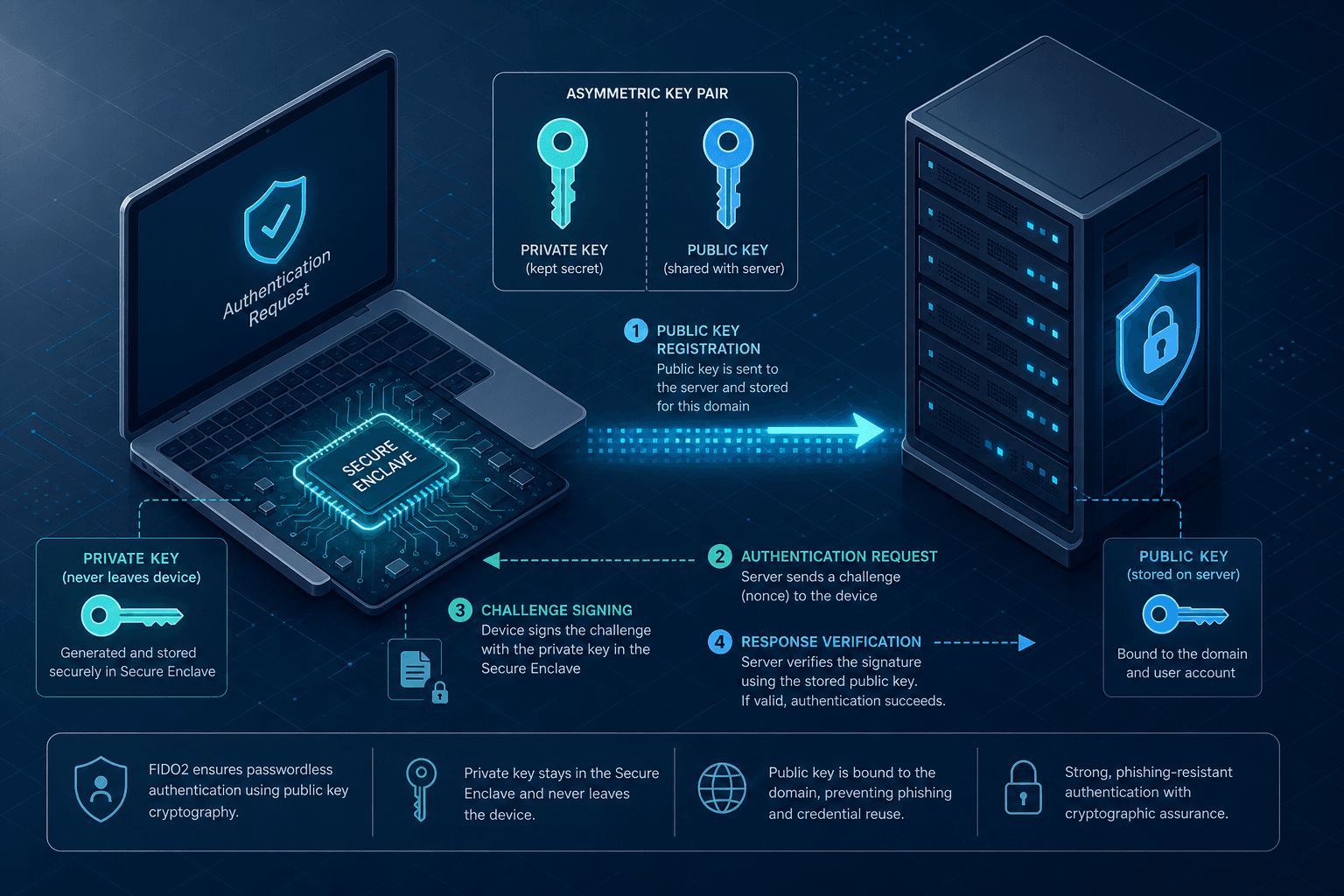
The transition from passwords to passwordless authentication is not merely a UX improvement; it is a fundamental architectural shift in how we handle identity. In a traditional password system, the server stores a hash of a secret shared between the user and the site. If that database is breached, attackers can attempt offline cracking or reuse the credentials elsewhere. In a passwordless system built on FIDO2 and WebAuthn, the server never sees, stores, or knows the secret. Instead, the server stores a public key, and the secret (private key) resides exclusively on the user's device. The security guarantee comes from the cryptographic binding of that key to a specific origin, making credential theft via phishing mathematically impossible.
This guide is Part 2 of the Passwordless & Next-Gen Authentication Series.

The Mechanism of Origin Binding
To understand why passwordless is resistant to phishing, we must look at the rpId (Relying Party Identifier) mechanism defined in the WebAuthn specification. When a user registers a credential, the authenticator (the device) records the rpId as part of the credential's metadata. This ID is usually the registered domain or its parent domain (e.g., example.com).
During the registration or authentication process, the browser sends a clientDataJSON object to the authenticator. This JSON includes the origin (the exact URL the user is visiting) and the rpId. The authenticator checks if the requesting origin matches the stored rpId. If a user is tricked into visiting evil-example.com while their key was registered for example.com, the authenticator refuses to sign the request because the origins do not match. This mechanism ensures that a stolen credential cannot be used on a different domain, even if the attacker has the user's device.
The server must enforce this by setting the rpId correctly in the challenge request. If the server passes rpId: "example.com" but the user is on sub.example.com, the browser handles the resolution, but the server must ensure the challenge is scoped correctly.
// Server-side challenge generation (Node.js example)
const challenge = crypto.randomBytes(32);
const challengeBuffer = Buffer.from(challenge);

// The registration options sent to the client
const options = {
  challenge: challengeBuffer.toString('base64'),
  rp: {
    name: "My Application",
    id: "example.com" // Critical: Must match the domain
  },
  user: {
    id: userId,
    name: "user@example.com",
    displayName: "John Doe"
  },
  pubKeyCredParams: [
    { alg: -7, type: "public-key" }, // ES256
    { alg: -257, type: "public-key" } // RS256
  ],
  attestation: "none" // Or "direct" depending on privacy needs
};
The Registration Flow & Key Generation
Registration is the moment the trust relationship is established. Unlike a password system where the user types a secret and the server hashes it, the WebAuthn registration flow relies on the client generating a key pair locally. The authenticator creates a new asymmetric key pair (e.g., ECDSA or RSA). The private key is generated within the secure hardware boundary of the device (TPM, Secure Enclave, or Trusted Platform Module) and is never exposed to the operating system or the network.
The client receives the createCredential command from the browser. The authenticator signs the attestation statement using the Attestation Private Key (APK) provided by the manufacturer (for direct attestation). If the attestation level is set to none, the authenticator produces no signature, and the server trusts the key generation without verifying the device manufacturer's signature. It is crucial to distinguish between the credential private key (used for authentication) and the attestation private key (used for proving the device's origin).
The server receives the attestationObject and the clientDataJSON. It must verify the signature chain. If attestation is set to none, the server trusts the key generation without verifying the device manufacturer's signature. If set to direct or indirect, the server validates the attestation certificate chain to ensure the key came from a genuine, trusted authenticator.
Crucially, the server stores only the publicKey, the credentialId, and the counter. The counter is vital for detecting replay attacks. If a user authenticates and the counter value returned by the authenticator is less than or equal to the last recorded counter, the server rejects the request, indicating the key might be cloned or replayed.

The Authentication Challenge-Response
Authentication is a challenge-response protocol. The server generates a fresh, random nonce (the challenge) and sends it to the client. The client passes this challenge to the authenticator. The authenticator retrieves the private key associated with the credentialId provided by the user.
The critical step here is the signing operation. The authenticator constructs a data structure containing the challenge, the RP ID, and the origin. It signs this structure with the private key. The resulting signature is returned to the server along with the clientDataJSON.
The server performs three distinct verification steps:
- Signature Verification: The server uses the stored public key to verify the signature against the signed data. If the signature is invalid, the key has been tampered with or the challenge was modified.
- Origin Verification: The server checks that the
originin theclientDataJSONmatches the current request URL. This prevents a valid signature from a different site from being accepted. - Counter Check: The server compares the returned
authenticatorDatacounter with the stored value. It must be strictly greater than the previous value.
If any of these checks fail, the authentication is rejected. This flow ensures that the user possesses the private key and that the request originates from the expected domain. This robust architecture forms the backbone of modern passwordless security.
// Server-side verification logic (simplified)
const authenticatorData = authResult.response.authenticatorData;
const signature = authResult.response.signature;
const userPublicKey = storedCredentials[credentialId].publicKey;

// Verify signature
const verified = crypto.verify(
  null,
  authenticatorData + clientDataHash,
  userPublicKey,
  signature
);

if (!verified) {
  throw new Error("Invalid signature");
}

// Check counter
if (authenticatorData.counter <= storedCredentials[credentialId].counter) {
  throw new Error("Replay attack detected");
}

// Update counter
storedCredentials[credentialId].counter = authenticatorData.counter;
Passkeys and Cross-Device Sync
Passkeys represent the evolution of FIDO2 by solving the "device loss" problem without compromising security. In a standard FIDO2 setup, if a user loses their phone or laptop, the private key is lost, and the credential is gone. Passkeys introduce a cloud-backed synchronization layer.
When a user enables passkeys on an iOS device, the private key is encrypted using a device-specific key and a user-derived key. This encrypted blob is uploaded to the cloud (e.g., iCloud Keychain). When the user logs in on a new device, the cloud provides the encrypted private key to the new device. The new device decrypts it using the user's biometric or PIN, effectively "transferring" the key.
This process maintains the security properties of FIDO2. The private key never travels in plaintext over the network. The synchronization relies on the end-to-end encryption provided by the operating system's keychain. The attestation in this context often includes a "cross-device" flag, indicating that the credential is backed up.
However, this introduces a dependency on the cloud provider's security model. If the cloud provider's encryption keys are compromised, the private keys could theoretically be decrypted. This is a trade-off between convenience and the "air-gapped" nature of local-only FIDO2 keys. For most enterprise and consumer applications, the risk profile of cloud-synced passkeys is significantly lower than the risk of lost passwords or stolen password databases.
The implementation requires the server to handle the credentialBackup and credentialBackupState flags in the authenticatorData. If credentialBackup is true, the server knows the key exists on multiple devices. If a user reports a lost device, the server invalidates the credential ID on the relying party side, and the cloud provider's sync mechanism ensures the revoked credential is removed from all synced devices or devices detect the invalidation.
This seamless integration makes passwordless login a viable replacement for traditional methods, offering both high security and user convenience.
Conclusion
Implementing passwordless authentication via FIDO2 and WebAuthn removes the entire class of vulnerabilities associated with password storage, transmission, and reuse. By shifting the secret to the user's device and binding it cryptographically to the origin, we eliminate the possibility of phishing attacks stealing credentials. The mechanism relies on asymmetric cryptography, where the public key is stored on the server and the private key is protected by hardware.
While passkeys add the complexity of cloud synchronization, they preserve the core security model while solving the usability issue of lost devices. The implementation requires careful attention to the rpId, challenge generation, and counter validation. As the industry moves away from passwords, the adoption of these standards will become the baseline for secure identity management.
Common Pitfalls
Implementing passwordless systems introduces specific challenges that differ significantly from traditional password management.
- rpId Misconfiguration: The most common failure point is the
rpId. If the server sends a challenge with anrpIdthat does not match the domain where the user is currently located (or its parent), the authenticator will refuse to sign. Developers must ensure therpIdlogic handles subdomains and root domains correctly according to the WebAuthn spec. - Legacy Client Handling: Older browsers or devices may not support the latest WebAuthn features or may require fallback mechanisms. A robust implementation must gracefully degrade to a secondary method (like email magic links) without breaking the user flow, while ensuring the primary passwordless path remains the default.
- Backup and Restore Edge Cases: When users restore from a backup or switch devices, the synchronization of passkeys can fail if the underlying OS keychain restoration is incomplete. Applications must handle scenarios where a user's credential appears missing or invalid due to sync delays, providing clear error messages rather than generic authentication failures.
Practical Takeaways
To successfully deploy passwordless solutions, adhere to these mental models:
- Trust the Hardware, Not the OS: Assume the operating system is compromised. The security of the private key relies entirely on the hardware enclave (TPM, Secure Enclave), so never attempt to extract or inspect the private key on the client side.
- Origin is the Anchor: The cryptographic binding to the
originis your primary defense against phishing. Treat any mismatch between the request origin and the storedrpIdas a critical security event, not a configuration error to be bypassed. - Optimize for Recovery: Design the enrollment flow to prioritize recovery options immediately. Since users cannot reset a "forgotten" password, they must have a reliable, redundant method to regain access to their account before the initial credential is finalized.
FAQ
Q: Can users still be phished with passwordless authentication? A: While passwordless authentication is highly resistant to phishing due to origin binding, it is not immune to sophisticated attacks like Man-in-the-Middle (MitM) proxies that can intercept the challenge. However, the WebAuthn spec includes protections against this by binding the signature to the origin and the challenge, making such attacks significantly harder to execute than with passwords.
Q: What happens if my cloud provider goes down? A: If the cloud provider (e.g., iCloud, Google Password Manager) is unavailable, users may be unable to sync passkeys to new devices or recover lost ones. However, existing passkeys on the user's primary device will continue to work, as the private key resides locally on that device.
Q: Is passwordless authentication slower than passwords? A: Generally, no. Passwordless login often feels faster because it eliminates the need to type complex passwords, retrieve them from a manager, or type two-factor codes. The interaction relies on biometrics or device PINs, which are near-instantaneous.
Related posts
FIDO2 and WebAuthn: Building Phishing-Resistant Authentication
An examination of FIDO2 and WebAuthn standards for implementing phishing-resistant authentication and secure credential management.
Implementing WebAuthn in Keycloak: Passkey Authentication Setup
A walkthrough for configuring WebAuthn and passkeys within Keycloak to enable passwordless authentication using FIDO2 standards.
Passkeys Guide: Google, Apple, Microsoft Ecosystems
A technical guide to implementing passkeys across Google, Apple, and Microsoft ecosystems using WebAuthn for cross-device synchronization.