FIDO2 and WebAuthn: Building Phishing-Resistant Authentication
An examination of FIDO2 and WebAuthn standards for implementing phishing-resistant authentication and secure credential management.
Part 3 of the Passwordless & Next-Gen Authentication series.
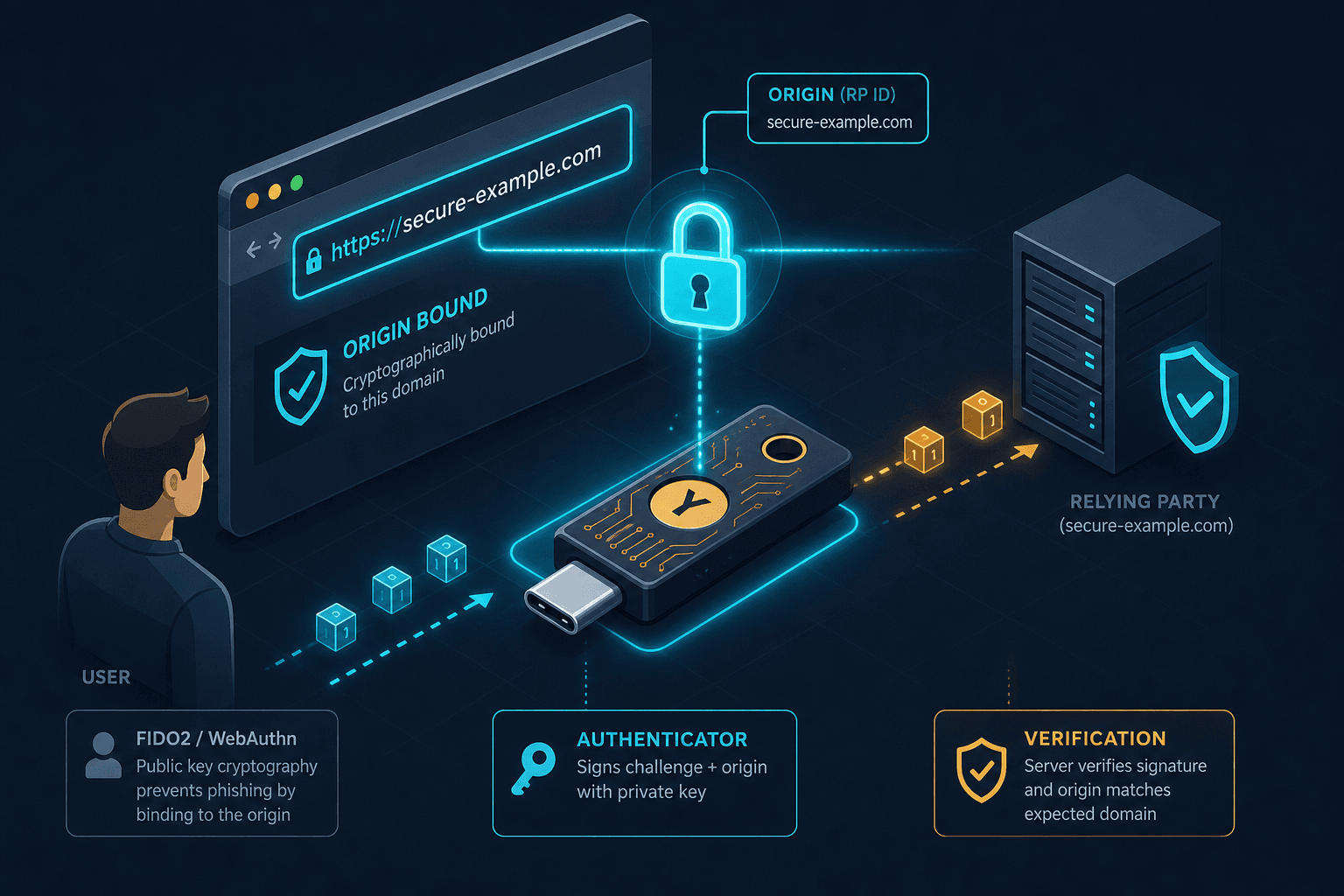
Traditional password authentication fails fundamentally because the secret is transmitted over the network, relying entirely on the client trusting the server it contacts. This vulnerability is exploited daily by sophisticated phishing attacks that mimic legitimate server UIs to trick users into sending credentials to attackers who replay them to the real server. FIDO2 and the Web Authentication (WebAuthn) API resolve this critical flaw by removing the secret from the network entirely. Instead of transmitting a password, the client transmits a cryptographic signature generated by a hardware-bound key. The core mechanism that renders this phishing-resistant is origin binding, which cryptographically ties every credential to a specific domain, scheme, and port, ensuring that stolen credentials are useless on any other site.
The Origin Binding Mechanism
In the WebAuthn protocol, every credential is generated for a specific origin. If a credential is created for https://bank.example.com, the cryptographic signature produced during authentication is mathematically bound to that specific origin. If an attacker attempts to use that same credential at https://evil-bank.example.com, the browser or authenticator rejects the operation because the origin in the request does not match the origin stored in the credential metadata.
Consider a scenario involving Alice, a banking customer, and a Relying Party (RP) named "SecureBank." Alice registers her YubiKey (an authenticator) with SecureBank. When she calls navigator.credentials.create(), the browser sends the current location.origin (e.g., https://securebank.com) to the authenticator. The authenticator generates a new public/private key pair, stores the private key securely inside its hardware chip, and returns the public key and metadata to the SecureBank server. Crucially, the server records the public key alongside the origin https://securebank.com.
Later, Alice attempts to log in. She visits https://securebank.com and enters her username. The server responds with a challenge (a random nonce) and a list of allowed credential IDs. Alice inserts her YubiKey. The browser calls navigator.credentials.get() with the challenge. The authenticator receives the request, verifies the challenge, and checks the origin.
If Alice had been tricked into visiting https://fake-securebank.com and entered her username, the browser would still call get(), but it would pass the fake origin to the authenticator. However, the critical phishing protection occurs at the browser level. Before the request even reaches the authenticator, the browser enforces the origin check. If the origin in the request does not match the credential's registered origin, the browser blocks the call immediately. The authenticator never receives the request to verify the RP ID against its internal policy because the browser has already rejected the operation as a security violation. This pre-check ensures that no signature is ever generated or sent to the attacker, effectively breaking the phishing chain before the hardware even engages.
The Authenticator Protocol
This mechanism relies on the WebAuthn Level 2 specification, which defines the precise API contracts between the browser (User Agent), the authenticator, and the server (Relying Party). The browser acts as the mediator, ensuring that the origin field in the JSON-RPC-like messages matches the URL bar and enforcing the origin check before any communication with the hardware. The authenticator, whether it is a TPM on a laptop, a Secure Enclave on a phone, or a USB key, acts as the root of trust. It holds the private key and performs the sign operation. The private key never leaves the device. This is distinct from password-based flows where the secret is the transmission medium.
The FIDO Alliance defines the underlying protocols, such as CTAP (Client to Authenticator Protocol), which handles the communication between the browser and the physical authenticator. When Alice uses a passkey synced across devices via iCloud Keychain or Google Password Manager, the synchronization happens between her trusted devices, not via the internet in a way that exposes the private key. The "passkey" is just a user-friendly term for a FIDO credential. The synchronization protocol ensures that if one device loses the key, others can decrypt and restore it using the user's master key, transporting an encrypted copy rather than regenerating or deriving the key from other devices. The cryptographic binding to the origin remains intact on every device.
The User Consent & Attestation Flow
Implementing this requires a shift in how the Relying Party handles the authentication flow. The server must be configured to accept public-key credentials. It cannot simply hash a string and compare it. It must verify the signature using the stored public key and the challenge it issued. The verification logic must check that the clientDataJSON (which contains the origin) has not been tampered with. If the server does not validate the origin in the clientDataJSON, the phishing resistance is broken. This is a common implementation error where developers focus on the signature verification but ignore the origin assertion.
The user consent and attestation flow is critical here. During registration, the authenticator may provide an attestation statement proving the credential was generated by a specific authenticator model. During authentication, the user must explicitly consent to the operation, often by touching a button or looking at a camera, ensuring that a background script cannot trigger a login without user interaction.
The Passwordless Tradeoff
There are tradeoffs in this model. The primary friction point is the dependency on hardware or a synced cloud ecosystem. If a user loses their only authenticator and has no backup method, they face account lockout. Unlike a password, which can be reset via email, a FIDO credential is often the sole key to the vault. This necessitates robust recovery flows, such as backup codes or multiple registered authenticators. For example, a user might register a YubiKey on their desktop and a Passkey on their mobile device; losing the desktop key is manageable because the mobile device can still authenticate. Another tradeoff is the complexity of supporting legacy systems. Many existing backend services do not support the public-key credential type and require a password fallback. A hybrid approach, where FIDO2 is the primary method but passwords remain as a fallback, is common but reintroduces the phishing vector for the fallback path, requiring careful implementation to ensure the password fallback is not the weak link.
Common Pitfalls
Implementing FIDO2 correctly requires navigating several specific pitfalls that can undermine security. First, developers often ignore the clientDataJSON origin validation on the server side. While the browser enforces the origin check, the server must still verify that the origin field within the clientDataJSON matches the expected domain, as this data is included in the signature and could theoretically be manipulated if the server ignores it. Second, improper fallback handling creates vulnerabilities; if a system allows a password fallback without rate limiting or additional MFA, attackers can target the weakest link. Finally, missing backup authenticators during the initial setup leaves users vulnerable to permanent lockout. Organizations must enforce policies that require users to register at least two authenticators or configure cloud sync to ensure redundancy.
Practical Takeaways
To successfully deploy phishing-resistant authentication, teams should focus on these actionable takeaways. First, audit your current rotation policy to ensure that legacy password mechanisms are disabled or strictly limited to emergency recovery scenarios only. Second, implement rigorous server-side validation for the clientDataJSON origin field to ensure the cryptographic binding is honored end-to-end. Third, prioritize user experience by guiding users through the registration of multiple authenticators, reducing the risk of lockout while maintaining high security standards. These steps ensure that the theoretical benefits of FIDO2 translate into practical, robust security for your organization.
FAQ
Q: What happens if I lose my only FIDO2 authenticator? A: Without a backup authenticator or a configured cloud sync recovery, you will be locked out of the account. This is why it is critical to register multiple devices or enable cloud synchronization during the initial setup process.
Q: Can FIDO2 work with legacy systems that don't support it natively? A: Yes, but with caveats. You can implement a hybrid approach where FIDO2 is the primary login method, and a password serves as a fallback. However, this fallback path remains vulnerable to phishing unless additional protections like rate limiting or MFA are applied.
Q: How does passkey synchronization work without exposing the private key? A: Passkeys are synchronized by encrypting the private key with a user-specific master key (derived from the device's secure enclave or cloud account credentials) before transmission. The private key is never exposed to the server or the network in plaintext; it is only decrypted and restored on trusted devices.
Conclusion
The adoption of passkeys is accelerating because they remove the human element from the security equation. Users no longer need to remember complex strings or avoid typos. They simply touch a button or look at a camera. The security is guaranteed by the protocol design, not user behavior. The browser enforces the origin check; the authenticator enforces the key storage. This shifts the burden of security from the user's discipline to the system's architecture.
In summary, FIDO2 and WebAuthn provide phishing-resistant authentication by binding credentials to the specific domain via cryptographic origin checks. The private key never leaves the authenticator, and the signature is invalid if the origin changes. This mechanism fundamentally breaks the phishing attack chain, rendering credential stuffing and domain spoofing ineffective against properly implemented FIDO2 deployments. While recovery and hardware dependencies present operational challenges, the security guarantee of origin-bound keys represents a necessary evolution beyond the limitations of shared secrets.
Related posts
Implementing WebAuthn in Keycloak: Passkey Authentication Setup
A walkthrough for configuring WebAuthn and passkeys within Keycloak to enable passwordless authentication using FIDO2 standards.
Passkeys Guide: Google, Apple, Microsoft Ecosystems
A technical guide to implementing passkeys across Google, Apple, and Microsoft ecosystems using WebAuthn for cross-device synchronization.
Passwordless Authentication: The Complete Implementation Guide
A complete implementation guide for passwordless authentication using FIDO2, WebAuthn, and passkeys to enhance security.