Biometrics and Fallback Design
A technical examination of biometric authentication systems, focusing on fallback methods, accessibility, and user verification protocols for product and security engineers.
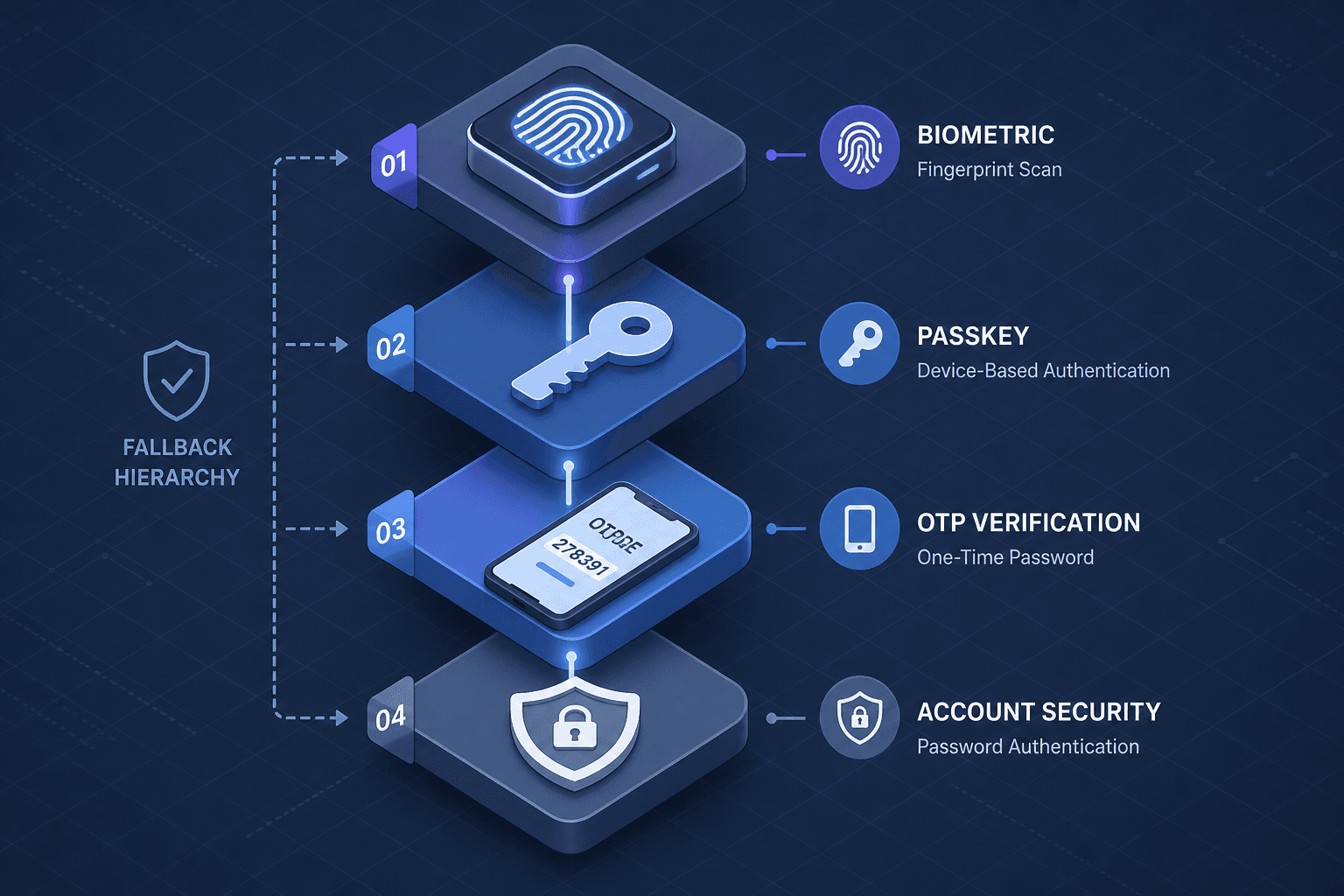
Biometric authentication is often marketed as the future of security, but technically, it is a probabilistic convenience layer. For product and security engineers, the critical insight is that biometrics do not replace passwords; they replace the need to remember them. This distinction dictates the architecture. If you treat biometrics as the primary root of trust, you will build systems that fail when the sensor is dirty, the user is injured, or the device is compromised. Secure design requires a structured fallback hierarchy that handles these failures gracefully while maintaining security.
The Biometric Contract: Probability, Not Certainty
Biometric systems do not compare raw images. They convert physical traits into mathematical templates. When a user places a finger on a capacitive sensor or looks at a camera, the device extracts features—ridge endings, bifurcations, or geometric distances—and hashes them into a vector. This vector is compared against a stored template using a similarity score.
The system operates on a threshold. If the score exceeds a certain value, the match is accepted. This introduces two types of errors:
- False Acceptance Rate (FAR): The system incorrectly authenticates an unauthorized user.
- False Rejection Rate (FRR): The system incorrectly rejects an authorized user.
These rates are inversely related. Lowering the threshold reduces FRR (fewer frustrated users) but increases FAR (more security risks). Engineers must tune this balance based on the threat model. As noted in ISO/IEC 19795-1 and NIST's biometric performance evaluation programs, accurate measurement of these error rates is critical for defining the operational performance of biometric systems. For a high-security banking app, FAR must be near zero, accepting a higher FRR. For a low-security IoT device, FRR should be minimal, tolerating a slightly higher FAR.
This probabilistic nature means biometrics are inherently unreliable as a sole authentication factor. They are best used as a "something you are" factor that complements "something you have" (the device itself).
Failure Modes and Hardware Constraints
Biometric systems fail. Understanding why is crucial for designing fallback mechanisms. Failure modes fall into three categories:
- Environmental/Physical Degradation: Wet fingers, cuts, or dirt can obscure fingerprint sensors. Poor lighting can break facial recognition. These are transient issues. The system should allow for multiple attempts before triggering a fallback.
- Hardware Limitations: Some devices lack liveness detection. Older fingerprint sensors may be susceptible to replay attacks using lifted prints. Facial recognition on low-resolution cameras may fail with masks or photos.
- User-Specific Factors: As people age, their biometric traits change. A fingerprint that worked at 20 may not work at 60. Facial recognition may fail for users with significant weight changes or those wearing hats/glasses.
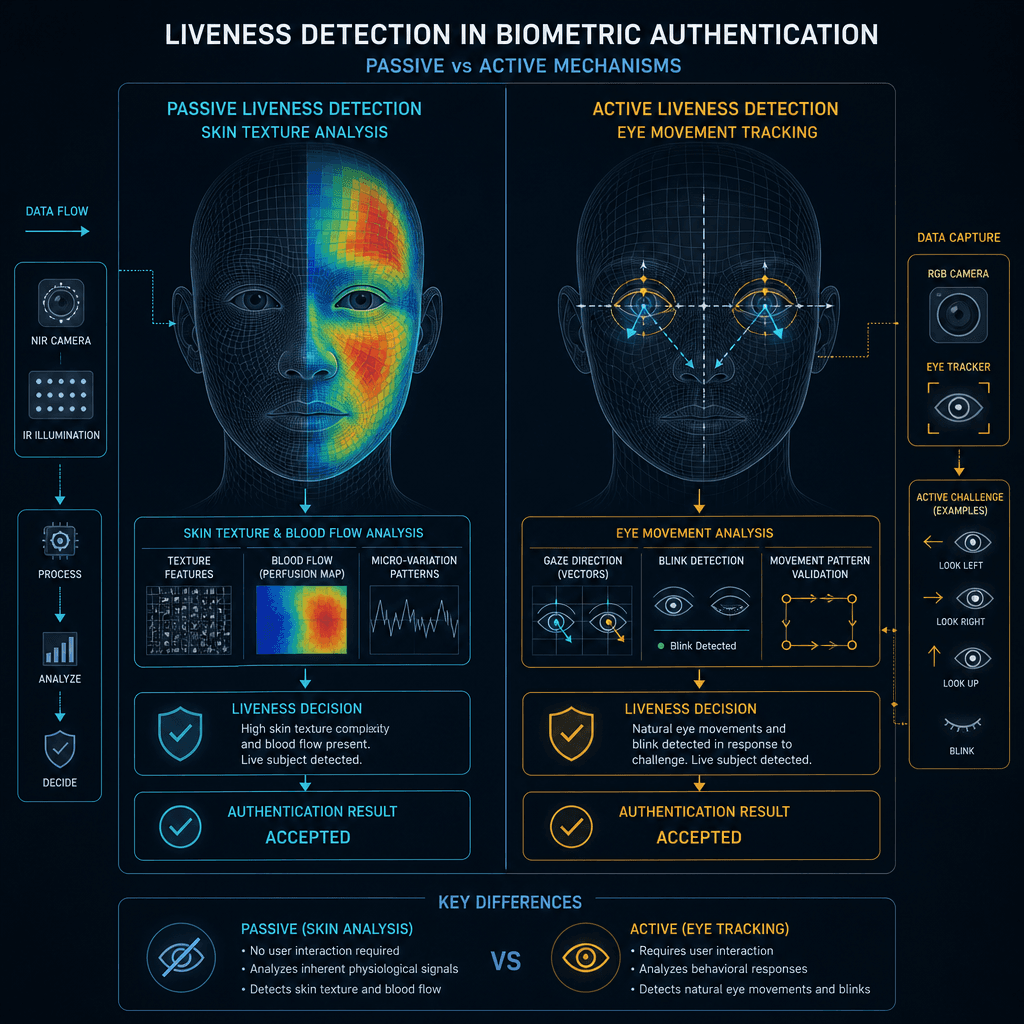
Liveness detection is the primary countermeasure against spoofing. It ensures the biometric sample comes from a live person, not a photo or a prosthetic. Techniques include:
- Passive Liveness: Analyzing skin texture, blood flow (photoplethysmography), or eye movement.
- Active Liveness: Asking the user to perform an action, such as blinking or turning their head.
As outlined in FIDO Alliance specifications and NIST guidelines on biometric liveness detection, robust liveness checks are essential to prevent presentation attacks. If your system lacks liveness detection, it is vulnerable to presentation attacks. In such cases, fallback methods must be stronger.
The Fallback Hierarchy
When biometrics fail, the system must degrade gracefully. The fallback chain should follow a security hierarchy:
- Primary: Biometric (Fingerprint/Face). Fast, convenient, secure if liveness is present.
- Secondary: Passkey/Password. The user knows a secret. This is more secure than SMS but less convenient than biometrics.
- Tertiary: SMS/Email OTP. Convenient but insecure due to SIM swapping and interception.
- Quaternary: Security Questions. Highly insecure due to social engineering and data breaches. Avoid if possible.
The key is to make the fallback seamless. If a fingerprint scan fails, the app should immediately prompt for a password or passkey without requiring the user to navigate away. This reduces friction and abandonment. As per NIST SP 800-63B, authenticator assurance levels dictate that higher assurance methods (like Passkeys) should be preferred over lower assurance methods (like SMS) when available. Similarly, FIDO Alliance documentation emphasizes the superiority of public-key cryptography-based authenticators over shared secrets for mitigating phishing and credential theft.
Why SMS is Problematic
Many systems use SMS OTP as a fallback. However, SMS is vulnerable to SIM swapping, where an attacker convinces a carrier to transfer the victim's phone number to a new SIM. This gives the attacker access to all SMS-based verifications.
If you must use SMS, implement additional safeguards:
- Rate Limiting: Limit the number of SMS requests per hour.
- Device Fingerprinting: Check if the request is coming from a known device.
- User Notification: Send an email or push notification when an SMS is requested, alerting the user to potential fraud.
Accessibility and Inclusivity
Biometric systems are not universal. Some users cannot use them due to:
- Physical Disabilities: Amputees, users with severe burns, or those with conditions that affect fingerprint quality.
- Medical Conditions: Users with facial paralysis or other conditions that affect facial recognition.
- Privacy Concerns: Some users refuse to provide biometric data due to privacy concerns.
Forcing biometric-only authentication excludes these users and may violate accessibility laws. As referenced in WCAG 2.1 Success Criteria and ADA guidelines, digital services must provide equivalent alternatives for users with disabilities. Your system must provide an alternative authentication method that is equally easy to use. This is not just a legal requirement; it is a business imperative. Excluding users reduces your addressable market.
Designing for Inclusivity
- Offer Multiple Options: Allow users to choose between biometrics, password, and SMS.
- Clear Error Messages: If biometrics fail, explain why (e.g., "Finger too wet") and suggest an alternative.
- No Forced Enrollment: Do not force users to enroll in biometrics. Let them opt out.
Lockout and Rate Limiting
Repeated failed biometric attempts can indicate a brute-force attack or a confused user. You must implement rate limiting to protect the system.
Device-Level vs. Account-Level Lockouts
- Device-Level Lockout: After a certain number of failed biometric attempts, the device itself may lock the biometric feature. This is a hardware or OS-level security measure. The user must use a PIN or password to unlock the device.
- Account-Level Lockout: If the backend detects multiple failed authentication attempts from different devices, it may lock the account. This protects against remote attacks.
Best Practices
- Exponential Backoff: Increase the delay between attempts after each failure. This slows down automated attacks without significantly impacting legitimate users.
- Captcha: After a few failures, require a CAPTCHA to prove the user is human.
- No Verbose Errors: Do not tell the user if the failure was due to an incorrect biometric or an invalid account. Use generic messages like "Authentication failed."
- Account Recovery: Provide a clear path for account recovery if the user is locked out. This should involve multi-factor verification (e.g., email + SMS) to prevent attackers from locking out legitimate users.
NIST SP 800-63B and the OWASP Authentication Cheat Sheet provide detailed recommendations on implementing these controls, emphasizing that account lockout thresholds should be configurable and that temporary lockouts are generally safer than permanent ones to avoid denial-of-service scenarios caused by attackers targeting legitimate users.
Conclusion
Biometric authentication is an effective tool, but it is not a complete solution. It introduces new failure modes and security risks that must be managed through careful fallback design. By understanding the probabilistic nature of biometrics, implementing a secure fallback hierarchy, and prioritizing accessibility, engineers can build systems that are both secure and user-friendly. The goal is not to eliminate friction entirely but to manage it intelligently, ensuring that security never becomes a barrier to access.
Related posts
WebAuthn and FIDO2, Explained
An examination of WebAuthn and FIDO2 standards, covering attestation, user verification, and public key credentials for passwordless authentication.
Migrating an Existing User Base to Passwordless
A practical guide to migrating an existing user base to passwordless authentication, covering enrollment strategies, user adoption, and rollout planning.
Passkeys: Sync, Device-Bound, and Recovery
Explore how passkeys balance device-bound security with cross-device sync and account recovery mechanisms for developers.