Migrating an Existing User Base to Passwordless
A practical guide to migrating an existing user base to passwordless authentication, covering enrollment strategies, user adoption, and rollout planning.
This is Part 6 of the Passwordless Authentication series.
Migrating an existing user base to passwordless authentication is rarely a simple code replacement. It is a complex behavioral intervention disguised as a technical upgrade. If you treat it as a pure engineering task—simply swapping bcrypt for WebAuthn—you will likely see a spike in support tickets and a dip in login success rates. The core challenge is not cryptographic verification; it is overcoming the user’s inertia and skepticism toward changing established habits.
This guide outlines the mechanism for a smooth transition, focusing on enrollment strategies, hybrid state management, and phased rollout.
The Friction of Change
Users have invested mental energy in remembering passwords. When you introduce a new method, you are imposing a "friction tax." If you force a user to enroll in a new method before they can access their account, you interrupt their primary goal (access). This interruption increases drop-off rates.
The goal of migration is to minimize this friction by decoupling authentication from enrollment. You want the user to authenticate successfully first, then enroll second, ideally in a way that feels like an upgrade rather than a hurdle. As noted in NIST guidelines on digital identity (SP 800-63B), minimizing user burden during authentication is critical to maintaining security and usability balance. This principle is central to transforming to passwordless systems without losing users to frustration.
Enrollment Strategies: Choosing the Right Mechanism
Not all passwordless methods are created equal. The choice depends on your user base’s device landscape and security posture.
1. WebAuthn (Passkeys/Push Notifications)
This is the gold standard for security and user experience on modern devices. It relies on the device’s biometric or PIN-based unlock mechanism.
- Mechanism: The server sends a challenge. The client (browser/app) uses the platform authenticator (e.g., TouchID, FaceID, Windows Hello) to sign the challenge with a private key stored in secure hardware. The public key is verified server-side. As defined by the W3C WebAuthn specification, this mechanism provides strong phishing resistance because the credential is bound to the origin.
- Pros: Highest security, phishing-resistant, no shared secrets.
- Cons: Requires user interaction on the device. If the user loses their device, recovery is critical.
2. Magic Links
A one-time link sent to the user’s email.
- Mechanism: The server generates a cryptographically signed, short-lived URL containing a unique token. The user clicks it, and the server validates the token and logs them in.
- Pros: Works on any device with email access. Very low friction.
- Cons: Slower than push notifications. Susceptible to email account compromise. Higher risk of phishing if the URL is not clearly branded. NIST SP 800-63B highlights the risks of out-of-band authentication channels if not properly secured.
3. OTP (One-Time Passwords) via SMS or Email
- Mechanism: A numeric code is sent to the user. The user enters it into the UI.
- Pros: Universal compatibility.
- Cons: Lowest security (SIM swapping, interception). Highest friction (typing codes). Generally discouraged for security-sensitive applications unless required for compliance.
Recommendation: For most consumer and B2B applications, WebAuthn should be the primary method, with Magic Link as a fallback for older devices or if the user loses their primary device.
The Hybrid State: Running Two Systems in Parallel
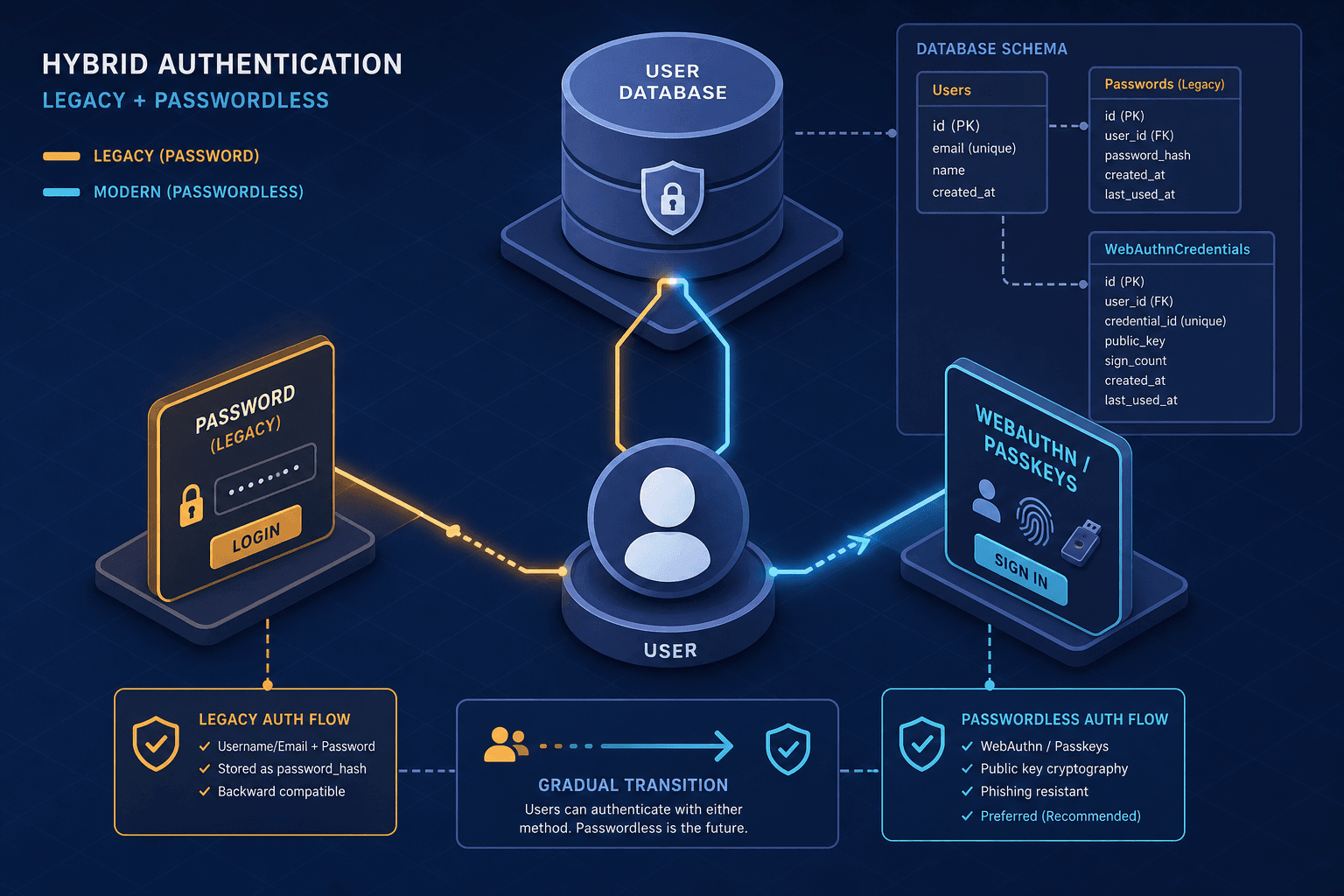
You cannot switch off passwords overnight. You must maintain a hybrid state where both passwords and passwordless methods are valid for authentication. This requires careful architecture.
Database Schema Changes
Add a passwordless_enabled boolean and a webauthn_credential_id field to your user table. Do not delete the password hash column yet.
ALTER TABLE users
ADD COLUMN passwordless_enabled BOOLEAN DEFAULT FALSE,
ADD COLUMN webauthn_credential_id VARCHAR(255);
Authentication Flow Logic
When a user attempts to log in, your authentication middleware must handle two scenarios:
- Passwordless Login: User provides email. Server checks if
passwordless_enabledis true. If so, send a magic link or trigger a push notification. - Password Login: User provides email and password. Server verifies the password hash. If successful, check if
passwordless_enabledis false. If so, redirect to an enrollment flow.
async function authenticate(credentials) {
  const user = await findUserByEmail(credentials.email);

  // Case 1: User wants to use passwordless
  if (credentials.method === 'passwordless') {
    if (!user.passwordless_enabled) {
      // Redirect to enrollment, but do NOT log them in yet
      return { status: 'enrollment_required', userId: user.id };
    }
    await sendMagicLink(user.email);
    return { status: 'link_sent' };
  }

  // Case 2: User wants to use password
  if (credentials.method === 'password') {
    const isValid = await verifyPassword(credentials.password, user.passwordHash);
    if (isValid) {
      // If they have no passwordless method, prompt enrollment after login
      if (!user.passwordless_enabled) {
        return { status: 'login_success', enroll_passwordless: true };
      }
      return { status: 'login_success' };
    }
    throw new Error('Invalid password');
  }
}
The "Silent" Upgrade
The most effective migration strategy is to upgrade users to passwordless after they have successfully logged in with their password.
- User logs in with password.
- Server returns
enroll_passwordless: true. - Frontend displays a modal: "Log in faster next time. Set up Passkeys."
- User completes WebAuthn registration.
- Server updates
passwordless_enabled = true. - Next login, the user can choose passwordless.
This approach leverages the trust already established by the password login to encourage enrollment.
Rollout Planning: Phased Adoption
A big-bang rollout is risky. Use a phased approach to manage support load and gather data.
Phase 1: Internal Beta
Enable passwordless for employees and internal stakeholders. Test the enrollment flow, error handling, and recovery mechanisms. Identify bugs in the hybrid state logic.
Phase 2: Early Adopters
Invite a small group of power users (e.g., 5% of your base) to opt-in. These users are more forgiving of bugs and more likely to provide feedback. Monitor enrollment rates and login success rates.
Phase 3: General Availability
Roll out to all new users by default. For existing users, enable the "upgrade after login" prompt. Do not force enrollment immediately.
Phase 4: Deprecation
After 6–12 months, evaluate adoption. If >80% of users have enrolled, consider making passwordless the default and eventually deprecating passwords. Note: Never force-deprecate passwords without a robust recovery plan. Account lockouts due to lost devices can be catastrophic. A phased rollout strategy allows you to mitigate these risks incrementally.
Key Metrics to Track
- Enrollment Rate: Percentage of users who complete passwordless setup after first login.
- Login Success Rate: Compare success rates between password and passwordless methods.
- Support Ticket Volume: Monitor spikes in tickets related to "login issues" or "lost access."
- Time to First Login: How long it takes for a new user to complete their first passwordless login.
Tracking these metrics against industry standards for authentication user behavior helps quantify the success of the migration.
Conclusion
Migrating to passwordless is a journey of incremental trust. By maintaining a hybrid state, decoupling authentication from enrollment, and using a phased rollout, you can transform your authentication system without disrupting your users. The technical complexity is manageable; the real work lies in designing a user experience that makes passwordless feel like a benefit, not a burden. Aligning your strategy with established security frameworks ensures that this transition strengthens, rather than weakens, your security posture.
Related posts
Implementing WebAuthn in Keycloak: Passkey Authentication Setup
A walkthrough for configuring WebAuthn and passkeys within Keycloak to enable passwordless authentication using FIDO2 standards.
Why Passwords Are Finally Losing | WebAuthn Guide
An examination of why passwordless authentication is replacing traditional passwords due to phishing resistance and security improvements.
WebAuthn and FIDO2, Explained
An examination of WebAuthn and FIDO2 standards, covering attestation, user verification, and public key credentials for passwordless authentication.