Angular OAuth2/OIDC: loadDiscoveryDocumentAndTryLogin
Learn how to use loadDiscoveryDocumentAndTryLogin and strict discovery document validation in Angular for secure OAuth2/OIDC authentication.
Discovery: loadDiscoveryDocumentAndTryLogin and Strict Validation
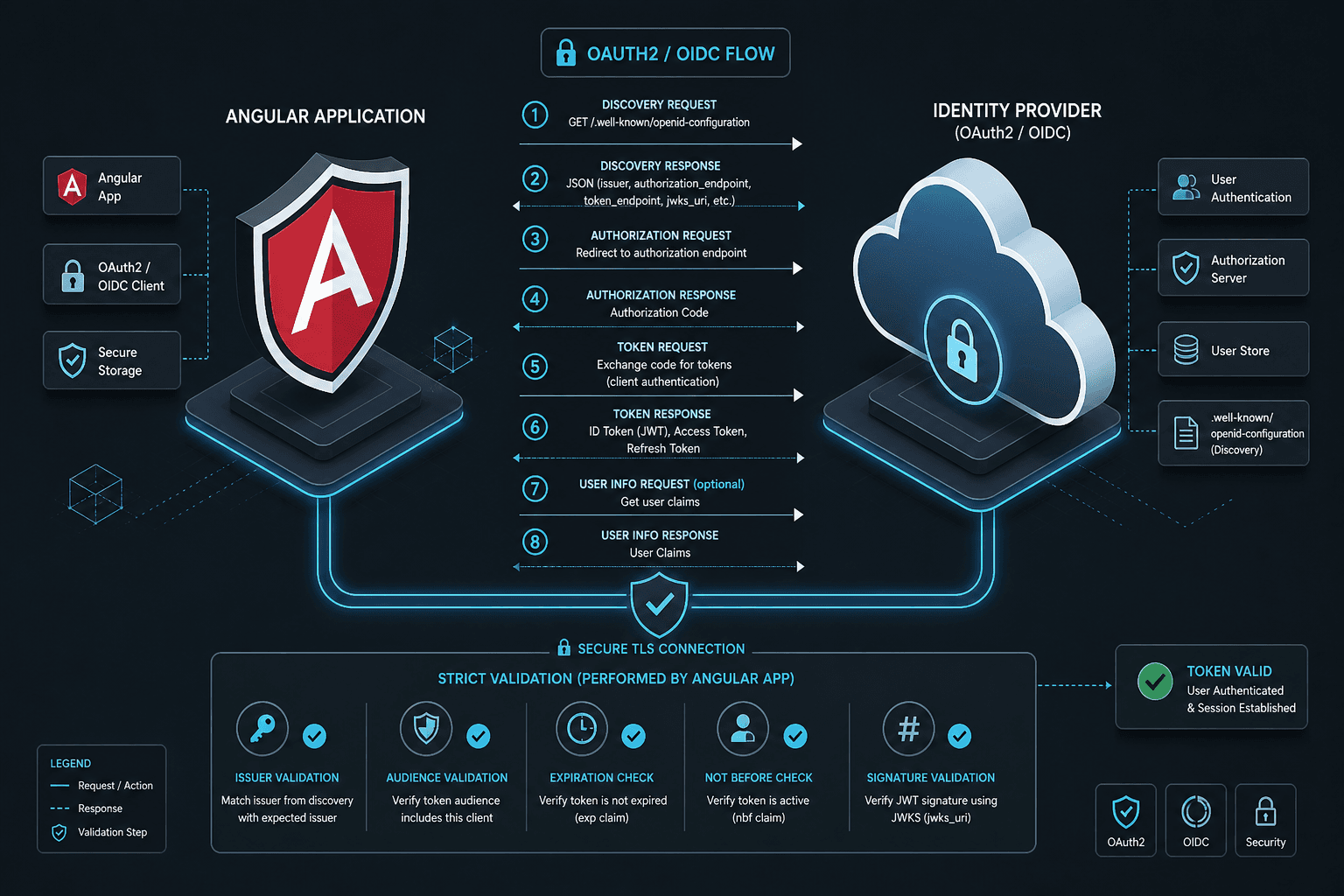
In the angular-oauth2-oidc library, the method loadDiscoveryDocumentAndTryLogin is often treated as a black box that "logs the user in." This is a dangerous abstraction. Mechanistically, it is an orchestrator that performs two distinct, sequential operations: it fetches the OpenID Connect Discovery Document (the .well-known/openid-configuration endpoint) and, if no active session is found in the storage, it immediately initiates the Authorization Code Flow.
This is Part 3 of the "angular-oauth2-oidc in Production" series.
For Angular developers building production applications, understanding this mechanism is critical because it defines the boundary between a secure, validated identity state and a vulnerable, guessable one. This article explains the internal data flow of loadDiscoveryDocumentAndTryLogin and why strict validation of the discovery document is the primary defense against issuer confusion attacks.
The Mechanism of loadDiscoveryDocumentAndTryLogin
The method loadDiscoveryDocumentAndTryLogin does not just fetch configuration; it manages the lifecycle of the authentication state. When called, it executes a specific sequence of events that bridges the gap between the browser's initial state and the OAuth2 provider's requirements.
First, the method issues an HTTP GET request to the discovery endpoint defined in your AuthConfig. This endpoint returns a JSON object containing the URLs for authorization, token issuance, and user info, as well as supported algorithms. The library parses this JSON and populates the internal state of the OAuthService.
// Conceptual representation of the internal flow
async function loadDiscoveryDocumentAndTryLogin() {
  // 1. Fetch and parse the discovery document
  const config = await fetch('/.well-known/openid-configuration');
  const json = await config.json();

  // 2. Store issuer and endpoints in OAuthService state
  this.issuer = json.issuer;
  this.authorizationEndpoint = json.authorization_endpoint;
  this.tokenEndpoint = json.token_endpoint;

  // 3. Check for existing session artifacts
  const hash = window.location.hash;
  const hasCodeOrError = hash.includes('code=') || hash.includes('error=');
  const hasSession = this.hasValidSession(); // Checks localStorage/cookie

  // 4. Conditional logic: If no session and no current auth response, start flow
  if (!hasCodeOrError && !hasSession) {
    this.tryLogin(); // Initiates the redirect to authorizationEndpoint
  }
}
The second part of the method, tryLogin(), is only triggered if the application detects no existing session. It constructs a redirect URL with specific parameters: response_type=code, client_id, redirect_uri, and a generated state parameter. This state parameter is crucial; it is stored in the OAuthStorage (usually sessionStorage) and later validated to ensure the callback response matches the original request, preventing CSRF attacks.
If a session already exists, the method skips the redirect. This is important for refresh token flows. If the access token is expired, the application must use the refresh token to obtain a new access token without interrupting the user. The discovery document is loaded once during initialization; subsequent token refreshes rely on stored credentials and do not require re-fetching the discovery document unless the issuer configuration is suspected to have changed.
Strict Validation as a Security Primitive
The most critical component of this setup is strictDiscoveryDocumentValidation. By default, angular-oauth2-oidc enables strict validation. This setting forces the library to perform rigorous checks on the discovery document and the resulting tokens.
When strict validation is enabled, the library verifies two main things:
- Issuer Match: The
issclaim in the ID token must exactly match theissuerfield in the discovery document. - Nonce Verification: If the
openidscope is requested, thenoncevalue sent in the authorization request must be returned in the ID token.
Consider the attack scenario where strict validation is disabled. An attacker could set up a rogue OAuth2 provider that mimics the interface of a legitimate one (e.g., Google, Azure AD). If the Angular application is configured with the client ID of a legitimate service but does not strictly validate the issuer, the application might accept an ID token from the rogue provider. This is known as issuer confusion.
By enforcing strict validation, the OAuthService ensures that the token it receives was issued by the exact entity defined in the discovery document. This binds the client to a specific identity provider, preventing token substitution attacks. This configuration aligns with best practices outlined in the OpenID Connect Core 1.0 specification regarding ID Token validation and issuer verification.
// Configuration example demonstrating strict validation
const config: AuthConfig = {
  issuer: 'https://accounts.google.com',
  clientId: 'your-client-id.apps.googleusercontent.com',
  redirectUri: window.location.origin + '/callback',
  strictDiscoveryDocumentValidation: true, // Default, but explicit is better
};
If strictDiscoveryDocumentValidation is set to false, the library will skip the issuer check. This might be necessary in rare cases where the discovery document is dynamically generated or the issuer claim varies slightly (e.g., trailing slashes). However, this is a significant security trade-off and should only be used when absolutely necessary, with alternative mitigations in place.
Implementation via APP_INITIALIZER
In Angular, the timing of discovery is critical. The OAuthService must be fully configured before any component attempts to authenticate. If a component tries to call login() before the discovery document is loaded, the service will fail because it doesn't know the authorization endpoint URL.
The standard solution is to use Angular's APP_INITIALIZER token. This allows the application to delay its bootstrap until an asynchronous task (loading the discovery document) completes.
import { APP_INITIALIZER, NgModule } from '@angular/core';
import { OAuthService } from 'angular-oauth2-oidc';

function initOAuth(oAuthService: OAuthService) {
  return () => oAuthService.loadDiscoveryDocumentAndTryLogin();
}

@NgModule({
  providers: [
    {
      provide: APP_INITIALIZER,
      useFactory: initOAuth,
      deps: [OAuthService],
      multi: true
    }
  ]
})
export class AppModule {}
This pattern ensures that loadDiscoveryDocumentAndTryLogin is executed during the application's initialization phase. If the discovery document fails to load (e.g., network error, invalid URL), the application will not start. This is a desirable failure mode because it prevents the application from running in an insecure, unauthenticated state.
Conclusion
loadDiscoveryDocumentAndTryLogin is an essential part of secure OAuth2/OIDC integration in Angular. It ensures that the client has the correct configuration and initiates the flow only when necessary. Combined with strict validation, it provides effective protection against common identity attacks. Developers should always use this method in conjunction with APP_INITIALIZER to guarantee that the authentication state is established before the application becomes interactive.
The key takeaway is that security is not a feature you add later; it is built into the initialization sequence. By trusting the discovery document and validating every token against it, you ensure that your Angular application remains a trusted party in the OAuth2 ecosystem.
Related posts
The AuthConfig Reference: Every Property That Matters
A complete reference for Angular-OAuth2-OIDC AuthConfig properties, covering requireHttps, remoteOnly, and nonceStateSeparator for secure Angular authentication.
Understanding OAuth2 Multiple Response Types: A Technical Guide
An examination of OAuth2 response types including hybrid flow, OIDC response types, and authorization server configurations for beginners.
OpenID Connect Guide: Extending OAuth 2.0 for Identity Verification
An examination of OpenID Connect (OIDC) and how it extends OAuth 2.0 to handle identity verification using ID tokens and discovery protocols.