Building a Custom OIDC Provider with Spring Authorization Server
Learn how to build a custom OpenID Connect provider using Spring Authorization Server for secure authentication flows.
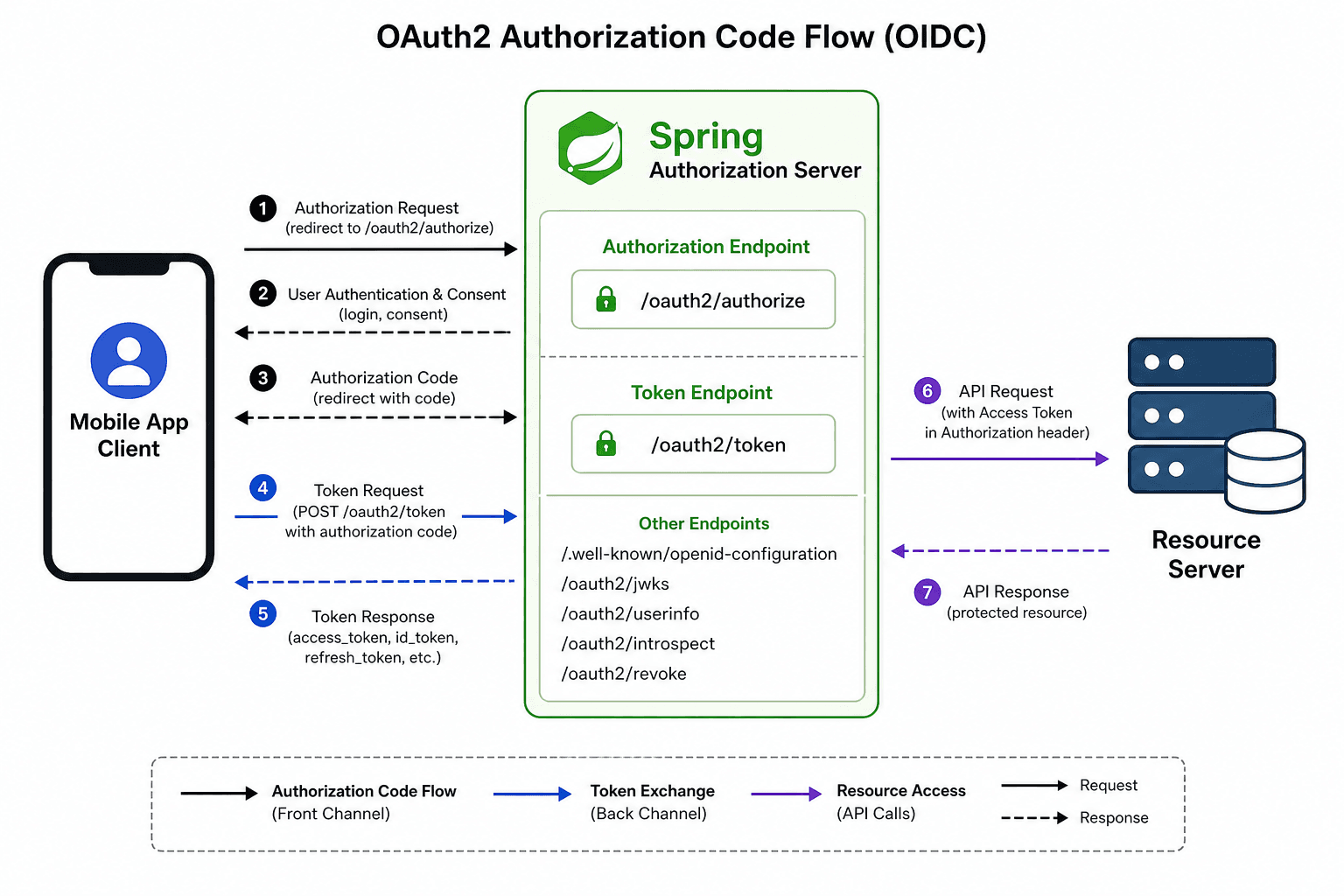
The architecture of an OpenID Connect (OIDC) provider has shifted significantly with the release of Spring Authorization Server (SAS). Unlike legacy implementations that relied on manual filter chains to parse requests, SAS introduces a declarative mechanism where the server acts as a stateful coordinator between the Client, the Resource Server, and the Identity Provider. To build a custom provider, you must move beyond surface-level configuration and understand the mechanism of token composition and the strict separation of concerns between the authorization endpoint and the token endpoint.
This article is Part 5 of the OpenID Connect Series.
The Dependency Graph and Filter Chain
The first mechanism to grasp is how SAS differentiates itself from a standard Spring Security application. In a typical web app, SecurityFilterChain protects resources. In SAS, the same chain must expose the authorization endpoints (/oauth2/authorize, /oauth2/token, etc.) without inadvertently blocking them. This is achieved by injecting the OAuth2AuthorizationServerConfiguration into the security context.
Consider a scenario where we have a client application named mobile-app requesting access to a user-profile resource. The flow begins when the request hits the SecurityFilterChain. SAS registers specific filters that intercept requests to the /oauth2 path prefix. If the request targets the authorization endpoint, the AuthorizationEndpointFilter is triggered. This filter validates the response_type (e.g., code) and the redirect_uri.
You must explicitly enable this behavior in your configuration class. Without the @EnableAuthorizationServer annotation, SAS does not register the necessary beans to handle the OIDC handshake.
@Configuration
@EnableWebSecurity
@EnableAuthorizationServer
public class SecurityConfig {

    @Bean
    public SecurityFilterChain securityFilterChain(HttpSecurity http) throws Exception {
        // The default configuration handles the /oauth2/* endpoints
        OAuth2AuthorizationServerConfiguration.applyDefaultSecurity(http);

        // Custom logic for resource protection
        http
            .authorizeHttpRequests(auth -> auth
                .requestMatchers("/api/**").authenticated()
                .anyRequest().permitAll()
            );

        return http.build();
    }
}
The mechanism here is critical: applyDefaultSecurity configures the SecurityFilterChain to permit access to the authorization endpoints while enforcing standard security policies on other paths. If you omit this, the /oauth2/token endpoint will be blocked by default CSRF or form login filters, breaking the flow immediately.

The Token Composition Mechanism
Once the user authenticates and consents, the server must generate an Access Token. In SAS, this is not a static string generation; it is a dynamic composition process orchestrated by the OAuth2TokenCustomizer. This component allows you to inject custom claims into the JWT payload before the token is signed.
Imagine a scenario where the mobile-app needs to know the user's tenant ID to route data correctly. The standard OIDC spec does not define a tenant_id claim. To include this, you must implement the OAuth2TokenCustomizer interface. The mechanism works by intercepting the JwtClaimsSet.Builder right before the token is serialized.
Here is how you define a customizer that adds a tenant claim based on the authenticated user's context:
@Bean
public OAuth2TokenCustomizer<JwtEncoderContext> jwtCustomizer() {
    return context -> {
        // Access the authentication principal
        var principal = context.getPrincipal();
        if (principal instanceof UserDetails) {
            var user = (UserDetails) principal;
            // Inject custom claim
            context.getClaimsSetBuilder()
                   .claim("tenant", user.getTenantId());
        }
    };
}
This customizer is then registered in the SecurityFilterChain configuration. When the AuthorizationServerTokenResponse is constructed, SAS invokes this customizer. The mechanism ensures that the sub (subject) claim remains the immutable identifier (usually the user_id), while the tenant claim is dynamically derived from the Authentication object held in the security context.
Mapping the User Context
The bridge between your database and the OIDC claims is the UserDetailsService. SAS does not store user credentials or identity data; it delegates authentication to a UserDetailsService while storing authorization state (codes, tokens) in the configured OAuth2AuthorizationService. The mechanism relies on the Authentication object returned by the AuthenticationManager.
When a user logs in, the Authentication object contains the UserDetails. SAS maps this object to the OAuth2Authorization entity. Crucially, the sub claim is typically generated from the getPrincipal() method of the Authentication object. If you return a User object where getId() returns "123", the sub claim will be "123". However, this can be explicitly customized via OAuth2TokenCustomizer to use any attribute.
If you need to map specific roles to OIDC scopes, you must configure the OAuth2TokenCustomizer to read from the GrantedAuthority collection. This is where the "custom" part of your provider shines. You can map a database role ADMIN to a scope read:admin automatically.
@Bean
public UserDetailsService userDetailsService() {
    // Fetch user from DB
    return username -> {
        var dbUser = userRepository.findByUsername(username);
        // Convert DB roles to GrantedAuthority
        var authorities = dbUser.getRoles().stream()
            .map(role -> new SimpleGrantedAuthority("ROLE_" + role))
            .collect(Collectors.toList());
        return User.withUsername(dbUser.getId())
                   .password(dbUser.getPassword())
                   .authorities(authorities)
                   .build();
    };
}
The mechanism here ensures that every time a token is requested, the OAuth2TokenCustomizer can inspect the GrantedAuthority collection to decide which claims to emit. This decouples the identity data from the token structure.
Configuration Trade-offs: Storage and Keys
A critical decision in building a custom provider is how to store client metadata and authorization codes. SAS supports both in-memory and JPA-backed storage.
In-memory storage is convenient for development but fails the "stateful" requirement for production in multi-instance deployments due to lack of shared state. When a client requests an authorization code, SAS stores the code in memory. If your application scales across multiple instances, the code generated on Node A will be lost when the request redirects to Node B. This is a fundamental mechanism failure in distributed systems.
For production, you must enable JPA storage. This involves adding the spring-boot-starter-data-jpa dependency and configuring the OAuth2AuthorizationService. The mechanism shifts from ephemeral memory to persistent tables (oauth2_authorization, oauth2_client_registration).
# application.properties
spring.datasource.url=jdbc:postgresql://localhost:5432/oidc_db
spring.jpa.hibernate.ddl-auto=update
Regarding the signing keys, SAS uses a JwkSource to sign the JWT. By default, it generates a random key pair on startup. This is dangerous for production because restarting the server changes the public key, invalidating all existing tokens. The mechanism requires a persistent JwkSet.
You should configure SAS to load keys from a JKS (Java KeyStore) or a KMS (Key Management Service). This ensures that the kid (Key ID) in the JWT header remains constant across restarts, allowing resource servers to cache the public key securely.

Conclusion
Building a custom OIDC provider with Spring Authorization Server is less about writing authentication logic and more about configuring the mechanisms that bind the Authentication object to the JWT payload. By understanding the OAuth2TokenCustomizer as the bridge for custom claims and enforcing JPA for state persistence, you create a provider that is both compliant with the OIDC spec and reliable enough for distributed systems. The trade-off is the complexity of managing the SecurityFilterChain correctly, but the result is a fully customizable identity layer that integrates efficiently with the Spring ecosystem.
Common Pitfalls
- Key Rotation Issues: Relying on the default in-memory key generation causes all existing tokens to become invalid upon server restart. Always configure a persistent
JwkSourcebacked by a KeyStore or KMS. - Filter Chain Ordering: Failing to apply
OAuth2AuthorizationServerConfiguration.applyDefaultSecuritybefore custom security rules can inadvertently block the/oauth2endpoints with standard CSRF protections. - State Management: Using in-memory storage in a clustered environment leads to authorization code loss. Ensure your deployment strategy includes a shared database or Redis cache for authorization state.
Practical Takeaways
- Decouple Identity from Tokens: Treat
UserDetailsServiceas a pure identity lookup andOAuth2TokenCustomizeras the sole interface for modifying token content. - Persistence is Mandatory for Scale: In-memory storage is only acceptable for local development; production clusters require a persistent
OAuth2AuthorizationService. - Keys Must Be Immutable: The signing key used for JWTs should be treated as a long-term secret that does not change during the lifecycle of the application unless a deliberate rotation strategy is implemented.
FAQ
Q: Can I change the sub claim after it is generated from the principal?
A: Yes. While SAS defaults to using the principal's identifier for the sub claim, you can override this behavior within your OAuth2TokenCustomizer implementation by explicitly setting the claim on the JwtClaimsSet.Builder.
Q: Do I need to manually register clients in the database?
A: No. If you use JdbcRegisteredClientRepository, SAS can automatically manage client registrations in the oauth2_client_registration table, provided you configure the repository bean correctly.
Q: What happens if I forget to add the spring-boot-starter-data-jpa dependency?
A: Your application will likely fall back to in-memory storage or fail to start if a JPA-based OAuth2AuthorizationService is explicitly requested but no JPA implementation is available on the classpath.
Related posts
Implementing Passwordless MFA with FIDO2 and WebAuthn in Spring Boot
A technical walkthrough on integrating passwordless MFA using FIDO2 and WebAuthn within a Spring Boot application.
Understanding OAuth2 Multiple Response Types: A Technical Guide
An examination of OAuth2 response types including hybrid flow, OIDC response types, and authorization server configurations for beginners.
Building a Custom Authentication Provider in Spring Security
This article covers the implementation of a custom authentication mechanism within Spring Security using a dedicated AuthenticationProvider.