Implementing Passwordless MFA with FIDO2 and WebAuthn in Spring Boot
A technical walkthrough on integrating passwordless MFA using FIDO2 and WebAuthn within a Spring Boot application.
Implementing Passwordless MFA with FIDO2 and WebAuthn in Spring Boot
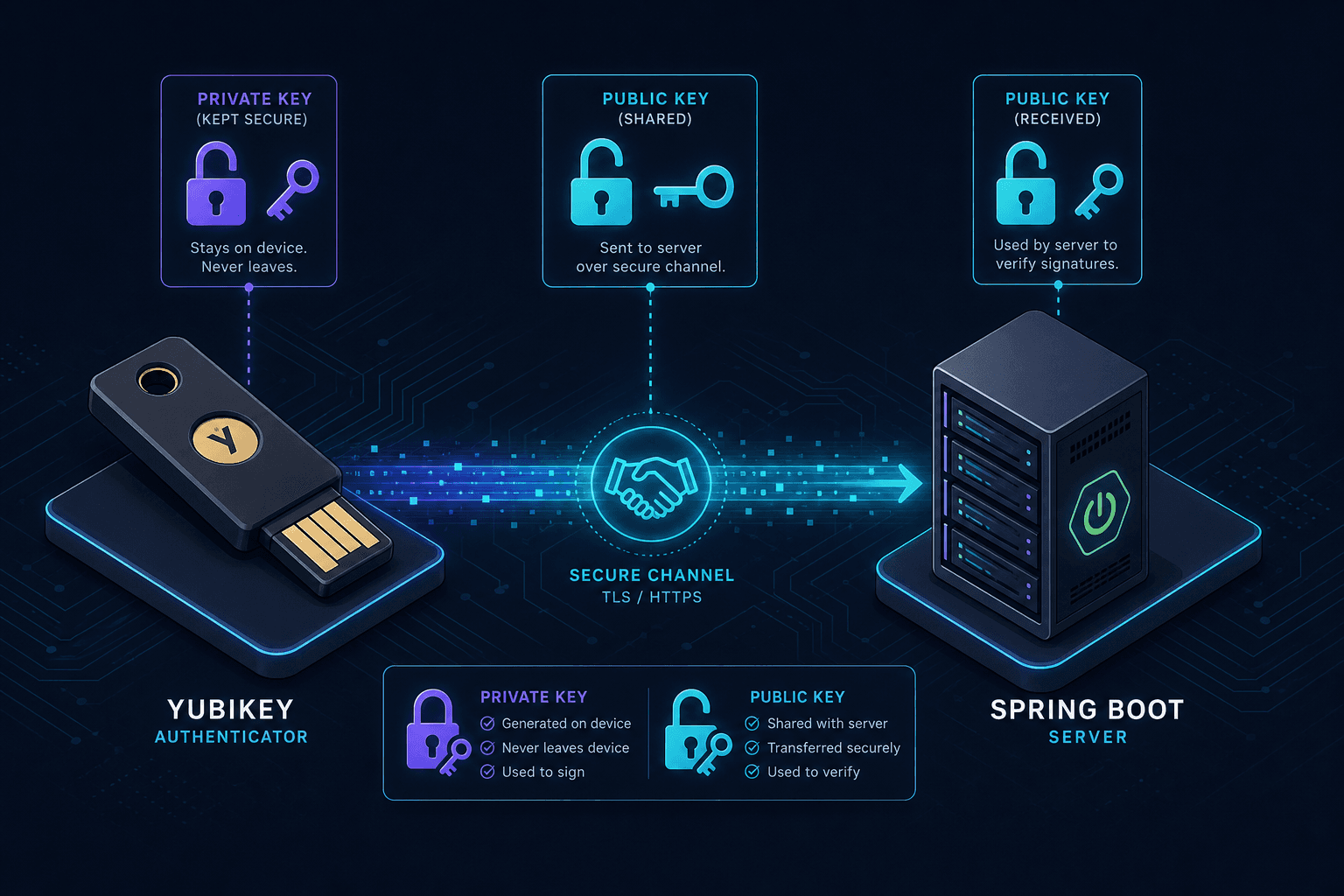
Traditional authentication relies on a shared secret—a password—where the client proves knowledge of the string to the server. This model is vulnerable to phishing, credential stuffing, and database breaches. FIDO2 and WebAuthn replace the shared secret with an asymmetric key pair generated directly on the user's device. The private key remains locked inside the authenticator (a YubiKey, a smartphone, or a platform TPM), while the public key is registered with the server. Authentication becomes a challenge-response protocol: the server issues a nonce, the authenticator signs it with the private key, and the server verifies the signature using the stored public key. No secret ever traverses the network.
The Asymmetric Mechanism
The core mechanism here is the binding of the credential to the relying party (your application). During registration, the authenticator generates a key pair specific to the rpId (Relying Party Identifier). If you change your domain or subdomain, the keys generated for the old domain become useless, preventing cross-site phishing attacks where a malicious site tries to trick a user into authenticating against the legitimate site's keys. This binding is the foundation of passwordless MFA, ensuring that credentials are intrinsically tied to the specific domain context.
This contrasts sharply with traditional password hashing. In the password model, the server stores a hash of the secret; if the database is breached, the attacker can attempt offline cracking or reuse the credentials elsewhere. In the FIDO2 model, the server stores only the public key and metadata. Even if an attacker steals the database containing the public keys and the user IDs, they cannot authenticate because they do not have the private key.
The Implementation Stack
To implement this in a Spring Boot application, we need a library that can parse the complex JSON structures defined by the WebAuthn specification and integrate them into the Spring Security filter chain. The standard approach involves two primary components: a library for cryptographic verification and a Spring Security module to handle the authentication flow.
We will use webauthn4j for the heavy lifting of parsing the JSON assertions and performing the cryptographic signature verification. This library handles the granular details of the WebAuthn protocol, such as validating the clientDataJSON hash and checking the authenticatorData flags. For the Spring integration, we use the spring-security-webauthn project (or manual configuration using webauthn4j beans) to create a custom AuthenticationProvider that the Spring Security context can use, effectively bridging the gap between raw cryptographic data and Spring Security's Authentication objects.
Registration Flow and Credential Creation
Let's trace the flow with a concrete scenario. Alice wants to register her YubiKey 5. Her browser calls your Spring Boot backend endpoint /api/auth/webauthn/register/start.
Your backend must generate a set of options for the browser to pass to the authenticator. This is done by creating a CredentialCreationOptions object. The server needs a unique userId (not the username, but a random UUID to decouple identity from the credential) and the rpId.
// Simplified conceptual code for generating options
WebAuthnRegistrationOptions options = new WebAuthnRegistrationOptions();
options.setRelyingParty(new RelyingParty("example.com", "Example Corp"));
options.setUserId("user-uuid-123");
options.setUserName("alice@example.com");
options.setChallenge(randomBytes(32)); // Nonce to prevent replay
options.setAuthenticatorSelection(new AuthenticatorSelectionCriteria()
    .setResidentKey(AuthenticatorAttachment.CROSS_PLATFORM) // Allow any device
    .setUserVerificationRequirement(UserVerificationRequirement.REQUIRED));
The server returns these options as JSON to the browser. The browser then invokes navigator.credentials.create(options). The YubiKey 5 receives the request. It prompts Alice to touch the device. The device generates a fresh ECDSA P-256 key pair. It signs the challenge using the private key and attaches the authenticatorData, which includes the RP ID hash and a flag indicating if the user was verified (via touch). The device returns a CredentialCreationResponse containing the public key and the attestation object to the browser, which POSTs it back to /api/auth/webauthn/register/finish.
On the server side, you receive this payload. You must verify the attestation. This is where webauthn4j becomes critical. You do not trust the JSON; you trust the cryptographic proof.
// Verification logic
WebAuthnRegistrationResponse response = new WebAuthnRegistrationResponse(options);
try {
    response.verify();
    // If successful, extract the public key bytes and store them in your DB
    PublicKey publicKey = response.getPublicKey();
    String credentialId = response.getCredentialId();
    // Save to database: userId, credentialId, publicKey, counter, aaguid
} catch (InvalidCredentialException e) {
    // Handle errors: invalid signature, wrong challenge, etc.
}
The Verification Mechanism
The verification process checks three things mechanically during registration. First, it ensures the challenge in the response matches the one issued. Second, it verifies the signature of the attestation object against the root certificates (if self-signed, it verifies the chain). Third, and most importantly for security, it checks the authenticatorData. Specifically, it checks the User Verified (UV) flag and the User Present (UP) flag. If UV is false, the device didn't confirm the user's presence (e.g., via fingerprint or PIN), which violates the requirement for high-assurance authentication.
During login, the verification mechanism shifts focus. The server no longer checks attestation against root certificates. Instead, it retrieves the user's previously stored public key and uses it to verify the assertion signature generated by the authenticator. This ensures the user possesses the private key corresponding to the registered credential without needing to re-verify the hardware's root of trust.
Login and Assertion Verification
Once registered, Alice attempts to log in. She visits /login and the server calls /api/auth/webauthn/login/start. The server retrieves Alice's stored public key and userId from the database. It generates a new challenge and sends CredentialRequestOptions to the browser.
The browser asks the YubiKey to sign this new challenge. The YubiKey uses the private key corresponding to the stored public key. It returns the signature and the credentialId. The browser posts this to /api/auth/webauthn/login/finish.
The server retrieves the public key associated with that credentialId. It constructs a WebAuthnAssertionResponse using the options, the request JSON, and the retrieved public key. The verification step here is purely cryptographic.
// Login verification logic
WebAuthnAssertionResponse assertionResponse = new WebAuthnAssertionResponse(options, requestJson, publicKey);
assertionResponse.verify(); // Validates signature, challenge, and flags
If the signature matches the public key and the challenge is valid, the server knows the user possesses the private key. At this point, Spring Security creates an Authentication object. We typically map the userId to a UserDetails implementation.
// Custom AuthenticationProvider logic
public class WebAuthnAuthenticationProvider implements AuthenticationProvider {
    @Override
    public Authentication authenticate(Authentication authentication) throws AuthenticationException {
        // assertionResponse is passed in the principal or arguments
        // If verify() passes, look up user by ID
        User user = userService.findById(userId);
        return new UsernamePasswordAuthenticationToken(user, null, user.getAuthorities());
    }
}
Operational Tradeoffs and Recovery
Implementing this in Spring Boot requires careful dependency management. You must ensure that the version of webauthn4j is compatible with the Java version you are running, as the cryptographic libraries have evolved. Additionally, you need to handle the UserVerificationRequirement strictly. In a production environment, you should enforce REQUIRED for the user verification method (biometric or PIN) rather than DISCOURAGED or PREFERRED. This ensures that a simple tap is not enough; the user must actively prove they are the owner of the device.
There is a critical nuance in the authenticatorData that developers often miss. The authenticatorData contains the RP ID Hash. The authenticator only signs data if the RP ID matches the one configured on the device. If you host your app at app.example.com but the rpId is set to example.com, the authenticator will reject the request because the computed RP ID hashes will not match. Strictly speaking, the hash must match the domain you are operating on to prevent subdomain hijacking.
One common point of failure is the handling of the counter. FIDO2 authenticators maintain a counter for each credential. If the counter in the response is less than or equal to the counter stored in the database, it indicates a replay attack or a cloned authenticator. The server must reject the login immediately if responseCounter <= storedCounter. This prevents an attacker from capturing a valid login response and replaying it later.
The tradeoff here is complexity for security. You lose the ability to reset passwords via email. If a user loses their device, you need a recovery flow. This usually involves a fallback to a secondary factor (like a backup code) or a multi-device sync mechanism (like Apple iCloud Keychain or Google Password Manager). Managing these recovery paths is often harder than managing password resets.
Furthermore, while browser support for WebAuthn is now excellent on modern Chrome, Firefox, Safari, and Edge, older environments or specific enterprise configurations might still block it. You must design a fallback strategy, perhaps keeping a legacy password option disabled by default but available for emergency access, though this reintroduces some of the original risks.
The data flow is strictly unidirectional regarding secrets. The client sends a public key and a signature. The server stores the public key and the challenge. The client never receives the private key. This architectural constraint is what makes the system secure against phishing. A phishing site cannot ask the authenticator to sign a request for a different domain because the authenticator checks the domain origin before signing.
Common Pitfalls
Developers frequently stumble on specific implementation details that can compromise security or usability.
- Counter Replay Attacks: If you fail to increment or check the
countervalue in theauthenticatorDataagainst the stored value, an attacker can capture a valid login response and replay it indefinitely. Always ensure the new counter is strictly greater than the stored one. - Subdomain RP ID Mismatches: If your application runs on
app.example.combut yourrpIdis configured asexample.com, authenticators may reject the login or behave inconsistently depending on the device configuration. Ensure therpIdmatches the specific domain or a valid parent domain that aligns with your authenticator's trust policy. - Recovery Flow Complexity: Unlike passwords, you cannot simply email a reset link. If a user loses their device, you must have a pre-planned recovery mechanism, such as a backup code system or a secondary device registration flow. Without this, a lost device results in a locked-out user account.
Practical Takeaways
To successfully deploy FIDO2, keep these mental models in mind. First, public keys are safe to store in your database; they are designed to be public. Private keys never leave the user's device; if a private key is ever seen by the server, the security model is broken. Second, the rpId is the anchor of trust; changing it invalidates existing credentials. Finally, always validate the counter to prevent replay attacks, as this is the only mechanism to detect if a credential has been cloned or replayed.
FAQ
What happens if I lose my device? Since the private key is stored locally on the device, you cannot recover it from the server. You must rely on a pre-configured recovery flow, such as backup codes or a second registered device, to regain access.
Can I use this on subdomains?
Yes, but you must configure the rpId correctly. If you set the rpId to the parent domain (e.g., example.com), authenticators will generally accept requests from app.example.com. However, if the rpId is set specifically to app.example.com, requests from other subdomains will be rejected.
Is this compatible with older browsers? WebAuthn support is excellent in all modern browsers (Chrome, Firefox, Safari, Edge). Older browsers or specific enterprise environments with strict CSP policies might not support it. A fallback strategy, such as a legacy password option, is recommended for broad compatibility.
Conclusion
Integrating FIDO2 and WebAuthn into Spring Boot shifts the security burden from the user remembering a secret to the hardware device holding a secret. The implementation involves balancing complexity against security gains, requiring careful handling of JSON parsing, cryptographic verification, and state management. By leveraging webauthn4j and Spring Security, you can build a strong authentication layer that aligns with modern security standards, provided you account for the operational challenges of recovery and counter management.
Related posts
Implementing WebAuthn in Keycloak: Passkey Authentication Setup
A walkthrough for configuring WebAuthn and passkeys within Keycloak to enable passwordless authentication using FIDO2 standards.
Building a Custom Authentication Provider in Spring Security
This article covers the implementation of a custom authentication mechanism within Spring Security using a dedicated AuthenticationProvider.
Implementing Account Lockout and Brute Force Protection in Spring Security
This article covers implementing account lockout and brute force protection mechanisms in Spring Security to secure failed logins with rate limiting and CAPTCHA.