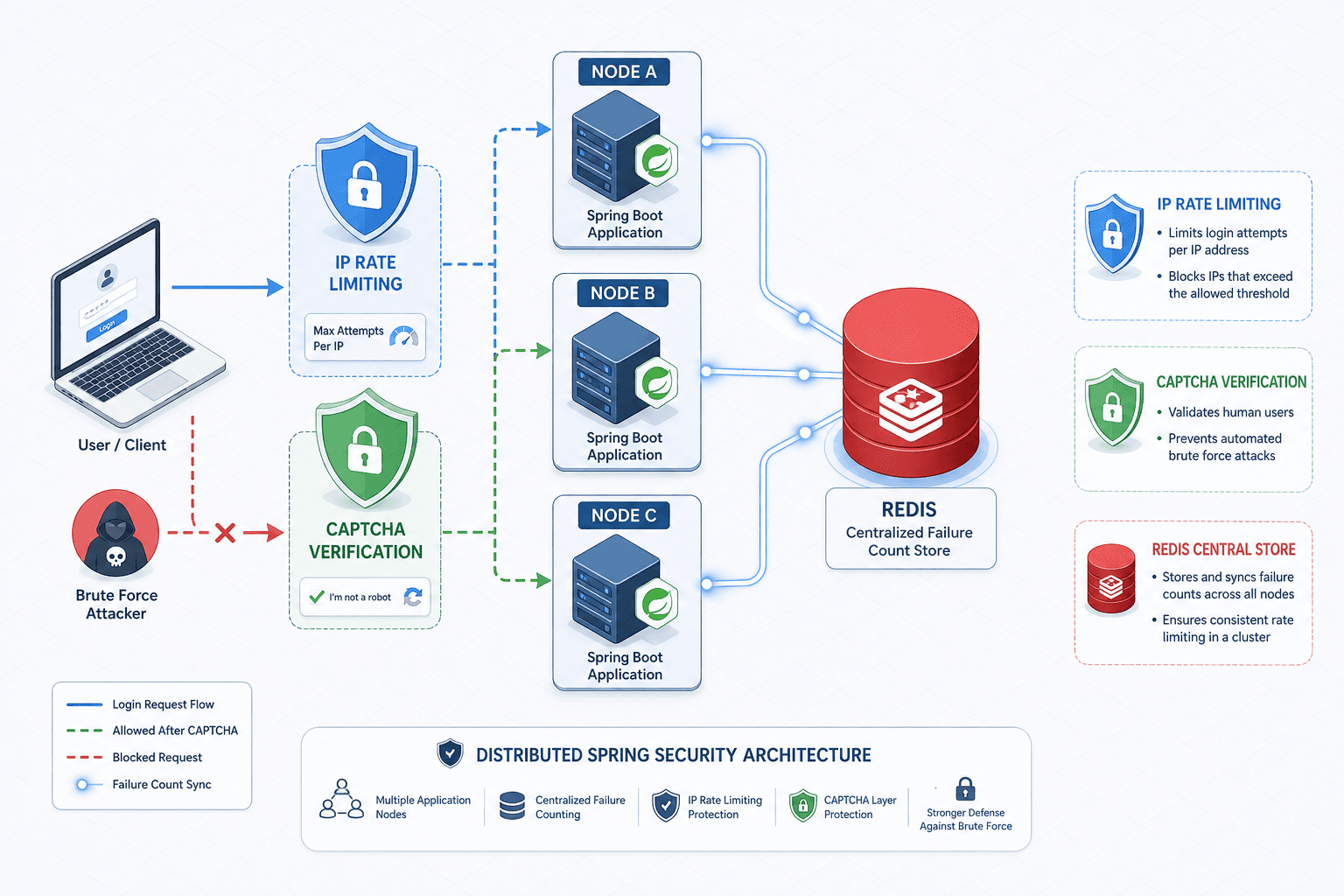
Implementing Account Lockout and Brute Force Protection in Spring Security
This article covers implementing account lockout and brute force protection mechanisms in Spring Security to secure failed logins with rate limiting and CAPTCHA.
Implementing Account Lockout and Brute Force Protection in Spring Security
Securing a Spring application against brute force attacks requires a mechanism that tracks state across multiple application instances and enforces strict temporal boundaries on failed attempts. The core vulnerability in naive implementations is the reliance on local memory, which fails to detect attacks distributed across multiple IP addresses or sessions. To solve this, we must decouple the failure counting logic from the UserDetailsService and persist it in a fast, shared store like Redis.
Effective brute force protection in Spring Security requires a layered approach combining stateful failure tracking (to trigger lockouts), distributed rate limiting (to throttle traffic before authentication), and CAPTCHA (to break automated bots), moving beyond simple static thresholds.
The Failure Counter Mechanism
Consider a scenario where an attacker named "Malicious" targets a user "Alice" with a password dictionary. If our application stores the failure count in a local HashMap within the AuthenticationProvider, a second instance of the application (Node B) will have no knowledge of the three failed attempts that occurred on Node A. Malicious can simply rotate their IP or target Node B to reset the counter. The mechanism that fixes this is a shared state check performed before the password hash is ever computed.
We implement this by creating a custom AuthenticationFailureHandler. This handler intercepts the AuthenticationException thrown during the AuthenticationManager's authenticate call. Instead of immediately returning a generic error, the handler queries Redis for the key lockout:Alice. If the key exists and the value exceeds the threshold (e.g., 5), the handler throws a specific AccountLockedException.
Crucially, the logic must check the current count before incrementing it to strictly enforce the threshold. If we increment first, we allow the MAX_ATTEMPTS + 1 request to pass through before blocking, which is a logic flaw.
public class CustomFailureHandler implements AuthenticationFailureHandler {
    private final RedisTemplate<String, String> redisTemplate;
    private static final int MAX_ATTEMPTS = 5;
    private static final long LOCKOUT_DURATION_MS = 30 * 60 * 1000; // 30 mins

    @Override
    public void onAuthenticationFailure(HttpServletRequest request,
                                        HttpServletResponse response,
                                        AuthenticationException exception) throws IOException {
        String username = extractUsername(exception);
        String lockoutKey = "lockout:" + username;

        // Check current count BEFORE incrementing
        Long count = Long.valueOf(redisTemplate.opsForValue().get(lockoutKey) != null
            ? redisTemplate.opsForValue().get(lockoutKey) : "0");

        if (count >= MAX_ATTEMPTS) {
            // Already locked out
            response.sendError(HttpServletResponse.SC_FORBIDDEN, "Account locked");
            return;
        }

        // Increment count with atomic operation
        redisTemplate.opsForValue().increment(lockoutKey, 1);
        redisTemplate.expire(lockoutKey, LOCKOUT_DURATION_MS / 1000, TimeUnit.SECONDS);

        // Trigger standard login failure message
        response.sendError(HttpServletResponse.SC_UNAUTHORIZED, "Invalid credentials");
    }

    // ... helper methods for username extraction
}
This mechanism ensures that regardless of which server node processes the request, the cumulative failure count is accurate. The expire command is critical here; without it, the account remains permanently locked, creating a Denial of Service (DoS) vector against legitimate users. The expiration time acts as a cooling-off period, allowing the system to recover automatically without administrative intervention.
However, to ensure immediate recovery for legitimate users who mistype a password once or twice, we must also reset the failure count upon successful authentication. This logic is typically placed in a custom AuthenticationSuccessHandler or within the UserDetails retrieval logic.
public class CustomSuccessHandler extends SimpleUrlAuthenticationSuccessHandler {
    private final RedisTemplate<String, String> redisTemplate;
    private static final long LOCKOUT_DURATION_MS = 30 * 60 * 1000;

    @Override
    public void onAuthenticationSuccess(HttpServletRequest request,
                                        HttpServletResponse response,
                                        Authentication authentication) throws IOException {
        String username = authentication.getName();
        String lockoutKey = "lockout:" + username;

        // Reset failure count immediately on success
        redisTemplate.delete(lockoutKey);

        super.onAuthenticationSuccess(request, response, authentication);
    }
}
Distributed Rate Limiting at the Gateway
While account lockout protects specific user accounts, it does not protect the application itself from being overwhelmed by a flood of requests targeting non-existent users. An attacker can send 10,000 requests per second to /login trying to guess usernames, exhausting CPU and database connections before any single username hits the lockout threshold. To mitigate this, we must implement rate limiting at the network or gateway level, or via a dedicated Spring Security filter that operates before the authentication provider.
The mechanism here relies on sliding window counters. We track the number of requests from a specific IP address within a defined time window. If the count exceeds the limit, the request is dropped immediately with a 429 Too Many Requests status. This prevents the request from ever reaching the AuthenticationProvider or the database.
In a Spring Security configuration, we inject a custom filter that sits before the UsernamePasswordAuthenticationFilter. This filter extracts the client IP and checks a Redis counter.
public class RateLimitFilter extends OncePerRequestFilter {
    private final RedisTemplate<String, Long> redisTemplate;
    private static final int MAX_REQUESTS = 100;
    private static final int WINDOW_SECONDS = 60;

    @Override
    protected void doFilterInternal(HttpServletRequest request,
                                    HttpServletResponse response,
                                    FilterChain filterChain) throws ServletException, IOException {
        String ip = getClientIp(request);
        String rateLimitKey = "ratelimit:" + ip;

        Long currentCount = redisTemplate.opsForValue().get(rateLimitKey);

        if (currentCount != null && currentCount >= MAX_REQUESTS) {
            response.setStatus(HttpStatus.TOO_MANY_REQUESTS.value());
            response.setContentType("application/json");
            response.getWriter().write("{\"error\": \"Rate limit exceeded\"}");
            return;
        }

        // Use INCR with EXPIRE to simulate a sliding window or fixed window
        redisTemplate.opsForValue().increment(rateLimitKey);
        if (redisTemplate.opsForValue().get(rateLimitKey) == 1) {
            redisTemplate.expire(rateLimitKey, WINDOW_SECONDS, TimeUnit.SECONDS);
        }

        filterChain.doFilter(request, response);
    }

    // ... IP extraction logic
}
This approach shifts the computational cost of security from the application logic (password hashing) to the lightweight Redis operations. It is a defensive layer that handles the "volume" of the attack, while the account lockout handles the "precision" of the attack.
CAPTCHA Integration for Suspicious Patterns
The final layer of defense addresses the "low-and-slow" attack where an attacker tries only a few passwords per minute to avoid triggering the hard lockout threshold. In this scenario, the account is still unlocked, but the behavior is suspicious. We introduce CAPTCHA as a friction mechanism that forces human verification.
The mechanism involves monitoring the failure count again, but at a lower threshold (e.g., 3 failures). If a user hits this "warning" threshold, the system does not immediately lock them out. Instead, it flags the session or the IP as requiring CAPTCHA. The next login attempt must include a valid CAPTCHA token.
This requires modifying the authentication flow to accept a captchaToken parameter. We create a custom AuthenticationFilter that validates this token against the CAPTCHA provider (e.g., Google reCAPTCHA) before passing the credentials to the AuthenticationManager.
public class CaptchaAuthenticationFilter extends UsernamePasswordAuthenticationFilter {
    private final ReCaptchaValidator reCaptchaValidator;

    @Override
    public Authentication attemptAuthentication(HttpServletRequest request,
                                                HttpServletResponse response) throws AuthenticationException {
        String captchaToken = request.getParameter("g-recaptcha-response");

        // Check if CAPTCHA is required based on session or IP history
        if (isCaptchaRequired(request)) {
            if (captchaToken == null || !reCaptchaValidator.validate(captchaToken)) {
                throw new BadCredentialsException("Invalid CAPTCHA");
            }
        }

        String username = obtainUsername(request);
        String password = obtainPassword(request);

        // Proceed with standard authentication
        UsernamePasswordAuthenticationToken authRequest =
            new UsernamePasswordAuthenticationToken(username, password);

        return this.getAuthenticationManager().authenticate(authRequest);
    }

    private boolean isCaptchaRequired(HttpServletRequest request) {
        // Logic to check if IP/User has exceeded warning threshold
        return true; // Simplified for example
    }
}
It is important to clarify the interaction between CAPTCHA and the failure count. A valid CAPTCHA token does not reset the global failure count used for hard lockouts (which tracks the total failed attempts). Instead, it resets a specific "suspicion" flag or allows the current attempt to proceed without incrementing the failure counter further. However, a successful authentication (valid credentials) must always reset the global failure count immediately, ensuring the user is not penalized for previous attempts once they have proven they are the legitimate owner. This is handled in the CustomSuccessHandler shown earlier.
The integration of these three mechanisms—distributed failure counting, IP-based rate limiting, and conditional CAPTCHA—creates a robust defense. The rate limiter stops the flood, the lockout stops the targeted guessing, and the CAPTCHA stops the persistent, low-volume probing. Each layer operates on a different mechanism of detection and enforcement, ensuring that the application remains available and secure under attack conditions.
Operational Considerations and Tradeoffs
Implementing these mechanisms introduces operational complexity. The reliance on Redis for state management means that the availability of the cache directly impacts the availability of the login service. If Redis goes down, the lockout mechanism might fail to record failures, potentially allowing an attacker to bypass the lockout, or conversely, if the lockout logic defaults to "fail closed," legitimate users might be locked out permanently.
In production, a fallback strategy is essential. If Redis is unreachable, the system should either log the event and proceed with a local, temporary cache that expires quickly, or default to a strict lockout mode if the risk profile dictates it. Additionally, the lockout duration must be configurable. A 30-minute lockout might be too long for a high-turnover internal tool but appropriate for a banking application.
Finally, monitoring is critical. You must track the number of lockouts, rate limit hits, and CAPTCHA challenges. A sudden spike in these metrics is often the first sign of an active brute force campaign. Without visibility into these metrics, the system is blind to the very attacks it is designed to stop.
Conclusion
Securing Spring applications against brute force attacks requires moving beyond static thresholds to a dynamic, layered defense. By combining distributed failure counting in Redis, IP-based rate limiting, and conditional CAPTCHA challenges, developers can effectively mitigate both high-volume floods and low-and-slow probing attacks. While this approach introduces operational complexity regarding state management and fallback strategies, the resulting resilience against credential stuffing and account takeover attempts is essential for modern security postures.
FAQ
Q: Does a CAPTCHA reset the account lockout counter? A: No. A valid CAPTCHA allows the current login attempt to proceed even if the user has hit the "warning" threshold, but it does not clear the global failure count. The global counter is only reset upon a successful authentication (correct username and password).
Q: What happens to the lockout mechanism if Redis is unavailable? A: This is a critical failure mode. If Redis is down, you must decide on a fallback strategy. Common approaches include: 1) "Fail Open": Skip the lockout check and rely solely on standard authentication (risky), or 2) "Fail Closed": Temporarily block all logins or use a local in-memory cache with a very short TTL to prevent DoS while Redis recovers.
Q: Can IP-based rate limiting cause false positives for legitimate users? A: Yes, especially in environments with NAT (e.g., corporate offices or mobile networks) where many users share a single public IP. In such cases, rate limits should be set higher, or the logic should be adjusted to focus more on user-specific failure counts rather than just IP volume.
Practical Takeaways
- Decouple State: Always use a shared store like Redis for failure counts to ensure consistency across clustered application nodes.
- Check Before Increment: In your failure handler, verify the current count against the threshold before performing the increment operation to strictly enforce the limit.
- Reset on Success: Implement a success handler to immediately delete the failure key upon valid authentication, preventing legitimate users from being stuck in a locked state after a typo.
Common Pitfalls
- Missing Expiration: Forgetting to set an expiration time on the Redis key will permanently lock user accounts, leading to severe DoS issues for legitimate users.
- Logic Flaws in Counters: Checking the count after incrementing allows one extra failed attempt to slip through the
MAX_ATTEMPTSthreshold. - Ignoring Success Handlers: Focusing only on failure handling while neglecting the success flow means the failure count never resets, locking users out indefinitely after a single successful login following errors.
Related posts
Building a Custom Authentication Provider in Spring Security
This article covers the implementation of a custom authentication mechanism within Spring Security using a dedicated AuthenticationProvider.
Decoding client_secret_basic Default in RFC 8414
An examination of the token_endpoint_auth_methods_supported metadata field in RFC 8414 and why client_secret_basic remains the default authentication method.
Securing gRPC with OAuth2 Token Propagation in Microservices
A guide to securing gRPC services using OAuth2 token propagation and interceptors for reliable microservice communication.