Building a Custom Authentication Provider in Spring Security
This article covers the implementation of a custom authentication mechanism within Spring Security using a dedicated AuthenticationProvider.
The confusion around Spring Security often stems from treating authentication as a monolithic "login" feature rather than a chain of discrete mechanisms. When you need to validate credentials that do not fit the standard "username and password" model—such as API keys, biometric tokens, or legacy system hashes—you cannot simply tweak the UserDetailsService. You must intervene at the mechanism level where the Authentication object is verified. This intervention happens via the AuthenticationProvider interface.
The AuthenticationProvider Contract
The core mechanism here is the contract defined by AuthenticationProvider. It does not handle the HTTP request; it handles the logical verification of a presented credential. The interface mandates two methods: supports(Class<?>) and authenticate(Authentication). The supports method acts as a gatekeeper, returning true only if the provider can handle the specific Authentication implementation class (e.g., ApiKeyAuthenticationToken). If the gate is closed, the provider is skipped entirely. If open, the authenticate method is invoked. This method is responsible for the heavy lifting: querying your data source, validating the input against the expected format, and returning a new Authentication object containing the principal (the user) and their granted authorities. If validation fails, it must throw a BadCredentialsException, signaling the chain to stop and deny access.
Implementing the Legacy API Key Scenario
Consider a scenario where a legacy system requires authentication via a specific X-API-Key header rather than a form submission. We have a named actor, the SecurityFilterChain, and a named artifact, the ApiKeyAuthenticationToken. The standard UsernamePasswordAuthenticationFilter cannot parse this token because it expects a JSON body with username and password. To solve this, we introduce a custom provider.
First, we define the token. This artifact carries the raw API key and the principal (if known) or the credentials (if unknown).
public class ApiKeyAuthenticationToken extends AbstractAuthenticationToken {
    private final String apiKey;

    public ApiKeyAuthenticationToken(String apiKey) {
        super(null); // No authorities yet
        this.apiKey = apiKey;
        setDetails(new WebAuthenticationDetailsSource().buildDetails(null));
    }

    @Override
    public Object getCredentials() {
        return this.apiKey;
    }

    @Override
    public Object getPrincipal() {
        return "apiKey";
    }
}
Next, we implement the AuthenticationProvider. This is where the custom logic lives. We do not rely on the default password encoder. Instead, we fetch the user by the API key, retrieve their stored hash, and compare them.
@Component
public class ApiKeyAuthenticationProvider implements AuthenticationProvider {

    private final UserDetailsService userDetailsService;
    private final ApiKeyRepository apiKeyRepository;

    public ApiKeyAuthenticationProvider(UserDetailsService userDetailsService,
                                        ApiKeyRepository apiKeyRepository) {
        this.userDetailsService = userDetailsService;
        this.apiKeyRepository = apiKeyRepository;
    }

    @Override
    public boolean supports(Class<?> authentication) {
        return ApiKeyAuthenticationToken.class.isAssignableFrom(authentication);
    }

    @Override
    public Authentication authenticate(Authentication authentication) throws AuthenticationException {
        ApiKeyAuthenticationToken token = (ApiKeyAuthenticationToken) authentication;
        String rawKey = (String) token.getCredentials();

        // Mechanism: Look up user by key
        User user = apiKeyRepository.findByApiKey(rawKey);

        if (user == null || !user.isValid()) {
            throw new BadCredentialsException("Invalid API Key");
        }

        // Create the authenticated token with authorities
        List<GrantedAuthority> authorities = user.getAuthorities();
        return new ApiKeyAuthenticationToken(user.getUsername(), authorities);
    }
}
Notice that the authenticate method returns a new ApiKeyAuthenticationToken with the principal set to the actual User object. The framework's AuthenticationManager wraps this returned object or sets the authenticated flag to true upon successful return, rather than the provider returning an already-authenticated instance. If the method completes without throwing an exception, the security context is updated.
Wiring the Security Filter Chain
To make this work, we must configure the SecurityFilterChain to recognize this provider. We also need a filter to parse the incoming HTTP header and create the ApiKeyAuthenticationToken. Without this filter, the AuthenticationManager never sees the token.
@Configuration
@EnableWebSecurity
public class SecurityConfig {

    @Bean
    public SecurityFilterChain filterChain(HttpSecurity http,
                                           ApiKeyAuthenticationProvider apiKeyProvider,
                                           ApiKeyAuthenticationFilter apiKeyFilter) throws Exception {
        http
            .authorizeHttpRequests(auth -> auth
                .requestMatchers("/api/public").permitAll()
                .anyRequest().authenticated()
            )
            .addFilterBefore(apiKeyFilter, UsernamePasswordAuthenticationFilter.class)
            .authenticationProvider(apiKeyProvider); // Wire the custom provider

        return http.build();
    }
}
Request Lifecycle and Data Flow
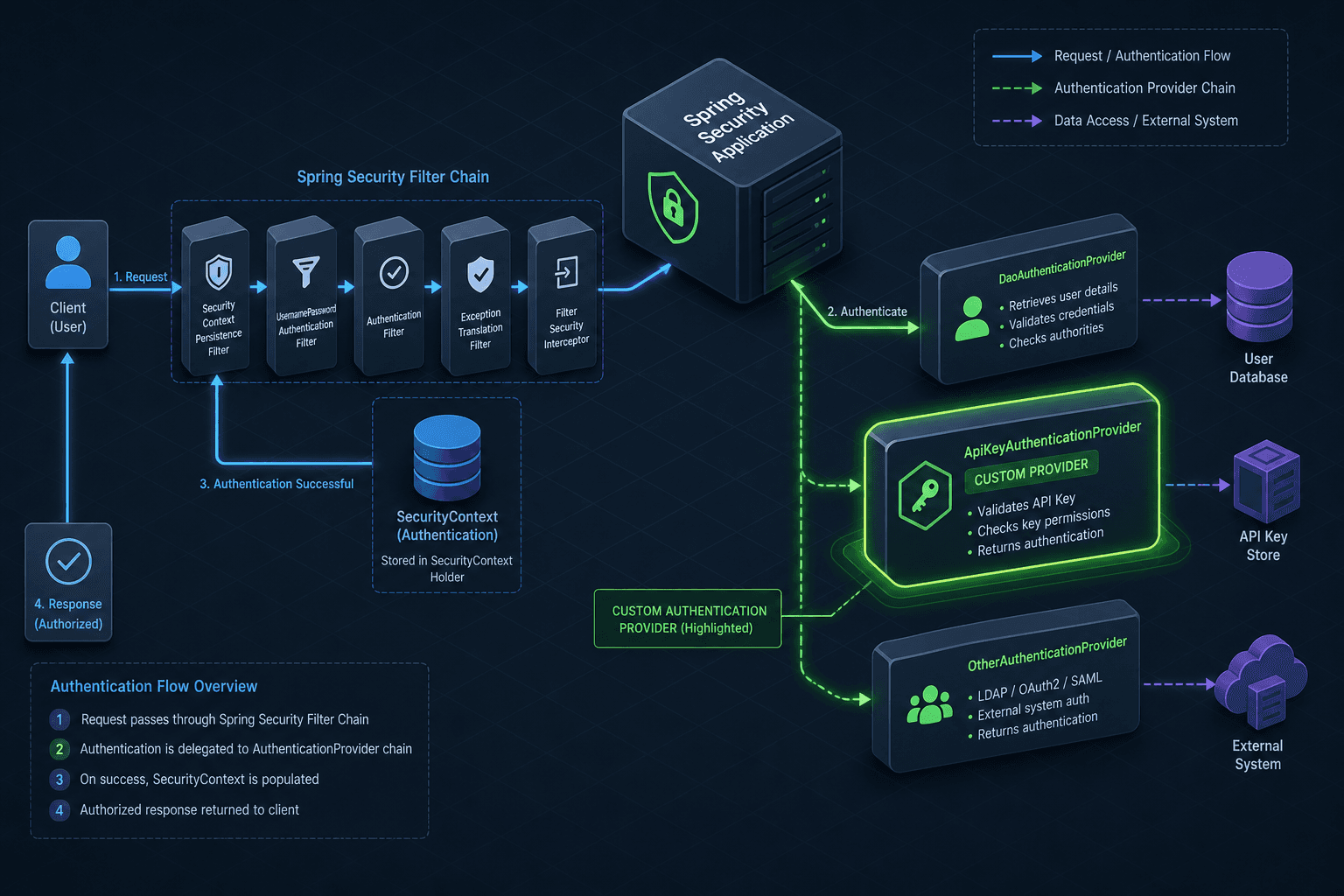
The flow of data during a request now follows a specific path. An external client sends a request with X-API-Key: secret-123. The ApiKeyAuthenticationFilter intercepts this request, extracts the key, and instantiates an ApiKeyAuthenticationToken. This token is placed in the SecurityContext as an unauthenticated token. The AuthenticationManager then iterates through its list of AuthenticationProviders. It checks supports() on each. The DaoAuthenticationProvider returns false because it expects a UsernamePasswordAuthenticationToken. The ApiKeyAuthenticationProvider returns true.
The ApiKeyAuthenticationProvider executes its logic. It queries the database. If the key exists and is valid, it returns a fully authenticated ApiKeyAuthenticationToken. The AuthenticationManager then updates the SecurityContextHolder. Subsequent calls to SecurityContextHolder.getContext().getAuthentication().getPrincipal() now return the User object, allowing the application to access the user's identity and roles.
Conclusion
This approach isolates the custom logic. If you switch the API key algorithm or move the storage to a Redis cache, you only modify the ApiKeyAuthenticationProvider. The rest of the Spring Security infrastructure—the filters, the context, the expression evaluators—remains untouched. This separation of concerns is the primary advantage of the AuthenticationProvider mechanism over hardcoding logic into filters or services.
However, there is a tradeoff. Every custom provider adds complexity to the startup sequence and the mental model of the security chain. If you have multiple authentication methods (e.g., SSO and API Keys), the order of providers in the chain matters if multiple providers could potentially support the same token type, allowing for fallback logic. Otherwise, logical execution order is determined by the supports check, making the configuration order irrelevant for distinct token types.
The AuthenticationProvider interface is not a magic bullet; it is a contract. It demands that you explicitly handle the BadCredentialsException and that you correctly implement the supports check. If you skip the supports check and return true for everything, you risk validating the wrong credentials or leaking information about supported types. The mechanism is resilient only when the contract is respected.
In summary, building a custom authentication mechanism in Spring Security requires dropping down to the AuthenticationProvider layer. You define a token to carry the credentials, a provider to validate them, and a filter to inject the token into the chain. This allows you to support any credential format while maintaining the integrity of the Spring Security architecture, whether you are implementing standard custom auth flows or handling legacy integrations.
FAQ
Q: Can I use multiple AuthenticationProvider implementations for the same token type?
A: Yes, but the order in which they are registered in the SecurityFilterChain becomes critical. The AuthenticationManager will invoke the first provider that returns true for supports(). If multiple providers support the same token, only the first one in the list will be executed for that specific token.
Q: Is it necessary to extend AbstractAuthenticationToken for every custom provider?
A: Yes. Spring Security relies on the Authentication interface to carry credentials, the principal, and authorities. You must create a concrete implementation (like ApiKeyAuthenticationToken) to encapsulate your specific credential data before passing it to the provider.
Q: Does the AuthenticationProvider handle session creation?
A: No. The AuthenticationProvider is responsible solely for verifying credentials and returning an authenticated Authentication object. Session management, including the creation of HttpSession attributes, is typically handled by the SessionFixationProtectionFilter or the SecurityContextRepository after the Authentication object is successfully set in the context.
Practical Takeaways
- Decouple Logic: Always keep credential validation logic inside the
AuthenticationProviderto maintain clean separation from HTTP filtering and session management. - Check Supports: Never rely on the
authenticatemethod to validate token types; thesupportsmethod is the designated gatekeeper that prevents unnecessary processing. - Throw Exceptions: On failure, always throw
BadCredentialsExceptionto ensure the security chain terminates correctly and denies access rather than proceeding with a partial state.
Common Pitfalls
- Returning Null: Forgetting to throw an exception on invalid credentials and instead returning
nullor a partially authenticated object, which can lead to security vulnerabilities. - Incorrect Principal: Setting the
principalto a string ID instead of aUserDetailsobject or the expected entity, causing downstream application code to fail when expecting a specific user type. - Ignoring Supports: Implementing
supportsincorrectly (e.g., returningtruefor all classes), which causes the provider to attempt processing tokens it cannot handle, leading to runtime errors or logic leaks.
Related posts
Building a Custom UserDetailsService with Spring Security
Learn how to implement a custom UserDetailsService in Spring Security to handle user loading and GrantedAuthority logic.
Custom Spring Security Filters: Advanced Authentication Patterns
Learn how to implement custom Spring Security filters for advanced authentication patterns like API keys and custom token validation.
Spring Security with Reactive WebFlux: Security for Reactive Applications
An examination of Spring Security integrated with Reactive WebFlux, covering authentication, reactive JWT, and securing reactive applications.