Custom Spring Security Filters: Advanced Authentication Patterns
Learn how to implement custom Spring Security filters for advanced authentication patterns like API keys and custom token validation.
Part 7 of the Spring Security Deep Dive Series.
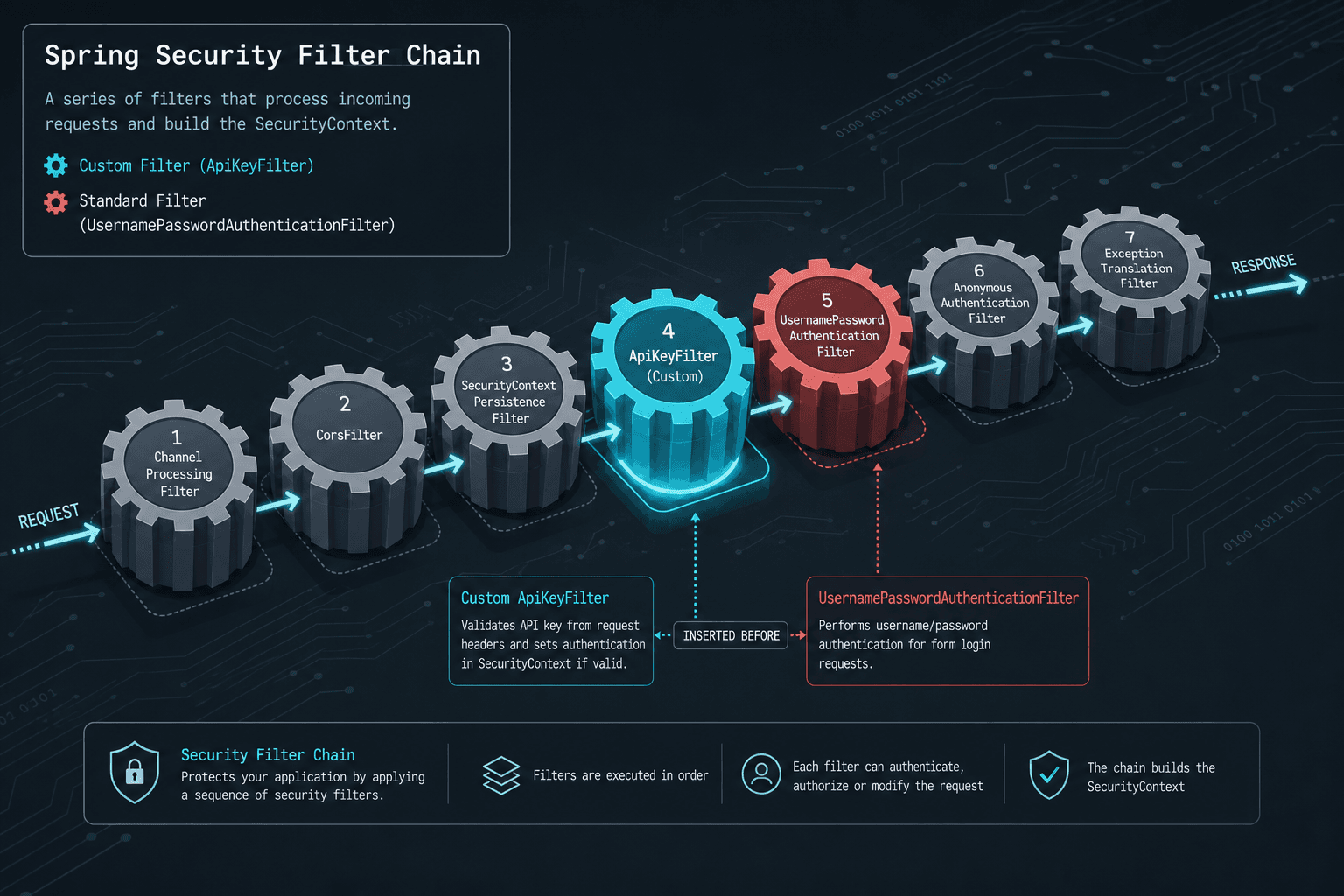
The default Spring Security configuration operates on a rigid assumption: every request carries a standard credential format like a username/password pair or a Bearer token. When you need to support an API key or a proprietary custom token, you cannot simply "add a rule." You must alter the execution flow of the SecurityFilterChain. This chain is a linear sequence of OncePerRequestFilter instances. Each filter in the list gets a chance to process the request; if a filter calls chain.doFilter(), the request passes to the next filter. If a filter decides the request is invalid, it throws an exception or sends a response immediately, terminating the chain. The mechanism of custom authentication is not about adding a new rule to the matcher; it is about injecting a new actor into this linear list who can validate a non-standard credential and populate the SecurityContext before the standard filters attempt to parse the request.
The Filter Chain Lifecycle and Execution Order
Spring Security's SecurityFilterChain is a mutable linked list of OncePerRequestFilter instances. The container iterates through this list, invoking doFilterInternal on each filter. The critical mechanism here is the order of execution relative to the standard authentication entry points.
Consider a scenario where a mobile client (Client) sends a request to a backend service (AuthService) protected by Spring Security. The client includes an X-API-Key header instead of an Authorization: Bearer header. The default UsernamePasswordAuthenticationFilter or BasicAuthenticationFilter sits in the chain. If the request reaches them without a valid standard token, they will reject the request with a 401 Unauthorized before your custom logic ever runs.
To fix this, we must insert a custom ApiKeyFilter into the chain. This filter acts as a gatekeeper. It intercepts the request, extracts the X-API-Key, queries a database or external service to validate the key, and if valid, constructs an Authentication object containing the API key's associated user details. Crucially, this object is set into the SecurityContextHolder before the request is passed to the next filter. Once the SecurityContext holds a valid Authentication object, the rest of the chain treats the request as authenticated, bypassing the need for further login checks.
Implementing the OncePerRequestFilter
The implementation relies on extending OncePerRequestFilter. This base class ensures the filter logic executes exactly once per request, preventing duplicate processing if the filter is re-entered by a proxy or the container. The core logic resides in doFilterInternal. Here, we extract the header, validate the key, and manually create the Authentication instance. While the extraction and initial lookup are manual, it is important to note that the constructed UsernamePasswordAuthenticationToken may still interact with the AuthenticationManager chain during subsequent processing, depending on your configuration.
The Authentication object we create must implement the Principal interface (often by wrapping a user details object) and have its getCredentials() and getAuthorities() methods implemented. If the key is invalid, the filter stops the chain by throwing an exception to ensure proper propagation to the AccessDeniedHandler. If valid, it sets the context and calls chain.doFilter().
@Component
public class ApiKeyFilter extends OncePerRequestFilter {

    private final ApiKeyService apiKeyService;
    private final String HEADER_NAME = "X-API-Key";

    public ApiKeyFilter(ApiKeyService apiKeyService) {
        this.apiKeyService = apiKeyService;
    }

    @Override
    protected void doFilterInternal(HttpServletRequest request,
                                    HttpServletResponse response,
                                    FilterChain filterChain)
                                    throws ServletException, IOException {

        String apiKey = request.getHeader(HEADER_NAME);

        // If no header is present, pass the request down.
        // The next filter (e.g., BasicAuth) will handle rejection if needed.
        if (apiKey == null || apiKey.isEmpty()) {
            filterChain.doFilter(request, response);
            return;
        }

        // Validate the key against the service
        UserPrincipal user = apiKeyService.validate(apiKey);

        if (user != null) {
            // Create an Authentication object representing the validated user
            List<GrantedAuthority> authorities = AuthorityUtils.createAuthorityList("ROLE_API_USER");
            Authentication authentication = new UsernamePasswordAuthenticationToken(user, apiKey, authorities);

            // Set the authentication into the SecurityContext
            SecurityContextHolder.getContext().setAuthentication(authentication);

            // Proceed to the next filter in the chain
            filterChain.doFilter(request, response);
        } else {
            // Invalid key: throw exception to trigger AccessDeniedHandler
            throw new org.springframework.security.authentication.BadCredentialsException("Invalid API Key");
        }
    }
}
Registering the Filter in the SecurityChain
Configuration is where many developers make a critical error. Simply annotating the filter with @Component is insufficient; Spring Security does not automatically know to run it in the security chain. You must explicitly register it in a SecurityFilterChain bean. The order matters. The ApiKeyFilter must run before the UsernamePasswordAuthenticationFilter and BasicAuthenticationFilter. If it runs after, those standard filters will have already rejected the request because they didn't see a standard Authorization header. We use http.addFilterBefore() to inject the filter at a specific position relative to an existing filter. This ensures the custom logic executes first, populates the context, and allows the rest of the chain to proceed with a pre-authenticated user.
@Configuration
@EnableWebSecurity
public class SecurityConfig {

    @Bean
    public SecurityFilterChain securityFilterChain(HttpSecurity http, ApiKeyFilter apiKeyFilter) throws Exception {
        http
            .authorizeHttpRequests(auth -> auth
                .requestMatchers("/public/**").permitAll()
                .anyRequest().authenticated()
            )
            // Inject the custom filter before the standard password filter
            .addFilterBefore(apiKeyFilter, UsernamePasswordAuthenticationFilter.class);

        return http.build();
    }
}
Decoupling Authentication and Authorization
This pattern demonstrates a fundamental tradeoff in security architecture: flexibility versus complexity. By introducing a custom filter, you gain the ability to support any authentication scheme, but you also assume responsibility for the entire validation lifecycle. The standard OAuth2ResourceServerFilter or JwtAuthenticationFilter handles complexities like token expiration, signature verification, and key rotation internally. A custom filter does not. For API keys, which often require immediate revocation or specific role mapping based on the key itself, this manual control is often necessary, but it demands rigorous implementation.
You must design strategies for token expiration and key rotation within your ApiKeyService. Unlike JWTs which carry their own expiration claims, API keys usually rely on database lookups. This means your service must efficiently check for revoked keys or expiration dates without causing significant latency. If the API key service is unavailable, your filter must decide whether to fail open (risking security) or fail closed (blocking legitimate traffic), a decision that impacts your system's availability.
The SecurityContextHolder remains the central artifact. Once the ApiKeyFilter sets the Authentication object into the SecurityContext, any subsequent filter or controller method can access it via SecurityContextHolder.getContext().getAuthentication(). This decouples the authentication mechanism from the authorization logic. The ApiKeyFilter proves who the user is; the AccessDecisionManager decides what they can do. This separation of concerns is why the filter chain is designed as a sequence of independent steps rather than a monolithic block. Each step performs a single responsibility: extraction, validation, context setting, or authorization decision. Downstream components trust the Authentication object regardless of how it was originally verified, provided the filter executed early enough to prevent premature rejection by standard filters.
Conclusion
Building custom Spring Security filters is about manipulating the execution order of the SecurityFilterChain. By extending OncePerRequestFilter and registering it via HttpSecurity.addFilterBefore, you can intercept requests, validate non-standard credentials like API keys, and inject the resulting Authentication object into the context. This allows the standard Spring Security infrastructure to treat these custom authentications with the same trust and authority as standard username/password logins, provided the filter executes early enough in the chain to prevent premature rejection.
FAQ
How do I handle exceptions thrown by the custom filter?
When you throw an AuthenticationException (like BadCredentialsException) inside the filter, Spring Security automatically routes it to the AuthenticationEntryPoint or AccessDeniedHandler. You should configure a global exception handler or a specific @ControllerAdvice to format the error response consistently (e.g., returning a standard JSON error structure) rather than relying on the default HTML error pages.
Can I use OAuth2 tokens with a custom filter?
Yes, but it is often redundant. If you are handling OAuth2 Bearer tokens, Spring Security provides OAuth2ResourceServerFilter out of the box. A custom filter is only necessary if you have a proprietary token format that doesn't fit the standard Bearer scheme or if you need to perform custom validation logic before the standard provider processes the token.
What if the API key service is down?
This is a critical availability consideration. If your ApiKeyService throws an exception due to a database outage, the filter will propagate that exception, potentially triggering a 500 error. You should implement circuit breakers or fallback logic in your service layer. Depending on your security requirements, you might choose to fail open (allowing the request to proceed unauthenticated but logging it) or fail closed (returning a 503 Service Unavailable) to protect the system from cascading failures.
Practical Takeaways
- Always throw exceptions, never send raw errors: Let Spring Security's exception handling mechanisms manage the response formatting and status codes. Avoid calling
response.sendError()directly in filters unless you are bypassing the entire security chain intentionally. - Register filters before standard auth filters: Use
addFilterBeforeto ensure your custom logic runs beforeUsernamePasswordAuthenticationFilterorBasicAuthenticationFilter. If placed after, standard filters may reject the request before your custom validation has a chance to populate theSecurityContext. - Decouple validation logic from the chain: Keep your validation logic (e.g., database lookups) in a dedicated service. The filter should only orchestrate the extraction, delegation to the service, and context population. This makes your code testable and easier to maintain.
Common Pitfalls
- Returning 403 directly instead of throwing exceptions: Sending a 403 response directly inside the filter bypasses Spring Security's
AccessDeniedHandler. This prevents global exception handling logic from running and can lead to inconsistent error responses across your application. - Registering the filter after standard auth filters: If your custom filter is registered after
BasicAuthenticationFilter, the standard filter will see the request, find no standard credentials, and reject it immediately. Your custom filter will never execute. - Assuming the provider chain is bypassed entirely: While you manually extract credentials, the resulting
Authenticationobject may still be processed by theAuthenticationManagerif configured to do so. Do not assume that manual extraction completely isolates your logic from the broader security framework.
Related posts
Building a Custom Authentication Provider in Spring Security
This article covers the implementation of a custom authentication mechanism within Spring Security using a dedicated AuthenticationProvider.
Building a Custom UserDetailsService with Spring Security
Learn how to implement a custom UserDetailsService in Spring Security to handle user loading and GrantedAuthority logic.
Spring Security with Reactive WebFlux: Security for Reactive Applications
An examination of Spring Security integrated with Reactive WebFlux, covering authentication, reactive JWT, and securing reactive applications.