Spring Security Testing: Unit & Integration Tests
Learn to implement effective unit and integration tests for Spring Security using MockMvc, @WithMockUser, and OAuth2 configurations.
Spring Security Testing: Unit & Integration Tests
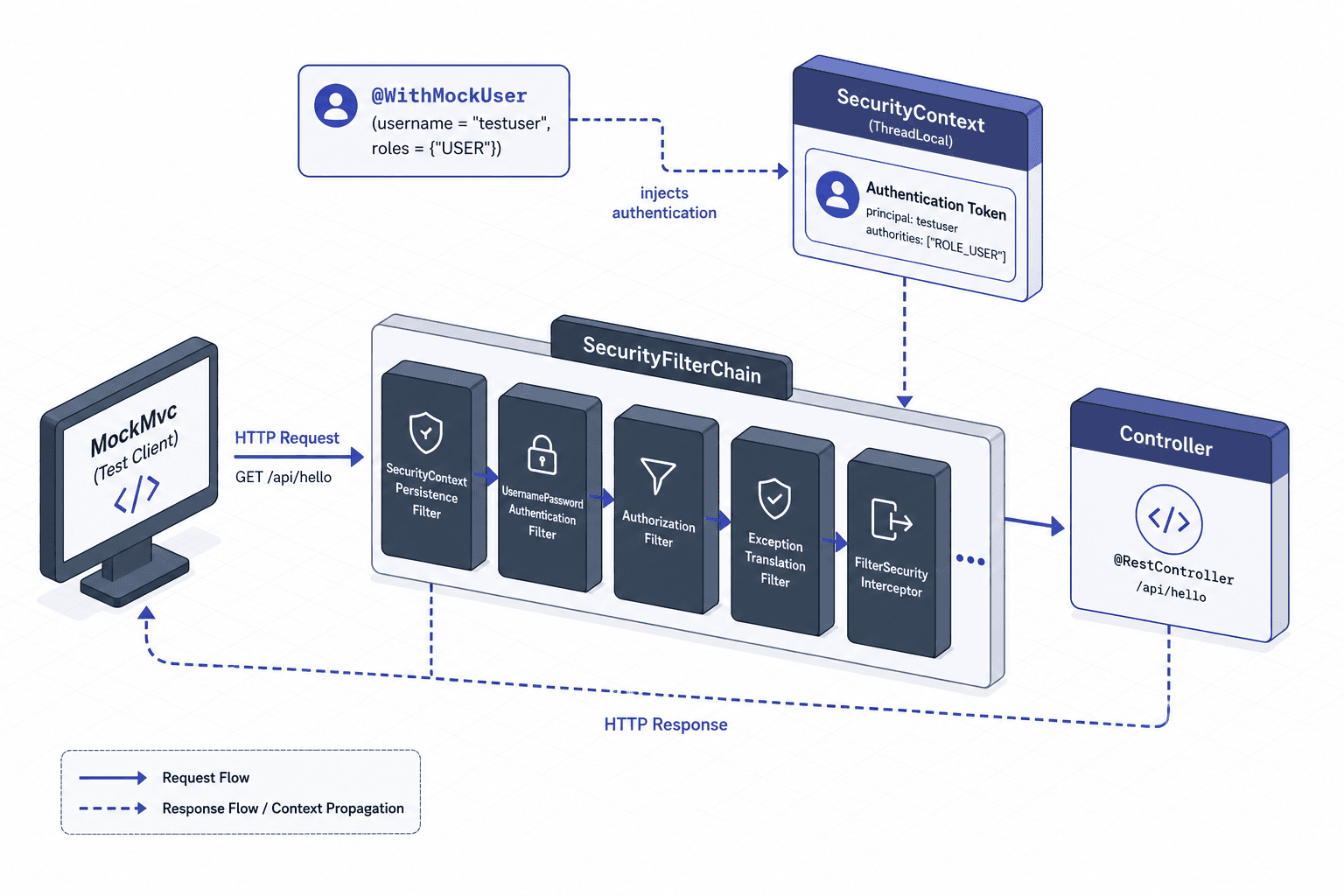
Testing Spring Security often feels like trying to solve a lock puzzle while blindfolded. The framework intercepts requests at the filter chain level, manipulating the SecurityContext before your controller logic ever sees the request. If you treat security as an afterthought in your test suite, you will miss critical vulnerabilities or break legitimate access controls during refactoring. The core mechanism for reliable testing is understanding how Spring injects authentication objects into the request scope and how to assert the state of the security context after the request completes.
The Mechanism of @WithMockUser
The @WithMockUser annotation is not magic; it is a TestExecutionListener hook that runs before your test method. When Spring detects this annotation, it constructs a UsernamePasswordAuthenticationToken containing the specified username and roles. This token is then wrapped in a SecurityContext and placed directly into the SecurityContextHolder. This happens entirely within the thread-local storage used by the current test execution.
This mechanism allows you to skip the actual authentication flow (username/password submission, token validation, LDAP lookup). You are essentially skipping the "how" of logging in and jumping straight to the "who" the user is. This is ideal for unit tests where you only care about the business logic associated with a specific role, not the credential verification.
Consider a scenario where we have a AdminService that should only be accessible to users with the ROLE_ADMIN role. Without @WithMockUser, every test would require a real database user or a complex mock of the authentication provider. With the annotation, we inject the context directly.
@Test
@WithMockUser(username = "alice", roles = {"ADMIN"})
void testAdminServiceShouldSucceed() {
    // The SecurityContext is already populated with Alice's admin token
    // before the service method is called.
    assertThat(adminService.performAction()).isEqualTo("Success");
}
If you need to test the absence of authentication, you use @WithAnonymousUser. This ensures the SecurityContext contains an anonymous token, simulating a user who has not logged in. This distinction is critical because Spring Security treats anonymous users differently from unauthenticated requests in some configurations, particularly when using hasRole vs isAuthenticated() checks.
MockMvc and the Filter Chain
While @WithMockUser sets the user, MockMvc is the tool that simulates the HTTP request passing through the security filter chain. In a standard Spring Boot application, the SecurityFilterChain is a bean that processes every request. MockMvc allows you to execute a request against this chain in memory without starting a web server.
The mechanism here involves MockMvc creating a MockHttpServletRequest, passing it through the configured FilterChainProxy, and then capturing the MockHttpServletResponse. This flow ensures that your assertions verify the actual security logic (e.g., "does this URL require a specific role?") rather than just the controller logic.
To configure MockMvc for security testing, you must ensure the security configuration is loaded. By default, @WebMvcTest excludes security auto-configuration entirely. To enable security, you must either use @AutoConfigureMockMvc without disabling filters or define a specific security bean. Relying on addFilters = false is often redundant if you intend to load the full chain via @AutoConfigureMockMvc.
Here is how you structure a test that verifies a 403 Forbidden response when a non-admin user tries to access an admin endpoint.
@WebMvcTest(controllers = AdminController.class)
@AutoConfigureMockMvc // Automatically loads security filters if configured
class AdminControllerTest {

    @Autowired
    private MockMvc mockMvc;

    @Test
    void testAdminEndpointRequiresRole() throws Exception {
        // Simulate a request with no authentication or a non-admin role
        mockMvc.perform(get("/admin/dashboard"))
               .andExpect(status().isForbidden()); // 403
    }
}
Note that if you use @WebMvcTest alone, the security filter chain is not active. You must explicitly ensure the necessary beans are loaded to verify that the actual security logic is being applied. This is where many developers fail: they test the controller logic but bypass the security layer entirely, creating a false sense of security in their test suite.
OAuth2 Integration Patterns
Testing OAuth2 flows introduces complexity because the security state is derived from an external authorization server. The mechanism here involves mocking the OAuth2AuthorizedClient and the OAuth2AuthorizedClientRepository. When a user logs in via OAuth2, Spring Security stores the access token in the OAuth2AuthorizedClient object, which is then linked to the SecurityContext.
For integration tests, you cannot simply mock the SecurityContext with a generic token. You must simulate the state of a valid OAuth2 session. This often involves using @WithOAuth2User or configuring a mock OAuth2AuthorizationServer within the test context.
The @WithMockUser annotation creates a generic username/password token distinct from an OAuth2 access token. It is insufficient for testing OAuth2 flows which require specific Bearer tokens and scopes. To simulate OAuth2 authorities correctly, you must use @WithOAuth2User or manually configure an OAuth2AuthorizedClientRepository with a pre-authenticated client.
The OAuth2TestConfiguration pattern allows you to define a mock authorization server that responds to token requests with valid tokens. This ensures that your MockMvc requests carry a valid Bearer token that matches the expected audience and issuer claims.
@TestConfiguration
static class OAuth2TestConfig {
    @Bean
    public OAuth2AuthorizedClientRepository authorizedClientRepository() {
        return new InMemoryOAuth2AuthorizedClientRepository();
    }

    @Bean
    public ServerOAuth2AuthorizedClientRepository serverRepository() {
        return new InMemoryServerOAuth2AuthorizedClientRepository();
    }
}
In a real-world scenario, you would also need to handle the OAuth2AuthorizedClientManager. This manager is responsible for refreshing tokens and managing the lifecycle of the client. If your test relies on a specific token expiry or refresh logic, you must inject a mock OAuth2AuthorizedClientManager that returns a pre-configured client.
Worked Scenario: JWT Validation Failure
Let's walk through a concrete scenario involving a JWT-based authentication system. We have a ResourceController that validates JWTs using a JwtDecoder. We want to test two things: first, that an invalid signature results in a 401 Unauthorized, and second, that a valid signature with the correct claim results in 200 OK.
We will use MockMvc to send requests and assert the response status. We will also use @WithMockUser to bypass the JWT decoding for the successful case, demonstrating the separation of concerns.
First, the invalid signature test. We send a raw request with a malformed token. The JwtDecoder bean will throw an exception, which the ExceptionTranslator converts to a 401 response.
@Test
void testInvalidJwtReturns401() throws Exception {
    String invalidToken = "eyJhbGciOiJIUzI1NiIsInR5cCI6IkpXVCJ9.invalid";

    mockMvc.perform(get("/api/resource")
            .header("Authorization", "Bearer " + invalidToken))
           .andExpect(status().isUnauthorized()); // 401
}
Next, the successful test. Instead of generating a valid JWT for every test run, we use @WithMockUser to simulate the post-decode state. Crucially, @WithMockUser does not bypass the JwtDecoder filter. If the filter chain requires a valid JWT, the request will still trigger validation unless the test explicitly mocks the decoder or disables the JWT filter. To successfully use @WithMockUser here, we must ensure the JwtDecoder is mocked to accept the request or we rely on the fact that @WithMockUser populates the SecurityContext after the filter chain has processed the request (in some configurations) or we mock the decoder to avoid the exception.
For the purpose of this example, we assume we are mocking the JwtDecoder to return a valid Jwt object for the fake token, allowing the flow to proceed to the controller.
@Test
@WithMockUser(username = "bob", roles = {"USER"})
void testValidJwtReturns200() throws Exception {
    // Note: In a real test, ensure the JwtDecoder is mocked or
    // the filter chain is configured to accept the 'fake-token'.
    mockMvc.perform(get("/api/resource")
            .header("Authorization", "Bearer fake-token-for-test"))
           .andExpect(status().isOk()); // 200
}
This approach is efficient because it isolates the JWT decoding logic (which is complex and slow) from the controller logic. However, it is an opinion that you should always run a separate integration test suite that actually validates the JWT signature against a real or mocked key store. Relying solely on @WithMockUser can lead to gaps in security coverage where token validation bugs slip through.
Conclusion
The mechanism of Spring Security testing revolves around controlling the SecurityContext and the FilterChain. @WithMockUser provides a fast, isolated way to set the user identity, while MockMvc ensures the request traverses the actual security filters. For OAuth2, the complexity increases, requiring careful management of the OAuth2AuthorizedClient and token repositories. By separating the concerns of authentication (who the user is) and authorization (what they can do), you can write tests that are both fast and reliable.
The tradeoff is clear: @WithMockUser is fast but skips the authentication mechanism, while full integration tests with real tokens are slow but verify the entire stack. A balanced strategy uses @WithMockUser for the majority of unit tests and a smaller set of integration tests to verify the authentication providers and OAuth2 flows. This ensures that your security tests are both comprehensive and maintainable.
Common Pitfalls
When implementing Spring Security tests, developers frequently encounter three specific pitfalls that undermine test reliability:
- Assuming
@WithMockUserbypasses all filters: As noted in the JWT section,@WithMockUserpopulates the context but does not automatically disable filter chains likeJwtAuthenticationFilter. If the filter requires a valid token format, the test will fail even if the user is mocked, unless the decoder is mocked. - Ignoring
@WebMvcTestdefaults: By default,@WebMvcTestdoes not load theSecurityFilterChain. Developers often assume security is active or rely onaddFilters = falsewithout realizing it is the default exclusion. You must explicitly enable security beans to test the chain. - Confusing
@WithMockUserwith OAuth2:@WithMockUsercreates aUsernamePasswordAuthenticationToken. It cannot simulate the authorities or claims derived from an OAuth2 access token. Using it for OAuth2 tests will result in missing permissions or incorrect claim assertions.
Practical Takeaways
To ensure robust security testing, adhere to these practical guidelines:
- Separate Concerns: Use
@WithMockUserfor pure business logic tests where authentication details are irrelevant. Use integration tests with real tokens for verifying the authentication pipeline. - Mock the Decoder: When using
@WithMockUserin a JWT environment, explicitly mock theJwtDecoderto prevent filter chain exceptions during unit tests. - Verify the Chain: Always assert the response status code (e.g., 403, 401) to confirm that the security filters are actually processing the request, not just the controller logic.
FAQ
Q: Does @WithMockUser bypass the JWT decoder?
A: No. @WithMockUser sets the SecurityContext but the request still passes through the JwtAuthenticationFilter. If the token provided in the header is invalid, the filter will reject it unless you mock the JwtDecoder bean.
Q: How do I test OAuth2 flows without a real server?
A: Use @WithOAuth2User to inject a user with specific OAuth2 authorities, or configure an InMemoryOAuth2AuthorizedClientRepository with a pre-authenticated client in your test configuration.
Q: Why does my @WebMvcTest test ignore security?
A: @WebMvcTest is designed for controller tests and excludes auto-configuration by default. You must use @AutoConfigureMockMvc or explicitly load a SecurityFilterChain bean to activate security filtering.
Related posts
Implementing and Validating Discovery in Your Client
A technical walkthrough for backend developers on implementing OAuth 2.1 discovery, issuer validation, and strict discovery document validation using OpenIDConnectConfigurationRetriever.
Decoding client_secret_basic Default in RFC 8414
An examination of the token_endpoint_auth_methods_supported metadata field in RFC 8414 and why client_secret_basic remains the default authentication method.
Securing gRPC with OAuth2 Token Propagation in Microservices
A guide to securing gRPC services using OAuth2 token propagation and interceptors for reliable microservice communication.