Spring Security CORS and CSRF: Proper Configuration for SPAs
A guide to configuring Spring Security CORS and CSRF settings for Single Page Applications, covering Angular integration and SameSite cookie handling.
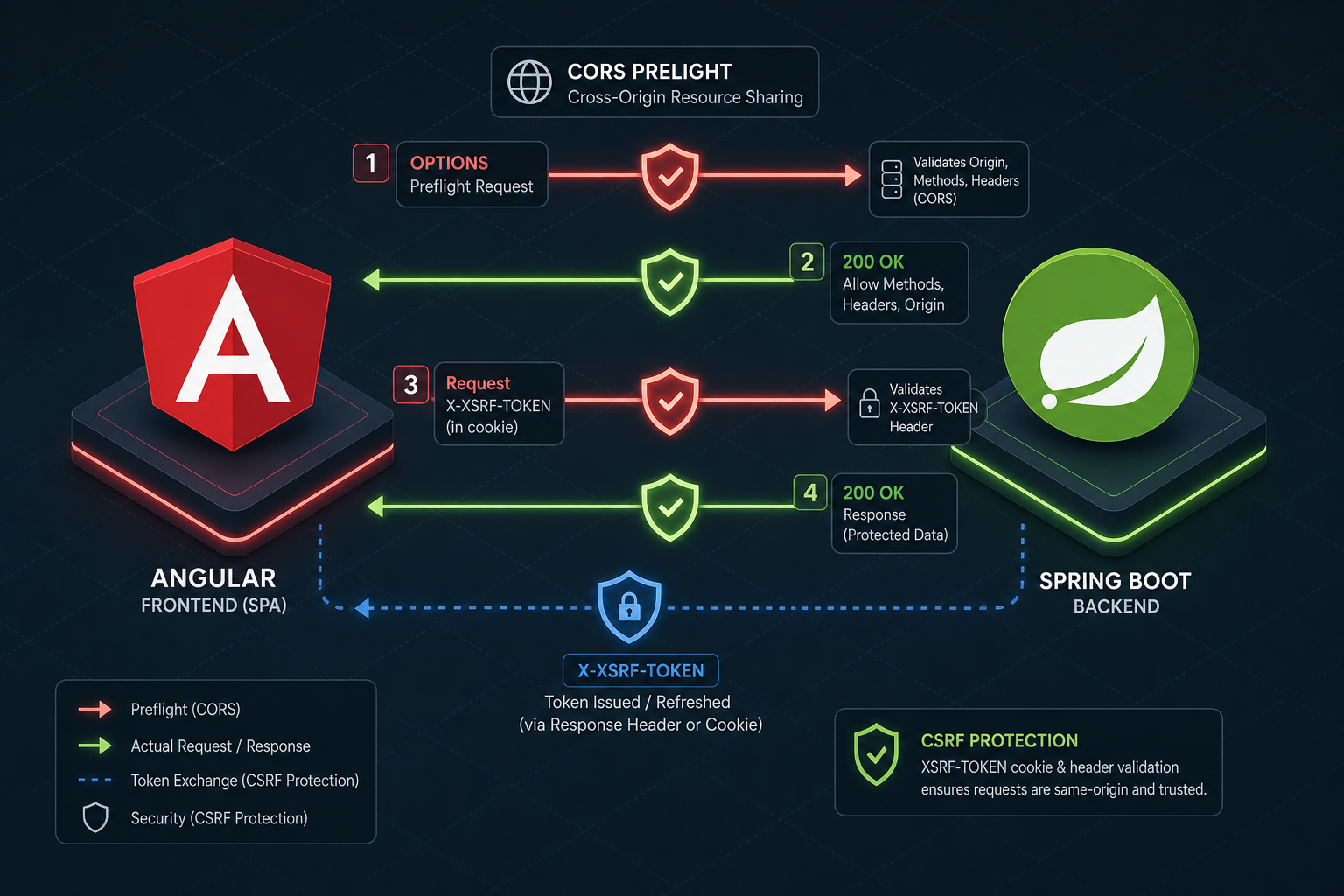
When a Single Page Application (SPA) like Angular communicates with a Spring Boot backend, the security model shifts from server-side page rendering to client-side token management. This architecture requires decoupling stateless CORS preflight handling from stateful CSRF token validation. The core mechanism involves configuring Spring Security to allow cross-origin OPTIONS requests while enforcing strict token matching via the X-XSRF-TOKEN header, all underpinned by modern SameSite cookie attributes to prevent credential theft.
This article is Part 9 of the Spring Security Deep Dive Series.
The CORS Preflight Mechanism and OPTIONS Handling
Before a browser sends a POST, PUT, or DELETE request to a different origin (e.g., frontend.com calling api.backend.com), it performs a "preflight" check. This is an OPTIONS request sent by the browser to verify if the actual request is safe. The browser sends specific headers like Access-Control-Request-Method and Access-Control-Request-Headers.
Spring Security's SecurityFilterChain treats all requests as candidates for CSRF protection by default. The CsrfFilter sits early in the chain and attempts to validate the request. Since an OPTIONS request does not carry a CSRF token (it's a handshake, not a state-changing action), the default filter rejects it with a 403 Forbidden response. This blocks the browser from ever sending the actual data.
To fix this, you must explicitly configure the CORS mapping to allow the preflight. However, simply allowing the origin is not enough; you must also tell Spring Security to skip CSRF validation for the OPTIONS method. The mechanism involves overriding the default CorsFilter and ensuring the CsrfFilter is bypassed for non-state-changing requests.
@Bean
public SecurityFilterChain securityFilterChain(HttpSecurity http) throws Exception {
    http
        .cors(cors -> cors.configurationSource(corsConfigurationSource()))
        .csrf(csrf -> csrf
            .csrfTokenRepository(CookieCsrfTokenRepository.withHttpOnlyFalse())
        )
        .authorizeHttpRequests(auth -> auth
            .requestMatchers(HttpMethod.OPTIONS).permitAll()
            .anyRequest().authenticated()
        );
    return http.build();
}
The critical insight here is that requestMatchers(HttpMethod.OPTIONS).permitAll() tells the security filter chain to ignore the CsrfFilter for preflight requests entirely. This allows the request to proceed to the CorsFilter (or the container), which then sets the Access-Control-Allow-Origin headers before the request reaches the application logic.
Angular's XSRF-TOKEN Interceptor and the Double-Submit Pattern
Angular provides a built-in HttpClient interceptor that handles CSRF protection automatically, but it relies on a specific mechanism: the "Double-Submit Cookie" pattern. When you enable withXsrfConfiguration in Angular's HttpClient, the interceptor performs two actions:
- It reads a cookie named
XSRF-TOKENfrom the browser. - It reads the value of that cookie and attaches it to the request header
X-XSRF-TOKEN.
Spring Security must be configured to expect this exact header. By default, Spring Security's CookieCsrfTokenRepository is designed to validate incoming requests by comparing the X-XSRF-TOKEN header against the cookie value. The issue often arises not because header checks are disabled, but because the default repository is not explicitly set to use cookies, or the application relies on the default form-parameter based validation.
The solution is to ensure the CsrfTokenRepository is set to CookieCsrfTokenRepository. This repository generates a unique token, stores it in a cookie, and automatically enables header validation for X-XSRF-TOKEN. If the header value matches the cookie value, the request is valid.
@Bean
public SecurityFilterChain securityFilterChain(HttpSecurity http) throws Exception {
    http
        .csrf(csrf -> csrf
            .csrfTokenRepository(CookieCsrfTokenRepository.withHttpOnlyFalse())
        )
        .authorizeHttpRequests(auth -> auth
            .anyRequest().authenticated()
        );
    return http.build();
}
SameSite Cookie Attributes and RFC 6265bis Evolution
The SameSite attribute evolution (RFC 6265bis) dictates how browsers handle cookies in cross-site contexts. Setting SameSite=Lax or Strict on session cookies mitigates CSRF without breaking the Angular header-based flow. This contrasts with the deprecated CrossSiteCookieAttribute found in older frameworks.
By configuring the cookie to be SameSite=Strict or SameSite=Lax, you ensure that the browser does not send the session cookie during a cross-site request unless the user initiated it directly. This adds a layer of defense-in-depth, ensuring that even if an attacker manages to trick a user into loading a page from a malicious site, the session cookie required for the attack is not sent.
In Spring Security, you can configure this via the Cookie object or by customizing the CookieCsrfTokenRepository using a customizer.
@Bean
public SecurityFilterChain securityFilterChain(HttpSecurity http) throws Exception {
    http
        .csrf(csrf -> csrf
            .csrfTokenRepository(
                CookieCsrfTokenRepository.withHttpOnlyFalse()
                    .cookieCustomizer(cookie -> cookie.sameSite("Lax")) // Or "Strict"
            )
        )
        .authorizeHttpRequests(auth -> auth
            .anyRequest().authenticated()
        );
    return http.build();
}
Conclusion
Securing SPA integration requires decoupling stateless CORS preflight handling from stateful CSRF token validation. By disabling default CSRF protection for OPTIONS requests, configuring the CookieCsrfTokenRepository for Angular's X-XSRF-TOKEN header, and enforcing SameSite attributes on cookies, you create a strong security posture. This approach ensures secure communication between frontend frameworks like Angular and backend services while adhering to modern web standards.
Common Pitfalls
Even with the correct configuration snippets, several pitfalls frequently break SPA security setups:
- Incorrect Filter Chain Order: If
CorsFilteris placed afterCsrfFilterwithout permitting OPTIONS requests, the preflight request fails at the CSRF stage before CORS headers are ever generated. Always ensurepermitAll()for OPTIONS is active or the filter order is explicitly managed. - Missing X-XSRF-TOKEN Header: Angular's interceptor only sends the
X-XSRF-TOKENheader if theXSRF-TOKENcookie exists. If the backend returns a 403 for missing headers, developers often mistakenly assume the backend is rejecting the request due to CORS, when it is actually a CSRF token mismatch. - HttpOnly Confusion: Developers sometimes confuse
HttpOnlywithSameSite.HttpOnlyprevents JavaScript access (good for session cookies, bad for CSRF tokens that Angular needs to read). For the CSRF token cookie,HttpOnlymust be false (withHttpOnlyFalse()), while the session cookie should remainHttpOnly.
Practical Takeaways
To maintain security in your SPA architecture, keep these mental models in mind:
- Preflight is Stateless: Treat
OPTIONSrequests as stateless handshakes. They should never trigger CSRF validation because they do not change server state. - Cookie and Header Sync: The Double-Submit pattern relies on the browser holding the cookie and the application code (Angular) reading it to set the header. If the cookie is
HttpOnly, the client cannot read it, and the pattern breaks. - Defense in Depth: Relying solely on CORS or solely on CSRF is insufficient. CORS protects the origin, while CSRF tokens protect the action.
SameSiteattributes protect the cookie transmission. Use all three.
FAQ
Q: Can I use Strict for SameSite instead of Lax?
A: Yes, Strict provides stronger CSRF protection by preventing the cookie from being sent in any cross-site context. However, it may break legitimate navigation if users click links from external sites (like social media) that redirect back to your app. Lax is generally recommended for SPAs as it allows top-level navigations while still blocking most CSRF attacks.
Q: Why am I getting a 403 Forbidden error even though I permit OPTIONS?
A: This usually happens for non-OPTIONS requests (like POST or PUT) where the X-XSRF-TOKEN header is missing or does not match the cookie. Ensure your Angular interceptor is enabled (withXsrfConfiguration) and that the backend is using CookieCsrfTokenRepository which expects the header, not a form parameter.
Q: Does enabling CORS automatically disable CSRF? A: No. CORS and CSRF operate independently. CORS handles cross-origin resource access (headers and origins), while CSRF handles state-changing actions. You must explicitly configure both to work together in an SPA environment.
Related posts
Understanding and Implementing CWE-306: Missing Authentication
An examination of CWE-306 missing authentication vulnerabilities, covering security audits, Spring Security defaults, and endpoint security best practices.
Cross-Origin Resource Sharing (CORS) Security: Configuration Guide
A guide to configuring CORS security, managing preflight requests, and troubleshooting cross-origin issues in Spring applications.
Spring Security 6 and Spring Boot 3: Migration Guide
A practical walkthrough for migrating applications to Spring Security 6 and Spring Boot 3, covering Jakarta EE transitions and essential security steps.