AWS WAF and Shield: Protecting Applications from Layer 7 Attacks
Learn how AWS WAF and AWS Shield protect applications against Layer 7 attacks, covering DDoS defense, API security, and OWASP compliance.
The Mechanics of Layer 7 Defense
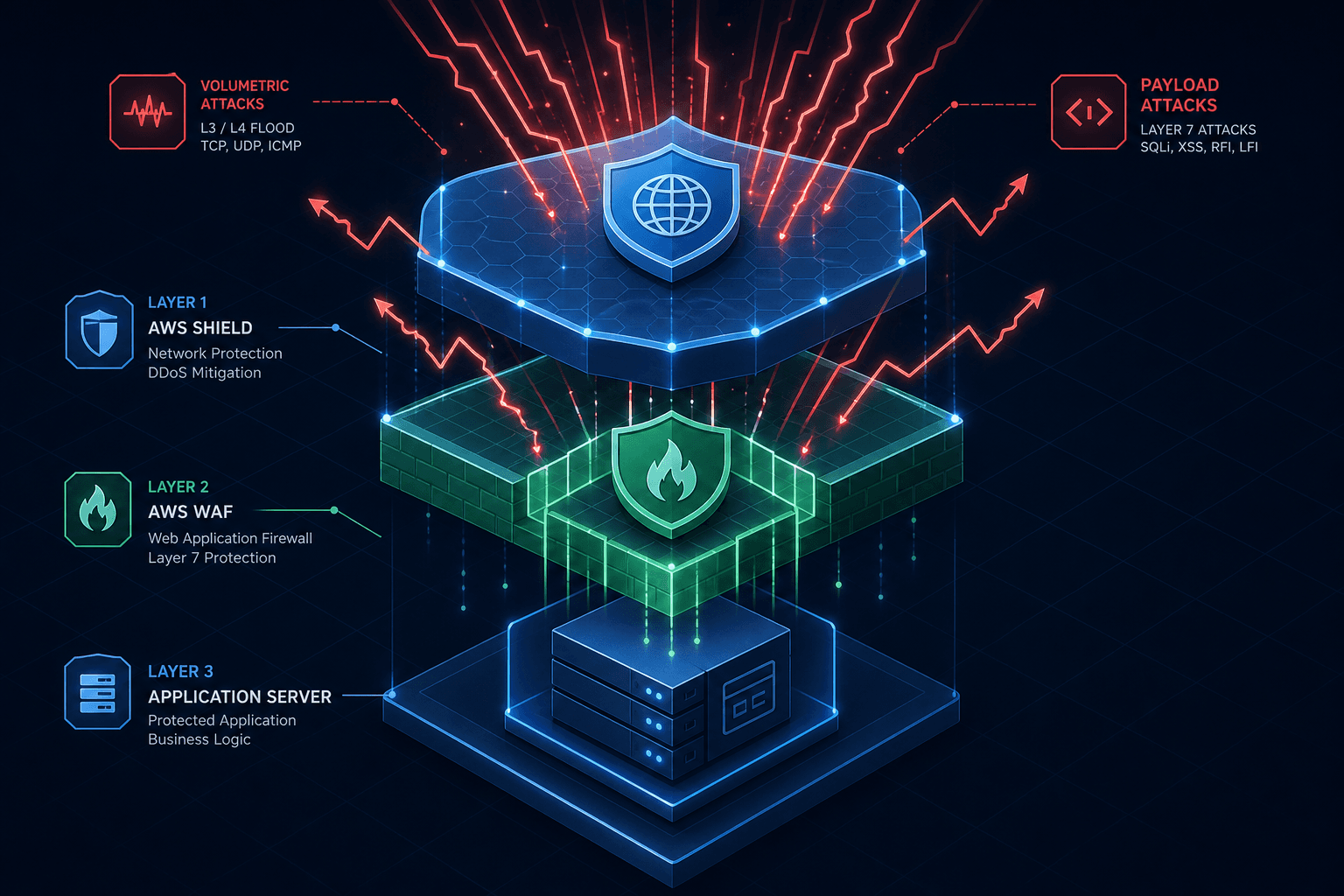
Layer 7 attacks target the application layer, exploiting HTTP/HTTPS logic rather than saturating network bandwidth. Unlike volumetric floods, these attacks mimic legitimate traffic to exhaust server resources, such as connection pools or database capacity. AWS WAF and Shield defend by inspecting request payloads and headers. While Shield mitigates network saturation, WAF acts as a gatekeeper, validating every request against defined rules before it reaches backend compute resources.
Shield Standard and Advanced: The First Line of Defense
AWS Shield provides two tiers of protection. Shield Standard is automatically enabled for all AWS customers at no extra cost for services like Amazon CloudFront, AWS Global Accelerator, and Elastic Load Balancing. This tier protects against common Layer 3 and 4 DDoS attacks, such as SYN floods and UDP reflection attacks. The mechanism here is largely automated; AWS monitors traffic patterns globally and automatically mitigates anomalies detected at the network edge.
However, Standard Shield does not inspect Layer 7 traffic in depth, nor does it offer cost protection. This is where Shield Advanced becomes critical for high-stakes applications. Shield Advanced provides real-time visibility into attacks via the AWS Shield Dashboard and AWS CloudWatch metrics. It offers the "Cost Protection" feature, which automatically credits you for the increased data transfer costs incurred during a DDoS attack. More importantly, Advanced enables access to the AWS Shield Response Team (SRT), which can assist in complex, multi-vector attacks that might require custom routing or BGP manipulation to mitigate.
The distinction lies in the granularity of the response. Standard Shield reacts to network-level saturation. Advanced Shield adds a layer of intelligence that can correlate attack patterns across different AWS regions and services, allowing for more nuanced mitigation strategies when an attacker attempts to evade standard thresholds.
WAF Rule Evaluation: The Logic Flow
When a request hits an AWS WAF web ACL (Web Access Control List), it undergoes a strict evaluation order. Understanding this flow is essential for debugging false positives or missed attacks. The evaluation begins with the IP Set matches. If a request comes from an IP address explicitly blocked in an IP Set, it is dropped immediately. This is the fastest path in the evaluation chain.
Next, the WAF evaluates Rate-Based Rules. These rules track the number of requests from a specific source IP or a combination of fields (like a header) within a specified time window. If the threshold is exceeded, the request is blocked. This is the primary mechanism for stopping HTTP floods. Unlike a simple IP block, rate-based rules are dynamic; once the traffic drops below the threshold, the block is lifted, allowing legitimate traffic to resume without manual intervention.
Following the rate checks, the WAF evaluates Managed Rule Groups (MRGs). AWS provides pre-configured rule sets based on the OWASP Top 10, such as AWS-AWSManagedRulesCommonRuleSet. These groups contain hundreds of rules designed to detect specific vulnerabilities like SQL Injection, Cross-Site Scripting (XSS), and directory traversal. The WAF parses the request URI, headers, and body against these signatures. If a rule matches, the action (Block, Count, or Allow) is triggered.
Finally, the WAF evaluates any Custom Rules defined by the user. These allow for complex logic using regular expressions or field match conditions. For instance, you might create a rule that blocks requests containing a specific string in the User-Agent header if the request also originates from a country you do not serve. The final decision is the result of this sequential evaluation, where the first rule that triggers an action determines the outcome for the request.
Rate Limiting and Custom Logic for Application DDoS
Layer 7 DDoS attacks are often characterized by low volume but high resource consumption. A single request might trigger a database query or a heavy computational task. To defend against this, AWS WAF utilizes Rate-Based Rules with custom keys. Instead of just counting requests per IP, you can count requests per specific header value, such as a custom authentication token or a specific API key.
Consider a scenario where an attacker is scraping an API endpoint. You can configure a rate-based rule that counts requests where the X-API-Key header matches a specific pattern. If a single key exceeds 100 requests per minute, the rule triggers a block. This is more granular than blocking an IP, as the attacker might rotate IPs but reuse the same stolen API key.
For more sophisticated scenarios, you can integrate AWS Lambda@Edge. This allows you to run custom code at the edge locations (CloudFront) before the request reaches the origin. You can fetch external threat intelligence feeds, check IP reputation scores, or analyze request patterns in real-time. If the Lambda function returns a status indicating a threat, the WAF can block the request. This mechanism moves the security logic from static rules to dynamic, executable code, providing flexibility that standard rule sets cannot match.
Integration Points: CloudFront vs. ALB
The placement of WAF and Shield determines the scope of protection. When associated with Amazon CloudFront, the WAF evaluates requests at the edge locations, which are distributed globally. This means the attack is mitigated closer to the user, reducing the latency impact on the origin server. The traffic never reaches your backend infrastructure if it matches a block rule. This is the preferred architecture for public-facing web applications.
In contrast, associating WAF with an Application Load Balancer (ALB) places the inspection at the regional level. While this still protects the application, the traffic must traverse the internet to the region before being filtered. For high-volume global applications, this can introduce unnecessary latency and cost. However, ALB WAF is useful for internal applications or microservices that are not exposed via CloudFront.
It is important to clarify the role of Shield Advanced regarding WAF functionality. WAF rules remain functional without Shield Advanced; the WAF logic itself does not require the Advanced tier to inspect traffic. However, if a volumetric DDoS attack saturates the network link before traffic reaches the WAF infrastructure, the rules cannot be evaluated. Shield Advanced provides the necessary network capacity and mitigation to ensure traffic delivery to the WAF, but it does not enable the WAF logic itself.
Common Pitfalls
Deploying WAF and Shield requires careful configuration to avoid operational issues. Three common pitfalls include:
- False Positives Blocking Legitimate Traffic: Overly aggressive Managed Rule Groups or custom regex rules can inadvertently block legitimate users. Without proper tuning and monitoring, this leads to service disruption for actual customers.
- Rate Limit Tuning Difficulties: Setting rate limits too low can block legitimate traffic spikes, while setting them too high renders the rules ineffective against slow-and-low attacks. Tuning requires a deep understanding of your specific application's normal traffic baselines.
- Misconception of WAF-Only Protection: Assuming WAF alone prevents all DDoS types is dangerous. WAF is designed for application-layer logic, not volumetric network attacks. Without Shield Advanced to absorb the initial network flood, a massive volumetric attack can overwhelm the underlying infrastructure before WAF rules ever execute.
Practical Takeaways
To implement an effective Layer 7 defense strategy, focus on these actionable steps:
- Enable Managed Rule Groups First: Start with AWS Managed Rule Groups (e.g., OWASP Core Rule Set) to quickly establish baseline protection against known vulnerabilities like SQLi and XSS.
- Configure Rate Limits Based on Business Logic: Define rate-based rules that reflect your specific API usage patterns, such as limiting requests per API key rather than just per IP address.
- Leverage Lambda@Edge for Custom Logic: Use Lambda@Edge to implement dynamic threat intelligence checks or custom authentication logic that standard WAF rules cannot handle.
Conclusion
Securing applications against Layer 7 attacks requires a layered approach that combines network-level mitigation with deep application inspection. AWS Shield provides the foundation by absorbing volumetric attacks, while AWS WAF enforces the application logic rules necessary to stop malicious payloads and resource exhaustion attempts. By understanding the evaluation order of WAF rules and leveraging rate-based logic, architects can build strong defenses that adapt to evolving threats. The integration with CloudFront further optimizes this setup, ensuring that protection happens at the edge with minimal latency. As attackers evolve their tactics, the combination of managed rule groups, custom rate limiting, and Lambda@Edge integrations offers a flexible, mechanism-driven defense strategy.
FAQ
Does WAF protect against Layer 3 attacks? No, AWS WAF operates at Layer 7 (the application layer) and inspects HTTP/HTTPS traffic. It does not filter Layer 3 (network) or Layer 4 (transport) packets. For protection against volumetric Layer 3 and 4 DDoS attacks, you must rely on AWS Shield Standard or Advanced.
Is Shield Advanced mandatory for WAF? No, Shield Advanced is not mandatory for WAF to function. You can associate WAF with CloudFront or ALB using the free tier. However, Shield Advanced is recommended for high-traffic applications to ensure network capacity is maintained during volumetric attacks, preventing traffic from being dropped before it reaches the WAF.
How do I debug a false positive in WAF? To debug a false positive, use AWS WAF logging to capture the specific request details that triggered the rule. Analyze the matched rule ID and the request data (headers, body, URI) to understand why it was flagged. You can then adjust the rule priority, modify the regex pattern, or create a custom allow list rule to permit the specific traffic.
Related posts
API Security Best Practices: Rate Limiting, JWT, and OAuth2 Scopes
Examination of API security best practices including rate limiting, JWT, and OAuth2 scopes to protect against common vulnerabilities.
JWT Expiration, Rotation, and Revocation: A Lifecycle Guide
A guide to JWT expiration, rotation, and revocation strategies for secure token lifecycle management.
Understanding OAuth2 Incremental Authorization
A technical overview of incremental authorization in OAuth2 to improve scope management and consent user experience.