The Mechanics of AWS Security Visibility: CloudTrail, CloudWatch & GuardDuty
A detailed examination of AWS CloudTrail, CloudWatch, and GuardDuty for effective security monitoring and incident response.
The Mechanics of AWS Security Visibility
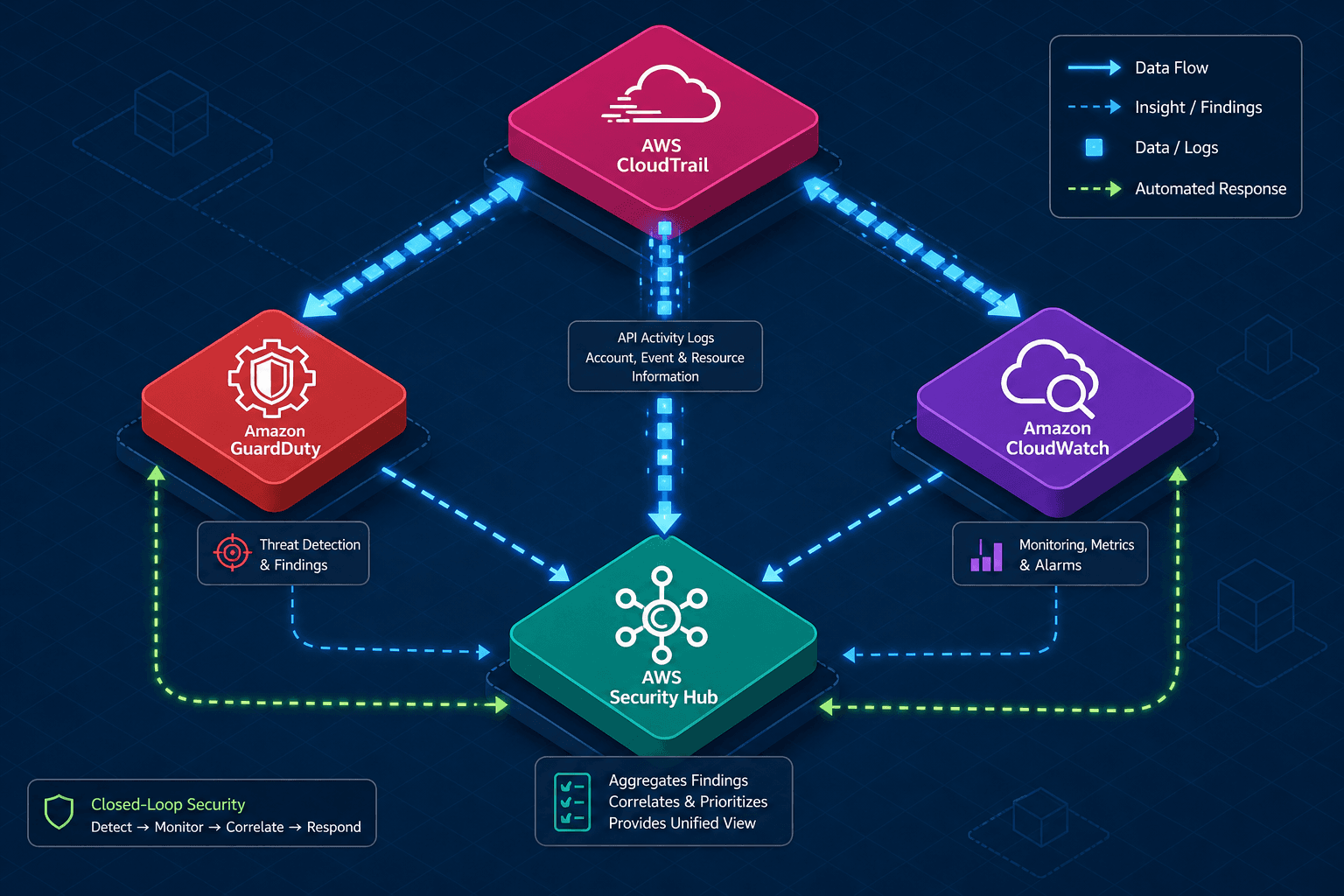
Effective security monitoring in AWS relies on understanding the distinct data planes each service occupies. CloudTrail, CloudWatch, and GuardDuty do not merely "monitor" the environment; they operate at different layers of the request lifecycle. CloudTrail captures the raw request history (the "what happened"), CloudWatch provides the infrastructure to process and react to that history in near real-time (the "when and how to react"), and GuardDuty applies context and threat intelligence to that history to identify malicious intent (the "why it matters"). Security Hub then aggregates these disparate signals into a standardized compliance posture. This article examines the mechanism of how data flows from an API call through these systems to form a closed-loop defense.
CloudTrail: The Immutable Intent Log
CloudTrail functions as the central nervous system for auditability. It does not store metrics or performance data; it stores API activity. When an actor (a user, role, or service) makes a request to an AWS service, AWS generates a CloudTrail event. This event is a JSON object containing critical fields: eventTime, eventSource, eventName, userIdentity, requestParameters, and responseElements.
The mechanism here is synchronous logging. Every time a DeleteBucket API call is made, CloudTrail captures the API request parameters and records the service's response as part of the event log. The userIdentity field is crucial; it contains the type (IAMUser, Root, AssumedRole), the principalId, and the arn. This allows you to trace exactly which identity initiated the action.
Consider a scenario where an attacker gains access to an IAM role. If they attempt to modify the security group of an EC2 instance using AuthorizeSecurityGroupIngress, CloudTrail records this. The requestParameters will show the IpPermissions being added, and the responseElements will confirm the successful modification. This is the "intent log." It tells you what was requested and what the result was. However, CloudTrail is passive. It records the event, but it does not inherently stop the action or alert you to the anomaly unless you configure it to do so.
CloudWatch: The Reaction Engine
CloudWatch is often misunderstood as just a metrics collector. In the context of security, its primary value lies in CloudWatch Logs and EventBridge. CloudTrail logs are shipped to a CloudWatch Logs log group. This creates a high-volume, structured text stream.
The mechanism of action here relies on EventBridge. EventBridge acts as a serverless router. You define a rule with an event pattern that matches specific JSON structures within the CloudTrail logs. For example, a rule could be defined to match any event where eventName is ConsoleLogin and responseElements contains Failure.
When such an event arrives in the CloudWatch Logs stream, EventBridge evaluates the pattern. If it matches, it triggers an invocation target. This is typically a Lambda function. The Lambda function receives the event payload, parses the JSON, and executes code. This is the "reaction engine." It transforms the passive log entry into an active workflow.
For instance, if a CloudTrail event indicates a CreateAccessKey action from an unexpected location, the EventBridge rule can trigger a Lambda function that immediately invalidates the new key or sends a Slack notification to the security team. The latency here is seconds, allowing for automated containment before the attacker establishes persistence.
{
  "detail-type": "CloudTrail Event",
  "source": "aws.cloudtrail",
  "detail": {
    "eventName": "ConsoleLogin",
    "responseElements": {
      "ConsoleLogin": "Failure"
    }
  }
}
GuardDuty: The Behavioral Analyzer
GuardDuty operates differently. It is a threat detection service that continuously monitors for malicious activity and unauthorized behavior. Unlike CloudTrail, which logs every API call, GuardDuty ingests specific data sources: CloudTrail logs, VPC Flow Logs, and DNS logs.
The mechanism is probabilistic analysis combined with threat intelligence. GuardDuty does not just look for a specific API call; it looks for patterns that deviate from the baseline. It uses machine learning to establish what "normal" looks like for your account.
For example, if a Lambda function usually runs in us-east-1 but suddenly initiates a connection to a known malicious IP address in a different region, GuardDuty flags this as UnauthorizedAccess:EC2/RootActivity or similar. The "source" of this finding is the VPC Flow Log data, which shows the network traffic, correlated with the CloudTrail data to identify the specific EC2 instance.
GuardDuty also leverages external threat intelligence feeds. If an IP address appears on a list of known bad actors, any traffic to or from that IP is immediately flagged. This is crucial because it detects attacks that might not trigger a specific CloudTrail rule, such as crypto-mining activities or reconnaissance scans that blend in with legitimate traffic volume.
Like CloudTrail, GuardDuty is a passive service. It generates findings based on analysis but does not automatically stop traffic or block requests unless integrated with EventBridge and Lambda functions for automated remediation.
Security Hub: The Aggregation Layer
Managing alerts from CloudWatch, GuardDuty, and other services individually leads to alert fatigue. Security Hub solves this by aggregating findings from multiple AWS services and third-party tools into a single dashboard.
The mechanism is standardization. Security Hub ingests findings and maps them to a common schema (the AWS Security Finding Format, or ASFF). This allows it to normalize a "High Severity" finding from GuardDuty with a "Medium Severity" finding from Amazon Inspector. It then compares these findings against standards like the CIS AWS Foundations Benchmark.
If GuardDuty detects a security group open to the world (0.0.0.0/0) and Security Hub checks the CIS benchmark, it can automatically mark the resource as "Non-Compliant." This shifts the focus from "what happened" to "what needs to be fixed." Security Hub does not generate the alerts itself; it consumes them from GuardDuty, Inspector, and other services, providing a unified view of the security posture.
Integrated Incident Response Workflow
To visualize how these mechanisms interact, consider a concrete scenario: a compromised IAM user attempts to exfiltrate data.
- The Event: The compromised user runs
GetObjecton a sensitive S3 bucket from an IP address in a country not associated with the organization. - CloudTrail's Role: CloudTrail immediately logs the
GetObjectevent. The log contains theuserIdentity(the compromised user) and thesourceIPAddress. - GuardDuty's Role: GuardDuty ingests this CloudTrail log. Its machine learning model recognizes that this user rarely accesses this bucket from this specific IP. Simultaneously, the IP is checked against threat intelligence feeds and found to be associated with a known botnet. GuardDuty generates a finding:
UnauthorizedAccess:S3/BucketExfiltration. - CloudWatch's Role: An EventBridge rule in CloudWatch detects the GuardDuty finding via the
aws.guarddutysource. It triggers a Lambda function. - The Response: The Lambda function executes. It calls the IAM API to
DeleteAccessKeyfor the compromised user. Note that this action revokes the specific access key but does not invalidate existing session tokens; those tokens persist until their natural expiry unless a separate session invalidation mechanism is invoked. - Security Hub's Role: Security Hub ingests the GuardDuty finding and marks the account as having a "High" severity issue. It updates the compliance dashboard, showing that the "Least Privilege" control is currently violated.
This workflow demonstrates the dependency chain: CloudTrail provides the raw data, GuardDuty provides the context and alert, CloudWatch provides the automation trigger, and Security Hub provides the visibility.
Common Pitfalls
Implementing this architecture often introduces specific configuration traps that undermine security visibility:
- Assuming Passive Services are Active Defenses: A common misconception is that enabling GuardDuty or CloudTrail automatically blocks threats. Both services are passive; they detect and report but do not enforce. Without an active integration layer (like EventBridge + Lambda), a malicious action will complete successfully before an alert is generated.
- Ignoring Data Retention Costs: CloudTrail logs and VPC Flow Logs can accumulate rapidly. Failing to configure appropriate retention policies or lifecycle transitions to S3 Glacier can lead to unexpected storage costs and make long-term forensic analysis difficult if logs are deleted too quickly.
- EventBridge Source Confusion: Configuring EventBridge rules without specifying the correct
source(e.g.,aws.cloudtrailvsaws.guardduty) often results in missed detections. Rules designed to react to GuardDuty findings must explicitly listen to the GuardDuty event source, not the raw CloudTrail logs, to avoid processing noise or duplicate events.
Practical Takeaways
To build an effective monitoring pipeline, apply these mental models:
- The Memory, Reflex, and Immune System: Treat CloudTrail as the memory (recording everything), GuardDuty as the immune system (detecting anomalies), and CloudWatch as the reflex arc (triggering immediate action). Each must be tuned to its specific role.
- Data Flow is King: Visualize the pipeline as a series of inputs and outputs. The output of CloudTrail is the input for GuardDuty and CloudWatch. The output of GuardDuty is the input for Security Hub and EventBridge. Ensure the schemas align at each handoff.
- Automate Containment, Not Just Detection: Detection without response is just noise. Always pair a GuardDuty finding or CloudTrail anomaly with an EventBridge rule that executes a containment action, even if that action is simply sending a high-fidelity alert to a human operator.
FAQ
Q: Can GuardDuty stop an attack in real-time? A: No, GuardDuty is a passive detection service. It generates findings when it detects suspicious activity. To stop an attack, you must integrate GuardDuty findings with EventBridge and Lambda to trigger blocking actions, such as updating security groups or revoking credentials.
Q: Does deleting an IAM Access Key invalidate active session tokens?
A: No. Deleting an access key (via DeleteAccessKey) only prevents future use of that key. Existing session tokens (STS sessions) created using that key remain valid until they expire. To immediately terminate sessions, you must use mechanisms like session policy conditions or revoke the session via the sts:RevokeSession action if supported by the identity provider.
Q: Why do I see the same event in both CloudTrail and GuardDuty? A: CloudTrail logs the raw API call. GuardDuty ingests that same log data (along with flow logs and DNS logs) to analyze it for patterns. Seeing the event in both places is expected; CloudTrail confirms the action occurred, while GuardDuty provides the threat context.
Related posts
AWS Compliance Automation: Config, Audit Manager, and Security Hub
Overview of AWS compliance automation using Config, Audit Manager, and Security Hub for SOC2 and CIS benchmarks.
AWS Network Security: VPC, SG, NACLs & IAM Integration
An examination of AWS VPC, security groups, and NACLs with IAM integration for advanced network security.
Implementing AWS IAM Identity Center: From Legacy SSO to Federated Control
A guide to implementing AWS IAM Identity Center for federated access, multi-account management, and SCIM provisioning.