AWS Compliance Automation: Config, Audit Manager, and Security Hub
Overview of AWS compliance automation using Config, Audit Manager, and Security Hub for SOC2 and CIS benchmarks.
The Mechanics of Automated Compliance: From State to Evidence
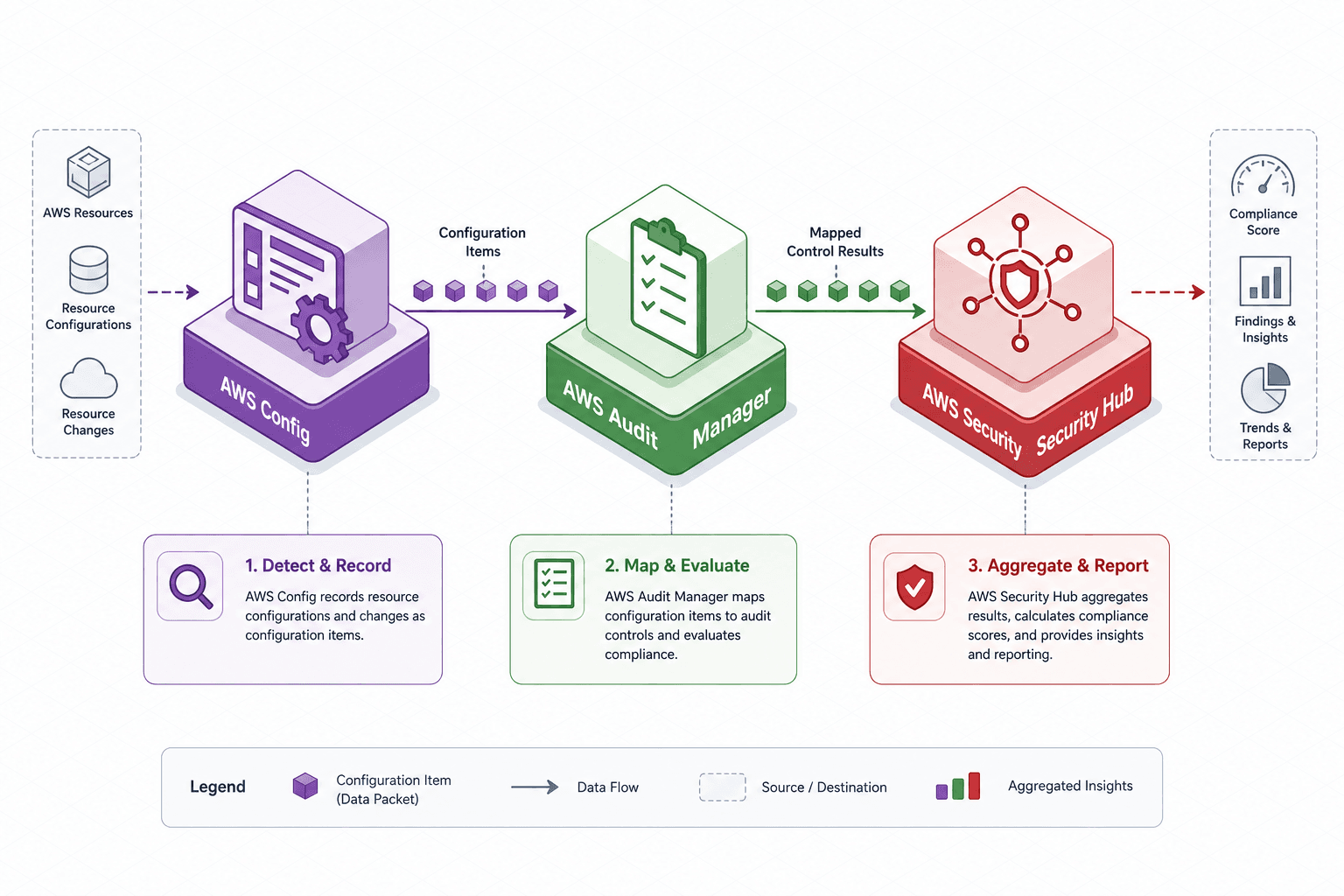
Most organizations treat cloud compliance as a periodic audit event, where engineers scramble to export logs and screenshots to prove security posture. This approach fails because cloud infrastructure is dynamic; a configuration compliant at one moment can drift moments later. To achieve true compliance for standards like SOC2 or CIS, you must shift from snapshot auditing to continuous state monitoring. The mechanism for this cloud compliance automation in AWS relies on a specific data flow: AWS Config detects the state, AWS Audit Manager maps the state to a control, and AWS Security Hub aggregates the results into a normalized view.
Detecting Non-Compliance: AWS Config and Configuration Items
The foundation of this automation is AWS Config. It does not merely store snapshots; it maintains a history of every resource's configuration over time. When a resource changes, Config captures a "Configuration Item" (CI) containing the current desired state and metadata.
Consider a resource like an Amazon S3 bucket. A compliance rule, such as s3-bucket-server-side-encryption-enabled, defines a logical condition: If resourceType == 'AWS::S3::Bucket' then property 'ServerSideEncryptionConfiguration' must exist. Config evaluates this logic against the CI. If the bucket lacks encryption, Config generates a "Non-Compliant" status.
Crucially, this evaluation is not a passive scan. Config triggers immediately upon any change detected via CloudTrail or API calls. It stores these evaluations as historical records, allowing auditors to see not just the current state, but the trajectory of the drift. For example, if an engineer removed encryption via the CLI, Config records the CI as non-compliant and retains the previous compliant CI for the timeline. This continuous recording is what differentiates automated compliance from manual sampling.

Mapping State to Control: The Audit Manager Workflow
Once Config identifies a non-compliant state, the data must be contextualized against a specific control requirement. This is where AWS Audit Manager operates as the orchestration layer. Audit Manager does not scan infrastructure; it scans the findings produced by services like Config.
When you enable AWS Audit Manager, you select a framework, such as the CIS AWS Foundations Benchmark or a custom SOC2 framework. Each framework consists of controls, and each control contains evidence requirements. AWS provides pre-mapped rules for standard frameworks, meaning CIS and SOC2 controls are automatically linked to relevant Config rules out of the box. However, for custom policies or specific internal controls, you must manually configure the mapping to standard controls.
For instance, the SOC2 control "CC6.1: Logical and Physical Access Controls" requires that data be protected at rest. Audit Manager maps the Config rule s3-bucket-server-side-encryption-enabled to this specific control. When Config reports a non-compliant S3 bucket, Audit Manager automatically ingests this finding. It then creates an "Evidence Item" within the Audit Manager workflow. This evidence item includes the Config rule ID, the resource ID, the timestamp of the violation, and a link to the resource in the AWS Console.
This mapping eliminates the manual step of searching for logs. The auditor does not need to query Config APIs; they simply navigate the Audit Manager dashboard, which presents a list of controls and their associated evidence items, automatically populated by the underlying Config findings. This transforms a raw configuration error into a structured audit artifact.
Aggregating the Signal: Security Hub and Standard Scores
While Audit Manager handles the evidence lifecycle, AWS Security Hub provides the high-level aggregation and normalization layer. Security Hub ingests findings from Config, but also from other security tools like Amazon GuardDuty, Amazon Inspector, and AWS Firewall Manager.
Security Hub organizes data into a hierarchy: Standards > Controls > Findings. A "Standard" (e.g., cis-aws-foundations-1.4.0) is a collection of controls. A "Control" (e.g., CIS 1.4.1) represents a specific check. A "Finding" is the actual instance of a non-compliance event.
The mechanism here is normalization. Config might report a finding with a severity level of "High", while GuardDuty might report a similar issue with a severity of "Medium". Security Hub maps both to its own severity taxonomy (Critical, High, Medium, Low, Informational) based on the rule definition. It then calculates a "Compliance Score" for the standard.
If you have 100 checks in the CIS benchmark and 95 are compliant, the Security Hub dashboard displays a 95% compliance score. However, this score is only useful if the underlying data is accurate. Security Hub relies on the "Standards" integration to pull the latest versions of benchmarks. When AWS releases a new version of the CIS benchmark, Security Hub updates the control definitions, and your existing findings are re-evaluated against the new criteria. This ensures that your compliance posture is always measured against the current AWS security standards without manual rule updates.
Worked Scenario: The Unencrypted Bucket Incident
To visualize the interaction between these services, consider a scenario involving an engineer named Alex who accidentally creates an S3 bucket without server-side encryption using the AWS CLI.
- State Change: Alex runs
aws s3api create-bucket --bucket alex-dev-data. The bucket is created with default settings (no encryption). - Config Detection: AWS Config, running a managed rule
s3-bucket-server-side-encryption-enabled, detects the new resource. It evaluates the CI against the rule logic. The evaluation returns "NON_COMPLIANT". Config records this finding in its database and sends a notification via Amazon SNS (if configured). - Audit Manager Ingestion: AWS Audit Manager, listening for Config findings, receives the non-compliant event. It identifies that this violation maps to SOC2 Control "CC6.1" and CIS Control "1.4.1". Audit Manager automatically creates an evidence item in the current audit cycle, linking the Config rule ID and the resource ARN (
arn:aws:s3:::alex-dev-data). - Security Hub Aggregation: Security Hub ingests the Config finding. It normalizes the severity to "MEDIUM" based on the CIS benchmark definition. It updates the compliance score for the
cis-aws-foundations-1.4.0standard. The score is recalculated based on the ratio of compliant to total controls in the selected standard, noting that weights may vary per control. - Remediation: Alex receives an alert or sees the issue in the Security Hub dashboard. Alex applies encryption using
aws s3api put-bucket-encryption. - Re-evaluation: Config detects the change. The rule re-evaluates the CI. The status flips to "COMPLIANT". Security Hub updates the score back up. Audit Manager marks the evidence item as "Resolved" and attaches the new CI as proof of remediation.

The Tradeoff: Depth vs. Breadth
There is a distinct tradeoff in this architecture. AWS Config is granular but can generate noise if rules are too broad. Security Hub provides a clean dashboard but can obscure the root cause if you don't drill down into the individual service findings. Audit Manager adds a layer of business logic (the "why") but requires upfront configuration to map your specific internal policies to the standard controls.
If you rely solely on Security Hub, you get a score but lack the granular evidence trail required for a rigorous SOC2 audit. If you rely solely on Config, you have the data but no automated workflow to present it to an auditor. The value lies in the chain: Config provides the truth, Audit Manager provides the context, and Security Hub provides the visibility. This architecture is particularly effective for infrastructure as code compliance, ensuring that IaC templates are validated against the same rules applied to live resources.
Common Pitfalls
Even with a robust architecture, misconfigurations can undermine your compliance posture. Be vigilant about these common issues:
- Rule Noise: Enabling too many Config rules without filtering can flood Security Hub with low-priority findings, making it difficult to spot critical risks. Start with managed rules aligned to your specific framework (e.g., CIS) before adding custom rules.
- Missing Evidence Retention: Config stores history, but if retention policies are too short or archives are not exported, you may lose the historical evidence required to prove continuous compliance during an audit. Ensure your retention period matches your audit window.
- Manual Mapping Errors: While standard frameworks are pre-mapped, custom controls often require manual configuration. Incorrectly mapping a custom policy to a standard control can lead to false positives or gaps in your audit evidence. Validate all custom mappings before the audit cycle begins.
Practical Takeaways
To effectively implement this workflow, adopt these mental models:
- Config is the Source of Truth: Treat Config as the primary data feed. If Config isn't detecting it, nothing else will. Prioritize rule coverage over dashboard aesthetics.
- Audit Manager is the Translator: View Audit Manager not as a scanner, but as a translator that converts raw technical findings into business-aligned evidence. Its value is in the mapping logic, not the detection.
- Security Hub is the Dashboard: Use Security Hub for visibility and trend analysis, but drill down to Config for root cause analysis. Do not let a high-level score hide a critical gap.
FAQ
Q: Can I use AWS Audit Manager without AWS Config? A: No. AWS Audit Manager relies on AWS Config to detect and record resource configuration changes. Without Config, Audit Manager has no mechanism to ingest evidence regarding infrastructure state.
Q: How often does Security Hub update compliance scores? A: Security Hub updates scores near real-time as Config findings are generated. However, the full aggregation and normalization process may take a few minutes depending on the volume of findings and the complexity of the standard being evaluated.
Q: Does AWS Security Hub support custom compliance frameworks? A: Yes, you can create custom standards in Security Hub and map them to your specific controls. However, the evidence for these custom standards still needs to come from Config or other supported security services, and the mapping logic is often best managed through Audit Manager.
Conclusion
Automating compliance in AWS is not about turning on a switch; it is about engineering a data pipeline that converts infrastructure state into audit evidence. By understanding the mechanism—where Config detects, Audit Manager maps, and Security Hub aggregates—you can build a system that satisfies SOC2 and CIS requirements continuously rather than periodically. This approach reduces the audit burden from weeks to hours and ensures that your security posture is always visible and actionable.
Related posts
The Mechanics of AWS Security Visibility: CloudTrail, CloudWatch & GuardDuty
A detailed examination of AWS CloudTrail, CloudWatch, and GuardDuty for effective security monitoring and incident response.
Least Privilege in Practice
A practical guide to implementing least privilege in AWS using IAM Access Analyzer, policy generation, and condition keys for secure access management.
Implementing Dynamic Authorization with Cedar Policy Language (AWS)
A technical overview of implementing dynamic authorization using Cedar policy language and AWS Verified Permissions with ABAC.