Multi-Account AWS Security Strategy with IAM and Organizations
This article explains a multi-account AWS security strategy using IAM and Organizations to establish enterprise governance.
The fundamental flaw in a single AWS account strategy is the assumption of trust. When a developer, a compromised script, or a malicious insider gains administrative access to a monolithic account, the blast radius encompasses all data, compute, and networking resources simultaneously. The solution is not merely adding more users; it is architecting a system where trust boundaries are enforced by the infrastructure itself. This strategy relies on AWS Organizations to create a hierarchy of accounts, Service Control Policies (SCPs) to define the maximum possible permissions, and IAM Role assumptions to handle dynamic identity federation.
The Mechanism of Isolation: Organizational Units and SCPs
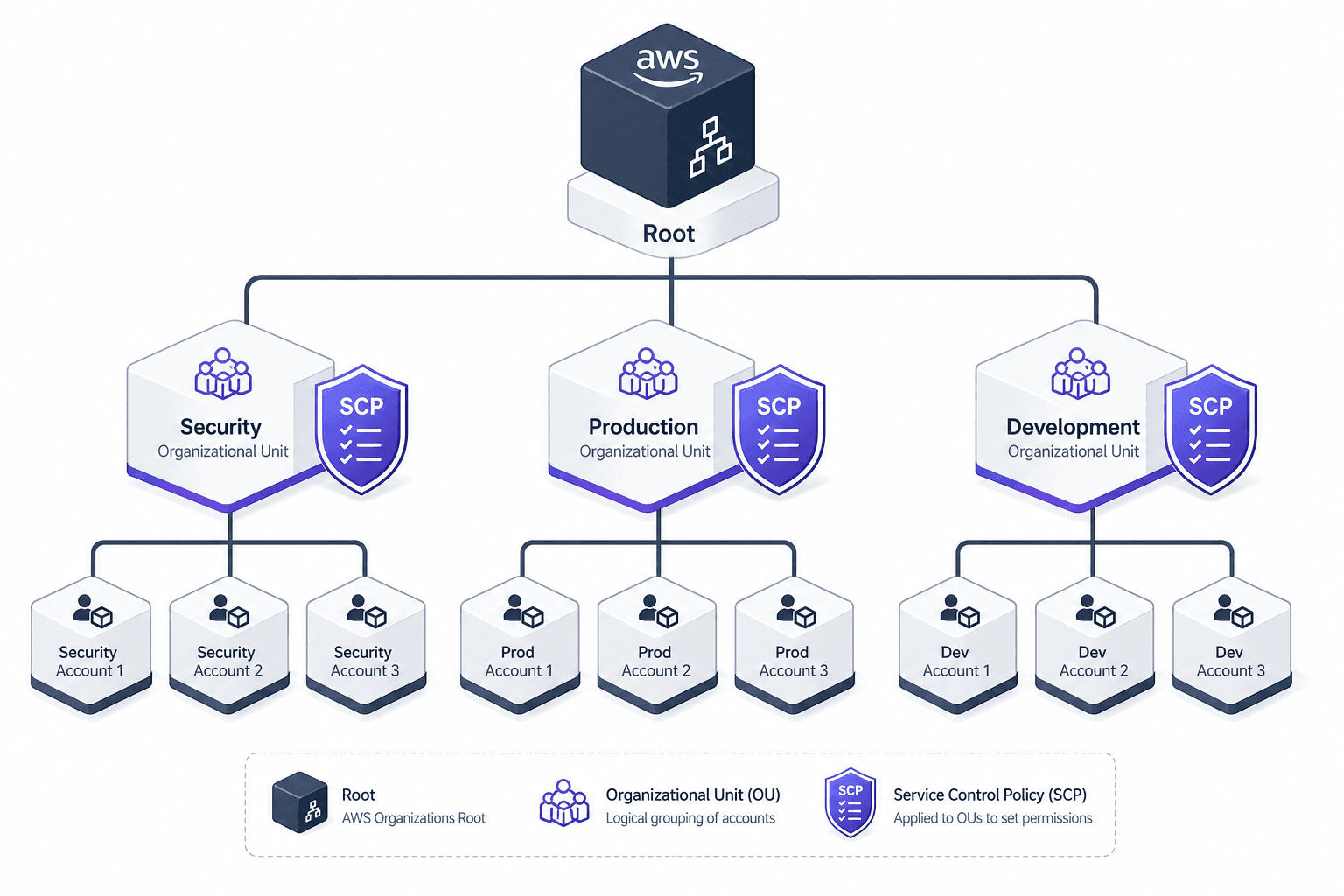
AWS Organizations does not just group accounts; it establishes a parent-child relationship where permissions flow downward through a mechanism known as SCP inheritance. An Organization is a tree structure where the root contains all member accounts. Within the root, you create Organizational Units (OUs) like "Security," "Production," or "Development."
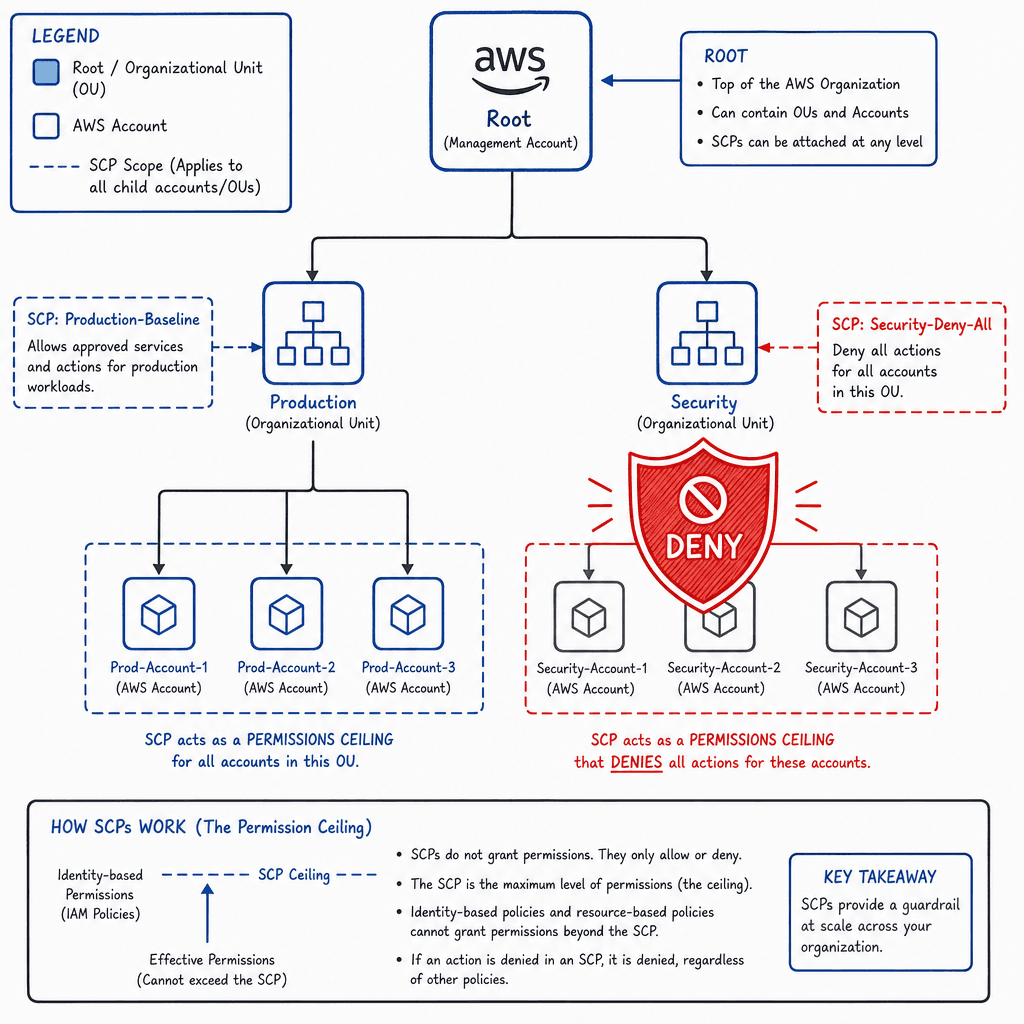
The critical mechanism here is the Service Control Policy (SCP). An SCP is a JSON policy document attached to an OU or a specific account. Unlike standard IAM policies, which grant permissions, an SCP sets a permission boundary. It defines the maximum permissions that any identity in that account can have, regardless of what their IAM policy says. If an SCP denies s3:DeleteObject, that action is impossible to perform in any account within that OU, even if the IAM user attached to that account has an explicit Allow statement for that action.
Consider a scenario where a "Security" OU contains three accounts: Audit, Compliance, and Monitoring. You attach an SCP to the "Security" OU that denies iam:* actions. This restriction applies strictly to the accounts within the "Security" OU and any child OUs. It does not affect a developer in a sibling "Production" OU. To restrict a developer in the "Production" OU, you must attach a deny SCP directly to the "Production" OU or to the Organization Root. This ensures that the "Security" OU's strict boundaries do not inadvertently lock out necessary operations in other parts of the organization, while still allowing the Root to enforce organization-wide ceilings if required.
Identity Federation: The Cross-Account Flow
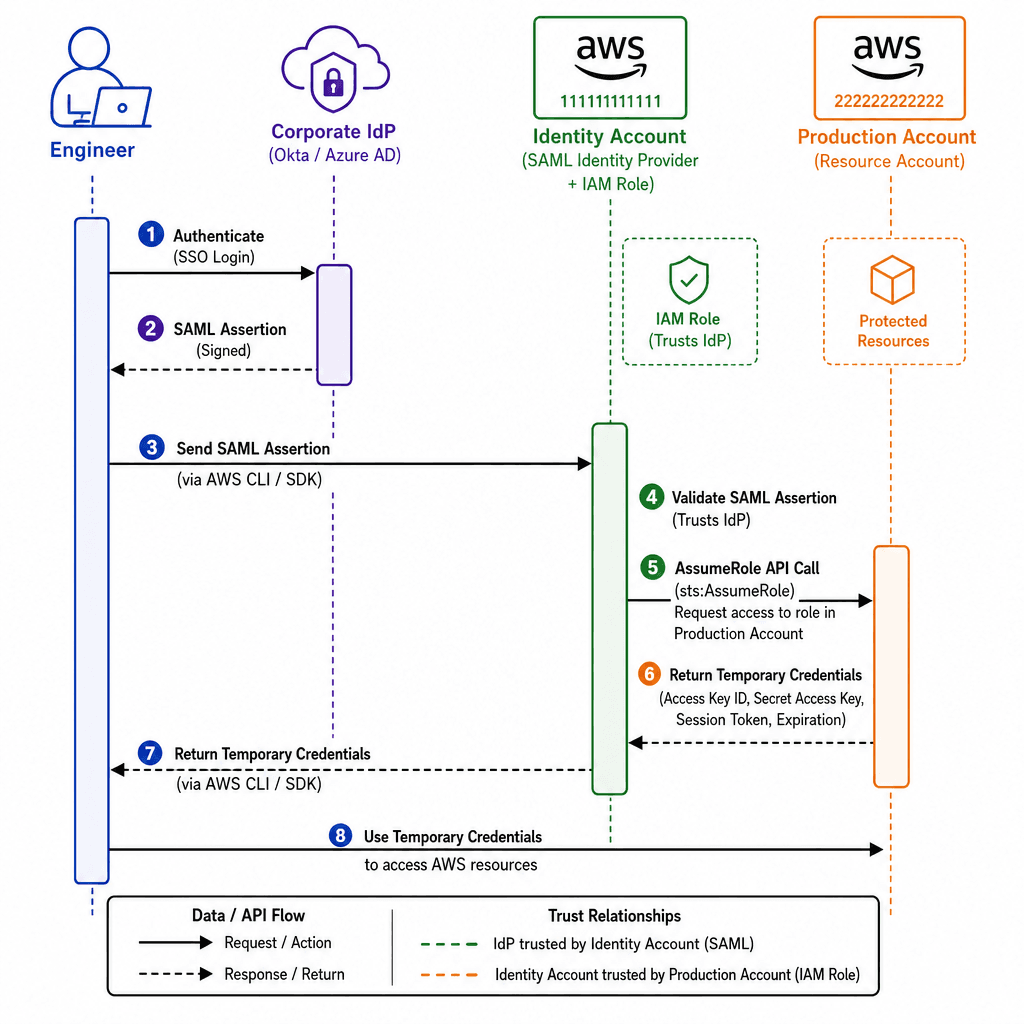
In a multi-account environment, you never log in directly to a production account with a long-term credential. Instead, you use IAM Roles and the AWS Security Token Service (STS) to establish temporary, scoped access. This mechanism relies on a specific trust relationship defined in the target account's IAM role.
Imagine an engineer, Alex, working in a central "Identity" account. Alex authenticates against a corporate IdP (like Azure AD or Okta). The IdP sends a SAML assertion to AWS STS. Alex's account has an IAM role configured to trust the IdP. When Alex requests access to the "Production" account, the following sequence occurs:
- Alex's Identity Provider asserts Alex's group membership (e.g.,
DevOps-Engineers). - Alex's STS call assumes a role in the "Identity" account that is configured to trust the external IdP.
- The "Identity" account role then calls
sts:AssumeRoleon behalf of Alex, targeting a role in the "Production" account. - The "Production" account role has a Trust Policy stating:
Principal: { "AWS": "arn:aws:iam::123456789012:role/Identity-Role" }. - STS validates the chain, issues temporary security credentials (Access Key ID, Secret Access Key, Session Token), and returns them to Alex's CLI.
These credentials expire automatically (e.g., in one hour). Crucially, the "Production" account role's permissions policy is scoped to specific resources. For example, it might allow ec2:DescribeInstances but deny ec2:TerminateInstances. Even if the SCP allows termination, the role policy restricts it. If the SCP blocks it, the role policy cannot override it. This two-layer check ensures that Alex can only act within the strictest boundary defined by the SCP and the Role Policy.
Governance Automation: Control Tower and Guardrails
Manually attaching SCPs to hundreds of accounts is prone to human error. AWS Control Tower automates the establishment of a secure landing zone. It provisions the initial set of accounts, creates the OUs, and applies a set of pre-built "Guardrails."
A Guardrail is a managed SCP that is automatically applied to specific OUs. For example, the "Restrict Regions" guardrail attaches an SCP to the Production OU that denies actions for regions outside of us-east-1 and eu-west-1. Another guardrail, "Require Encryption," denies S3 bucket creation unless the x-amz-server-side-encryption header is present.
Control Tower enforces Tag Policies via SCPs, which deny the creation of resources missing required tags. For remediation (tagging or deletion), teams typically implement separate EventBridge rules triggering Lambda functions. Control Tower also enforces resource tagging policies. It can automatically apply tags to all resources created in the "Production" OU. If a resource is created without the required CostCenter tag, the SCP denies the creation, or the EventBridge rule triggers a Lambda function to tag it or delete the resource. This shifts governance from a reactive audit process to a proactive enforcement mechanism. The "Landing Zone" is the result of this automation: a baseline environment where security, networking, and identity are pre-configured according to best practices.
The Trust Boundary: Root vs. Delegated Admin
The most common failure point in this architecture is the misuse of the "Root" user. The root user is the identity created when the first account is provisioned. It has unrestricted access to all resources and can remove SCPs, delete the organization, and close the account. In a multi-account strategy, the root user must be secured with MFA and never used for daily operations.
Instead, you create a "Delegated Administrator" account for each service (e.g., Security, Logging, Backup). This account is granted administrative privileges for specific AWS services within the organization but is still bound by SCPs. The critical distinction is that the Delegated Administrator cannot modify or remove SCPs attached to the Root or OUs. For instance, the Delegated Administrator for Security can enable GuardDuty and CloudTrail in all member accounts, but they cannot alter the SCPs that govern those accounts.
This separation ensures that even if the Delegated Administrator account is compromised, the attacker cannot bypass the SCPs defined at the root level or alter the organizational structure. The root account remains the "super-admin" for the organization's structure, while the delegated accounts handle operational tasks within the constraints of the guardrails. This architectural decision limits the blast radius of a compromised administrative credential to the scope of the delegated account's permissions, not the entire organization.
Conclusion
Implementing a multi-account strategy is not about creating silos; it is about creating controlled boundaries. By leveraging AWS Organizations for hierarchy, SCPs for maximum permission ceilings, and IAM Role assumptions for dynamic access, you create a system where security is embedded in the flow of data and identity. The mechanism works because every action is checked against two layers: the SCP defined by the organization and the IAM policy defined by the role. This dual-layer approach ensures that no single identity, whether human or machine, can exceed the permissions granted by the enterprise governance model.
Common Pitfalls
When migrating to a multi-account strategy, organizations often encounter specific architectural traps:
- Over-reliance on SCPs: SCPs are powerful but can create "permission hell" if not carefully layered. A common mistake is attaching overly restrictive SCPs at the root level without understanding the downstream impact, effectively locking out legitimate business logic that requires specific permissions.
- Orphaned Accounts: As teams spin up test environments, accounts can become disconnected from the main OU structure or lack proper tagging. These "orphaned" accounts continue to accrue costs and may lack the security guardrails applied to the rest of the organization.
- Trust Boundary Confusion: Teams often assume that an SCP attached to a child OU affects sibling OUs. As established, SCPs flow downward only. Misunderstanding this hierarchy can lead to false assumptions about security isolation between development and production environments.
Practical Takeaways
To successfully implement this strategy, adopt these mental models:
- Least Privilege by Design: Never assume a role has more power than the SCP allows. Always design your IAM roles to request the minimum permissions required, assuming the SCP is the absolute ceiling.
- Automation First: Do not manually attach policies to individual accounts. Use Control Tower or Infrastructure as Code (IaC) to ensure that every new account automatically inherits the correct SCP hierarchy and tagging policies.
- Separation of Duties: Distinguish clearly between "organizational administration" (managing the structure, SCPs, and accounts) and "service administration" (managing resources within an account). The latter should never have the power to alter the former.
FAQ
Can I move accounts between OUs after they are created? Yes. AWS Organizations allows you to move accounts between OUs dynamically. However, be aware that moving an account to an OU with stricter SCPs will immediately enforce those new restrictions, potentially breaking existing workloads if they rely on permissions previously allowed by the parent OU.
How do SCPs interact with IAM policies?
SCPs act as a filter on top of IAM policies. The effective permissions are the intersection of the IAM permissions (what the user is allowed to do) and the SCP permissions (what the organization allows). If an SCP explicitly denies an action, the IAM policy's Allow statement is ignored, and the action is blocked.
Do SCPs apply to the Root user? No. Service Control Policies do not apply to the root user of an account. The root user retains full access unless the account is closed. This is why securing the root user with MFA and limiting its usage is critical; SCPs cannot protect against a compromised root user.
Related posts
Multi Cloud Identity Management Framework: A Reference Architecture
A reference framework for cross-cloud IAM that addresses multi-cloud identity management, entitlements, and reference architecture for architects.
Why Multi-Cloud Identity Fragments
An examination of identity fragmentation across AWS, Azure, and GCP, comparing identity models to understand multi-cloud challenges.
Least Privilege in Practice
A practical guide to implementing least privilege in AWS using IAM Access Analyzer, policy generation, and condition keys for secure access management.