Least Privilege in Practice
A practical guide to implementing least privilege in AWS using IAM Access Analyzer, policy generation, and condition keys for secure access management.
Most engineers treat least privilege as a checklist item: ensure no one has AdministratorAccess, and you’re done. In practice, this approach fails because static policies drift. A developer granted s3:* on a bucket for a legacy migration script often keeps that access long after the migration completes. Over time, these accumulated permissions create a massive attack surface.
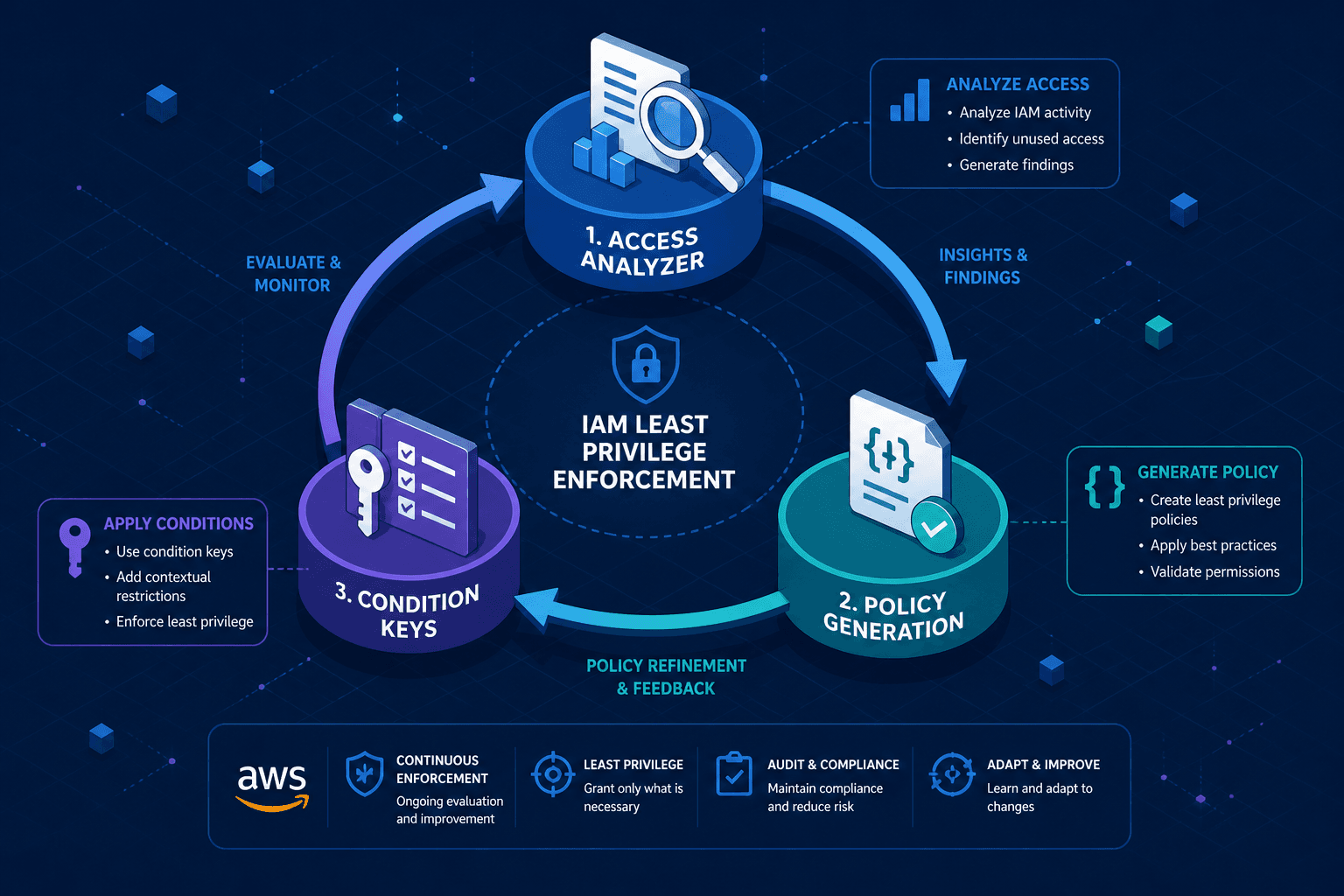
Implementing true least privilege in AWS requires a three-part mechanism: continuous validation via IAM Access Analyzer, iterative policy generation from usage data, and precise scoping using condition keys. This guide details how these components interact to reduce risk without breaking functionality.
The Mechanism of Validation: IAM Access Analyzer
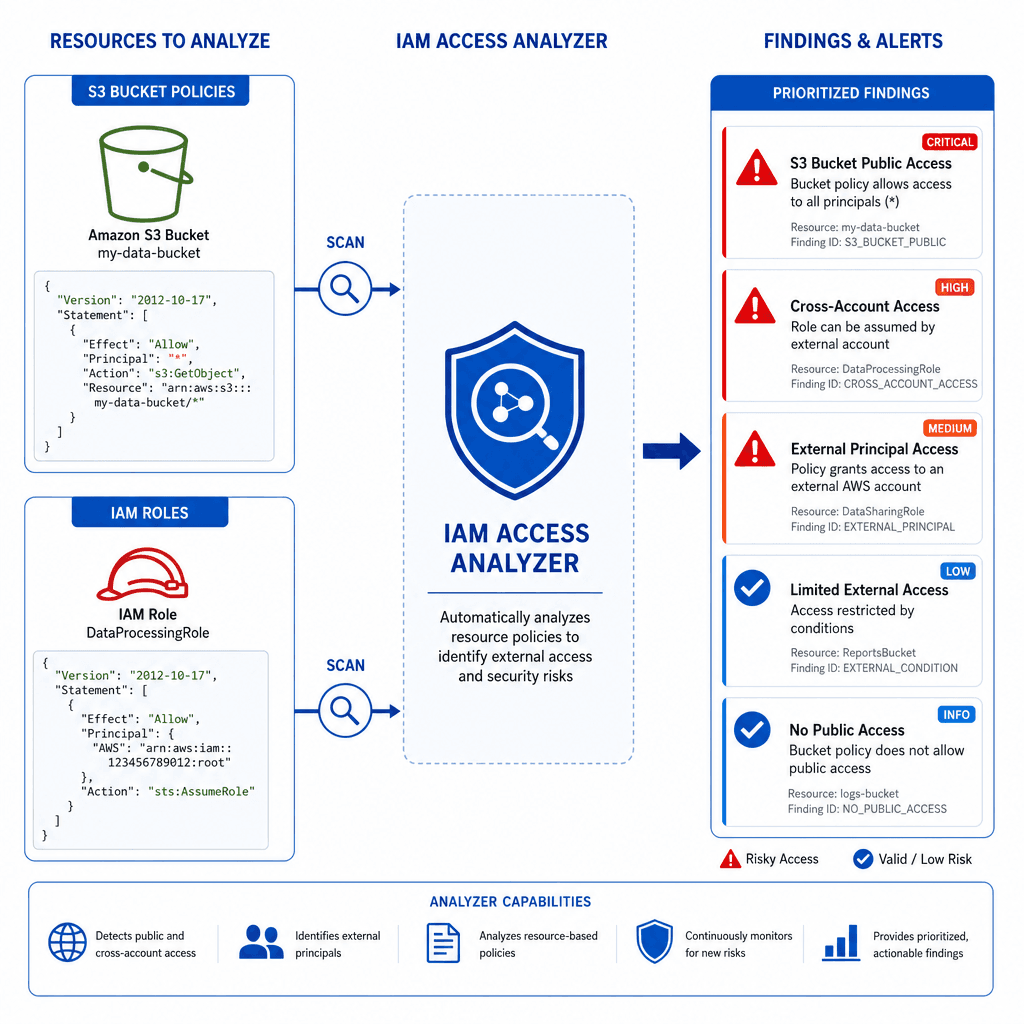
You cannot enforce least privilege if you don’t know what access actually exists. Manual review of IAM roles and resource-based policies (like S3 bucket policies) is error-prone. IAM Access Analyzer solves this by continuously monitoring your AWS environment for resources that are shared with external principals or have overly broad permissions. For more details on how Access Analyzer works, see the IAM Access Analyzer documentation.
Access Analyzer primarily identifies resource-based policies, such as S3 bucket policies and SQS queue policies, that grant access to external AWS accounts or AWS Organizations outside the current account. It also flags public access, where 'anonymous' refers to unauthenticated access to the resource itself, rather than IAM authentication states. This static policy analysis helps identify potential security risks before they are exploited.
Consider a scenario where a developer creates an S3 bucket policy allowing s3:GetObject for a specific Lambda function in another account. If that Lambda function is later deleted or its role permissions change, the bucket policy might still grant access to the public internet or an unintended account. Access Analyzer detects this "unauthorized access" by comparing the policy against known external identities and AWS Organization structures.
The output is not just a list of findings; it’s a prioritized alert system. Each finding includes the principal, the action, and the resource. For example, a finding might state: "Principal arn:aws:iam::123456789012:role/DevRole has s3:* access on arn:aws:s3:::my-bucket." This specific artifact allows you to move from guessing what access is needed to knowing exactly what is being used. If you need to validate if those permissions are actually being used, you can cross-reference this with IAM Access Advisor, which provides insights into service access based on last-accessed information.
The Loop of Refinement: Policy Generation
Once Access Analyzer identifies broad permissions or unused access, the next step is policy generation. This is where you translate observed behavior into restrictive IAM policies. The most effective method uses CloudTrail logs to create an initial draft, rather than deprecated tools. For guidance on using usage data, refer to the IAM Access Advisor documentation.
The mechanism here is iterative reduction. You start with a policy that allows all observed actions, then systematically remove anything not strictly necessary. CloudTrail provides the historical log data needed to understand what actions were actually performed, as detailed in the CloudTrail documentation.
Let’s look at a concrete example. A security engineer notices an IAM role DataProcessorRole has the policy AmazonS3FullAccess. Access Analyzer shows this role only reads from s3://data-lake-raw and writes to s3://data-lake-processed. Using the policy generation workflow, you create a new policy that restricts access to these specific buckets and actions.
{
  "Version": "2012-10-17",
  "Statement": [
    {
      "Effect": "Allow",
      "Action": [
        "s3:GetObject",
        "s3:ListBucket"
      ],
      "Resource": [
        "arn:aws:s3:::data-lake-raw",
        "arn:aws:s3:::data-lake-raw/*"
      ]
    },
    {
      "Effect": "Allow",
      "Action": [
        "s3:PutObject",
        "s3:GetObject"
      ],
      "Resource": [
        "arn:aws:s3:::data-lake-processed",
        "arn:aws:s3:::data-lake-processed/*"
      ]
    }
  ]
}
This policy is significantly more restrictive than AmazonS3FullAccess. However, it is still vulnerable to lateral movement. If an attacker compromises the DataProcessorRole, they can still read from data-lake-raw and write to data-lake-processed. To close this gap, you need condition keys.
The Precision of Context: Condition Keys
Condition keys allow you to attach context to your IAM policies, ensuring that permissions are only granted under specific circumstances. This is the final layer of least privilege enforcement. Without conditions, a permission is either allowed or denied based solely on the principal and resource. With conditions, you add constraints like IP address, time, or resource tags. For a comprehensive list of available condition keys, see the IAM User Guide on Condition Keys.
For example, you can use the aws:SourceIp condition key to restrict API calls to a specific corporate network. If an attacker steals credentials from a laptop on a coffee shop Wi-Fi, the request will fail because the source IP does not match the condition.
{
  "Effect": "Allow",
  "Action": "sts:AssumeRole",
  "Resource": "arn:aws:iam::123456789012:role/AdminRole",
  "Condition": {
    "IpAddress": {
      "aws:SourceIp": "203.0.113.0/24"
    }
  }
}
Another powerful condition is aws:RequestedRegion. You can restrict a role to only operate in us-east-1. If an attacker tries to spin up resources in eu-west-1, the policy will deny the action. This limits the blast radius of a compromise.
Condition keys also work with resource tags. You can restrict access to S3 buckets tagged with Environment: Production. This ensures that even if a role has broad permissions, it can only act on resources that meet the tag criteria.
Operationalizing the Workflow
Implementing least privilege is not a one-time project. It requires a continuous loop:
- Enable Access Analyzer: Continuously monitor for unused or overly broad permissions using IAM Access Analyzer.
- Generate Policies: Use CloudTrail logs to create initial IAM policies.
- Refine with Conditions: Add condition keys to restrict access by IP, region, or tags.
- Test and Iterate: Deploy the new policy in a controlled environment, verify functionality, and repeat.
This process reduces the attack surface by ensuring that every permission granted is justified by actual usage and constrained by context. It shifts security from a reactive stance to a proactive, data-driven discipline.
Conclusion
Least privilege in AWS is achieved through the interplay of validation, generation, and conditioning. IAM Access Analyzer provides the visibility to see what access exists, as documented in the official AWS docs. Policy generation allows you to create restrictive policies based on observed behavior, often leveraging CloudTrail logs. Condition keys add the final layer of precision, ensuring that permissions are only granted under specific, secure conditions. By adopting this workflow, cloud and security engineers can significantly reduce the risk of unauthorized access and data breaches.
Related posts
Implementing AWS IAM Identity Center: From Legacy SSO to Federated Control
A guide to implementing AWS IAM Identity Center for federated access, multi-account management, and SCIM provisioning.
Serverless Security on AWS: Lambda, API Gateway, and DynamoDB
An examination of serverless security on AWS focusing on securing Lambda functions, API Gateway authorization, and DynamoDB access policies.
CloudTrail, CloudWatch, and GuardDuty: Who Does What
Understand the distinct roles of CloudTrail, CloudWatch, and GuardDuty in AWS security and monitoring architecture.