angular-oauth2-oidc: Setting Up Code Flow With PKCE
A practical walkthrough for configuring angular-oauth2-oidc with code flow and PKCE to secure Angular applications.
Part 1 of the angular-oauth2-oidc in Production series.
The transition from the Implicit Flow to the Authorization Code Flow with Proof Key for Code Exchange (PKCE) is not merely an update; it is a security remediation. For Angular developers seeking secure angular authentication using angular-oauth2-oidc, this migration requires dismantling the legacy hash-based authentication pattern and rebuilding the authentication handshake around a secure, server-side token exchange. This guide details the mechanism-level configuration required to secure your Angular application against token interception and authorization code replay attacks. The configuration examples below are written in TypeScript, leveraging the library's type definitions.
The Security Imperative: Why Implicit Flow Fails
The Implicit Flow, historically supported by angular-oauth2-oidc, returns access tokens directly to the client via the URL fragment (hash). This pattern is dangerous because URLs are frequently logged in browser history, server logs, and proxy headers. Furthermore, modern browsers and identity providers (IdPs) have deprecated implicit flow due to its inability to securely handle long-lived sessions without exposing tokens to the client environment.
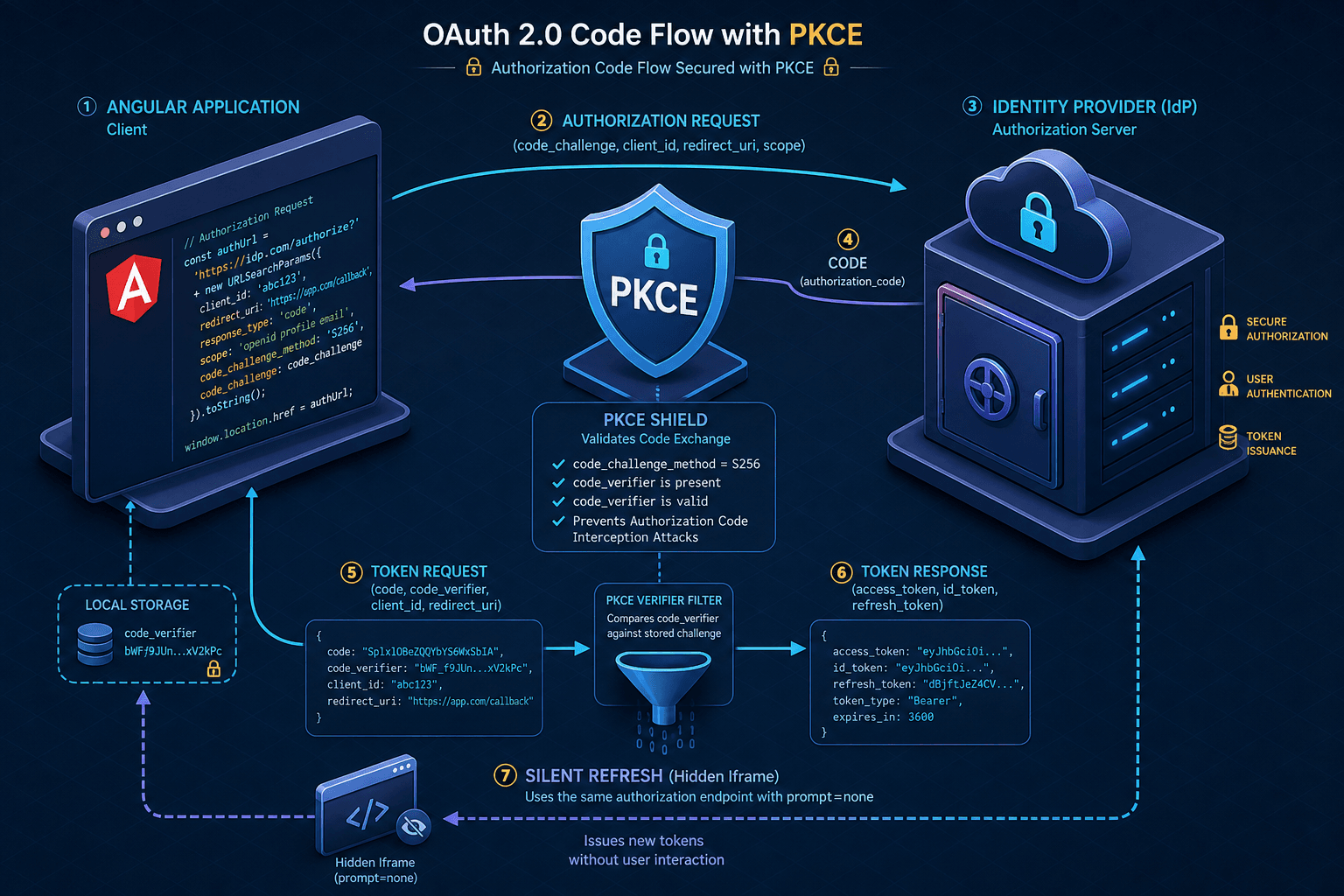
PKCE addresses these vulnerabilities by introducing a two-step verification process during the authorization request. The client generates a code_verifier—a cryptographically random string—and derives a code_challenge from it. The code_challenge is sent to the IdP. When the IdP redirects back with the authorization code, the client must present the original code_verifier. The IdP hashes this verifier and compares it to the stored challenge. If they match, the token is issued. This ensures that only the client that initiated the request can redeem the code, preventing attackers who might intercept the authorization code in the URL query string from using it.
Core Configuration Changes
For a complete oauth2 setup with PKCE, you must restructure the AuthConfig object passed to OAuthService.configure(). The primary shift is moving away from the implicit flow's responseType: 'id_token token' setting to a configuration that explicitly enables the code flow via responseType: 'code'.
In your app.config.ts or core module provider, define the configuration as follows:
import { AuthConfig } from 'angular-oauth2-oidc';

export const authConfig: AuthConfig = {
  // 1. Explicitly set the response type to enable the Authorization Code Flow
  responseType: 'code',

  // 2. Token endpoint configuration
  issuer: 'https://your-idp-domain.com',
  clientId: 'your-client-id',
  redirectUri: window.location.origin + '/auth-callback',

  // 3. Security constraints
  requireHttps: true, // Mandatory for production
  strictDiscoveryDocumentValidation: true,

  // 4. Scopes
  scope: 'openid profile email offline_access',
};
Note the inclusion of offline_access in the scope. This requests a refresh_token, which allows the library to renew the access token via the refresh token grant as an alternative to the iframe-based silent refresh described later. Without a refresh mechanism in place, the user would be forced to re-authenticate every time the access token expires, degrading user experience.
Handling the Redirect and State
In the implicit flow, angular-oauth2-oidc parsed the access token directly from window.location.hash. In the code flow with PKCE, the IdP redirects the user back to your redirectUri with an authorization code in the query string (?code=...&state=...).
The OAuthService handles this parsing automatically, but you must ensure your route configuration supports this. Create a dedicated component, AuthCallbackComponent, to handle the initial navigation.
import { Component, OnInit } from '@angular/core';
import { OAuthService } from 'angular-oauth2-oidc';
import { Router } from '@angular/router';

@Component({
  selector: 'app-auth-callback',
  template: '<p>Processing authentication...</p>',
})
export class AuthCallbackComponent implements OnInit {
  constructor(
    private oauthService: OAuthService,
    private router: Router
  ) {}

  ngOnInit(): void {
    // 1. Parse the hash/query params and exchange code for tokens
    this.oauthService.loadDiscoveryDocumentAndTryLogin().then(() => {
      // 2. If login was successful, navigate away
      if (this.oauthService.hasValidAccessToken()) {
        this.router.navigate(['/dashboard']);
      } else {
        this.router.navigate(['/login']);
      }
    });
  }
}
The key mechanism here is loadDiscoveryDocumentAndTryLogin(). This method performs three actions:
- It fetches the IdP's discovery document to validate the issuer and endpoints.
- It checks if there is an authorization code in the current URL.
- If a code exists, it initiates the token exchange request to the IdP's token endpoint, sending the
code_verifierstored in session storage.
This exchange happens via a direct HTTP POST request. The user sees no redirect loop beyond the initial return from the IdP.
Silent Refresh Implementation
Access tokens typically expire in 1-2 hours. In a Single Page Application (SPA), we cannot force the user to re-enter credentials every hour. Instead, we use the refresh_token to obtain a new access token without user interaction. This is achieved via a silent refresh, which uses a hidden iframe.
Configure angular-oauth2-oidc to initiate this process automatically:
// In your app initialization or core service
this.oauthService.configure(authConfig);
this.oauthService.loadDiscoveryDocumentAndTryLogin().then(() => {
  this.oauthService.setupAutomaticSilentRefresh();
});
The setupAutomaticSilentRefresh() method configures an internal timer. When the access token is nearing expiration (by default, once 75% of its lifetime has elapsed), the library creates a hidden iframe pointing to the IdP's authorization endpoint with the prompt=none parameter.
The IdP responds within the iframe context. If the user is still authenticated in their browser session (which is likely, as they are using the app), the IdP returns a new ID token and access token to the iframe. The library uses postMessage sent from the iframe's redirect page to extract the tokens and update its internal state. The user remains unaware of this process.
However, silent refresh has limitations. If the user logs out from another device, or if the IdP detects an anomaly, the IdP may return an error in the iframe. angular-oauth2-oidc provides an event emitter events to handle these edge cases. You should listen for silent_refresh_error or token_expires events to trigger a full re-authentication flow if silent refresh fails.
this.oauthService.events.subscribe(event => {
  if (event.type === 'silent_refresh_error') {
    console.error('Silent refresh failed, forcing full login.');
    this.oauthService.initCodeFlow();
  }
});
Production Considerations and Validation
Achieving secure frontend auth requires strict validation in production. Ensure strictDiscoveryDocumentValidation is set to true. This prevents man-in-the-middle attacks where an attacker might redirect your app to a malicious IdP that mimics the real one but captures tokens.
Additionally, verify that your IdP supports PKCE. Most modern IdPs (Auth0, Azure AD, Keycloak, Okta) do, but older systems might not. If your IdP does not support PKCE, the token exchange will fail because the code_verifier will not match the expected challenge.
Finally, consider the storage strategy. angular-oauth2-oidc uses sessionStorage by default for storing the code_verifier and tokens. This is secure for most SPAs because the data is cleared when the tab closes. However, if you require persistent sessions across tabs, you must configure the library to use localStorage, accepting the increased risk of XSS attacks. For most applications, sessionStorage is the recommended balance of security and usability.
Conclusion
By implementing these changes, you move your Angular application from a deprecated, insecure authentication model to a modern, PKCE-secured flow. This not only aligns with industry best practices but also protects your users' data from common interception attacks.
Related posts
The AuthConfig Reference: Every Property That Matters
A complete reference for Angular-OAuth2-OIDC AuthConfig properties, covering requireHttps, remoteOnly, and nonceStateSeparator for secure Angular authentication.
OAuth 2.0 Refresh Tokens in Angular: Silent Refresh with useRefreshTokens
Learn how to implement automatic silent refresh in Angular using userefreshtoken and setupautomaticsilentrefresh for secure session management.
Angular OAuth2/OIDC: loadDiscoveryDocumentAndTryLogin
Learn how to use loadDiscoveryDocumentAndTryLogin and strict discovery document validation in Angular for secure OAuth2/OIDC authentication.