OAuth 2.0 Refresh Tokens in Angular: Silent Refresh with useRefreshTokens
Learn how to implement automatic silent refresh in Angular using userefreshtoken and setupautomaticsilentrefresh for secure session management.
In modern Single Page Applications (SPAs), managing authentication state is a constant battle between security and usability. Access tokens, typically JSON Web Tokens (JWTs), are designed to be short-lived—often expiring in minutes—to limit the damage if they are stolen. However, this design creates a friction point: every time an access token expires, the application must either make a request with an invalid token (resulting in a 401 Unauthorized) or force the user to re-enter credentials.
The angular-oauth2-oidc library provides a solution to this problem through two key methods: useRefreshTokens() and setupAutomaticSilentRefresh(). These methods work in tandem to automate the renewal of access tokens in the background, ensuring uninterrupted user sessions while maintaining strict security boundaries.
The Mechanism of Refresh Tokens
To understand why we need these methods, we must first distinguish between the two primary token types in OAuth 2.0 and OpenID Connect (OIDC):
- Access Token: A short-lived credential used to access protected resources (APIs). It has a limited lifespan (e.g., 5–15 minutes).
- Refresh Token: A long-lived credential used exclusively to obtain new access tokens. It does not grant direct access to APIs but allows the client to "refresh" its access rights without user interaction.
When an access token expires, the application cannot simply "extend" it. Instead, it must exchange the refresh token for a new access token. This exchange happens directly, via a back-channel HTTP request, between the Angular application and the Identity Provider (IdP). The angular-oauth2-oidc library abstracts this complexity, but it requires explicit configuration to enable the behavior. Understanding the timing of access token expiration is critical for configuring the silent refresh window correctly.
Securing the Refresh Token with useRefreshTokens()
By default, angular-oauth2-oidc may not automatically use refresh tokens, depending on the initial configuration and the IdP's response. To enable the library to store and utilize the refresh token received from the IdP, you must call useRefreshTokens().
This method configures the OAuthService to:
- Store the refresh token securely in the storage provider (usually
localStorageorsessionStorage). - Automatically include the refresh token in the token exchange request when the access token is expired or about to expire.
Here is how you configure this in your Angular module:
import { OAuthModule, OAuthModuleConfig } from 'angular-oauth2-oidc';

export function configureOAuth(): OAuthModuleConfig {
  return {
    resourceServer: {
      allowedUrls: ['https://api.example.com'],
      sendAccessToken: true,
    },
  };
}

@NgModule({
  imports: [
    OAuthModule.forRoot(configureOAuth()),
  ],
})
export class AppModule {
  constructor(private oauthService: OAuthService) {
    // Enable refresh token usage
    this.oauthService.useRefreshTokens();
  }
}
Note that calling useRefreshTokens() is a critical step. Without it, the library ignores the refresh token, even if one is provided by the IdP. This ensures that the application only attempts silent renewals when a valid refresh token is available.
Automating Renewal with setupAutomaticSilentRefresh()
Storing the refresh token is only half the solution. You must also instruct the library to use it automatically before the access token expires. This is where setupAutomaticSilentRefresh() comes in.
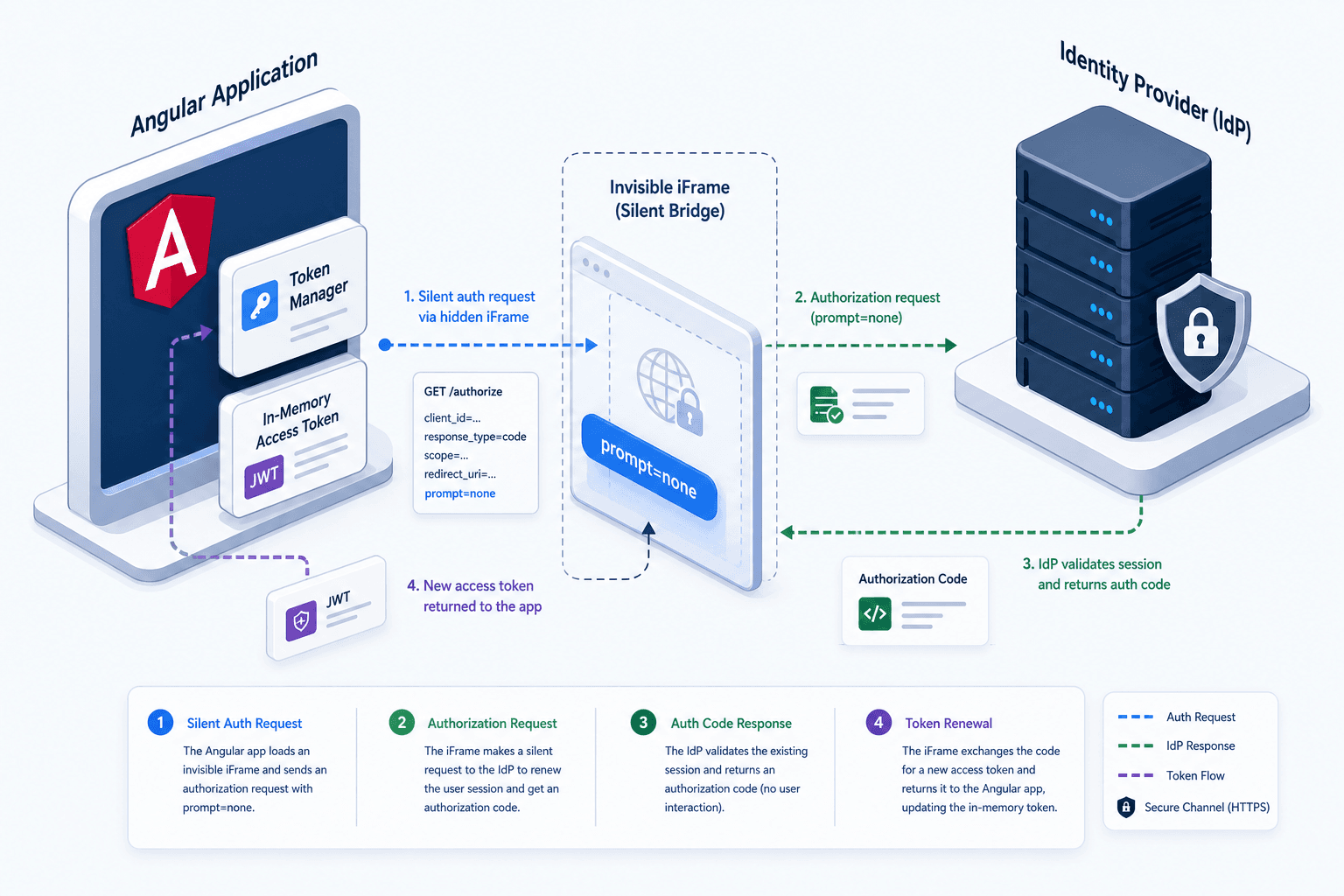
This method sets up an internal monitor that checks the expiration time of the current access token. When the token is close to expiring (typically within a configurable window, such as 60 seconds), the library initiates a silent refresh process. This process usually involves making a direct request to the IdP's token endpoint using the refresh token grant type, without needing an iframe. Note that while the prompt=none parameter is used in the authorize endpoint to check session state, the actual token renewal happens at the token endpoint.
The silent refresh flow works as follows:
- The Angular app detects the access token is near expiration.
- It sends a direct request to the IdP's token endpoint using the refresh token, without needing an iframe.
- The IdP validates the refresh token and checks whether the associated session is still valid.
- If valid, the IdP returns a new access token (and optionally a new refresh token) in the response.
- The
angular-oauth2-oidclibrary captures the new token and updates the in-memory state. - The user continues their session uninterrupted, unaware that their token was renewed.
Here is how you initialize this automation in your AppModule:
import { OAuthService } from 'angular-oauth2-oidc';

@NgModule({
  declarations: [AppComponent],
  imports: [BrowserModule, OAuthModule.forRoot()],
  providers: [],
  bootstrap: [AppComponent]
})
export class AppModule {
  constructor(private oauthService: OAuthService) {
    // ... other configuration like config.issuer, config.clientId, etc.

    // Enable automatic silent refresh
    this.oauthService.setupAutomaticSilentRefresh();
  }
}
Handling Silent Refresh Failures
Silent refresh is not guaranteed to succeed. Several scenarios can cause the process to fail:
- Refresh Token Revoked: The user may have logged out from another device or browser tab, causing the IdP to invalidate the refresh token.
- Session Expiry: The user's session at the IdP may have expired, even if the refresh token was still valid locally.
- Third-Party Cookie Blocking: Modern browsers increasingly block third-party cookies, which can interfere with the iframe-based silent refresh mechanism if the IdP relies on cookies for session validation.
When the silent refresh process fails, the angular-oauth2-oidc library triggers an error event. By default, this may result in the user being logged out. However, you can customize this behavior by subscribing to the events stream:
this.oauthService.events.subscribe(event => {
  if (event.type === 'token_error') {
    console.error('Silent refresh failed:', event);
    // Optionally redirect to login or show an error message
    this.oauthService.logOut();
  }
});
Conclusion
Implementing automatic silent refresh in Angular using useRefreshTokens() and setupAutomaticSilentRefresh() is essential for creating a secure yet user-friendly authentication experience. By leveraging refresh tokens and automating their renewal, you eliminate the need for frequent re-authentication while maintaining the security benefits of short-lived access tokens.
Remember to test your implementation thoroughly, especially in environments where third-party cookies are blocked, as this can impact the reliability of the silent refresh mechanism. Always ensure that your IdP supports the prompt=none parameter and that your refresh token handling aligns with your security policies.
Related posts
Angular OAuth2/OIDC: loadDiscoveryDocumentAndTryLogin
Learn how to use loadDiscoveryDocumentAndTryLogin and strict discovery document validation in Angular for secure OAuth2/OIDC authentication.
The AuthConfig Reference: Every Property That Matters
A complete reference for Angular-OAuth2-OIDC AuthConfig properties, covering requireHttps, remoteOnly, and nonceStateSeparator for secure Angular authentication.
angular-oauth2-oidc: Setting Up Code Flow With PKCE
A practical walkthrough for configuring angular-oauth2-oidc with code flow and PKCE to secure Angular applications.