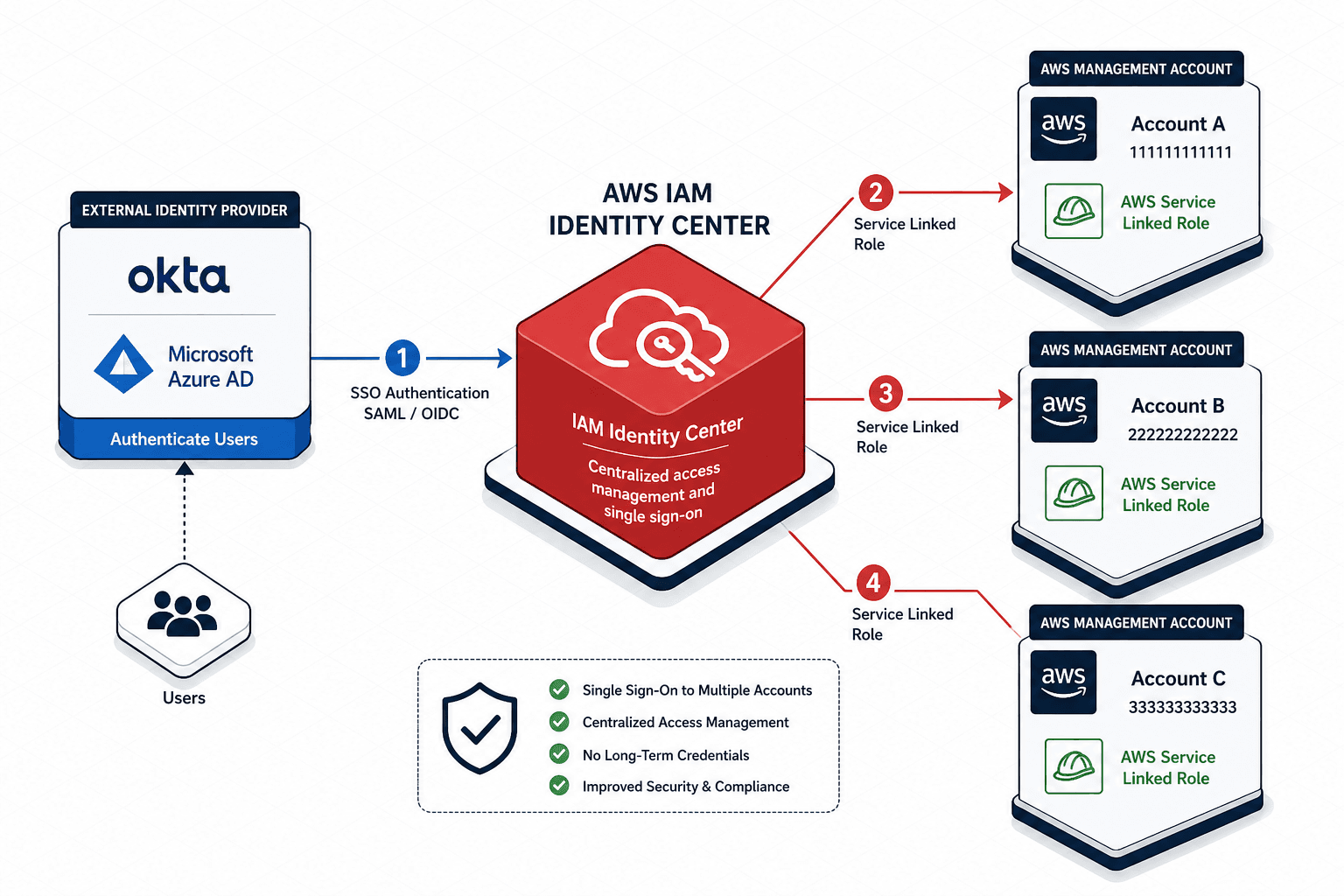
Implementing AWS IAM Identity Center: From Legacy SSO to Federated Control
A guide to implementing AWS IAM Identity Center for federated access, multi-account management, and SCIM provisioning.
The transition from AWS Single Sign-On (AWS SSO) to AWS IAM Identity Center is often misunderstood as a simple rebranding. It is not. The fundamental shift is architectural: moving from a tool that simply facilitated login to a centralized access management platform that streamlines the lifecycle of access. In the legacy AWS SSO model, you created roles and manually configured trust relationships. In IAM Identity Center, you define a "Permission Set," and the service automatically injects the necessary trust relationships and roles into your target accounts. This post dissects the mechanism of that injection, the flow of federated assertions, and the operational logic of SCIM provisioning.
The Permission Set Mechanism: Decoupling Policy from Role
Before implementing, you must understand the data object driving access: the Permission Set. In the old model, you created an IAM Role with a specific policy attached and then manually added the AWS SSO trust relationship to that role. This created a tight coupling; if you needed to change the policy, you had to edit the role directly in the target account.
IAM Identity Center inverts this. You define a Permission Set in the Management Account (the Identity Center hub). This object contains two distinct parts: the IAM policy (what the user can do) and the AWS SSO Trust Relationship (who can assume the role). When you assign this Permission Set to a target account, the Identity Center performs a specific API sequence: it creates a new IAM Role in that target account named aws-sso-<permission-set-name> and attaches the policy. Crucially, it also updates the role's trust policy to trust the AWS Identity Center service principal, not a specific user or group ID.
This mechanism allows for "write once, deploy everywhere." If you update the Permission Set in the hub, the service can propagate the policy change to the target account's role without touching the role's trust relationship.
# Example: Creating a Permission Set via CLI
# Note: This creates the object in the hub, not the target account
aws iam create-permission-set \
  --name Admin \
  --instance-arn arn:aws:sso::123456789012:instance/sso-instance-id \
  --session-duration 3600
Once the Permission Set exists, you link it to a target account. The service then creates the role in that account. The user never sees the role; they only see the Permission Set name when they log in.
The Federation Flow: SAML Assertions and Temporary Credentials
The core of the federated access lies in the SAML 2.0 assertion flow. When a user attempts to access the AWS Management Console, the browser is redirected to your Identity Provider (IdP), such as Okta, Azure Active Directory, or PingIdentity.
The mechanism here is stateless validation. The IdP authenticates the user against its own directory. Upon success, the IdP generates a SAML assertion containing the user's identity and, critically, the "groups" or "roles" the user belongs to. This assertion is signed and sent back to the AWS Identity Center endpoint.
The Identity Center does not authenticate the user. It validates the signature of the IdP. If the signature is valid, it extracts the user identifier and maps it to the Permission Sets assigned to that user or group within the Identity Center console.
Once the mapping is complete, the Identity Center calls the AWS Security Token Service (STS) AssumeRoleWithSAML API on behalf of the user. This returns temporary security credentials (Access Key ID, Secret Access Key, Session Token) with an expiration time defined by the Permission Set. These credentials are then used by the browser to sign requests to the AWS API.
This flow ensures that no long-term credentials ever touch the user's device. The trust boundary is the IdP; the execution boundary is the AWS Role created by the Permission Set.
SCIM Provisioning: The Source of Truth Shift
A common implementation error is treating IAM Identity Center as the primary user store. It is not. It is a policy engine that reads from an external IdP. To automate this, we use SCIM (System for Cross-domain Identity Management).
SCIM is a protocol that allows the Identity Center to act as a client, pulling user and group data from the IdP (the server). When you enable SCIM provisioning in IAM Identity Center, you configure a connection to your IdP using a client ID and secret.
The mechanism operates based on the configuration chosen during setup. If using webhook notifications, the IdP sends a POST request to the Identity Center upon user changes. If using polling, the Identity Center queries the IdP at set intervals. In either case, if a new user is added to a group in the IdP, the Identity Center updates its internal mapping: it associates the new user with the specific Permission Sets assigned to that group.
Conversely, if a user is deleted from the IdP, the Identity Center removes their access upon the next successful SCIM sync cycle or subject to session token expiration. This ensures that the IdP remains the "source of truth." If you were to create a user directly in AWS IAM, they would be invisible to the Identity Center and could not log in via the SSO portal.
# Example: Verifying SCIM status in the console
# Conceptual check: Ensure the "Provisioning" tab shows "Active"
# and the last sync time is recent.
# If sync fails, check the IdP's outgoing webhook logs.
Without SCIM, you are manually managing user assignments in the IAM Identity Center console, which defeats the purpose of enterprise identity management. With SCIM, the workflow is: Admin adds user to Group in IdP -> SCIM syncs -> User gains access in AWS.
Multi-Account Management via AWS Organizations
The final piece of the puzzle is the integration with AWS Organizations. In a multi-account environment, you do not want to manually configure every account to trust the Identity Center.
When you enable AWS Organizations integration in IAM Identity Center, the service discovers all member accounts in your organization. It then automatically registers these accounts as "target accounts" for the Permission Sets you have defined.
The mechanism here is the use of Service Control Policies (SCPs) and the automatic creation of the aws-sso- roles mentioned earlier. When you assign a Permission Set to an Organizational Unit (OU) or a specific account, the Identity Center triggers internal provisioning logic via the AssociatePermissionSet API to ensure the role exists. If the account is new, it creates the role. If the account already has a role with that name, it updates the policy.
This creates a hierarchy of access. You can assign a "ReadOnly" Permission Set to the entire "Dev" OU, and a "Admin" Permission Set only to the "Prod" OU. When a user logs in, the console displays only the accounts and permissions relevant to their assignment.
START_IMAGE_BLOG : aws-iam-identity-center-implementation-guide-org : aws-iam-identity-center-implementation-guide-org.png : Diagram showing AWS Organizations hierarchy with OUs, arrows pointing from IAM Identity Center to specific OUs, and role icons appearing in accounts within those OUs. Style: Organizational chart, tree structure, green and grey tones, clear typography, technical schematic. ##END_IMAGE_BLOG
Operational Tradeoffs and Conclusion
Implementing IAM Identity Center requires a shift in mindset. You stop managing IAM Users and Roles in individual accounts. You start managing Permission Sets and IdP Groups.
There is a tradeoff in flexibility. Because the Identity Center manages the roles in the target accounts, you cannot manually modify those roles. If you try to add a custom inline policy to a role created by Identity Center, the service will overwrite it during the next sync or deployment. This is a feature, not a bug, as it prevents configuration drift, but it requires discipline to manage policies in the Permission Set definition rather than the target account.
Furthermore, the reliance on SCIM means your IdP must be reliable. If the IdP is down, you cannot provision new users, though existing sessions may persist until token expiration. The IdP is the gatekeeper; the Identity Center is the turnstile.
By understanding the Permission Set as a template, the SAML flow as a credential fetcher, and SCIM as the synchronization engine, you move from managing access manually to governing it programmatically. This is the essence of the successor to AWS SSO.
Conclusion
AWS IAM Identity Center represents a significant evolution in AWS identity management, replacing the manual heavy lifting of legacy AWS SSO with a declarative, automated approach. By decoupling policy definitions from role creation through Permission Sets, automating credential issuance via SAML assertions, and enforcing the IdP as the source of truth through SCIM, organizations can achieve a scalable, secure, and maintainable multi-account environment. While it introduces constraints on manual role modification, these constraints serve to enforce governance and eliminate drift, ultimately delivering a stronger security posture for the enterprise cloud.
Common Pitfalls
- Manual Role Modification: Attempting to edit IAM roles created by Identity Center in the target account. The service will detect these changes as drift and overwrite them during the next sync, potentially removing custom configurations.
- IdP Downtime Impacts: Assuming that an IdP outage only affects new logins. While existing sessions may persist, you cannot provision new users or groups, and critical access changes will be delayed until the IdP recovers and the next sync cycle occurs.
- Trust Relationship Misconfiguration: Manually altering the trust policy of the
aws-sso-roles. These policies must remain managed by Identity Center to ensure the service principal is correctly trusted; manual edits break the federation chain.
Practical Takeaways
- Permission Sets are Templates: Treat Permission Sets as immutable templates. Define your policies centrally; never edit the resulting roles in target accounts.
- SAML is a Fetcher: Understand that SAML is not for authentication storage but for fetching temporary credentials. The IdP handles authentication; Identity Center handles the credential exchange.
- SCIM is the Sync Engine: View SCIM not as a user creation tool, but as a synchronization mechanism. The IdP is the source of truth; Identity Center is just the mirror.
FAQ
Q: Is AWS IAM Identity Center just a rebrand of AWS SSO? A: No. While it replaces AWS SSO, it introduces significant architectural changes, specifically the decoupling of policies from roles via Permission Sets and deeper integration with AWS Organizations and SCIM.
Q: Can I use SCIM to create users directly in AWS? A: No. SCIM only synchronizes data from your external Identity Provider. You cannot create users directly within the AWS Identity Center console; they must exist in the IdP first.
Q: What happens if I manually add a policy to an Identity Center-managed role? A: The next time Identity Center syncs (either via SCIM trigger or periodic poll), it will overwrite your manual changes with the policy defined in the Permission Set, ensuring consistency but removing your custom additions.
Related posts
Serverless Security on AWS: Lambda, API Gateway, and DynamoDB
An examination of serverless security on AWS focusing on securing Lambda functions, API Gateway authorization, and DynamoDB access policies.
AWS Network Security: VPC, SG, NACLs & IAM Integration
An examination of AWS VPC, security groups, and NACLs with IAM integration for advanced network security.
The Mechanics of AWS Security Visibility: CloudTrail, CloudWatch & GuardDuty
A detailed examination of AWS CloudTrail, CloudWatch, and GuardDuty for effective security monitoring and incident response.