IaC Security: Terraform IAM and CloudFormation Best Practices
Examination of IaC security practices for Terraform and CloudFormation IAM policies using tools like Checkov, tfsec, and OPA.
Security failures in Infrastructure as Code (IaC) rarely occur because the tool is broken; they happen because "secure" is treated as a static code property rather than a dynamic cloud constraint. When writing a Terraform aws_iam_policy or CloudFormation AWS::IAM::Policy, you generate JSON for the provider. The critical security mechanism is not HCL syntax, but the semantic content of the resulting JSON policy document.
Consider a scenario where a developer named Alex creates an IAM role for a CI/CD runner. In Terraform, Alex writes:
resource "aws_iam_role" "ci_runner" {
  name = "ci-runner-role"
  assume_role_policy = jsonencode({
    Version = "2012-10-17"
    Statement = [{
      Effect = "Allow"
      Principal = { Service = "ec2.amazonaws.com" }
      Action = "sts:AssumeRole"
    }]
  })
}

resource "aws_iam_role_policy" "ci_runner_policy" {
  name = "ci-runner-policy"
  role = aws_iam_role.ci_runner.id
  policy = jsonencode({
    Version = "2012-10-17"
    Statement = [{
      Effect = "Allow"
      Action   = "s3:*"
      Resource = "*"
    }]
  })
}
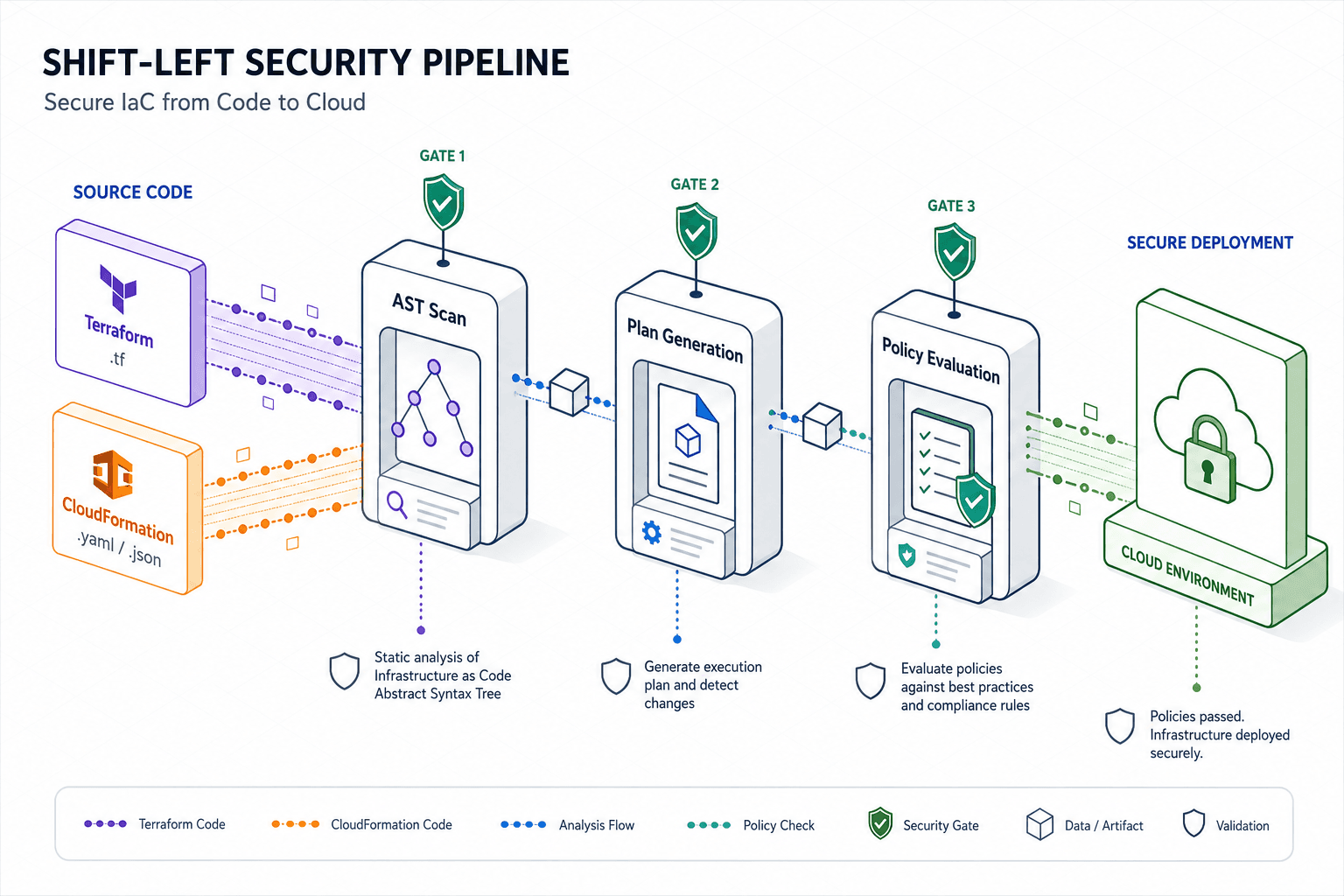
If Alex applies this, the resulting policy attached to the role grants s3:* on all resources. The mechanism of failure here is the absence of a Condition block. In AWS IAM, a policy is a conjunction of Effect, Action, Resource, and Principal. Without Condition, the Action is applied universally to the Resource. A static analysis tool like Checkov or tfsec does not need to deploy this to know it is dangerous; it scans the AST (Abstract Syntax Tree) of the Terraform file. It locates the policy attribute, deserializes the JSON string, and checks if the Action contains wildcards (*) while the Resource also contains wildcards, and if no Condition key exists to restrict the scope.
The mechanism of static analysis relies on parsing the code structure before execution. When Checkov runs, it converts the HCL into an intermediate representation. It traverses the nodes looking for aws_iam_policy resources. It extracts the policy string, parses it as JSON, and evaluates it against a library of rules. Rules such as CKV2_AWS_11 specifically look for "IAM policies should not allow access to all resources." If the parser finds Action = s3:* and Resource = *, it flags the node as a violation. This is a pattern match on the data structure, not a simulation of the cloud environment.
Parsing the Abstract Syntax Tree
The distinction between "checking the code" and "checking the policy" is vital. Tools like tfsec operate by understanding the semantics of the IaC language itself. When tfsec processes a CloudFormation template, it doesn't just look for the word "Allow"; it constructs a logical model of the resource graph.
In a CloudFormation context, the input might look like this:
Resources:
  MyBucket:
    Type: AWS::S3::Bucket
    Properties:
      BucketName: !Sub "my-bucket-${AWS::AccountId}"
  AdminRole:
    Type: AWS::IAM::Role
    Properties:
      AssumeRolePolicyDocument:
        Version: '2012-10-17'
        Statement:
          - Effect: Allow
            Principal:
              Service: ec2.amazonaws.com
            Action: sts:AssumeRole
      Policies:
        - PolicyName: AdminPolicy
          PolicyDocument:
            Version: '2012-10-17'
            Statement:
              - Effect: Allow
                Action: "*"
                Resource: "*"
When tfsec parses this, it resolves the intrinsic functions (like !Sub) to their likely values or marks them as "unknown" depending on the strictness of the scan. However, for the IAM policy, it sees the literal string "*" in both Action and Resource. The tool's internal rule engine then evaluates: IF (Action == "*") AND (Resource == "*") AND (No Condition Exists) THEN Risk = High.
This mechanism allows for immediate feedback. If Alex tries to commit this change to the repository, the static analyzer catches it. The tool does not need to authenticate to AWS to know that Resource = * is dangerous for an IAM policy. It simply validates the data structure against a known set of insecure patterns. This is distinct from runtime security, which would require the policy to be deployed and then monitored for actual usage. Static analysis prevents the deployment of the dangerous pattern entirely.
However, static analysis has a limitation: it cannot see the final rendered state if the logic is complex. If the policy is generated dynamically using local variables or template functions that resolve to * only under specific conditions, a simple regex-based scanner might miss it. This is where the mechanism shifts from simple pattern matching to full policy evaluation.
The Policy-as-Code Enforcement Loop
To bridge the gap between static code structure and dynamic policy intent, we introduce Open Policy Agent (OPA) or Conftest. These tools operate on the principle of "Policy as Code," where the security rules themselves are written in Rego, a declarative language.
The mechanism here involves the inputs object. When a CI pipeline runs a Terraform plan, it produces a JSON output representing the changes. OPA consumes this JSON. The critical step is that OPA does not look at the source code; it looks at the intent of the change.
Suppose we have a Rego policy that enforces "No IAM policies with * actions unless explicitly scoped":
package iam.security

deny[msg] {
  input.resource_changes[_].type == "aws_iam_policy"
  input.resource_changes[_].change.after.action == "*"
  not input.resource_changes[_].change.after.conditions
  msg := "IAM policy must not have wildcard actions without conditions"
}
When the CI pipeline executes, it runs terraform plan -out=plan.out and then terraform show -json plan.out. This JSON output is passed to OPA as the input. OPA evaluates the rule against the input.resource_changes objects.
The difference between Checkov and OPA is the depth of evaluation. Checkov looks at the .tf file. OPA looks at the .json plan output. If the Terraform code uses a module that conditionally sets the action to s3:GetObject based on a variable, Checkov might flag the module as risky because it sees the default or the static structure. OPA, however, sees the final calculated value in the plan JSON. If the variable resolves to a safe value, OPA passes. If the variable resolves to *, OPA blocks the deployment.
However, it is important to note that OPA validates the result of plan generation. If the plan JSON does not contain resolved values due to complex dependencies that prevent a full plan, OPA cannot validate them either. This mechanism ensures that the policy is enforced on the rendered artifact, not just the source template. It catches logic errors that static analysis might miss, such as a if/else block in a Terraform module that inadvertently grants broad permissions in a specific branch.
The GitOps Gatekeeper
The final piece of the mechanism is the integration of these tools into a GitOps workflow. The goal is to create a dependency chain where the merge request cannot be merged unless the security checks pass.
In a typical GitOps setup using GitHub Actions or GitLab CI, the workflow is:
- Developer pushes code to a feature branch.
- CI pipeline triggers on
push. - Step 1: Run
checkov -d .(Static analysis on source). - Step 2: Run
terraform plan -no-colorto generate the plan JSON. - Step 3: Run
opa eval -d policy.rego --input plan.json(Policy-as-Code). - Step 4: If any step returns a non-zero exit code, the pipeline fails, and the PR is blocked.
This creates a "shift-left" mechanism where the security constraint is applied before the code ever touches the production environment. The data flow is strictly linear: Source Code -> AST Scan -> Plan Generation -> Policy Evaluation -> Merge Decision.
If the checkov scan finds a missing Condition in the IAM policy, it fails immediately. The developer receives a comment on the PR pointing to the specific line number in the .tf file. If the opa check fails, it fails on the plan output, meaning the logic was flawed even if the code syntax was correct.
The tradeoff here is development velocity versus security assurance. Running OPA on every plan can add minimal latency to the CI pipeline, especially for large state files. However, the cost of a misconfigured IAM role in production—where an attacker gains AdministratorAccess—is exponentially higher than the seconds added to a CI run.
In practice, the most effective strategy combines both. Use Checkov or tfsec for rapid, high-frequency scanning of the source code to catch obvious typos and missing fields. Use OPA for deep, semantic validation of the rendered plan to catch logical errors and complex conditional logic. This layered approach ensures that the IAM policies generated by your IaC tools adhere to the principle of least privilege before they are ever applied to the cloud.
The mechanism of IaC security is not a single tool, but a pipeline of validations that transform code into a secure artifact. By treating IAM policies as data that must be validated against a strict schema before execution, you prevent the most common vector of cloud compromise: the accidental granting of excessive permissions.
Common Pitfalls
Even with robust tooling, specific pitfalls frequently undermine IaC security.
- Over-reliance on Static Analysis: Static tools scan the source, not the runtime state. They often miss logic errors where variables resolve to wildcards only in specific execution paths. Relying solely on Checkov without a plan-based validator like OPA leaves gaps in coverage.
- Ignoring Intrinsic Functions: In CloudFormation, intrinsic functions like
!Subor!Joincan obscure the actual values. Static analyzers may flag these as "unknown" or incorrectly assume safety, missing cases where dynamic resolution results in overly permissive policies. - Hardcoded Secrets in Policies: While rare in IAM policy documents themselves, developers sometimes inadvertently include credentials or specific ARNs in
policystrings that should be dynamic. This prevents the use of placeholders and forces manual updates, increasing the risk of drift and error.
Practical Takeaways
To effectively secure IaC IAM, adopt these mental models:
- Validate the Rendered State: Treat the Terraform plan JSON or CloudFormation template as the source of truth. Validate what actually gets sent to the cloud API, not just what is written in the editor.
- Least Privilege by Default: Configure your OPA policies to deny by default. Explicitly allow only the specific actions and resources required for a role, rather than trying to list every exception.
- Shift Left Aggressively: Integrate security checks into the local development environment (pre-commit hooks) and the CI pipeline. The faster a developer learns that their policy is too broad, the cheaper the fix.
FAQ
Q: Can OPA replace static analysis tools like Checkov? A: No. OPA validates the rendered plan JSON, which is excellent for logic and variable resolution, but it requires a successful plan generation first. Checkov scans source code directly, catching errors before a plan is even possible. Both are necessary for a complete pipeline.
Q: How do I handle !Sub or !Join functions in CloudFormation with OPA?
A: OPA operates on the input provided. If you pass the raw CloudFormation template, OPA sees the function strings. To validate effectively, you must either resolve these functions in the CI pipeline before passing to OPA, or use a tool that supports CloudFormation intrinsic function resolution during the scan.
Q: What is the performance impact of adding OPA to a CI pipeline? A: OPA evaluation is generally fast, often adding only seconds to the pipeline duration. The latency is proportional to the complexity of the Rego policies and the size of the plan JSON, but it is negligible compared to the time saved by preventing a security breach in production.
Conclusion
Securing Infrastructure as Code requires shifting the validation boundary from syntax correctness to semantic policy enforcement. By combining static analysis of the Abstract Syntax Tree with dynamic policy evaluation of rendered plans within a GitOps pipeline, organizations can effectively prevent privilege escalation vectors before they reach the cloud provider. The integration of tools like Checkov, tfsec, and OPA transforms the CI pipeline into an active gatekeeper, ensuring that least privilege is not just an aspiration but a structural constraint of the deployment process.
Related posts
Implementing Identity Governance with Custom Policy Engines
An examination of implementing identity governance using custom policy engines like OPA, Cedar, and XACML for policy-as-code.
Identity-Driven Kubernetes Access: Beyond RBAC with Gatekeeper and Kyverno
An examination of identity-driven Kubernetes access management using OPA Gatekeeper and Kyverno for enhanced policy-as-code security.
Implementing Attribute-Based Access Control (ABAC) with Spring Security
A technical guide on implementing attribute-based access control (ABAC) using Spring Security and Open Policy Agent for dynamic policy enforcement.