AWS IAM Boundaries, SCPs & ABAC: Advanced Access Control
An examination of AWS IAM policy boundaries, SCPs, ABAC, and conditions for advanced multi-account security.
The Mechanics of AWS IAM Policy Boundaries and Advanced Access Control
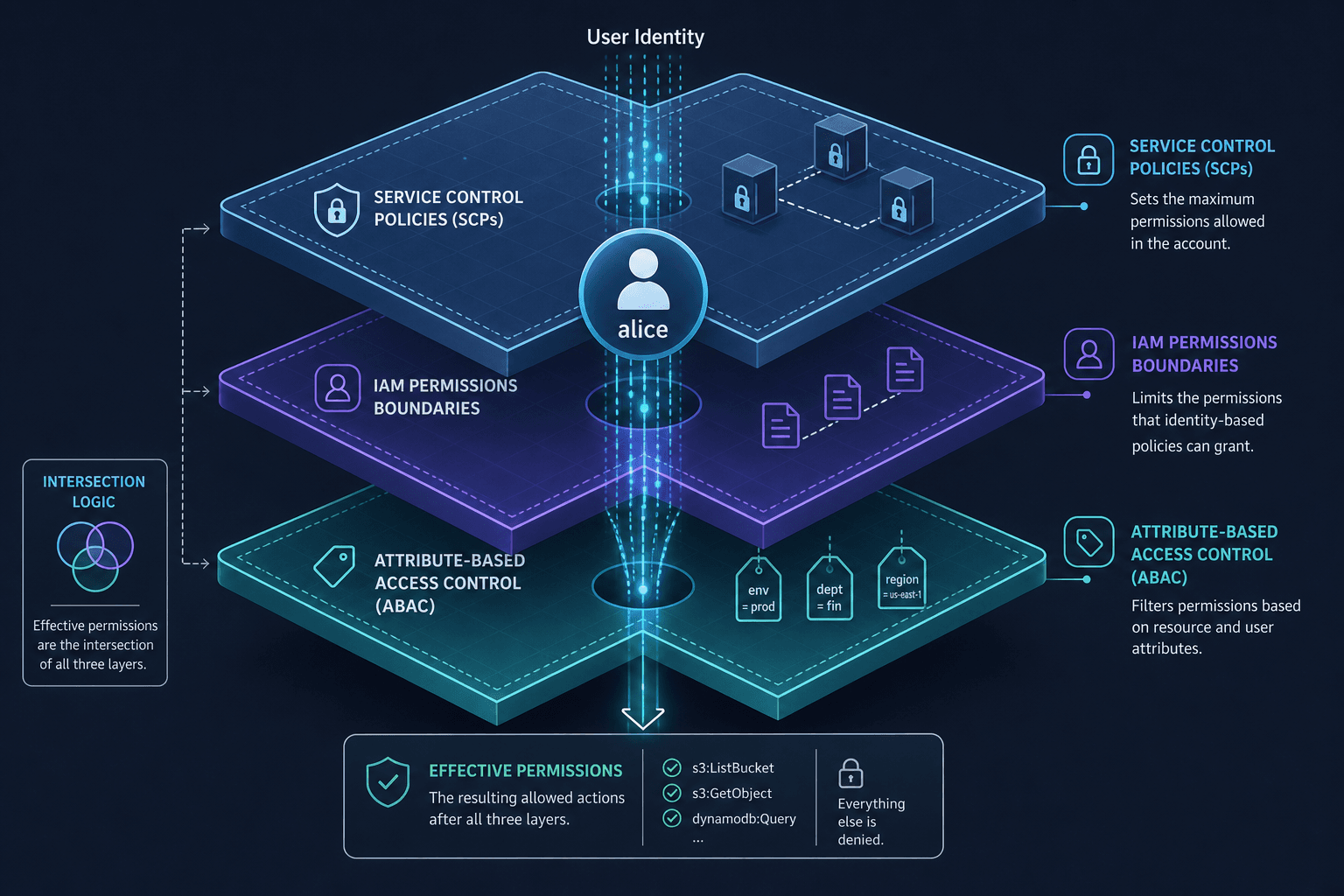
In AWS Identity and Access Management (IAM), the default assumption is often that adding a policy grants access. However, in advanced multi-account environments, granting access is only half the battle; ensuring that access cannot exceed a defined limit is the critical security mechanism. This architecture relies on three distinct enforcement layers: Permissions Boundaries, Service Control Policies (SCPs), and Attribute-Based Access Control (ABAC). These mechanisms do not simply "add" permissions; they constrain or filter the effective permissions of an identity.
As Part 8 of the AWS IAM & Cloud Security Series, this guide examines how these layers interact to enforce strict least-privilege principles across complex organizational structures.
The Intersection Logic of Permissions Boundaries
Consider a scenario where a DevOps engineer, alice, is granted a policy allowing s3:* on all buckets. In a standard setup, alice can delete production data. To prevent this without removing the s3:* permission from her identity policy, you attach a Permissions Boundary to her IAM role.
The Permissions Boundary does not grant permissions; it sets a maximum. The evaluation logic here is an intersection. The effective permissions are calculated as: Effective Permissions = (Identity Policy Permissions) AND (Permissions Boundary Permissions). If the Identity Policy allows s3:* but the Boundary allows only s3:GetObject and s3:PutObject, alice cannot list, delete, or create buckets, regardless of what her identity policy says.
This is distinct from a standard policy statement with a Deny action. A Deny explicitly blocks an action. A Permissions Boundary silently truncates the allowed set. If alice attempts to run s3:DeleteBucket, the engine calculates the intersection, finds that the action is not present in the Boundary, and rejects the request before the action ever reaches the service API.
{
  "Version": "2012-10-17",
  "Statement": [
    {
      "Sid": "MaxS3Access",
      "Effect": "Allow",
      "Action": [
        "s3:GetObject",
        "s3:PutObject",
        "s3:ListBucket"
      ],
      "Resource": "*"
    }
  ]
}
Example: A Permissions Boundary JSON attached to alice.
This mechanism is crucial for delegated administration. It allows a central team to give s3:* to a developer role while ensuring that a future policy update or a copy-paste error cannot accidentally grant iam:* or ec2:TerminateInstances access. The boundary acts as a hard ceiling that cannot be bypassed by any policy attached to that specific entity.
Service Control Policies: The Organization-Level Cap
While Permissions Boundaries apply to individual users or roles, Service Control Policies (SCPs) operate at the AWS Organizations level. An SCP is an organization-wide policy that controls the available permissions for all accounts in the organization.
The evaluation logic for an SCP is different from a Permissions Boundary. An SCP acts as a filter on the entire account's permissions. The effective permissions for any principal in an account are calculated as: Effective Permissions = (Account Policies) AND (SCPs).
If an SCP denies iam:*, no user in that account, including the root user, can create IAM users or modify policies, unless the SCP explicitly allows it. This creates a "max" policy. Even if an account has a policy allowing ec2:*, an SCP that denies ec2:TerminateInstances will block that action for everyone in the account.
Consider a multi-account strategy where you have a "Security" account and a "Production" account. You might apply an SCP to the Production OU (Organizational Unit) that explicitly denies delete-* actions on RDS instances. This ensures that even if a developer in the Production account has rds:* permissions via their identity policy, they cannot delete databases.
The critical distinction here is scope. A Permissions Boundary is attached to a specific IAM entity (user/role). An SCP is attached to an Organizational Unit (OU) or the entire Organization. If you attach an SCP to an OU, it applies to every account within that OU and all child OUs. This is the primary mechanism for enforcing "governance" across a large enterprise, ensuring that no account can ever violate specific compliance rules, such as disabling CloudTrail or enabling public S3 buckets.
Attribute-Based Access Control (ABAC)
As organizations scale, managing permissions via Identity-Based policies becomes unmanageable. You end up with hundreds of policies listing specific ARNs for every bucket, database, or instance. Attribute-Based Access Control (ABAC) solves this by binding permissions to tags on resources and principals.
Instead of saying "Allow s3:GetObject on arn:aws:s3:::prod-data-001", ABAC allows you to say "Allow s3:GetObject if the resource tag Environment matches the principal's tag Environment".
The mechanism relies on the Condition key in the policy, specifically using functions like StringEquals or StringLike against aws:PrincipalTag and aws:ResourceTag. When a request is made, the authorization engine evaluates the tags on the user (from their IAM role or directory) and the tags on the resource. If the tags match the condition, the permission is granted.
{
  "Version": "2012-10-17",
  "Statement": [
    {
      "Sid": "AllowAccessToMatchingEnvironment",
      "Effect": "Allow",
      "Action": "s3:GetObject",
      "Resource": "arn:aws:s3:::*",
      "Condition": {
        "StringEquals": {
          "aws:PrincipalTag/Environment": "aws:ResourceTag/Environment"
        }
      }
    }
  ]
}
Example: ABAC policy allowing S3 GetObject only when the user's Environment tag matches the resource's Environment tag.
This reduces the operational overhead significantly. When a new resource is created with the tag Environment=Production, it automatically inherits the correct access controls for users tagged as Production. You do not need to update the policy. This is particularly effective for dynamic environments like Kubernetes or auto-scaling groups where resource names and ARNs change frequently.
However, this introduces a dependency on tagging discipline. If a developer creates a resource without the required tags, the ABAC policy will not grant access, potentially breaking applications. Therefore, ABAC is best used in conjunction with strict tagging governance policies enforced via SCPs.
The Evaluation Flow: Putting It All Together
To understand how these layers interact, we must trace the path of a single request through the AWS Authorization Engine. Let's assume alice (in the Production OU) tries to delete an S3 bucket named prod-logs.
- Explicit Deny Check: The engine first checks for explicit denies in the Identity Policy, Resource Policy, and SCP. If any layer contains an explicit
Deny, the request is immediately rejected. - Permission Boundary Check: If
alicehas a Permissions Boundary attached, the engine calculates the intersection of her Identity Policy and the Boundary. If the Boundary does not includes3:DeleteBucket, the request is denied here, even if the Identity Policy allows it. - SCP Check: The engine checks the SCPs attached to the
ProductionOU. If the SCP deniess3:DeleteBucketfor the entire account, the request is denied. - Policy Condition Evaluation: If the request passes the structural checks above, the engine evaluates the conditions within the Identity and Resource policies. This includes ABAC logic. If
alicehas the tagEnvironment=Devbut the resource hasEnvironment=Prod, the condition fails, and access is denied. - Final Allow: Only if all previous checks pass (no denies, allowed by boundary, allowed by SCP, and ABAC conditions match) is the action allowed.
This flow demonstrates that SCPs and Permissions Boundaries are not alternatives; they are complementary layers. SCPs provide the organization-wide "max" ceiling, while Permissions Boundaries provide the account-level "max" ceiling for specific entities. ABAC provides the logic for dynamic, fine-grained access within those ceilings. For more details on the evaluation order, see the IAM User Guide.
Conclusion
Advanced access control in AWS is not about writing more permissive policies; it is about defining precise limits. Permissions Boundaries ensure that no single role exceeds its intended scope, SCPs ensure that no account violates organizational compliance, and ABAC ensures that access scales dynamically with resource metadata. By understanding the intersection logic of these mechanisms, architects can build systems that are secure by design, where the "least privilege" principle is enforced by the infrastructure itself rather than relying on human discipline alone.
Common Pitfalls
- Misconfigured Boundaries: Attaching a Permissions Boundary that is too permissive (e.g.,
s3:*) effectively nullifies the boundary's purpose, as the identity policy can still grant excessive permissions up to that ceiling. - Tag Hygiene Failures: Relying on ABAC without enforcing mandatory tagging via SCPs leads to broken applications when resources are created without the required attributes, causing unintended access denials.
- SCP Scope Errors: Applying SCPs to the root of an organization instead of specific Organizational Units (OUs) can inadvertently lock out legitimate operations in accounts that should have more flexibility.
Practical Takeaways
- Boundaries vs. SCPs: Use Permissions Boundaries for account-level delegation and SCPs for organization-wide governance.
- ABAC Efficiency: Leverage ABAC to reduce policy complexity in dynamic environments, but pair it with strict tagging enforcement.
- Evaluation Order: Remember that explicit Denies always win, followed by the structural limits of Boundaries and SCPs, and finally the conditional logic of ABAC.
FAQ
Q: Can an SCP override a Permissions Boundary? A: Yes. An SCP acts as a filter on the entire account. Even if a Permissions Boundary allows an action, an SCP attached to the account or OU that denies that action will prevent it from being executed.
Q: What happens if I use ABAC without tagging my resources?
A: If an ABAC policy requires a specific tag (e.g., Environment) and the resource lacks that tag, the condition evaluates to false, and access is denied. This is why tagging governance is critical.
Q: Do I need both Permissions Boundaries and SCPs? A: Generally, yes. SCPs provide a safety net for the whole organization, while Permissions Boundaries allow for finer-grained control over specific roles within an account, especially in delegated administration scenarios. For further reading on these interactions, consult the AWS Organizations User Guide.
Related posts
Least Privilege in Practice
A practical guide to implementing least privilege in AWS using IAM Access Analyzer, policy generation, and condition keys for secure access management.
Implementing Dynamic Authorization with Cedar Policy Language (AWS)
A technical overview of implementing dynamic authorization using Cedar policy language and AWS Verified Permissions with ABAC.
IAM for Data Lakes: Securing Big Data
An examination of identity and access management strategies for data lakes, covering Apache Ranger, Lake Formation, and column-level security.