Implementing Dynamic Authorization with Cedar Policy Language (AWS)
A technical overview of implementing dynamic authorization using Cedar policy language and AWS Verified Permissions with ABAC.
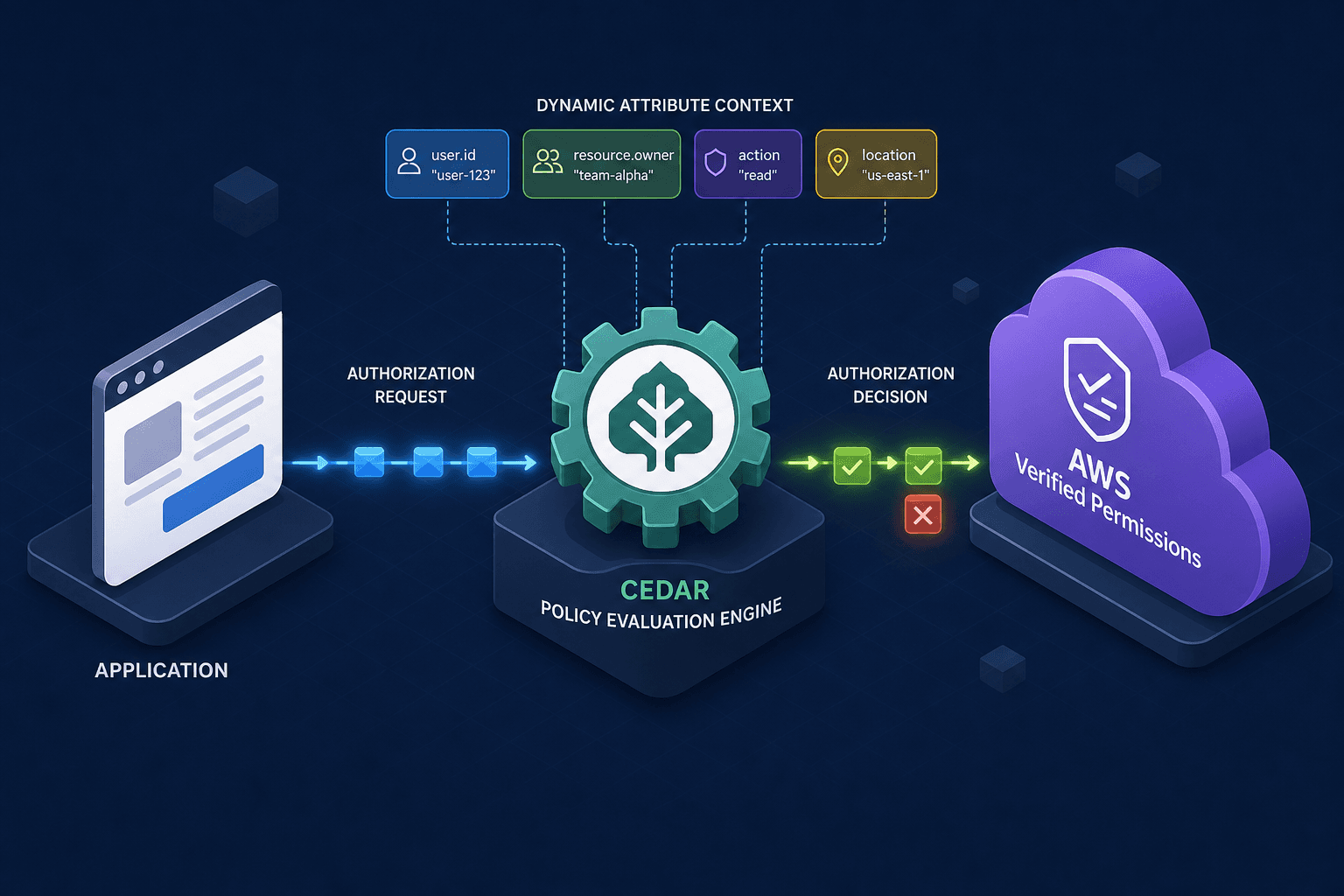
Static access control models fail when the number of users and resources scales. Hardcoding permissions for every user-resource pair creates an unmanageable matrix. AWS Verified Permissions solves this by introducing a dynamic authorization engine built on the Cedar policy language. Instead of asking "Who is allowed?", the system asks "Does this principal have this relationship to this resource in this specific context?" This shift enables Attribute-Based Access Control (ABAC), where permissions are derived from the attributes of the principal, the resource, and the environment at the moment of the request.
The Evaluation Mechanism
The core mechanism of AWS Verified Permissions is a stateless evaluation engine. When an application needs to decide if an action is permitted, it sends a query to the AVP API containing four distinct components: the Principal (who is acting), the Action (what they want to do), the Resource (what they want to act upon), and the Context (the runtime environment data).
The engine does not store state between calls. It retrieves the active policy set and the entity store snapshot. It then compiles the Cedar policy into a logical representation and evaluates it against the provided inputs. If the policy logic resolves to true, the response is Authorized; otherwise, it is Unauthorized. This mechanism ensures that access decisions are consistent with the latest policy definitions and the most recent attribute data without requiring a database of individual permissions.
Consider a scenario where Alice requests access to a specific document. A traditional IAM policy might check if Alice is in the "Finance" group. A dynamic approach checks if Alice's department attribute matches the document's owner_department attribute. The engine performs this comparison at runtime, allowing access rules to adapt automatically as users change roles or documents move between departments.
Constructing the Data Model
To enable dynamic checks, you must first define a schema that describes your entities and their relationships. In Cedar, this is done using a namespace definition. You define entity types, such as User, Document, and Department. Each type has attributes. For example, a User entity has attributes like name (String) and department (String). A Document entity might have title, sensitivity, and owner_department.
Crucially, you define relationships to link these entities. A relationship like is_member_of connects a User to a Department. This allows the policy engine to traverse the graph. If you need to know if a user belongs to a department, you don't look up a static list; you query the relationship path.
namespace Example {
  // Define the User entity with attributes and a relationship
  entity User is (department: String) {
    relationship is_member_of -> Department
  }

  // Define the Document entity
  entity Document is (owner_department: String) {
    relationship owned_by -> User
  }

  // Define the Department entity
  entity Department {
    // Attributes like name are implicit or explicit depending on use case
  }
}
This schema allows the system to resolve "who" and "what" dynamically. If Alice moves from "Engineering" to "Sales," you update her department attribute and the is_member_of relationship. The next time she requests access, the engine traverses the new relationship graph without requiring a policy update.
Writing the Policy Logic
The policy language itself is declarative. You write policies that describe what is allowed, using Cedar's syntax to reference attributes and relationships. The power lies in the if condition, which allows for fine-grained logic based on context.
Imagine a policy where a user can read a document only if they belong to the same department as the document's owner. The policy references the principal (the user making the request) and the resource (the document). It uses the is_member_of relationship to traverse the department hierarchy.
// Policy: Allow reading documents within the same department
permit(principal, action, resource)
  if principal.is_member_of.Department[?department == resource.owner_department];
In this snippet, principal.is_member_of.Department correctly traverses the relationship to the Department entity. The filter [?department == resource.owner_department] checks if any of those departments match the document's owner department. If the condition is true, the permit statement is satisfied.
This approach eliminates the need for explicit allow lists. If a new document is created for a user in "Marketing," the policy automatically applies because the check is based on the owner_department attribute, not the document ID. This is the essence of dynamic authorization: the rule remains constant, but the outcome varies based on the data. This capability is a hallmark of Amazon Cedar's design philosophy, allowing for highly flexible access control.
For more complex scenarios, such as restricting access to high-sensitivity documents only to managers, you can add additional conditions.
// Policy: Restrict high-sensitivity docs to managers
permit(principal, action, resource)
  if resource.sensitivity == "High" && principal.role == "Manager";
This composite condition ensures that even if the department matches, the role attribute must also satisfy the requirement. The policy engine evaluates all if conditions as a logical AND. If any condition fails, the permit is denied.
Runtime Integration and Context
Implementing dynamic authorization requires the application to pass the necessary identifiers to the AVP API. Contrary to some misconceptions, the application should not pass static entity attributes (like department or role) in the context parameter. Instead, the application passes the Principal ID and the Resource ID. AWS Verified Permissions internally queries the Entity Store to resolve the current attributes associated with those IDs.
When a user makes an API call, the application identifies the user via an ID token. It extracts the user's ID and the resource ID. These identifiers are packaged into the request sent to the IsAuthorized API call. The context parameter should be reserved strictly for transient runtime data that does not exist in the entity store, such as ip_address, request_time, or device_type.
# Pseudocode for IsAuthorized call
def check_access(user_id, document_id, action):
    # Pass only IDs; AVP resolves attributes internally
    principal_id = user_id
    resource_id = document_id

    # Optional: Only include transient runtime data in context
    context = {
        "ip_address": "192.168.1.1",
        "request_time": "2024-05-21T10:00:00Z"
    }

    # Call AWS Verified Permissions
    response = verified_permissions.is_authorized(
        policy_store_id="my-store-id",
        principal=principal_id,
        action=action,
        resource=resource_id,
        context=context
    )

    return response.decision == "ALLOW"
This architecture decouples the authorization logic from the application logic. The application focuses on identifying principals and resources, while AVP focuses on evaluating the Cedar policy against the authoritative entity store. This separation improves security posture because the policy logic is centralized and versioned, reducing the risk of inconsistent implementations across different microservices and ensuring that attribute resolution always uses the source of truth.
Conclusion
Dynamic authorization with AWS Verified Permissions and Cedar shifts the paradigm from static role assignment to contextual attribute evaluation. By defining a robust data model and writing policies that leverage relationships and attributes, organizations can build access control systems that scale with their data. The mechanism ensures that every access decision is grounded in the current state of the system, providing a flexible and secure foundation for cloud-native applications. This approach is particularly effective for multi-tenant environments where strict isolation is required but rigid role definitions are impractical.
Common Pitfalls
When implementing dynamic authorization, developers often stumble into specific traps that can compromise security or performance.
- Confusing Context with Entity Attributes: Do not pass static user attributes (like
departmentorrole) in thecontextparameter. The engine expects IDs in the request and will look up attributes from the Entity Store. Passing them manually creates stale data risks and bypasses the integrity of the store. - Improper Relationship Traversal: Ensure you are traversing relationships correctly in your policy syntax. A common error is attempting to filter attributes directly on a relationship without navigating to the target entity (e.g., missing
.Departmentin the path). - Over-reliance on Static Lists: Avoid trying to maintain static allow lists within policies. The power of Cedar lies in evaluating relationships and attributes at runtime. If you find yourself hardcoding IDs in policies, you are likely misusing the model.
Practical Takeaways
To succeed with dynamic authorization, adopt these mental models:
- Identity is Dynamic: Treat user identity as a set of evolving attributes and relationships, not a fixed role. Your policies should reflect this fluidity.
- Source of Truth: Always trust the Entity Store for attribute data. The authorization service is a query engine over this data, not a storage repository for user profiles.
- Decouple Logic: Keep your application logic focused on business flow and identity extraction, leaving the complex "who can do what" logic entirely to the Cedar policy engine.
FAQ
Q: Can I use AWS Verified Permissions without an external Entity Store? A: Yes, AWS Verified Permissions includes a built-in Entity Store for smaller applications or prototyping. However, for large-scale production systems, integrating with an existing identity provider or database is often preferred to maintain a single source of truth.
Q: How does Cedar handle negative permissions (denials)?
A: Cedar uses a "deny overrides" model. If a forbid statement matches a request, it takes precedence over any permit statements. This allows you to explicitly block access in specific scenarios, such as revoking access for compromised accounts.
Q: Is Cedar compatible with other cloud providers? A: Cedar is an open-source policy language developed by AWS. While the engine is open, the AWS Verified Permissions service is specific to AWS. However, the Cedar policy syntax is portable, meaning you could theoretically implement a Cedar engine on other platforms if you build the infrastructure to support it.
Related posts
AWS IAM Boundaries, SCPs & ABAC: Advanced Access Control
An examination of AWS IAM policy boundaries, SCPs, ABAC, and conditions for advanced multi-account security.
Least Privilege in Practice
A practical guide to implementing least privilege in AWS using IAM Access Analyzer, policy generation, and condition keys for secure access management.
IAM for Data Lakes: Securing Big Data
An examination of identity and access management strategies for data lakes, covering Apache Ranger, Lake Formation, and column-level security.