Understanding OAuth2 Incremental Authorization
A technical overview of incremental authorization in OAuth2 to improve scope management and consent user experience.
The standard OAuth 2.0 authorization flow was originally designed around a single, static transaction where a user logs in, reviews a list of requested permissions, and grants them all simultaneously. This "all-or-nothing" model often creates a friction point between an application's functional requirements and a user's willingness to trust it with sensitive data. When an app requests access to email, contacts, and calendar data in one go, users frequently grant access out of convenience rather than genuine intent, leading to "consent fatigue."
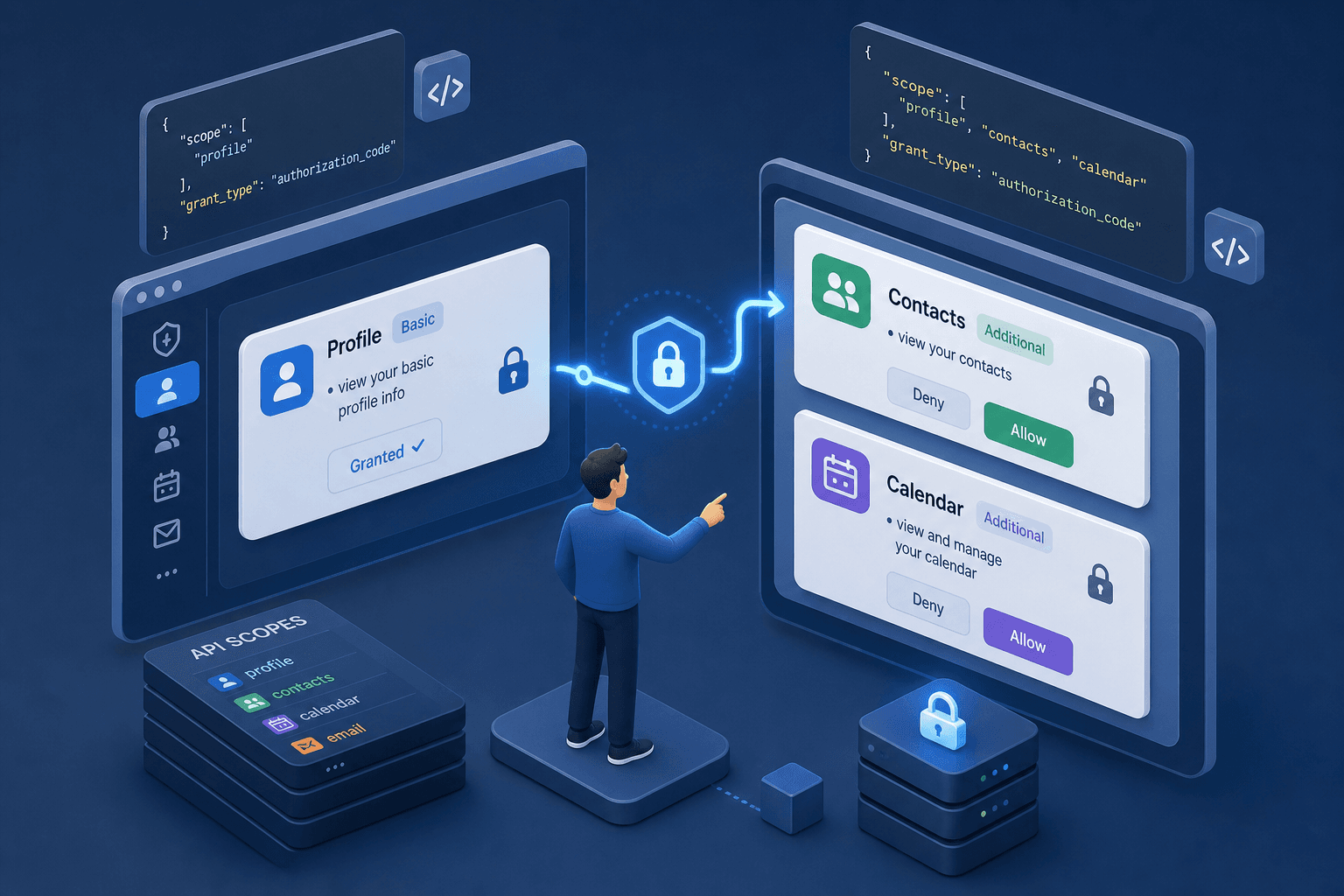
Incremental authorization addresses this by decoupling scope granting from the initial login event. Instead of requesting every permission upfront, the application requests only the minimum scope required for the current action. If a user later attempts to use a feature requiring additional permissions, the application triggers a targeted consent request for that specific scope only. This mechanism preserves the user's existing access token while introducing a targeted prompt for the missing permission, thereby optimizing scope management and improving the overall consent user experience.
The Consent Fatigue Mechanism
In a traditional OAuth 2.0 flow, the scope parameter in the initial authorization request acts as a binding contract for the entire session. Consider an application named "SocialSync" attempting to connect a user's Google account. If SocialSync requests https://www.googleapis.com/auth/userinfo.profile, https://www.googleapis.com/auth/contacts.readonly, and https://www.googleapis.com/auth/calendar.readonly in the first request, the user is forced to decide for all three permissions simultaneously.
If the user only needs profile data to log in, but the app also asks for calendar access, the user faces a binary choice: grant all (potentially exposing privacy) or deny (losing access to the service). This static binding is the root cause of poor UX and security risks. Users often assume the "Grant" button covers only the visible text, failing to realize that the scope string defines the full extent of the API access. Psychologically, a long list of permissions triggers a "defense mechanism" where users either blindly click "Allow" to proceed or abandon the app entirely to avoid the perceived risk, neither of which represents informed consent.
The mechanism of incremental authorization relies on the fact that the scope parameter is mutable in subsequent authorization requests. The Authorization Server does not require the user to re-enter their password if they are already authenticated. Instead, it checks the current session state and the requested scope difference. If the new scope is a superset of the current granted scope, the server prompts the user specifically for the new permissions.
The Progressive Request Flow
The core technical mechanism involves detecting a missing scope and redirecting the user back to the authorization endpoint with an updated scope string. The critical component here is the prompt parameter. By setting prompt=consent, the application tells the Authorization Server to force a consent dialog, even if the user is already logged in.
Imagine a user, Alice, logging into "SocialSync". The application initially requests profile. Alice grants this. Later, she clicks "Import Contacts". The application detects it lacks the contacts.readonly scope. It constructs a new authorization URL:
GET https://accounts.google.com/o/oauth2/v2/auth?
  client_id=YOUR_CLIENT_ID&
  redirect_uri=https://socialsync.example.com/callback&
  response_type=code&
  scope=profile%20contacts.readonly&
  prompt=consent
Notice that the scope parameter now includes both profile and contacts.readonly. The Authorization Server recognizes that Alice already has profile. It compares the requested set against the currently granted set. Since contacts.readonly is new, it displays a consent screen showing only the new permission: "SocialSync wants to read your contacts." Alice clicks "Allow." The server issues a new authorization code.
When the application exchanges this code for a token, the resulting access token contains the union of all previously granted scopes plus the new ones. The refresh_token remains valid, allowing the application to silently obtain new tokens without further user interaction, provided the total scope does not exceed what was granted.
This mechanism prevents the "login wall" effect. Without prompt=consent, some servers might silently skip the new scope request if they assume the user has already consented to the broader set, or they might return an error. Explicitly forcing the consent dialog ensures the user is aware of the expansion of permissions.
State Management and Token Refresh
Implementing incremental authorization requires robust state management on the client side. The application must track which scopes have been successfully granted. If the application attempts to access an API endpoint requiring a scope it does not possess, the API returns an error. Specifically, invalid_scope applies when the requested scope is unknown or syntactically invalid, whereas insufficient_scope (or access_denied) applies when the scope is known but was not previously granted by the user.
The application should catch this error and trigger the incremental flow. However, a critical edge case exists: what if the user denies the new scope? The application must handle the rejection gracefully, perhaps by disabling the feature that requires the permission, rather than crashing or repeatedly spamming the user.
Furthermore, the token lifecycle changes slightly. In the initial flow, the access_token is short-lived, and the refresh_token is long-lived. In incremental flows, the refresh_token is usually persistent unless the user revokes access entirely. The application must ensure that the refresh_token used to fetch a new access_token still has the necessary scopes. If the user previously granted profile and contacts, the refresh_token issued after the second step covers both.
It is important to note that the refresh_token itself does not change its identity, but the set of scopes embedded in the new access_token derived from it will reflect the latest grant. The application cannot simply assume that a refresh_token obtained early in the session will grant new scopes; it must go through the authorization flow again to get a token that includes the new permissions.
Implementation Strategy
To visualize this, consider the actors: Alice (User), "SocialSync" (Client), and "Google Identity" (Authorization Server).
- Initial Login: Alice opens SocialSync. The app requests
profile. Alice authenticates and grantsprofile. The app receives a token withscope=profile. - Feature Trigger: Alice clicks "Add to Calendar". The app checks its local state or the token payload and sees
scopelackscalendar.readonly. - Redirect: The app redirects Alice to the authorization endpoint with
scope=profile%20calendar.readonlyandprompt=consent. - Consent: The Identity Server shows a prompt: "SocialSync wants to read your calendar events." Alice approves.
- Token Exchange: The app receives a new authorization code, exchanges it, and receives a new access token with
scope=profile calendar.readonly. - API Call: The app calls the Calendar API using the new token.
This flow is defined in the OAuth 2.0 specification, specifically regarding the flexibility of the scope parameter and the prompt parameter (Source: https://datatracker.ietf.org/doc/html/rfc6749). While the RFC does not mandate "incremental authorization" as a named feature, the mechanics of requesting a superset of scopes with a prompt are the standard way to achieve it. The prompt parameter mechanics are further clarified in RFC 7009 (OAuth 2.0 Security Best Current Practice).
Some providers, like Google, explicitly document this pattern as "Incremental Authorization" (Source: https://developers.google.com/identity/protocols/oauth2/scopes#incremental-auth). They advise that developers should not request unnecessary scopes initially. Google's implementation ensures that if a user has already granted a scope, the consent screen focuses only on the new scope, preventing the user from seeing a long, intimidating list of permissions they have already approved.
A common misconception is that incremental authorization allows an app to bypass the user's consent entirely. This is false. Every time a new scope is requested, the user must explicitly grant it. The prompt=consent parameter ensures this. If an app tries to sneak in a new scope without a prompt, the server will likely ignore the new scope in the token response, or the token will be issued with the old scope only, causing the API call to fail.
Conclusion
Incremental authorization is not a new protocol, but a usage pattern that leverages existing OAuth 2.0 mechanisms to solve a UX and security problem. By breaking the scope request into logical steps, applications reduce the cognitive load on the user and minimize the attack surface of a compromised token. The mechanism relies on the prompt parameter to force a targeted consent dialog and the scope parameter to define the incremental expansion of permissions.
Developers must implement logic to detect missing scopes, construct the correct redirect URLs, and handle the token exchange for the expanded scope set. This approach aligns with the principle of least privilege, ensuring users only grant access when a specific feature demands it.
The tradeoff is implementation complexity. The application must manage state, handle errors, and orchestrate multiple redirects. However, the cost of building this logic is far lower than the cost of losing user trust due to broad, upfront permission requests. For any application interacting with sensitive user data, incremental authorization is the recommended standard for scope management.
FAQ
Can a user revoke a specific scope? Generally, no. Most OAuth 2.0 implementations allow users to revoke access to the entire application or specific scopes via the provider's dashboard, but the application itself cannot dynamically remove a granted scope from an existing token without the user initiating a new consent flow or the token expiring.
Does incremental authorization change the token format? No. The structure of the access token (e.g., JWT or opaque string) remains the same. The only difference is the content of the token's payload or metadata, which will include the union of all scopes granted across the different consent dialogs.
What happens if a user denies a scope in an incremental flow? The application receives an error indicating the scope was not granted. The application must handle this gracefully, typically by disabling the feature that requires the denied scope, rather than retrying the request immediately or blocking the user from accessing other parts of the app.
Common Pitfalls
- Silent scope escalation: Failing to use
prompt=consentwhen expanding scopes can lead to the server silently ignoring the new scope request if it assumes the user has already consented, resulting in an access token that lacks the necessary permissions. - Token refresh race conditions: Attempting to use a
refresh_tokento fetch a newaccess_tokenthat includes newly requested scopes without a fresh consent dialog will fail, as the refresh token only grants the scopes present at the time of its creation. - Over-requesting scopes: Requesting a superset of scopes in a single incremental step (e.g., asking for
contactsandcalendartogether) defeats the purpose of incremental authorization and reintroduces consent fatigue.
Practical Takeaways
- Always check the current scope set against the required scope before triggering a redirect.
- Use
prompt=consentexplicitly to force a user review of new permissions. - Handle
insufficient_scopeerrors gracefully by disabling features rather than spamming the user.
Related posts
OAuth 2.0 Fundamentals: Grant Types Explained Simply
A clear explanation of OAuth 2.0 grant types including authorization code, client credentials, and PKCE for secure API access.
Understanding JWKS: Rotating Signing Keys Gracefully
An examination of JSON Web Key Set (JWKS) mechanisms for securely rotating signing keys and verifying JWTs without service interruption.
API Security Best Practices: Rate Limiting, JWT, and OAuth2 Scopes
Examination of API security best practices including rate limiting, JWT, and OAuth2 scopes to protect against common vulnerabilities.