Common OAuth2 Implementation Mistakes and How to Avoid Them
An examination of common OAuth2 mistakes, anti-patterns, and security issues with guidance on implementation best practices.
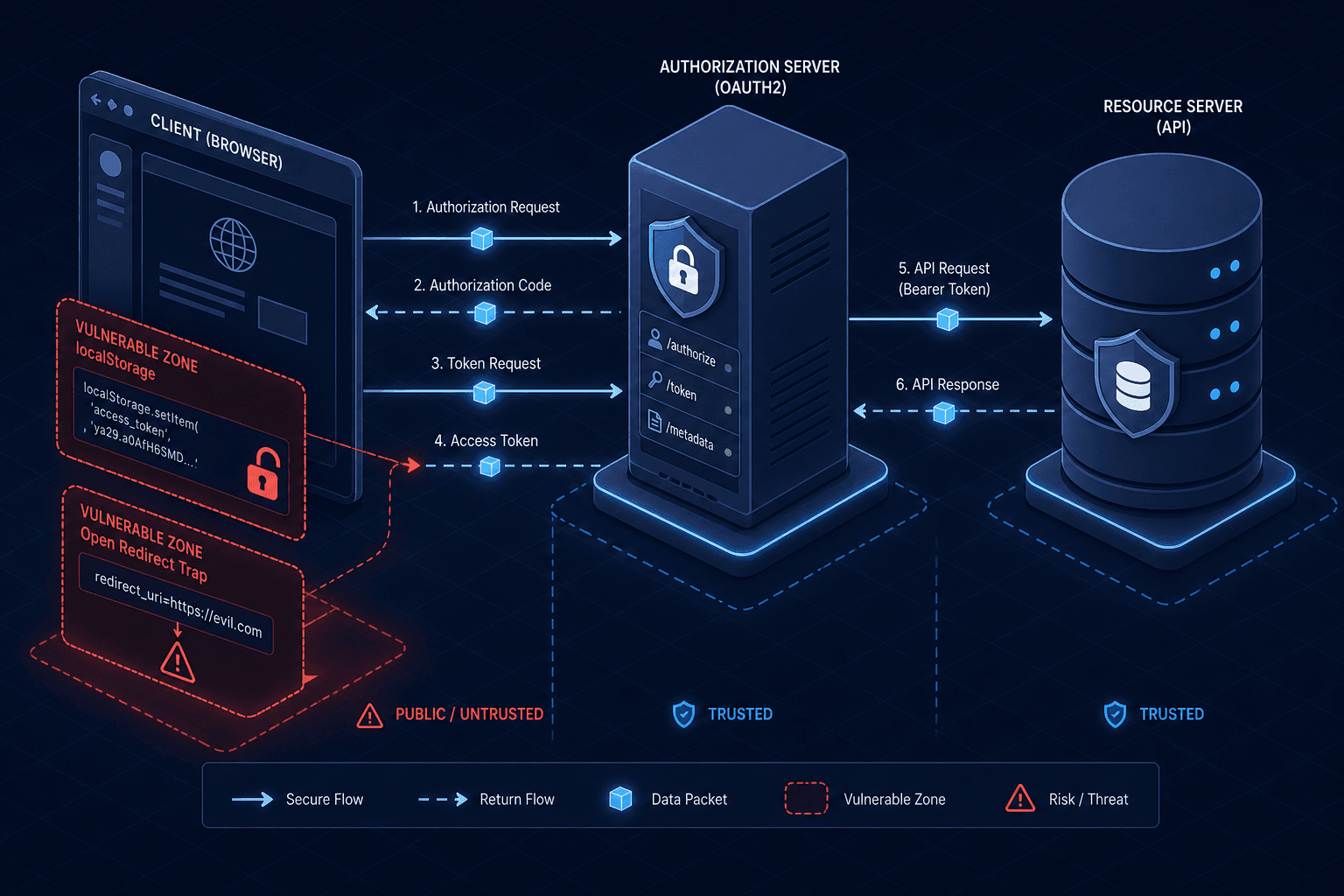
The most dangerous assumption in OAuth2 implementation is treating the protocol as a simple "login button." It is not. OAuth2 is a framework for delegating authorization, not an authentication protocol itself. When developers conflate these two concepts, they introduce mechanism-level flaws that bypass security controls entirely. The following analysis dissects four major failure modes, moving from the cryptographic handshake to the browser's memory management.
The PKCE Mechanism: Why State is Not Enough
In the standard Authorization Code Flow, a client generates a random state parameter to prevent Cross-Site Request Forgery (CSRF). This state value is stored server-side and validated upon callback. This works perfectly for confidential clients (server-side apps) because the client secret acts as a secondary barrier. However, this mechanism fails catastrophically for public clients, such as Single Page Applications (SPAs) running in a browser, because they cannot securely store a secret.
If a public client relies solely on state, an attacker can inject a malicious state value into the user's session or exploit a race condition. The real vulnerability emerges when the attacker intercepts the authorization code and exchanges it for a token. Without additional binding, the server cannot distinguish between the legitimate user's request and the attacker's stolen code.
The solution is the Proof Key for Code Exchange (PKCE), defined in RFC 7636. PKCE introduces a code_verifier—a high-entropy random string generated by the client—and a code_challenge, which is a hashed version of that verifier sent during the initial authorization request.
Consider this scenario:
- Client (Browser): Generates a
code_verifier(e.g.,random_string_123) and computes its SHA-256 hash (code_challenge). - Request: Sends
code_challenge=hash_valueto the Authorization Server. - Callback: The user returns. The client sends the
code_verifierback with the token exchange request. - Verification: The Authorization Server hashes the received
code_verifierand compares it to the storedcode_challenge.
If an attacker steals the authorization code but lacks the code_verifier (because it never left the client's browser), the hash comparison fails, and the token exchange is rejected. This mechanism ensures that only the client that initiated the flow can complete it, even if the code is intercepted.
GET /authorize?response_type=code&client_id=xyz&redirect_uri=https://app.com/callback&code_challenge=S4dS...&code_challenge_method=S256Without PKCE, public clients are effectively inviting attackers to replay captured codes. The OAuth 2.0 specification (RFC 6749) recommends PKCE for public clients, and major providers like Google and GitHub require it for public clients.
Token Storage: The Browser Memory Boundary
Once a token is issued, where does it live? The choice between localStorage and HttpOnly cookies dictates the entire threat model.
Storing an Access Token in localStorage is a prevalent anti-pattern. localStorage is accessible to any JavaScript running in the page context. If an attacker successfully executes a Cross-Site Scripting (XSS) payload—a common vector in modern web apps—they can execute localStorage.getItem('access_token') and exfiltrate the token. Since the token is often valid for an hour, the attacker has a full hour of unauthorized access.
Conversely, storing the token in a cookie marked with the HttpOnly flag prevents JavaScript from reading it. However, this introduces a new requirement: the browser must send the cookie automatically, which triggers Cross-Site Request Forgery (CSRF) risks if not handled correctly.
The correct mechanism involves a hybrid approach:
- Access Token: Stored in memory (JavaScript variable) only for the duration of the session, never in persistent storage.
- Refresh Token: Stored in an
HttpOnly,Secure,SameSite=Strictcookie.
When the SPA needs to call an API, it sends the Access Token in the Authorization: Bearer <token> header. If the Access Token expires, the SPA makes a silent request to a refresh endpoint. The browser automatically attaches the HttpOnly Refresh Token cookie. The server validates the cookie and issues a new Access Token.
This separation ensures that even if an XSS vulnerability exists, the attacker cannot steal the Refresh Token (which grants new access tokens) because they cannot read the cookie. They also cannot call the refresh endpoint because they do not possess the cookie required to authenticate the request.
Redirect URI Validation: The Open Redirect Trap
The Authorization Server must strictly validate the redirect_uri parameter. A common mistake is allowing the client to pass a dynamic or wildcard URL, or failing to validate the URL against a pre-registered allowlist.
Consider a client registered with https://app.com/callback. If the Authorization Server accepts https://attacker.com/steal-code?code=... without checking the allowlist, the flow is compromised. The attacker can craft a link that redirects the user's browser to their own server, capturing the authorization code.
The mechanism for mitigation is exact string matching or subdomain matching (depending on the policy) performed before the authorization page renders. The server must reject any request where the redirect_uri does not match a registered entry for that client_id.
Furthermore, the redirect_uri must be HTTPS. Allowing HTTP redirects exposes the authorization code to network sniffing on public Wi-Fi or compromised routers. While the core protocol specification (RFC 6749) defines the mechanics of the redirect, general security best practices and IETF Security Considerations mandate that authorization codes be transmitted securely, making HTTPS a de facto requirement for the final leg of the transmission.
Scope Creep and Token Rotation
Developers often request the offline_access scope by default, assuming it is necessary for "remember me" functionality. This is a significant error. offline_access grants a Refresh Token, which can be used indefinitely to issue new Access Tokens. If the Refresh Token is leaked, the attacker has persistent access.
The mechanism for limiting this risk is the principle of least privilege. The client should only request scopes necessary for the immediate action. If a user needs to sync data, request read:data. If they need to write, request write:data. Never request * or offline_access unless there is a verified business need for background processing.
Additionally, implementing Token Rotation is essential for high-security environments. Instead of issuing a static Refresh Token, the Authorization Server issues a new Refresh Token with every rotation, invalidating the old one. This creates a "one-time-use" mechanism for the refresh token.
If an attacker steals a Refresh Token, they can use it once. When the legitimate user attempts to use their (now invalidated) token, the server detects the reuse and revokes both tokens, alerting the system to the compromise. This limits the window of opportunity for an attacker to a single request.
Conclusion
OAuth2 is a protocol of trust boundaries. When you store tokens in localStorage, you break the boundary between your application and malicious scripts. When you skip PKCE, you break the boundary between the user and the attacker. When you ignore scope limits, you break the boundary between temporary access and persistent compromise.
The path to a secure implementation is not about adding more layers of encryption; it is about respecting the protocol's state machine. Validate every input, bind every request with a challenge, and ensure that no secret leaves the browser without a mechanism to prove the sender's identity.
Key Takeaways
- Enforce PKCE for Public Clients: Never rely on
statealone for SPAs; use PKCE to bind the authorization code to the specific client instance. - Isolate Token Storage: Keep Access Tokens in memory and Refresh Tokens in
HttpOnlycookies to mitigate XSS and CSRF risks respectively. - Validate Redirect URIs Strictly: Perform exact matching against a whitelist before rendering the authorization page to prevent open redirect attacks.
Common Pitfalls
- Storing tokens in LocalStorage: This exposes tokens to any script on the page, including malicious XSS payloads.
- Omitting PKCE: Public clients without PKCE allow attackers to exchange intercepted authorization codes for tokens.
- Over-requesting Scopes: Requesting broad scopes like
offline_accessunnecessarily by default increases the impact of token leakage. - Weak Redirect Validation: Accepting dynamic redirect URLs allows attackers to steal authorization codes via open redirects.
Practical Takeaways
- Audit your token storage strategy: Ensure no JavaScript can read your sensitive tokens and that cookies are properly secured with
HttpOnly,Secure, andSameSiteflags. - Implement strict redirect validation: Configure your Authorization Server to reject any redirect URI that does not exactly match a pre-registered entry.
- Adopt token rotation: Implement automatic refresh token rotation to invalidate stolen tokens after a single use, minimizing the window of opportunity for attackers.
FAQ
Q: Can I use PKCE with a confidential client? A: Yes, while PKCE is mandatory for public clients, using it with confidential clients adds an extra layer of security against token interception, even if a client secret is present.
Q: Is it safe to store tokens in sessionStorage instead of localStorage?
A: sessionStorage is safer than localStorage because it is cleared when the tab closes, reducing the window of exposure. However, it is still vulnerable to XSS while the tab is open. HttpOnly cookies remain the preferred method for Refresh Tokens.
Q: What happens if a Refresh Token is reused? A: If you implement token rotation, the server will detect the reuse of a Refresh Token that was already used by the legitimate client. The server will then revoke both the stolen token and the legitimate one, forcing a re-authentication.
Related posts
Angular OAuth2/OIDC: loadDiscoveryDocumentAndTryLogin
Learn how to use loadDiscoveryDocumentAndTryLogin and strict discovery document validation in Angular for secure OAuth2/OIDC authentication.
The AuthConfig Reference: Every Property That Matters
A complete reference for Angular-OAuth2-OIDC AuthConfig properties, covering requireHttps, remoteOnly, and nonceStateSeparator for secure Angular authentication.
angular-oauth2-oidc: Setting Up Code Flow With PKCE
A practical walkthrough for configuring angular-oauth2-oidc with code flow and PKCE to secure Angular applications.