Cross-Origin Resource Sharing (CORS) Security: Configuration Guide
A guide to configuring CORS security, managing preflight requests, and troubleshooting cross-origin issues in Spring applications.
Cross-Origin Resource Sharing (CORS) Security: Configuration Guide
Cross-Origin Resource Sharing (CORS) is a browser-enforced policy mechanism, not a server-side firewall. When a page at https://frontend.com requests data from https://api-backend.com, the browser intercepts the request. If the origins differ, the browser blocks the response unless the server explicitly grants permission via specific HTTP headers. Without these headers, the JavaScript context cannot read the data, even if the server sent it successfully. This guide dissects this negotiation and how to configure Spring Boot securely.
The Mechanism of Origin Validation
Consider a user loading a dashboard on https://dashboard.example.com that fetches data from https://api.example.com. This is a cross-origin request.
If the request is "simple," the browser sends it immediately with an Origin header. A simple request must use a safe HTTP method (GET, HEAD, POST), have a content type of application/x-www-form-urlencoded, multipart/form-data, or text/plain, and must not include custom headers in the actual request.
The server must include the Access-Control-Allow-Origin header in its response to allow the browser to read the body. If the server returns * (wildcard), the browser accepts it for public APIs. However, for authenticated applications, using a wildcard is a security risk because it allows any site to read the response, leading to data exfiltration. Note that CORS itself does not prevent Cross-Site Request Forgery (CSRF); CSRF is mitigated by SameSite cookie attributes or anti-CSRF tokens.
In Spring Boot, the CorsFilter or SecurityFilterChain inspects the Origin header to decide whether to append the Access-Control-Allow-Origin header to the response.
Preflight Request Dynamics
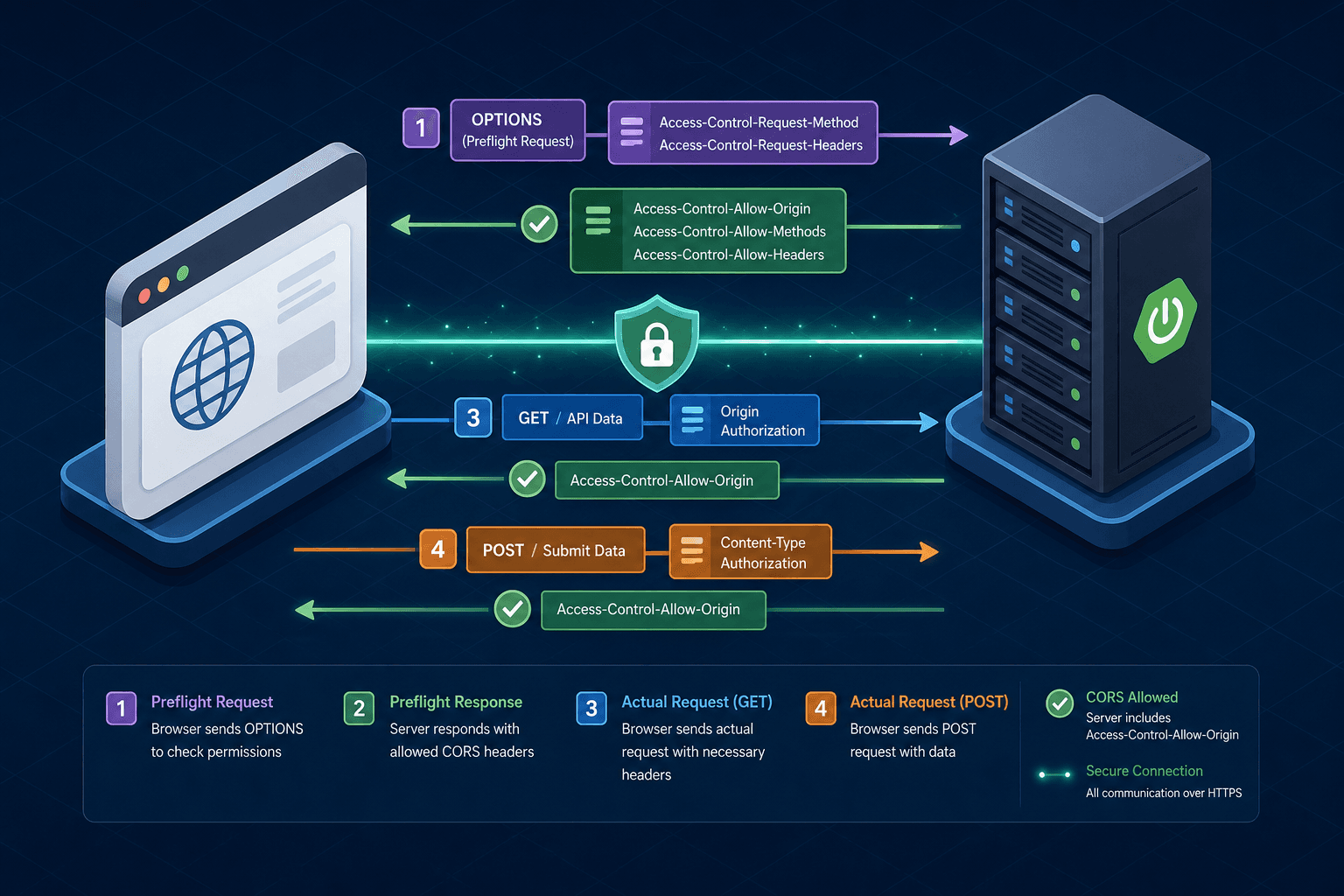
When a request does not meet the criteria for a "simple request," the browser initiates a two-step process known as a "preflight" check. This occurs when the actual request uses a non-standard method like PUT or DELETE, includes custom headers (e.g., Authorization), or uses a content type like application/json.
Crucially, if the actual request intends to send custom headers, it is not simple. The browser first sends an OPTIONS request to the target URL. This preflight request contains specific headers asking for permission:
OPTIONS /api/user/profile HTTP/1.1
Host: api.example.com
Origin: https://dashboard.example.com
Access-Control-Request-Method: POST
Access-Control-Request-Headers: X-Custom-Auth, Content-Type
Here, Access-Control-Request-Method tells the server which HTTP method the actual request will use. Access-Control-Request-Headers lists the custom headers the actual request intends to send. These preflight headers are distinct from the headers of the subsequent actual request.
The server must respond to this OPTIONS request with a 200 status code and headers: Access-Control-Allow-Origin, Access-Control-Allow-Methods, and Access-Control-Allow-Headers. If the server responds correctly, the browser proceeds to send the actual POST request. If the server fails, the browser blocks the operation.
This mechanism allows the server to validate the requested method and headers before any sensitive data is transmitted. In Spring, the CorsFilter automatically handles OPTIONS requests by checking the configuration against the Access-Control-Request-Method and Access-Control-Request-Headers provided in the preflight.
Spring Configuration Deep Dive
Spring Boot provides two primary mechanisms to configure CORS: the legacy WebMvcConfigurer approach and the modern SecurityFilterChain approach (Spring Security 5.7+ and 6.x). The latter is preferred for production applications because it integrates CORS validation into the overall security chain.
To configure CORS securely, define which origins, methods, and headers are permitted. Avoid the wildcard * for origins in authenticated applications. Instead, whitelist specific domains.
Using WebMvcConfigurer:
@Configuration
public class WebConfig implements WebMvcConfigurer {
    @Override
    public void addCorsMappings(CorsRegistry registry) {
        registry.addMapping("/api/**")
                .allowedOrigins("https://dashboard.example.com")
                .allowedMethods("GET", "POST", "PUT", "DELETE")
                .allowedHeaders("*") // Only use wildcard if you trust all headers
                .exposedHeaders("X-Total-Count", "X-Next-Page") // Headers exposed to JS
                .allowCredentials(true); // Crucial for cookie-based auth
    }
}
However, allowCredentials(true) changes the security rules. When credentials are allowed, the Access-Control-Allow-Origin header cannot be *. It must be an explicit origin. The browser enforces this: if the origin is * and credentials are true, the browser blocks the response.
In Spring Security 6, the configuration moves into the SecurityFilterChain:
@Configuration
@EnableWebSecurity
public class SecurityConfig {

    @Bean
    public SecurityFilterChain filterChain(HttpSecurity http) throws Exception {
        http
            .cors(cors -> cors.configurationSource(corsConfigurationSource()))
            .csrf(csrf -> csrf.disable()) // Often needed for API-only apps
            .authorizeHttpRequests(auth -> auth.anyRequest().authenticated());

        return http.build();
    }

    @Bean
    public CorsConfigurationSource corsConfigurationSource() {
        CorsConfiguration config = new CorsConfiguration();
        config.setAllowedOrigins(List.of("https://dashboard.example.com"));
        config.setAllowedMethods(List.of("GET", "POST", "PUT", "DELETE"));
        config.setAllowedHeaders(List.of("Authorization", "Content-Type"));
        config.setAllowCredentials(true);
        config.setMaxAge(3600); // Cache preflight for 1 hour

        UrlBasedCorsConfigurationSource source = new UrlBasedCorsConfigurationSource();
        source.registerCorsConfiguration("/**", config);
        return source;
    }
}
The setMaxAge parameter is a mechanism optimization. It tells the browser to cache the result of the preflight check for the specified number of seconds. During this window, the browser skips the OPTIONS request for subsequent calls, reducing latency. This is safe only if the CORS policy does not change dynamically during the cache window.
A common mistake is setting allowedHeaders to * while also allowing specific credentials. While technically allowed by the spec, it is often better to list specific headers like Authorization and Content-Type to minimize the attack surface. If an attacker can send arbitrary headers, they might attempt to inject unexpected metadata.
Troubleshooting Common Failures
When CORS fails, the browser console provides specific error messages that map directly to the underlying mechanism failure.
Error: "No 'Access-Control-Allow-Origin' header"
This occurs when the server did not return the Access-Control-Allow-Origin header in the response. In Spring, this usually means the request path does not match the addMapping or registerCorsConfiguration pattern, or the CorsFilter was not included in the filter chain. Check that the URL pattern in your configuration matches the request URL exactly.
Error: "Preflight blocked"
This indicates the OPTIONS request failed. The most common cause is a mismatch between the Access-Control-Request-Method sent by the browser and the allowedMethods configured in Spring. For example, if the frontend sends a PATCH request, but the server only allows GET and POST, the preflight fails. Similarly, if the frontend sends a custom header X-Auth-Token but it is not listed in allowedHeaders (or allowedHeaders is *), the preflight fails.
Error: "Response to preflight request doesn't pass access control check"
This is a generic browser error often resulting from the server returning a non-200 status code for the OPTIONS request. Spring's CorsFilter returns 200 OK for valid preflights. If your application logic or a preceding filter (like a custom authentication filter) intercepts the OPTIONS request and returns an error (e.g., 401 Unauthorized), the browser sees this as a CORS violation. Ensure that the CORS configuration is applied early in the filter chain, before any authentication logic that might block OPTIONS requests.
Error: "Access to fetch at... has been blocked by CORS policy: Response to preflight request doesn't pass access control check: The value of the 'Access-Control-Allow-Origin' header in the response must not be the wildcard '*' when the request's credentials mode is 'include'."
This is a strict browser enforcement of the credential rule. If your application sends cookies (credentials mode is 'include'), the server must specify the exact origin in Access-Control-Allow-Origin. It cannot use *. Ensure your Spring configuration sets allowedOrigins to the specific domain and allowCredentials(true).
Conclusion
CORS security in Spring is not about adding a firewall; it is about correctly negotiating the trust relationship between the browser and the server. By understanding the mechanism of the preflight request and the strict rules governing Access-Control-Allow-Origin, you can configure Spring to allow legitimate cross-origin traffic while blocking unauthorized access. The key is precision: whitelist specific origins, limit allowed methods and headers, and ensure that credential handling is consistent with the origin policy. Misconfiguration here leaves your application vulnerable to data exfiltration, while over-restriction breaks legitimate user experiences.
CTA: Audit Your CORS Policy
Before deploying your application, perform a full audit of your current CORS policy. Review your allowedOrigins list to ensure no unintended domains are included, and verify that allowedHeaders are explicitly defined rather than using wildcards where possible. This proactive check ensures your security posture aligns with the principle of least privilege.
Common Pitfalls
- Using Wildcards with Credentials: Setting
allowedOriginsto*whileallowCredentials(true)is enabled will cause the browser to block the response entirely. Always pair credentials with an explicit origin. - Exposing Internal Headers: Failing to restrict
exposedHeaderscan leak internal metadata to the client. Only expose headers that the frontend application explicitly needs to access. - Misconfigured Filter Order: Placing the
CorsFilterafter an authentication filter can causeOPTIONSrequests to be rejected with a 401 error before CORS headers are even added, breaking the preflight flow.
Practical Takeaways
- Least Privilege Origins: Never trust a wildcard for authenticated APIs. Explicitly whitelist the domains you own or partner with.
- Explicit Headers: Define
allowedHeadersspecifically. Relying on*increases the attack surface for header injection. - Preflight Awareness: Understand that every non-simple request triggers an
OPTIONSround-trip. OptimizingmaxAgereduces latency but requires stable policies.
FAQ
Q: Can I use CORS to prevent CSRF attacks? A: No. CORS controls what a browser reads, not what it sends. CSRF prevention relies on SameSite cookie attributes, anti-CSRF tokens, or the Origin/Referer header validation on the server side.
Q: Why does my OPTIONS request return a 401 Unauthorized?
A: This usually happens because an authentication filter is running before the CORS filter. The CORS filter must be registered early in the chain to handle preflight requests before any security checks block them.
Q: What is the difference between allowedHeaders and exposedHeaders?
A: allowedHeaders defines which headers the client is permitted to send in the request. exposedHeaders defines which headers the server allows the client to read from the response.
Related posts
JWT Expiration, Rotation, and Revocation: A Lifecycle Guide
A guide to JWT expiration, rotation, and revocation strategies for secure token lifecycle management.
Understanding and Implementing CWE-287: Improper Authentication
An examination of CWE-287 improper authentication vulnerabilities, covering OWASP guidelines and essential security fixes for robust authentication systems.
Spring Security CORS and CSRF: Proper Configuration for SPAs
A guide to configuring Spring Security CORS and CSRF settings for Single Page Applications, covering Angular integration and SameSite cookie handling.