Building a Centralized Audit Log for Identity Events with ELK Stack
A walkthrough for building a centralized audit log for identity events using the ELK stack to ensure audit compliance and effective log management.
Building a Centralized Audit Log for Identity Events with ELK Stack
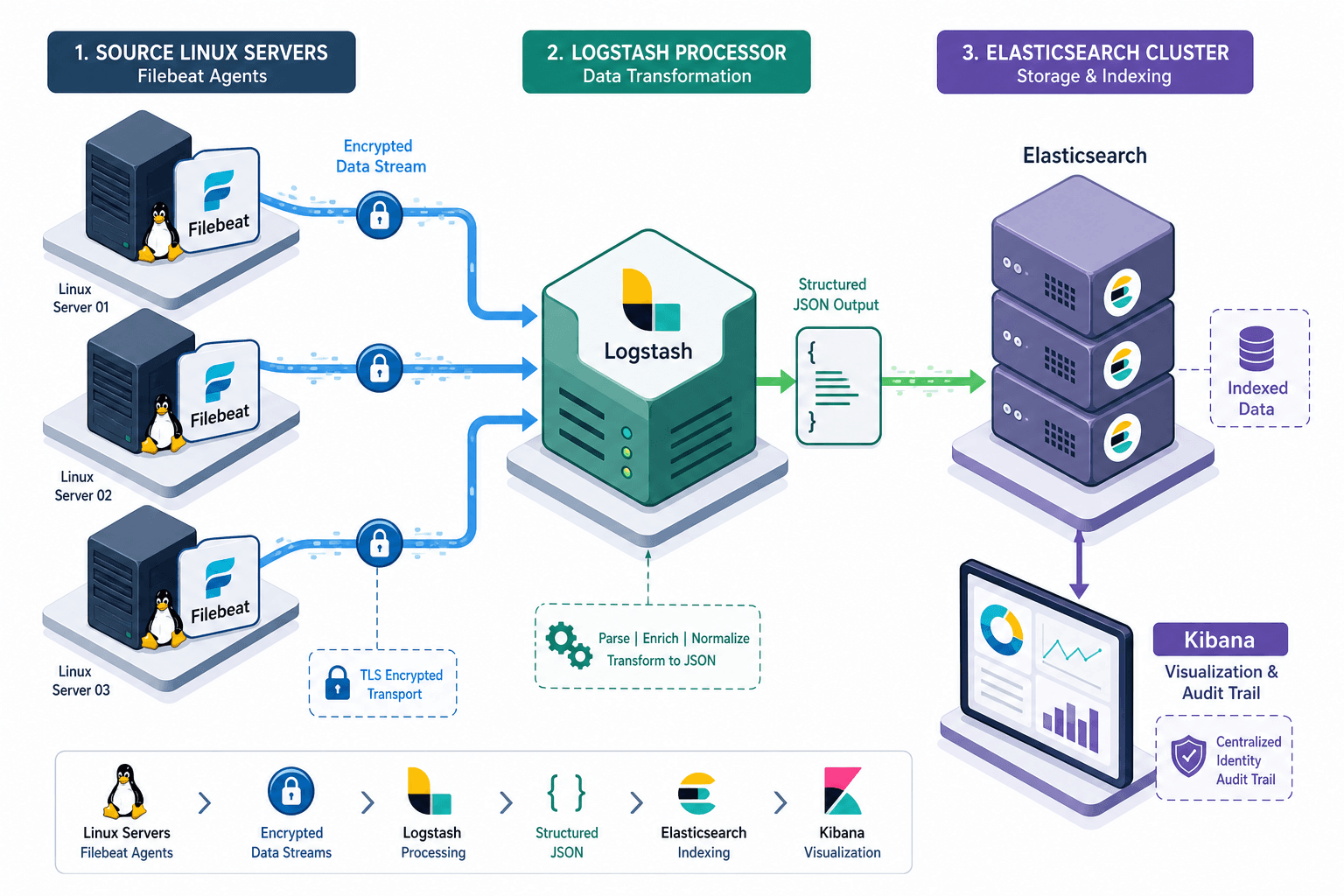
The fundamental challenge in building an audit log for identity events is not merely collecting data; it is guaranteeing that the collected data has not been altered, deleted, or obscured after the event occurred. In a distributed environment, identity events—such as logins, permission changes, or password resets—must flow from the source system to a centralized repository with cryptographic integrity. The ELK stack (Elasticsearch, Logstash, Kibana) provides the infrastructure, but the mechanism of trust relies on how we configure the pipeline to treat logs as immutable artifacts rather than mutable text.
The Mechanism of Ingestion
We begin at the source. Consider a Linux server acting as an identity provider. When a user attempts to authenticate, the kernel writes entries to /var/log/auth.log. A naive approach might involve SSH-ing into the server and piping tail -f to a remote host. This fails immediately because the remote host cannot verify the source, and the data travels in plain text. Instead, we deploy a Filebeat agent on the source server. Filebeat reads the raw text bytes from the log file and forwards them to Logstash. This separation of concerns ensures the agent acts only as a transport mechanism, reducing the attack surface on the source system. Acknowledging the complexity of converting raw syslog text into structured data is critical; we must parse unstructured lines into specific grok groups to ensure downstream reliability.
The critical mechanism happens at the ingestion point. Logstash must transform these raw syslog entries into a structured JSON object before they hit Elasticsearch. If we allow Elasticsearch to index raw text, it will apply a standard analyzer that tokenizes the text, breaking up unique identifiers like session IDs or IP addresses into searchable fragments. For an audit log, this destroys the ability to reconstruct the exact event sequence. We must define a rigid schema in the Logstash filter section.
input {
  beats {
    port => 5044
    ssl => true
    ssl_certificate => "/etc/pki/filebeat/cert.pem"
    ssl_key => "/etc/pki/filebeat/key.pem"
  }
}

filter {
  grok {
    match => { "message" => "%{SYSLOGTIMESTAMP:syslog_timestamp} %{SYSLOGHOST:syslog_host} %{DATA:syslog_program}(?:\[%{POSINT:pid}\])?: %{GREEDYDATA:identity_event}" }
  }
  mutate {
    rename => { "identity_event" => "audit_record" }
    add_field => { "log_source" => "linux-auth-log" }
    add_field => { "@timestamp" => "%{syslog_timestamp}" }
  }
}

output {
  elasticsearch {
    hosts => ["https://elasticsearch:9200"]
    index => "audit-identity-%{+YYYY.MM.dd}"
  }
}
In this configuration, the grok pattern extracts the unstructured syslog line into specific fields. Crucially, the add_field directive normalizes the timestamp using the extracted syslog_timestamp field. Without this, Elasticsearch might infer the time based on ingestion, creating a false timeline of events. The index name uses a daily rollover pattern (audit-identity-%{+YYYY.MM.dd}). This granularity is essential for performance and, more importantly, for the Index Lifecycle Management (ILM) strategy.
Schema Enforcement & Indexing
Once the data enters Elasticsearch, the mechanism shifts to schema enforcement. Elasticsearch maps fields dynamically by default, inferring types based on the first document it sees. If the first login event sends an IP address as a string, Elasticsearch maps it as text. If a subsequent event sends a numeric IP, it might cause a mapping conflict or, worse, store it as a number, breaking string-based queries. For audit logs, we must pre-define mappings to force keyword types for all identifiers.
PUT /_index_template/audit_identity_template
{
  "index_patterns": ["audit-identity-*"],
  "template": {
    "mappings": {
      "properties": {
        "audit_record.actor": { "type": "keyword" },
        "audit_record.action": { "type": "keyword" },
        "audit_record.resource": { "type": "keyword" },
        "audit_record.outcome": { "type": "keyword" },
        "audit_record.ip_address": { "type": "ip" }
      }
    }
  }
}
By forcing keyword types, we ensure that values like "admin" or "root" are treated as exact matches, not analyzed text. This preserves the integrity of the audit trail. Furthermore, the ip type ensures that IP addresses are stored in a binary format optimized for range queries, allowing security teams to quickly identify if a brute-force attack originated from a specific subnet.
Immutability & Retention
The next layer of security is immutability. Once an audit event is indexed, it must be impossible to alter. Elasticsearch supports this through ILM policies. We configure a policy that transitions the index to a read-only state immediately after the day's data is ingested. This is often combined with the "snapshot" action to back up the index to a remote storage tier (like S3 or HDFS) before the index is deleted. This ensures that even if an attacker gains admin privileges in Elasticsearch, they cannot modify historical audit records without breaking the chain of custody.
PUT _ilm/policy/audit_retention_policy
{
  "policy": {
    "phases": {
      "hot": {
        "actions": {
          "rollover": { "max_size": "50gb", "max_age": "1d" },
          "set_priority": { "priority": 100 }
        }
      },
      "warm": {
        "min_age": "1d",
        "actions": {
          "readonly": {},
          "shrink": { "number_of_shards": 1 },
          "forcemerge": { "max_num_segments": 1 }
        }
      },
      "delete": {
        "min_age": "365d",
        "actions": { "delete": {} }
      }
    }
  }
}
The readonly action in the warm phase is the mechanical equivalent of a wax seal on a legal document. It prevents any write operations, including updates and deletes, for the entire index. This is a requirement for many compliance frameworks, such as SOC 2 and GDPR, which mandate that audit logs be tamper-evident.
Access Control & Querying
Finally, we must secure access to the data itself. Even with immutable indices, a malicious insider with valid credentials could query and exfiltrate the entire audit log. Elasticsearch offers Index Level Security (ILS) and, in legacy configurations or specific contexts, Field Level Security (FLS). Modern ILS typically relies on field-level access control lists where you grant specific fields, implicitly denying access to everything else. The following configuration demonstrates a role that permits read access only to specific fields, masking sensitive PII (Personally Identifiable Information) like full names or email addresses, while allowing the security team to see the action and the actor.
PUT /_security/role/audit_reader_role
{
  "indices": [
    {
      "names": ["audit-identity-*"],
      "privileges": ["read"],
      "field_security": {
        "grant": ["audit_record.actor", "audit_record.action", "audit_record.ip_address"]
      }
    }
  ]
}
This configuration ensures that even if a user has the audit_reader_role, they cannot see fields not explicitly granted, protecting privacy while maintaining the ability to track identity events. In Kibana, we then build a dashboard that visualizes these filtered fields. A simple "Failed Login Attempts" visualization becomes a powerful monitoring tool when the underlying data is guaranteed to be accurate and unaltered.
Building a centralized audit log is less about the tools and more about the constraints we impose on them. By enforcing schema at ingestion, locking indices after creation, and restricting field-level access, we transform a collection of text files into a forensic-grade audit trail. The ELK stack provides the engine, but the configuration logic provides the trust. Without these mechanisms, the log is just noise; with them, it is evidence.
Conclusion
Implementing a robust audit logging system requires a shift in mindset from simple data collection to rigorous data governance. The ELK stack is capable, but its security posture depends entirely on the precision of your configuration.
Common Pitfalls
- Timestamp Drift: Relying on the ingestion time instead of the source timestamp (
%{syslog_timestamp}) creates a false timeline, making forensic analysis of the attack window impossible. - Mapping Conflicts: Allowing dynamic mapping to guess types can lead to
textfields being indexed wherekeywordoriptypes are required, breaking exact match queries and range searches. - Retention Costs: Configuring retention policies without considering storage costs can lead to runaway expenses; always balance compliance requirements (e.g., 365 days) with storage tiering strategies.
Practical Takeaways
- Immutable by Design: Treat every audit event as a legal document; once written, it should never be editable. Use ILM policies to enforce read-only states immediately.
- Schema First: Define your data structure (mappings) before ingesting data to prevent the "first document wins" problem that corrupts audit integrity.
- Least Privilege Access: Never grant access to raw fields; use field-level security to mask sensitive PII while allowing investigators to see the necessary context.
FAQ
Q: Can I use the standard Elasticsearch analyzer for audit logs?
A: No. Standard analyzers tokenize text, breaking unique identifiers. You must use keyword types and custom grok patterns to preserve the integrity of the event data.
Q: How do I handle timestamp discrepancies across different servers?
A: Always configure Logstash to use the source timestamp (%{syslog_timestamp}) rather than the ingestion time. Ensure NTP synchronization is active on all source servers to minimize drift.
Q: Does Elasticsearch Index Level Security work on older versions?
A: Field Level Security (FLS) is available in most modern versions, but the syntax and capabilities have evolved. Always consult the specific version documentation for the field_security configuration to ensure compatibility.
Related posts
RFC 8693: Token Exchange, Delegation, and Impersonation
RFC 8693 defines token exchange, delegation, and impersonation mechanisms for OAuth 2.0, enabling secure identity propagation across service boundaries.
Implementing and Validating Discovery in Your Client
A technical walkthrough for backend developers on implementing OAuth 2.1 discovery, issuer validation, and strict discovery document validation using OpenIDConnectConfigurationRetriever.
Decoding client_secret_basic Default in RFC 8414
An examination of the token_endpoint_auth_methods_supported metadata field in RFC 8414 and why client_secret_basic remains the default authentication method.