Generating SBOMs for Kubernetes Workloads
A guide to generating Software Bill of Materials (SBOMs) for Kubernetes workloads using tools like Syft and Trivy to improve vulnerability management.
Platform engineers and SREs face a fundamental contradiction in modern Kubernetes environments: the infrastructure is ephemeral, but security requirements are persistent. When a vulnerability is disclosed in a base library, you must identify every running pod affected by it. However, most Kubernetes clusters do not carry a Software Bill of Materials (SBOM) with them. The SBOM is typically a build artifact that gets lost when images are tagged, moved across registries, or deployed into dynamic namespaces.
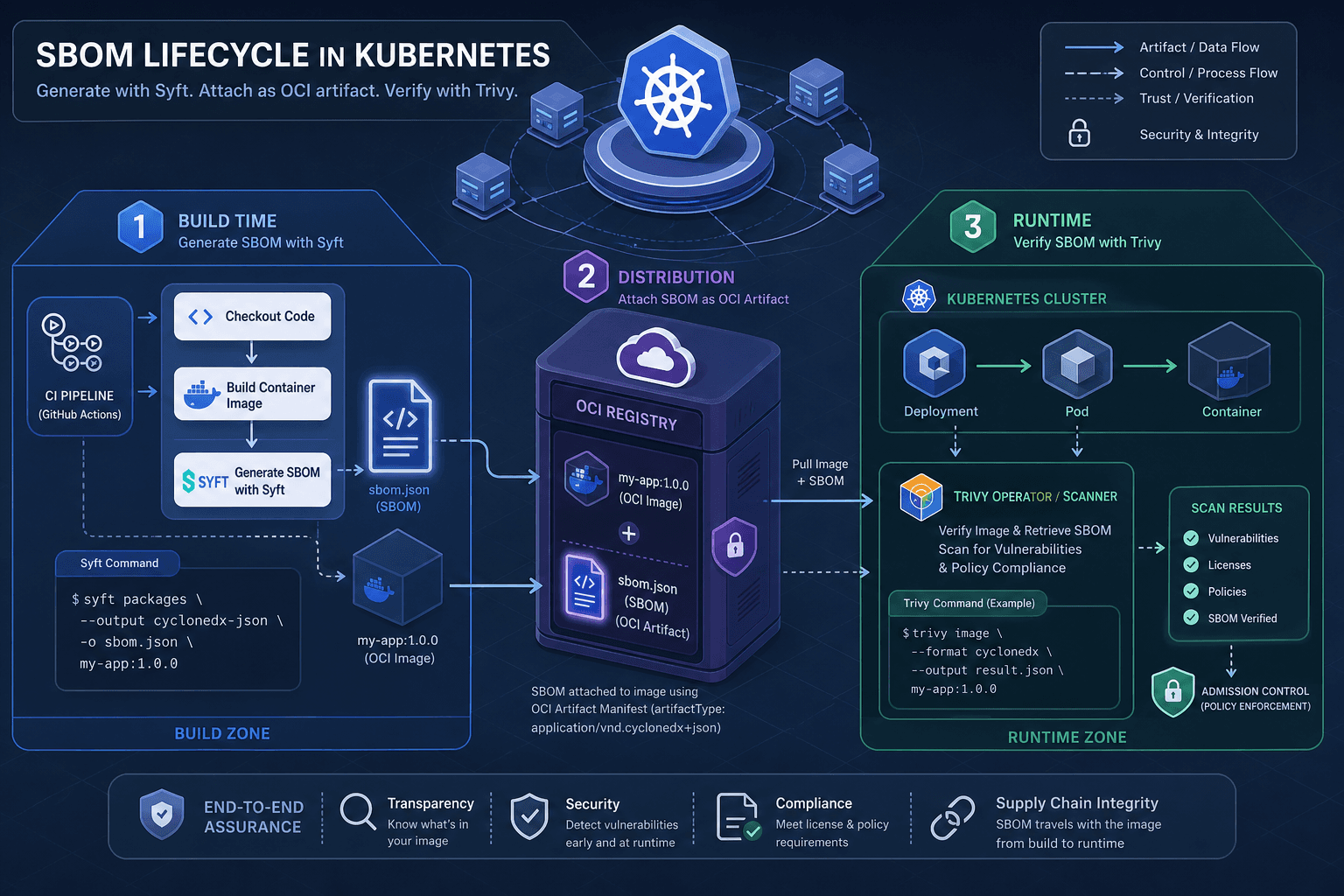
To manage vulnerabilities effectively, you must generate SBOMs at the source (build time) and validate them at the destination (runtime). This guide details the mechanism for generating accurate SBOMs for Kubernetes workloads using Syft for creation and Trivy for verification.
The Limitation of Static Images
An OCI container image is a collection of layers. While tools like skopeo inspect can show metadata, they do not inherently contain a structured list of every package, library, and binary within those layers. Without an SBOM, you cannot answer "what is inside this image?" without downloading and parsing the entire filesystem, which is computationally expensive and often blocked by network policies.
Furthermore, Kubernetes workloads are defined by manifests (YAML) that reference image tags. Tags are mutable. An image tagged v1.0 today might be overwritten tomorrow with a different build. Relying on tag-based tracking is unreliable for vulnerability management because it fails to account for these shifts. The only immutable identifier is the image digest. Therefore, the SBOM must be bound to the digest, not the tag.
Build-Time SBOM Generation with Syft
The most reliable way to generate an SBOM is during the image build process. This ensures the SBOM is created from the exact source state before any post-build modifications or registry transformations occur.
Syft is a tool that analyzes container images, filesystems, and SBOMs to generate a standardized SBOM in SPDX or CycloneDX format. To integrate this into a Kubernetes workflow, you should embed the SBOM directly into the container image as an OCI artifact. This integration is a critical component of modern devops pipelines, ensuring that security artifacts travel with the code.
Mechanism: Embedding SBOMs
When building an image, you can use Syft to generate the SBOM and then attach it to the image using docker or skopeo. This makes the SBOM part of the image manifest, accessible via the same registry API used for the image layers.
Here is the workflow using kaniko, a common tool for building container images in Kubernetes clusters without Docker daemons:
# 1. Build the image with Kaniko
kaniko --context=. --dockerfile=Dockerfile --destination=myregistry.com/app:v1

# 2. Generate SBOM using Syft and save to file
syft myregistry.com/app:v1 -o spdx-json > sbom.json

# 3. Attach SBOM as an OCI artifact (if your registry supports it)
# Note: This step depends on registry capabilities (e.g., Harbor, ECR, GCR)
oras push myregistry.com/app:v1 sbom.json:application/spdx+json
By attaching the SBOM, you create a direct link between the image digest and the software inventory. When a vulnerability scanner runs, it can pull the SBOM along with the image metadata.
Alternative: Labeling
If your registry does not support OCI artifacts, you can embed the SBOM as a label. However, this has size limitations and is not standard-compliant for large SBOMs. Syft allows you to output the SBOM and then add it as a label:
# Generate SBOM
syft myregistry.com/app:v1 -o spdx-json > sbom.json

# Add SBOM content as a base64-encoded label
sbom_b64=$(base64 -w 0 sbom.json)
docker build --label "com.example.sbom=${sbom_b64}" -t myregistry.com/app:v1 .
This approach is fragile because labels are limited in size and may be stripped by certain registry operations. The OCI artifact method is preferred for production environments.
Runtime Verification with Trivy
Generating an SBOM is only half the equation. You must verify that the running workload matches the expected SBOM. Trivy, a tool from Aqua Security, excels at scanning images and running containers for vulnerabilities, but it also has robust SBOM scanning capabilities.
Trivy can scan an image directly from a registry or from a local file. In a Kubernetes context, you might use Trivy in a CI/CD pipeline to block deployments if the SBOM does not meet policy requirements.
Mechanism: Scanning for Vulnerabilities
Trivy uses a database of known vulnerabilities (CVEs) to cross-reference with the packages identified in the SBOM or the image layers. When you run Trivy against an image, it performs the following steps:
- Extract Layers: It pulls the image layers from the registry.
- Identify Packages: It scans each layer for installed packages, binaries, and configuration files.
- Match Vulnerabilities: It compares the identified packages against its vulnerability database.
- Report: It outputs a JSON or table report detailing the vulnerabilities.
# Scan an image from a registry
trivy image myregistry.com/app:v1

# Scan an image from a local tarball
trivy image --input app.tar

# Scan an SBOM file directly
trivy sbom sbom.json
Runtime Context vs. Static Analysis
A key distinction in Kubernetes vulnerability management is the difference between static analysis and runtime context. Static analysis (like Trivy scanning an image) tells you what could be vulnerable. Runtime inventory tools, such as those integrated with eBPF, tell you what is running. This distinction is vital because static analysis provides a baseline, while runtime tools provide the ground truth of active processes.
For SBOM purposes, static analysis is sufficient if the image is immutable. However, if your workloads use mutable configurations or sidecar containers that modify the environment at runtime, the SBOM may become stale. To mitigate this, you should integrate SBOM validation into your admission control policies.
Integration: Admission Control and Policy Enforcement
To enforce SBOM generation across your Kubernetes cluster, you can use admission controllers like OPA Gatekeeper or Kyverno. These tools can intercept deployment requests and verify that the referenced image has an associated SBOM. This is a core aspect of admission control strategies for supply chain security.
Mechanism: Validating SBOM Presence
You can configure an admission controller to check for the presence of an SBOM artifact or label in the image manifest before allowing the pod to be created. This ensures that no workload is deployed without a corresponding SBOM.
Using Kyverno, you can create a policy that checks for the SBOM:
apiVersion: kyverno.io/v1
kind: ClusterPolicy
metadata:
  name: require-sbom
spec:
  validationFailureAction: Enforce
  rules:
    - name: check-sbom
      match:
        any:
          - resources:
              kinds:
                - Pod
      preconditions:
        all:
          - key: "{{ request.object.spec.containers[].image }}"
            operator: AnyIn
            value: ["*"]
      validate:
        message: "Image must have an SBOM attached."
        pattern:
          spec:
            containers:
              - image: "*@sha256:*" # Require digest
      # Note: Actual SBOM presence check requires external image scanning or registry API integration
Clarification: The Kyverno policy shown above enforces that images use immutable digests (image@sha256:*), which is a best practice for stability. However, Kyverno does not natively verify the presence or content of the SBOM artifact itself. As acknowledged in the code comment, actual SBOM validation requires a separate external admission webhook or image scanner integration that can query the registry for the SBOM artifact and verify its integrity before allowing the deployment to proceed.
Common Pitfalls
When implementing SBOM workflows, avoid these common mistakes:
- Relying on Tags: Using mutable tags (e.g.,
latest,v1.0) for SBOM binding leads to confusion and security gaps. Always bind SBOMs to image digests. - Ignoring Registry Capabilities: Assuming all registries support OCI artifacts. If your registry lacks this support, you must use the labeling alternative or migrate to a compliant registry.
- Assuming Static Analysis is Enough: Failing to account for runtime changes. If workloads mutate at runtime, static SBOMs become inaccurate without continuous monitoring.
FAQ
Q: Can I generate an SBOM for a running pod directly? A: Yes, tools like Syft can analyze a running container's filesystem if you have access to the container's rootfs. However, generating the SBOM at build time is more efficient and reliable.
Q: Does an SBOM replace vulnerability scanning? A: No. An SBOM provides the inventory of what is present. Vulnerability scanning (using tools like Trivy) cross-references that inventory against known CVEs. Both are necessary for complete security.
Q: How do I handle SBOMs for multi-stage builds? A: Ensure you generate the SBOM from the final stage of the build process. Multi-stage builds often discard intermediate layers, so an SBOM generated from an intermediate stage will be incomplete or incorrect.
Conclusion
Generating SBOMs for Kubernetes workloads requires a shift from manual inventory management to automated, pipeline-integrated processes. By embedding SBOMs as OCI artifacts during build time using Syft, you ensure that every image carries its software bill of materials. By validating these SBOMs at runtime using Trivy and enforcing their presence via admission controllers, you maintain continuous visibility into your supply-chain security.
This approach reduces the mean time to detect (MTTD) vulnerabilities and provides a clear audit trail for compliance requirements. The key is to treat the SBOM as a first-class artifact, equal in importance to the container image itself.
Practical Takeaways
- Generate Early: Create SBOMs during the build phase using Syft to capture the exact state.
- Bind to Digests: Always associate SBOMs with immutable image digests, not mutable tags.
- Validate Continuously: Use Trivy and admission controllers to verify SBOMs before and during deployment.
- Automate Enforcement: Integrate SBOM checks into your CI/CD pipelines and Kubernetes admission controls to prevent non-compliant deployments.
Related posts
GitOps Security: Secrets, Access, and Drift
A guide to securing GitOps workflows using SOPS, Sealed Secrets, and External Secrets Operator while managing access and detecting drift.
IRSA vs EKS Pod Identity: Architecture, Trust, and Tradeoffs
Compare IRSA and EKS Pod Identity for securing Kubernetes workloads on AWS. Learn how service accounts, trust policies, and STS sessions differ in implementation and best practices.
Certificate Rotation and Truststore Operations on Kubernetes
Explore certificate rotation and truststore operations in Kubernetes, covering cert-manager, CA rotation, and expiry monitoring for platform engineers.
