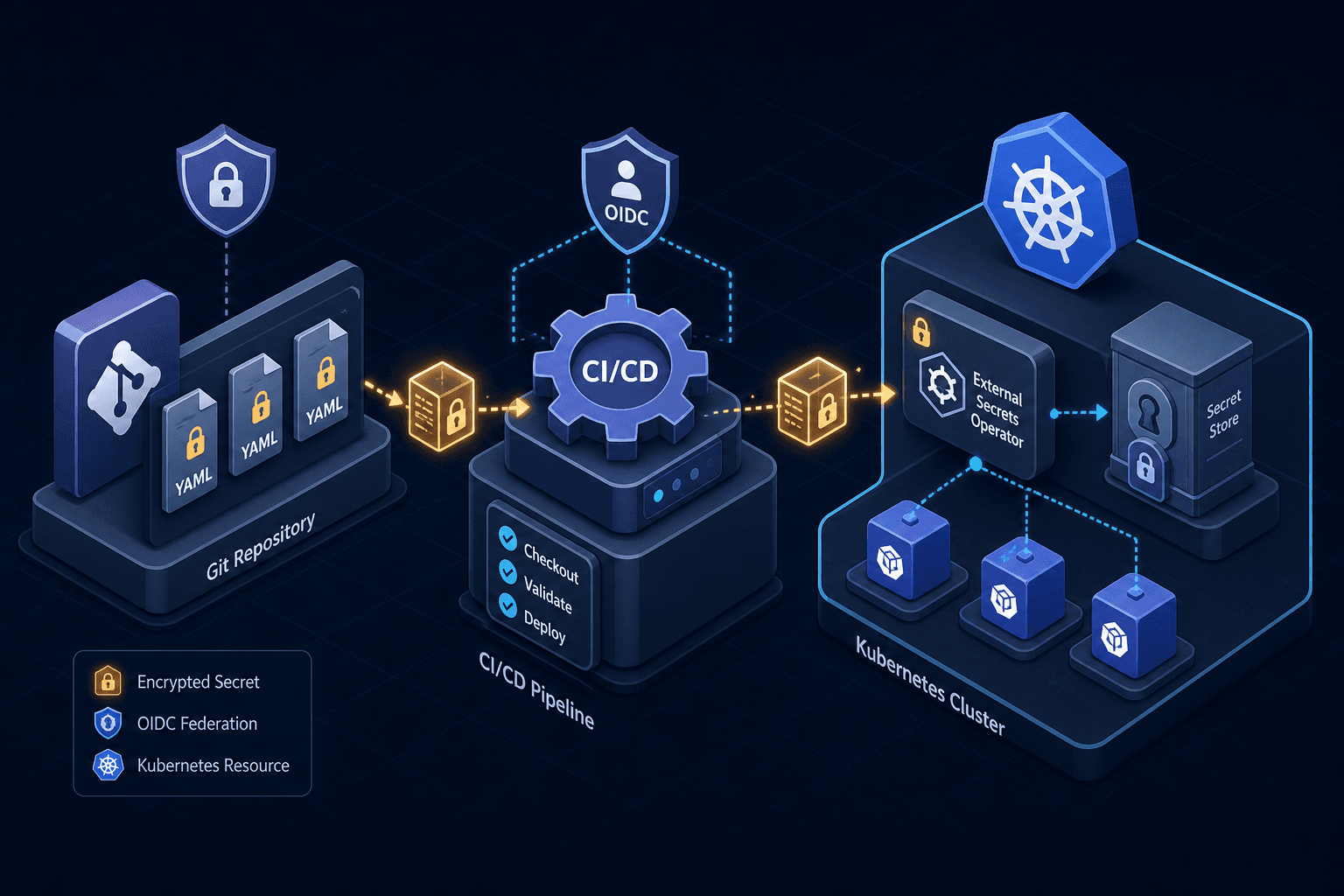
GitOps Security: Secrets, Access, and Drift
A guide to securing GitOps workflows using SOPS, Sealed Secrets, and External Secrets Operator while managing access and detecting drift.
GitOps promises a single source of truth: Git. By declaratively defining infrastructure and application state in version-controlled YAML, teams gain auditability, reproducibility, and rollback capabilities. However, this model introduces a critical security paradox. Traditional security models keep secrets out of version control because Git is a collaborative, auditable medium. GitOps security requires that everything needed to deploy the system lives in Git, including secrets. If you commit plaintext secrets, you expose credentials to every developer with repository access. If you exclude them, your pipeline breaks.
Securing a GitOps workflow requires solving three distinct problems: encrypting secrets for storage in Git, managing access to those encrypted artifacts, and detecting when the cluster diverges from the declared state. This guide details the mechanisms for handling these challenges using SOPS, Sealed Secrets, and External Secrets Operator.
The Secrets Paradox: Envelope Encryption with SOPS
The most common mistake in GitOps security is attempting to encrypt secrets with a symmetric key and storing that key in the repository. This is insecure because anyone who can read the repository can decrypt the secrets. Instead, we use envelope encryption.
Mozilla’s SOPS (Secrets OPerationS) is a standard editor for encrypted files. It does not store the secret directly in the ciphertext. Instead, it generates a random Data Encryption Key (DEK) to encrypt the actual secret value. It then encrypts the DEK using one or more Key Management Service (KMS) keys (e.g., AWS KMS, GCP KMS, or Azure Key Vault). The final file in Git contains the encrypted secret and the encrypted DEK.
When a developer opens the file locally, SOPS uses their local IAM credentials or CLI tools to fetch the KMS key, decrypt the DEK, and then decrypt the secret. The KMS key never leaves the cloud provider’s boundary; only the encrypted blob travels through Git.
# Example: Encrypting a secret using AWS KMS via SOPS
# The .sops.yaml file defines the KMS ARN for encryption
sops --encrypt --encrypted-regex '^(data)$' secrets.yaml > secrets.enc.yaml
The mechanism here is critical: Git holds the ciphertext, but the decryption capability is tied to the identity of the user or CI runner, not the file content. This allows multiple teams to share the same Git repository while only authorized identities can decrypt specific secrets.
Kubernetes Native Secrets: Static vs. Dynamic
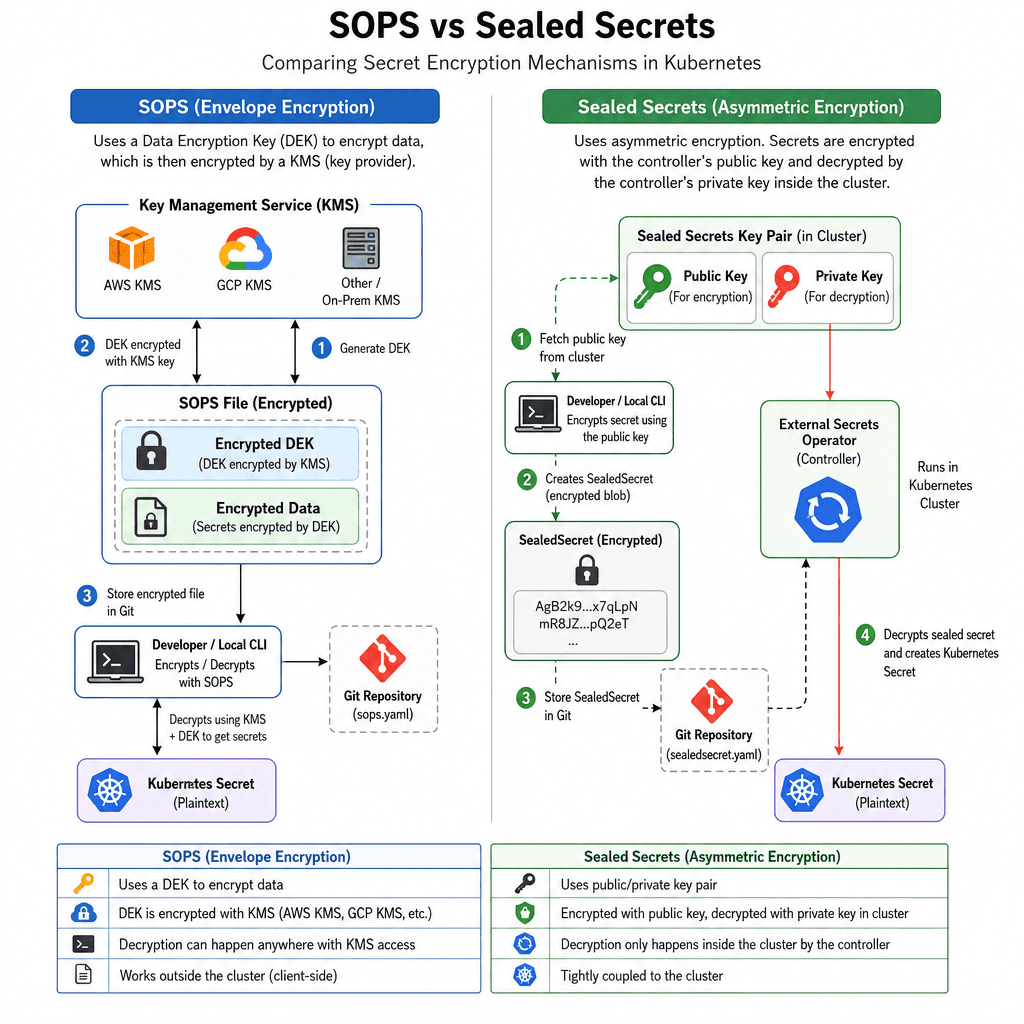
Once secrets are encrypted in Git, they must be deployed to Kubernetes. There are two primary mechanisms for this, each with different security implications.
Sealed Secrets: Asymmetric Encryption
Bitnami’s Sealed Secrets operates on an asymmetric key model. The cluster administrator generates a public/private key pair. The public key is exposed via the controller’s certificate endpoint, while the private key is stored inside the cluster as a Kubernetes Secret accessible only to the controller.
Developers use the public key to encrypt secrets locally into SealedSecret CRDs. These sealed secrets are safe to commit to Git because they can only be decrypted by the controller running inside the cluster with the private key.
# A SealedSecret resource safe to commit to Git
apiVersion: bitnami.com/v1alpha1
kind: SealedSecret
metadata:
  name: my-secret
  namespace: default
spec:
  encryptedData:
    password: AgBY3...
Mechanism: The SealedSecret controller watches for these resources, decrypts them using the offline private key, and creates a standard Kubernetes Secret object.
Trade-off: Sealed Secrets are static. If a password rotates, you must update the Git repository, commit the change, and wait for the controller to sync. This introduces latency and operational overhead for high-rotation secrets like database passwords. Choose this approach for low-frequency updates where the simplicity of having the secret definition in Git outweighs the need for immediate rotation.
External Secrets Operator: Dynamic Pulling
For high-rotation secrets, the External Secrets Operator is often superior. Instead of storing the secret value in Git, ESO stores a reference (e.g., aws-secretsmanager:my-app:password). The operator runs inside the cluster, authenticates to the external vault (AWS Secrets Manager, HashiCorp Vault, etc.), pulls the current value, and creates the Kubernetes Secret.
# ExternalSecret resource: Git only knows the reference, not the value
apiVersion: external-secrets.io/v1beta1
kind: ExternalSecret
metadata:
  name: my-app-secret
spec:
  refreshInterval: 1h
  secretStoreRef:
    name: aws-secretsmanager
    kind: SecretStore
  target:
    name: my-app-secret
  data:
    - secretKey: password
      remoteRef:
        key: my-app
        property: password
Mechanism: ESO decouples the Git definition (the reference) from the actual secret value (stored in the vault). This allows for immediate rotation without touching Git.
Security Implication: ESO requires the cluster to have permissions to read from the external vault. This expands the attack surface of the cluster identity. You must ensure the IAM role attached to the ESO pod has least-privilege access to only the required secrets.
Access Control: Identity and Signed Commits
In a GitOps model, the CI/CD pipeline is the actor that applies changes. If an attacker compromises the CI/CD credentials, they can deploy malicious manifests. Therefore, securing the pipeline identity is as important as securing the secrets.
OIDC over Long-Lived Credentials
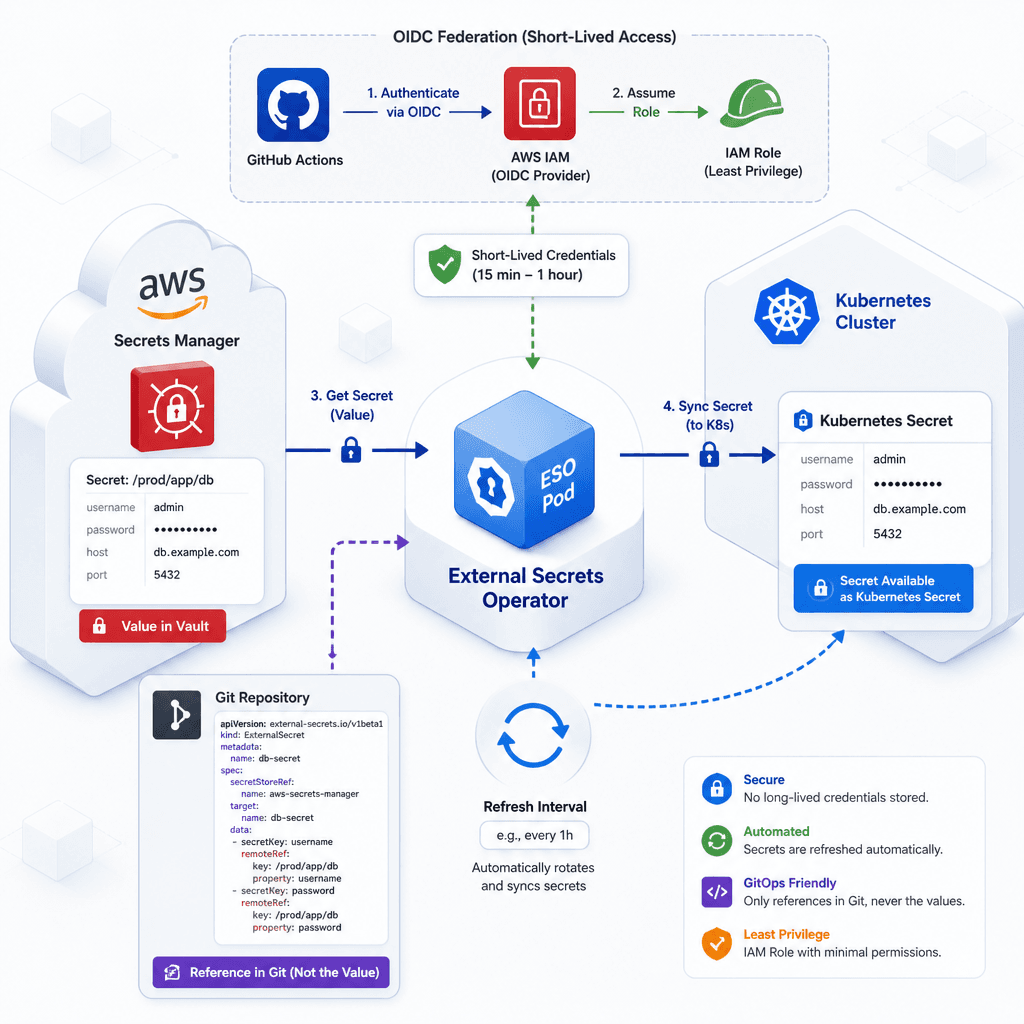
Legacy CI/CD systems use long-lived SSH keys or access tokens to interact with Git and cloud providers. These are high-value targets if leaked. Modern platforms support OIDC (OpenID Connect) federation.
With OIDC, the CI/CD runner requests a short-lived JWT token from the Git provider (e.g., GitHub Actions’ id-token: write). The cloud provider (e.g., AWS) trusts this token and assumes an IAM role for a limited duration. No static credentials are stored in the CI/CD environment.
# GitHub Actions example: OIDC federation
jobs:
  deploy:
    permissions:
      id-token: write   # This enables OIDC
      contents: read
    steps:
      - name: Configure AWS Credentials
        uses: aws-actions/configure-aws-credentials@v4
        with:
          role-to-assume: arn:aws:iam::123456789012:role/GitOps-Deploy-Role
          aws-region: us-east-1
This mechanism ensures that even if the runner is compromised, the attacker cannot export long-lived keys. They can only assume the role within the short window the job runs.
Signed Commits and Branch Protection
Not all changes should be automated. Critical configuration changes (e.g., modifying RBAC policies or changing the encryption keys for SOPS) should require human review. Git supports signed commits using GPG or SSH keys.
Platform engineers should enforce branch protection rules that require:
- Signed commits: Ensures the commit author is verified cryptographically.
- Required reviews: Prevents self-merge of sensitive files.
- Status checks: Ensures linting and security scans (e.g.,
git-secrets,checkov) pass before merge.
This creates an immutable audit trail. If a secret is rotated or a policy is changed, you can verify who made the change and when.
Drift Detection: The Safety Net
GitOps controllers like ArgoCD or Flux continuously reconcile the cluster state with the Git state. They detect drift—any deviation between the declared state in Git and the actual state in the cluster.
Drift can be benign (a developer manually patched a pod via kubectl) or malicious (an attacker injected a backdoor). The controller’s mechanism is simple: it diffs the live cluster resources against the Git manifests.
# ArgoCD CLI example: Checking for drift
argocd app get my-app --show-resources
If drift is detected, ArgoCD marks the application as OutOfSync. Depending on the configuration, it can either:
- Auto-sync: Automatically revert the cluster to the Git state.
- Manual Sync: Alert the team and wait for approval.
Critical Security Note: Auto-sync is dangerous if combined with weak access controls. If an attacker can commit to Git, auto-sync will deploy their malicious manifest. Therefore, drift detection is not a security control in itself; it is a detection mechanism that must be paired with strict Git write permissions.
Conclusion
Securing GitOps is not about a single tool; it is about layering mechanisms. Use SOPS or Sealed Secrets to encrypt data at rest in Git. Use the external secrets operator for dynamic, high-rotation secrets. Use OIDC federation to secure the CI/CD pipeline identity. Finally, use signed commits and drift detection to maintain the integrity of the source of truth.
The goal is not to prevent all access, but to make unauthorized access detectable and reversible. In GitOps, the repository is the ultimate authority. If you secure the repository and the pipeline, you secure the cluster.
A common pitfall when configuring OIDC with AWS is forgetting to configure the aud (audience) claim correctly in the IAM role trust policy, which leads to authentication failures despite correct GitHub Actions setup. For further reading on these patterns, refer to the CNCF Cloud Native Security Whitepaper, which emphasizes the importance of identity-centric security models in distributed systems.
Practical Takeaways
- Encrypt at Rest: Never store plaintext secrets in Git. Use SOPS with envelope encryption or Sealed Secrets to ensure data remains confidential even if the repository is compromised.
- Minimize Permissions: Apply least-privilege principles to both CI/CD identities (via OIDC) and cluster identities (via External Secrets Operator IAM roles).
- Verify Integrity: Enforce signed commits and branch protection rules to ensure that only verified, reviewed changes reach production.
FAQ
How do I rotate secrets with Sealed Secrets?
To rotate a secret, you must update the value in your Git repository, re-encrypt it using the public key, commit the new SealedSecret, and wait for the controller to sync the change to the cluster.
Can I use SOPS with multiple cloud providers?
Yes. SOPS supports multiple KMS providers. You can configure .sops.yaml to define different encryption keys for different environments or teams, allowing you to manage secrets across AWS, GCP, and Azure from a single workflow.
What happens if the External Secrets Operator loses access to the vault?
If the ESO cannot authenticate to the external vault, it will fail to refresh the Kubernetes Secret. The existing secret values in the cluster will remain until they expire or are manually deleted, potentially causing application failures if the vault is the source of truth for critical credentials.
Audit your current OIDC configurations to ensure you are using the latest action versions.
Related posts
Generating SBOMs for Kubernetes Workloads
A guide to generating Software Bill of Materials (SBOMs) for Kubernetes workloads using tools like Syft and Trivy to improve vulnerability management.
IRSA vs EKS Pod Identity: Architecture, Trust, and Tradeoffs
Compare IRSA and EKS Pod Identity for securing Kubernetes workloads on AWS. Learn how service accounts, trust policies, and STS sessions differ in implementation and best practices.
Certificate Rotation and Truststore Operations on Kubernetes
Explore certificate rotation and truststore operations in Kubernetes, covering cert-manager, CA rotation, and expiry monitoring for platform engineers.
