GitOps Security: Protecting Kubernetes Secrets and Configuration
An examination of GitOps security strategies for protecting Kubernetes secrets and configuration using Sealed Secrets, SOPS, ArgoCD, and Flux.
Part 5 of the Machine Identity & DevSecOps Series.
The fundamental flaw in naive GitOps implementations is the assumption that a version control system is a secure vault for sensitive data. When a developer pushes a Kubernetes Secret manifest containing a plaintext password or API key to a Git repository, they create a permanent, immutable record of that credential. Even if the developer attempts to "fix" the leak by reverting the commit, the secret remains in the object history of the Git object store. This is not merely a policy violation; it is a mechanism failure where the data lifecycle extends beyond the intended scope of the application runtime.
Consider a scenario involving a developer named Alex and a CI/CD pipeline named build-bot. Alex commits a config.yaml file containing a database password in plain text. The build-bot picks up the change, and the Git history now contains the plaintext password in every snapshot since that commit. If an attacker gains read access to the Git server, they can iterate through the history using git log -p to extract the credential. The vulnerability here is not the encryption algorithm used later in the pipeline, but the initial storage of the secret in a format that is trivially readable by anyone with repository access.
To solve this, we must move the decryption boundary. Instead of storing secrets in Git, we store encrypted blobs that the cluster can only interpret. This approach relies on the principle that the cluster should never see the plaintext secret until the exact moment of runtime execution, and even then, the secret should exist only in memory.
The Exposure Mechanism
The vulnerability of "secret sprawl" across Git history creates a persistent attack surface. When kubectl apply is used with standard manifests, the secret exists in plaintext or weak encryption within the version control system. The Git object store does not automatically purge data upon deletion; it merely marks the object as unreachable, yet the data persists in the reflog and the object database.
This mechanism failure means that once a secret is committed, it is effectively public to anyone with repository read access. The "fix" of reverting the commit is insufficient because the secret remains in the history of the Git object store. The data lifecycle extends beyond the intended scope of the application runtime, creating a permanent record of the credential that can be extracted by an attacker with repository access.
Sealed Secrets Architecture
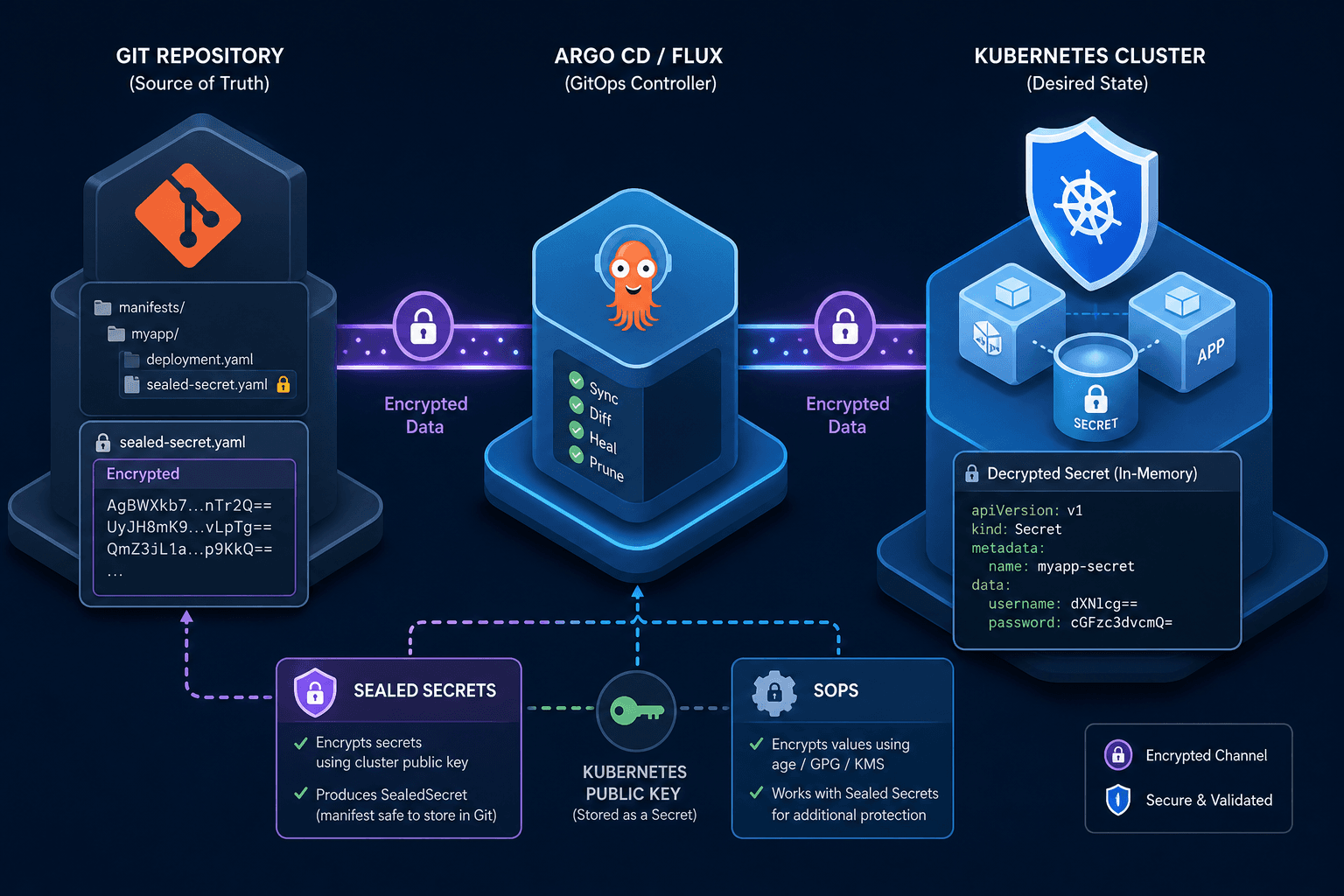
Sealed Secrets implements a hybrid encryption scheme that decouples the encryption key from the decryption key in a way that aligns with GitOps workflows. The process relies on asymmetric cryptography and a specific controller lifecycle.
In a standard GitOps flow, the cluster operator (the person managing the infrastructure) deploys a Sealed Secrets controller into the target cluster. This controller generates a public/private key pair. The public key is exported and stored in the Git repository, often as a ConfigMap or a specific resource definition. The private key remains strictly inside the cluster, held by the controller's pod.
When the CI pipeline runs, it uses the kubeseal CLI tool. The tool fetches the public key from the Git repository (or a known location) and encrypts the secret locally. The resulting output is a SealedSecret custom resource. This resource contains the encrypted payload and metadata indicating which cluster-specific key was used for encryption. Crucially, the SealedSecret object is safe to commit to Git. Even if an attacker obtains the SealedSecret manifest, they cannot decrypt it because they lack the private key, which resides only in the cluster.
Once the SealedSecret is applied to the cluster via the GitOps controller (ArgoCD or Flux), the controller detects the new resource. It intercepts the request, decrypts the payload using the local private key, and creates a standard Kubernetes Secret object. The standard Secret object is ephemeral in the context of the GitOps workflow; it is not committed back to Git. The plaintext exists only within the cluster's etcd storage (encrypted at rest if configured) and the application's memory.
This mechanism prevents "history pollution." If Alex accidentally commits a SealedSecret with a typo, the kubeseal tool does not expose the underlying secret. The only way to recover the plaintext is to have the private key, which is isolated within the cluster's trust boundary.
GitOps Security with SOPS and Field-Level Encryption
While Sealed Secrets operates at the resource level, SOPS (Secrets OPerationS) offers a more granular approach suitable for environments with multiple clusters or complex cloud integrations. SOPS integrates with cloud provider Key Management Services (KMS) such as AWS KMS, Azure Key Vault, or HashiCorp Vault.
In this architecture, the encryption key is not generated by the cluster but by the cloud provider. The CI pipeline uses the sops CLI to encrypt specific fields in a YAML or JSON file. The encryption process involves the CI runner fetching a data key from the cloud KMS. The KMS wraps this data key using a customer master key (CMK) and returns the encrypted data key. The sops tool then encrypts the secret value using the data key and stores the encrypted data key alongside the encrypted value in the file.
The critical difference here is the location of the decryption authority. To decrypt the file, a service needs permission to call the cloud KMS API to unwrap the data key. In a GitOps context, this means the cluster's service account (or the GitOps operator's identity) must have the necessary IAM permissions to access the KMS.
Consider a scenario where a team uses Flux to manage configuration across three environments: Dev, Staging, and Production. Each environment has its own KMS key. The sops file contains the encrypted secret. When Flux syncs the configuration to the Dev cluster, it does not decrypt the secret. Instead, the application running in Dev requests the secret from an External Secrets Operator (ESO). The ESO, running in the cluster, uses the Dev service account to call the Dev KMS, retrieve the decrypted value, and inject it into the application via environment variables or a mounted volume.
This approach ensures that the Git repository contains only encrypted blobs. The decryption logic is offloaded to the cloud provider's infrastructure, not the cluster's storage. This is particularly useful for compliance requirements where the organization wants to rotate keys without redeploying the application, as the KMS handles key rotation transparently.
The Role of External Secrets Operator
Relying solely on in-cluster decryption can lead to tight coupling between the application and the secret store. The External Secrets Operator (ESO) decouples the GitOps workflow from the secret management backend.
The workflow involves defining an ExternalSecret resource in Git. This resource points to a secret in an external store (like AWS Secrets Manager or HashiCorp Vault). The ESO controller watches for this resource. It authenticates with the external store using the cluster's service account credentials. Once authenticated, it fetches the current value of the secret.
Here is a typical ExternalSecret definition showing how the mapping works:
apiVersion: external-secrets.io/v1beta1
kind: ExternalSecret
metadata:
  name: db-credentials
spec:
  refreshInterval: 1h
  target:
    creationPolicy: Owner
    template:
      type: Opaque
      data:
        username: {{ .username }}
        password: {{ .password }}
  secretStoreRef:
    name: aws-secrets-manager
    kind: SecretStore
In this example, the secretStoreRef points to a SecretStore resource that defines how to connect to the external backend. The data section defines the template for the resulting Kubernetes Secret. The ESO fetches the raw secret from the external store, applies the template, and creates the standard Kubernetes Secret.
This pattern is essential for GitOps security because it allows the Git repository to contain only the intent (the mapping), not the value. The actual secret values live in a dedicated, audited secret management system with fine-grained access controls and audit logs. The GitOps controller only manages the synchronization of the reference, not the secret itself.
ArgoCD and Flux Security Postures
The choice of GitOps engine—ArgoCD or Flux—dictates how these encrypted secrets are handled during the sync process. Both tools act as the bridge between the Git repository and the cluster, but their mechanisms for handling secrets differ slightly in configuration.
ArgoCD uses a component called the argocd-secret to store its own state, but for application secrets, it relies on the application manifest. If you use Sealed Secrets with ArgoCD, the controller simply applies the SealedSecret resource. ArgoCD does not need to know how to decrypt it; it treats it as an opaque object. The decryption happens entirely within the cluster via the Sealed Secrets controller.
However, if you use SOPS with ArgoCD, you must configure the ArgoCD application to use the sops plugin. This requires setting up a custom sync hook or using the argocd sops plugin to decrypt the file before applying it to the cluster. This introduces a dependency: the ArgoCD server must have access to the KMS keys or the SOPS configuration to decrypt the file. If the ArgoCD server is compromised, the attacker could potentially access the decrypted secrets if they are cached in the ArgoCD database. Crucially, the GitOps controller (ArgoCD) should not hold the private keys for SOPS decryption to maintain the security principle established earlier.
Flux handles this differently. Flux is designed to be stateless regarding secrets. It pulls the manifests from Git and applies them. If you use Sealed Secrets, Flux applies the SealedSecret resource, and the controller decrypts it. If you use SOPS, Flux does not natively decrypt the files. Instead, you must configure a specific integration, such as the Flux SOPS plugin or pre-sync hooks, to handle decryption before the manifests are applied. In this scenario, the decryption is handled by an external tool or the CI pipeline, not the Flux controller itself.
A critical security consideration for both tools is the "drift" detection. If a secret is manually changed in the cluster (bypassing Git), the GitOps controller will detect this as a drift and attempt to revert it. In the case of Sealed Secrets, if a user manually edits the Secret object, the controller will overwrite it with the decrypted value of the SealedSecret on the next sync. This ensures consistency but can be confusing if the user expects the manual change to persist.
The Risk of Secret Sprawl
The most common failure mode in GitOps security is "secret sprawl." This occurs when developers, frustrated by the complexity of Sealed Secrets or SOPS, hardcode secrets into Helm values files or Kustomize patches. They might use helm --set to inject a password during deployment. This bypasses the GitOps encryption layer entirely.
To prevent this, organizations must enforce strict policies. For example, a pre-commit hook can scan for patterns resembling passwords or API keys. If a match is found, the commit is rejected. Additionally, the CI pipeline should validate that all Secret resources are either SealedSecret resources or ExternalSecret resources. If a standard Secret resource is detected in the Git repository, the pipeline fails.
This enforcement requires a shift in mindset. Developers must stop thinking of secrets as configuration values to be edited in a text file. Instead, they must treat secrets as immutable artifacts that are injected at runtime. The Git repository becomes a ledger of intent, not a vault of values.
Common Pitfalls
Even with robust tools, implementation errors can compromise the entire security posture. Three common pitfalls frequently observed in production environments include:
- Hardcoding in Helm Values: Developers often bypass encryption by placing secrets directly in
values.yamlfiles, assuming Helm templating provides sufficient obfuscation. This is a critical failure;values.yamlis stored in Git and is readable by anyone with repository access. Secrets must always be referenced via an encrypted resource or an external store reference. - Leaking Secrets in CI Logs: When a pipeline fails or debug mode is enabled, secrets can be inadvertently printed to the console. If the CI/CD system stores logs indefinitely, these secrets become accessible to anyone with log access. Ensure that sensitive output is masked in CI configuration and that log retention policies are strictly enforced.
- Misconfigured RBAC for KMS: In SOPS and External Secrets setups, the service account running the decryption process must have the correct IAM permissions. If the permissions are too broad (e.g., allowing access to all secrets in the KMS), a compromised application can exfiltrate all secrets. Conversely, if permissions are too restrictive, the deployment will fail silently or intermittently, leading to debugging delays.
Practical Takeaways
To maintain a secure GitOps environment, adopt these mental models and rules of thumb:
- Decryption Boundary Must Be Outside Git: The private key used for decryption must never exist in the Git repository. Whether it resides in the cluster (Sealed Secrets) or the cloud provider (SOPS), the key material is the ultimate line of defense.
- Controller Should Not Hold Private Keys: The GitOps controller (ArgoCD or Flux) should act as a transport layer, not a decryption engine for SOPS. It should pass encrypted manifests to the cluster or an external operator that holds the decryption authority.
- Audit Logs Are Mandatory: Every access to a secret, whether via decryption or retrieval from an external store, must be logged. Without audit trails, you cannot detect or investigate a breach. Ensure your KMS, Vault, and ESO configurations include comprehensive logging.
FAQ
Q: When should I choose Sealed Secrets over SOPS? A: Choose Sealed Secrets if you want to keep all key management within your Kubernetes cluster and avoid external dependencies. It is ideal for organizations that prefer cluster-local identity. Choose SOPS if you need to manage secrets across multiple clusters with different environments or if you require integration with cloud-native KMS services for key rotation and compliance.
Q: How do I handle key rotation with these tools? A: With Sealed Secrets, you regenerate the key pair in the cluster and re-seal the secrets with the new public key. With SOPS, you rotate the Customer Master Key (CMK) in your cloud provider; the encrypted data key is re-wrapped automatically by the KMS, and the application continues to function without downtime.
Q: Is it safe to run the GitOps controller in the same cluster as the applications? A: Yes, but you must ensure the controller's service account has the minimum necessary permissions. The controller should not have permissions to read the actual secret values from the cluster's etcd unless it is performing a specific decryption task for a specific resource type (like Sealed Secrets). For SOPS, the controller should ideally not hold the decryption keys itself.
Conclusion
Securing Kubernetes secrets in a GitOps pipeline is not about finding a better encryption algorithm; it is about architectural design. The goal is to ensure that the plaintext secret never touches the version control system. Tools like Sealed Secrets and SOPS provide the mechanisms to achieve this by pushing the decryption boundary to the cluster or the cloud provider.
By using Sealed Secrets, you leverage the cluster's own identity to decrypt secrets, ensuring the private key never leaves the cluster. By using SOPS and External Secrets, you leverage cloud-native identity to manage secrets externally, keeping the Git repository clean and auditable. The GitOps controllers (ArgoCD, Flux) act as the transport layer, ensuring that the encrypted state in Git is faithfully reproduced in the cluster, where the actual decryption occurs.
The final defense is operational discipline. Every commit must be validated against the policy that no plaintext secrets exist. This requires automated scanning and strict enforcement. Only then can the GitOps model be considered secure for sensitive workloads.
Related posts
The Role of Identity in DevSecOps: Integrating Security into the Pipeline
An examination of identity management within DevSecOps to ensure secure CI/CD pipelines through code signing and secure security integration.
SBOMs and Identity: From Inventory to Trust
An examination of Software Bills of Materials (SBOM) and identity mechanisms like SLSA and cosign for strengthening supply chain security.
Kubernetes RBAC and Service Account Security
An examination of Kubernetes RBAC and service account security strategies to enhance cluster protection using Kyverno and pod security policies.