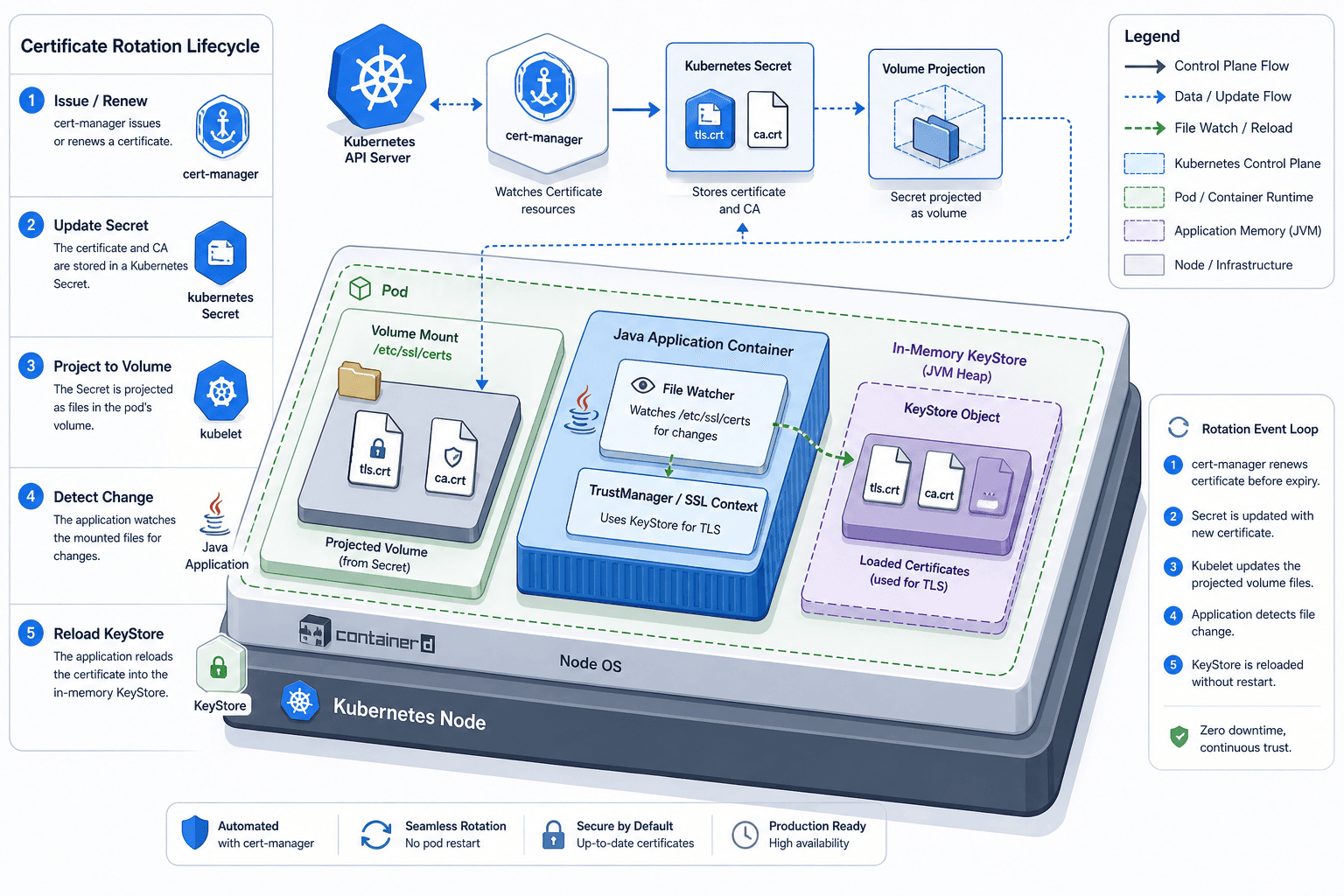
Certificate Rotation and Truststore Operations on Kubernetes
Explore certificate rotation and truststore operations in Kubernetes, covering cert-manager, CA rotation, and expiry monitoring for platform engineers.
This is Part 6 of the "mTLS With Spring Boot" series.
Managing TLS certificates in Kubernetes requires shifting from a static file-management mindset to a dynamic reconciliation model. For platform engineers and Java developers, the core challenge of effective certificate rotation lies not in generating the certificate itself, but in the synchronization of the truststore across a distributed system during rotation. When a Certificate Authority (CA) rotates, every service must agree on the new public key. If this agreement happens asynchronously, you risk split-brain trust scenarios where one pod accepts a client’s certificate while another rejects it.
This guide details the mechanism of certificate rotation using cert-manager, focusing on how Kubernetes Secrets interact with application truststores and how to manage the lifecycle without downtime.
The Source of Truth: cert-manager and Secrets
In a Kubernetes cluster, certificates should never be hardcoded or manually copied. Instead, they are managed by controllers. cert-manager is the de facto standard for this. It operates by watching custom resources of type Certificate.
When you define a Certificate resource, you specify the DNS names, the duration, and the Issuer (or ClusterIssuer) responsible for signing it. The Issuer might be an internal PKI like HashiCorp Vault, or a public CA like Let's Encrypt.
apiVersion: cert-manager.io/v1
kind: Certificate
metadata:
  name: my-app-tls
  namespace: production
spec:
  secretName: my-app-tls-secret
  dnsNames:
    - my-app.production.svc.cluster.local
  issuerRef:
    name: production-ca
    kind: ClusterIssuer
Once cert-manager signs the certificate, it writes the private key (tls.key) and the public certificate (tls.crt) into a standard Kubernetes Secret named my-app-tls-secret. This Secret is the single source of truth. The application does not generate the certificate; it merely consumes the Secret.
The Truststore Drift Problem
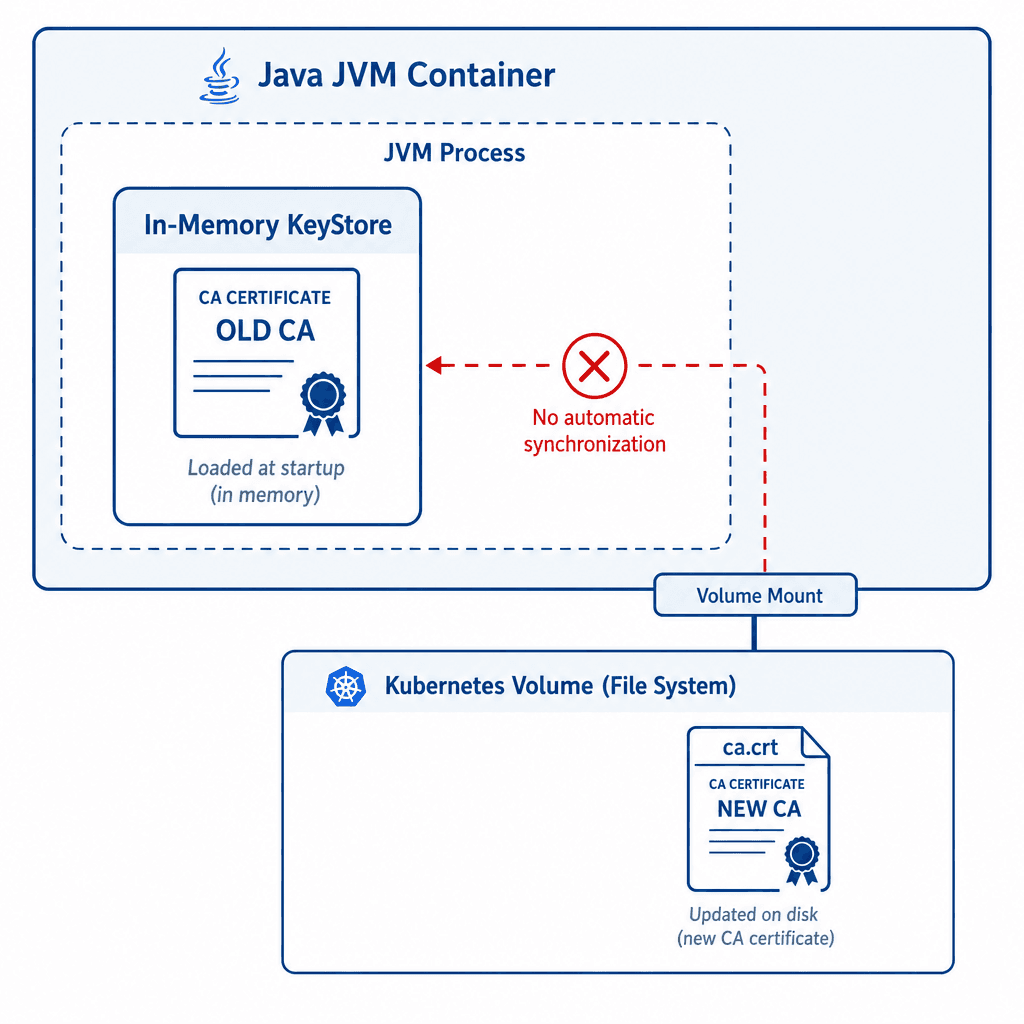
Here is where the confusion often arises. You rotate your CA. cert-manager issues a new leaf certificate signed by the new CA. The Kubernetes Secret updates. However, your Java application (Spring Boot, Quarkus, etc.) does not automatically know that the CA certificate in the Secret has changed.
In Java, trust decisions are made against an in-memory KeyStore. Typically, this is either the default JDK truststore (cacerts) or a custom truststore loaded at startup. If you update the file on disk (which Kubernetes does when the Secret volume is mounted), the JVM does not reload the truststore. It continues to use the old CA hash in memory.
This creates a window of vulnerability and instability where a truststore reload is required but not automatic:
- Old Certs Rejected: If you rotate the CA and the client still presents a certificate signed by the old CA, the server (running the old truststore) might accept it, but if the server has also rotated its own truststore, it might reject it.
- New Certs Rejected: If the server has updated its truststore to include the new CA, but the client hasn’t, the client will fail to validate the server’s certificate if mutual TLS (mTLS) is enforced.
The mechanism here is strict: Kubernetes Secrets are files on disk, but JVM TrustStores are objects in memory. The bridge between them is not automatic.
The Rotation Workflow
To rotate certificates safely, you must follow a deterministic sequence. You cannot simply "update the secret." You must coordinate the trust chain.
Step 1: Rotate the CA (Platform Level)
First, the platform team rotates the Root CA or Intermediate CA. This step initiates the ca rotation process across the cluster by generating a new CA key pair and updating the ClusterIssuer resource. cert-manager detects this change and begins issuing new leaf certificates signed by the new CA.
Step 2: Update the Truststore Secret
The new CA certificate must be added to the truststore of all services. In a microservices architecture, this means every service needs the new CA cert in its truststore.
A common pattern is to maintain a truststore-secret that contains the concatenated CA certificates. When the CA rotates, you update this Secret with the new CA cert (and potentially keep the old one for a grace period, depending on your strategy).
# Example: Updating a truststore secret with a new CA cert
kubectl create secret generic app-truststore \
  --from-file=ca.crt=/path/to/new-ca.crt \
  --from-file=truststore.p12=/path/to/existing-truststore.p12 \
  --dry-run=client -o yaml | kubectl apply -f -
Step 3: Trigger Application Reload
This is the most critical step. Since the JVM does not hot-reload truststores, you have two options:
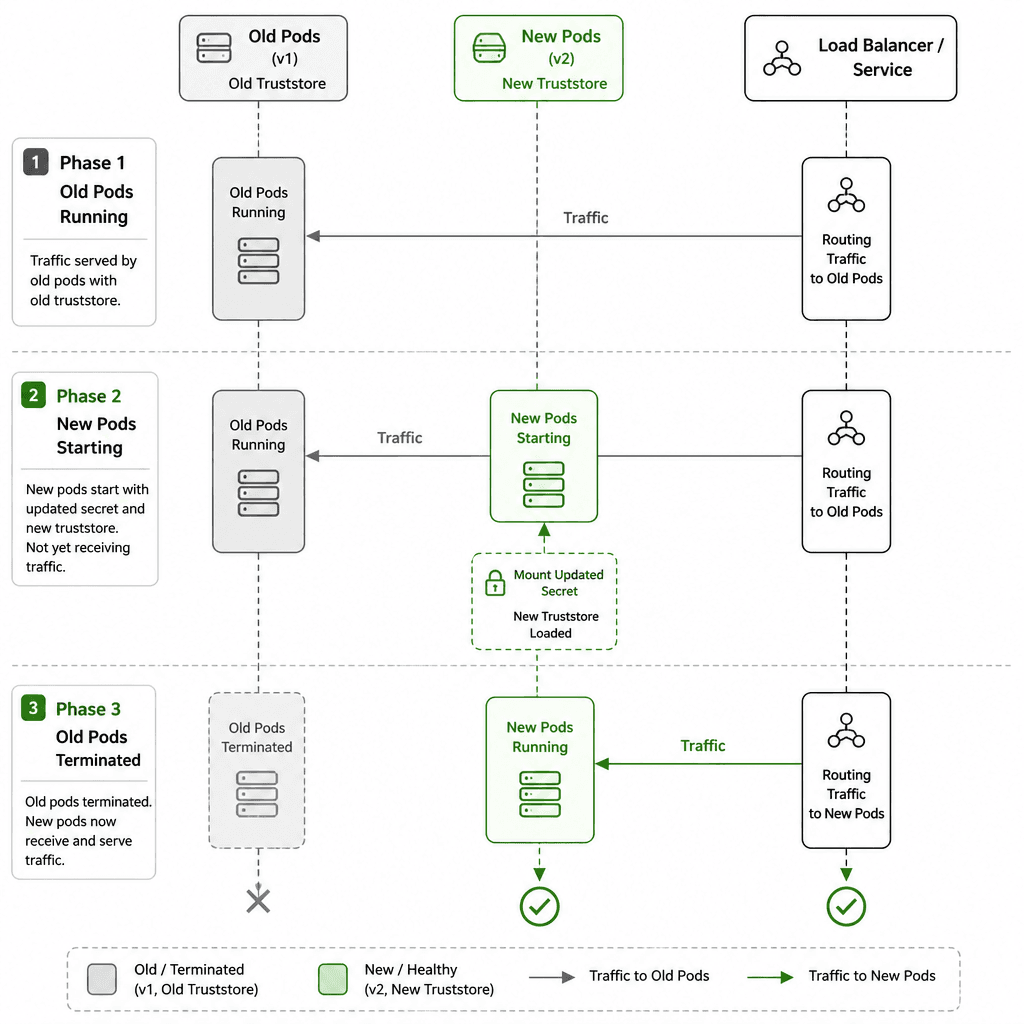
- Rolling Restart: The safest and most common approach. Update the Secret, then trigger a rolling restart of the Deployment. The new pods mount the updated Secret, load the new CA into the JVM truststore, and start accepting connections.
- Programmatic Reload: Some frameworks allow reloading the truststore at runtime. For example, Spring Boot supports reloadable SSL bundles, or you can implement custom
TrustManagerFactoryimplementations that poll for file changes. However, this introduces race conditions. If a client connects exactly when the truststore is being swapped, the connection may fail.
For mTLS, a rolling restart is strongly recommended. It ensures that during the restart window, traffic is routed to pods that are either fully old or fully new, avoiding mixed-mode failures.
Monitoring Expiry and Grace Periods
Manual rotation is error-prone. You need automated monitoring. cert-manager exposes Prometheus metrics that allow you to track certificate age and expiry.
Effective expiry monitoring is critical to avoid unexpected outages. The key metric is certmanager_certificate_expiration_timestamp_seconds. You should set up an alert that fires when a certificate is within a certain threshold of expiry (e.g., 30 days).
# Alert if a certificate expires in less than 30 days
certmanager_certificate_expiration_timestamp_seconds - time() < 86400 * 30
This alert gives you a "grace period" to perform the rotation workflow described above. Without this, you will experience outages when certificates expire unexpectedly.
Conclusion
Certificate rotation in Kubernetes is a multi-step process involving the CA, the Secret, and the application memory. The key takeaway is that updating a Kubernetes Secret does not automatically update your application’s trust decision logic. You must explicitly handle the reload, typically via a rolling restart, to ensure that all pods agree on the current CA. By combining cert-manager for automation, Prometheus for monitoring, and deliberate rollout strategies, you can maintain secure mTLS configurations without manual intervention.
For further details on cert-manager metrics, refer to the official cert-manager documentation and the Java Security Specification regarding truststore management.
Audit your current certificate rotation policy and ensure your truststore reload strategy is automated.
Related posts
Enabling TLS and mTLS in Spring Boot
A practical guide to configuring TLS and mutual TLS (mTLS) in Spring Boot using SSL bundles and server.ssl properties for secure communication.
TLS and mTLS Fundamentals
An examination of TLS and mTLS protocols, covering handshake mechanics, keystores, and truststores for secure backend communication.
Understanding X.509 Certificates: From Basics to mTLS Implementation
An examination of X.509 certificates, covering core concepts, certificate management, and the implementation of mutual TLS (mTLS) within PKI infrastructure.