Spring Security X.509: Client Certificate Authentication
Implement X.509 client certificate authentication in Spring Security to secure mutual TLS connections using SubjectPrincipalRegex and UserDetailsService.
X.509 Client Certificate Authentication in Spring Security
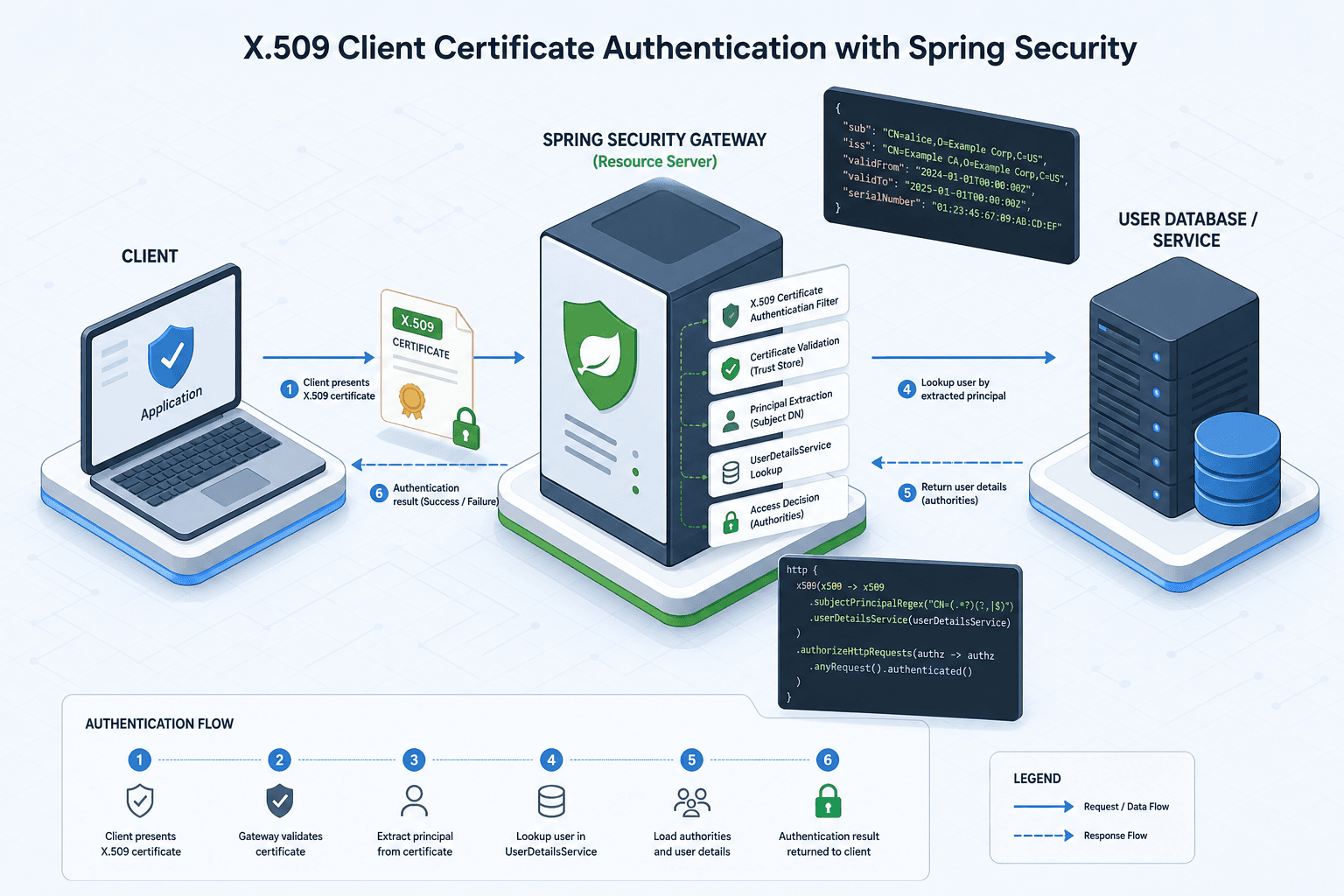
When you configure Spring Security for X.509 client certificate authentication, you are not merely enabling TLS. You are establishing a specific data flow where the SSL engine acts as an identity provider, and Spring Security acts as an identity resolver. This pattern, often called mutual TLS (mTLS), requires understanding three distinct mechanisms: principal extraction, regex parsing, and user service resolution.
Most developers assume that presenting a certificate automatically logs them in. It does not. The certificate only proves possession of a private key. Spring Security must then answer: "Who does this certificate belong to?" and "What are they allowed to do?"
The Principal Extraction Mechanism
The process begins at the transport layer. When a client connects via HTTPS and presents its certificate, the underlying TLS implementation validates the certificate chain against the truststore. If the chain is valid, the SSLSession contains the client's certificate.
Spring Security’s X509AuthenticationFilter sits in the filter chain. It does not handle the cryptographic handshake. Instead, it reads the already-established SSLSession. It extracts the Subject Distinguished Name (DN) from the client certificate.
A Subject DN is a string like:
CN=alice, OU=Engineering, O=Acme Corp, L=Seattle, ST=Washington, C=USThe filter converts this DN string into a PreAuthenticatedAuthenticationToken. At this stage, the "username" is the raw DN string. The authorities list is empty. This token is passed down the chain, but it is not yet a valid authenticated user because Spring Security needs a clean username and a set of roles.
Parsing the Principal with SubjectPrincipalRegex
The raw DN string is rarely suitable as a username. You cannot easily map CN=alice, OU=Engineering... to a database record or a role-based access control system. You need a canonical identifier.
This is where SubjectPrincipalRegex comes in. It is a configuration property on the X509AuthenticationFilter that tells Spring Security how to slice the DN string.
Consider a scenario where your organization issues certificates with the format CN=<username>, OU=<department>. You want the username to be just the CN value.
In your SecurityFilterChain configuration, you define the regex:
@Bean
public SecurityFilterChain filterChain(HttpSecurity http) throws Exception {
    http
        .x509(x509 -> x509
            .subjectPrincipalRegex("CN=(.*?),\\s*OU=(.*)")
            .userDetailsService(customUserDetailsService)
        )
        // ... other config
}
Here is the mechanism at work. The regex CN=(.*?),\s*OU=(.*) is applied to the input string CN=alice, OU=Engineering.
- The engine matches
CN=. - It captures
aliceinto group 1. - It matches
, OU=. - It captures
Engineeringinto group 2.
Spring Security takes Group 1 (alice) and sets it as the principal (username) in the PreAuthenticatedAuthenticationToken. Group 2 is ignored by the framework unless you explicitly use it for further processing. The token now carries alice as the username, but still has no authorities.
If the DN does not match the regex, authentication fails immediately. The filter throws an AuthenticationException before reaching the user service. This is a critical failure point: if your certificate subject changes format, or if you forget to update the regex, valid certificates will be rejected.
Resolving Identity with UserDetailsService
Once the username is extracted, Spring Security needs to know who alice is in the context of your application. Does she have admin rights? Is she a viewer?
X.509 certificates themselves do not contain application-specific roles. They only contain cryptographic identity. Therefore, Spring Security delegates to a UserDetailsService.
You must provide an implementation that takes the extracted username (alice) and returns a UserDetails object containing her authorities.
@Service
public class CustomUserDetailsService implements UserDetailsService {

    @Override
    public UserDetails loadUserByUsername(String username) throws UsernameNotFoundException {
        // Look up 'alice' in your database or config
        List<SimpleGrantedAuthority> authorities = new ArrayList<>();

        if ("alice".equals(username)) {
            authorities.add(new SimpleGrantedAuthority("ROLE_ADMIN"));
            authorities.add(new SimpleGrantedAuthority("ROLE_DEVELOPER"));
        } else {
            throw new UsernameNotFoundException("User " + username + " not found");
        }

        return new org.springframework.security.core.userdetails.User(
            username,
            "", // Password is irrelevant for X.509 auth, but required by interface
            authorities
        );
    }
}
Note the empty password string. In X.509 authentication, the password field in UserDetails is ignored. The authentication was proven by the TLS handshake, not by a shared secret. However, the UserDetailsService interface requires it, so an empty string or placeholder is standard practice.
This step is where your application’s business logic meets security. If alice presents a valid certificate but is not found in your UserDetailsService, authentication fails. This decouples certificate issuance from application access control. You can revoke application access by removing the user from your database without revoking their certificate from the CA.
Wiring the Configuration
The final piece is ensuring the filter chain is configured correctly. You must enable X.509 authentication and inject your custom services. This setup ensures that spring security respects the subject principal regex defined earlier.
@Configuration
@EnableWebSecurity
public class SecurityConfig {

    @Bean
    public SecurityFilterChain securityFilterChain(HttpSecurity http,
                                                   UserDetailsService userDetailsService) throws Exception {
        http
            .authorizeHttpRequests(auth -> auth
                .requestMatchers("/admin/**").hasRole("ADMIN")
                .anyRequest().authenticated()
            )
            .x509(x509 -> x509
                .userDetailsService(userDetailsService)
                .subjectPrincipalRegex("CN=(.*?),\\s*OU=(.*)")
            )
            // Disable form login since we are using certs
            .formLogin().disable()
            .csrf(csrf -> csrf.disable()); // Often disabled in API-only mTLS setups

        return http.build();
    }
}
Common Pitfalls and Debugging
- Regex Mismatch: If authentication fails with an
AuthenticationExceptionduring the filter chain processing, check the DN string in the server logs. Enable debug logging fororg.springframework.security.web.authentication.preauth.x509to see the raw DN being processed. Note that "Bad credentials" or "No such user" errors stem from theUserDetailsServicenot finding a user, not from a regex mismatch. - Truststore Issues: If the connection fails before authentication, the issue is likely in the JVM truststore. Ensure the CA that signed the client certificate is in the
truststore.jksortruststore.p12loaded by the Spring Boot application. - Empty Authorities: If authentication succeeds but access is denied, verify that your
UserDetailsServiceis returning non-empty authorities. An empty list means the user has no permissions.
Conclusion
X.509 client certificate authentication in Spring Security is a three-step pipeline: extract, parse, resolve. The SSL layer proves identity. The regex defines the username. The UserDetailsService defines the permissions. By understanding this separation, you can build secure, decoupled systems where certificate management and access control are handled independently.
Related posts
SecurityFilterChain in Spring Security 6
A technical walkthrough of configuring SecurityFilterChain in Spring Security 6 using the Lambda DSL and RequestMatchers for Java developers.
Building a Custom Authentication Provider in Spring Security
This article covers the implementation of a custom authentication mechanism within Spring Security using a dedicated AuthenticationProvider.
Building a Custom UserDetailsService with Spring Security
Learn how to implement a custom UserDetailsService in Spring Security to handle user loading and GrantedAuthority logic.