Understanding HTTP Strict Transport Security (HSTS) for Identity Applications
An examination of HTTP Strict Transport Security (HSTS) implementation for identity applications using Spring Boot to enhance web security.
In identity application architecture, a user navigating to http://login.example.com creates a critical vulnerability. Without HTTP Strict Transport Security (HSTS), the browser sends this initial request unencrypted, allowing an attacker to strip the subsequent HTTPS redirect. HSTS protects subsequent visits by enforcing HTTPS, but the very first visit remains vulnerable unless the domain is on the HSTS Preload List, which enforces HTTPS immediately upon entry.
HSTS Implementation Overview
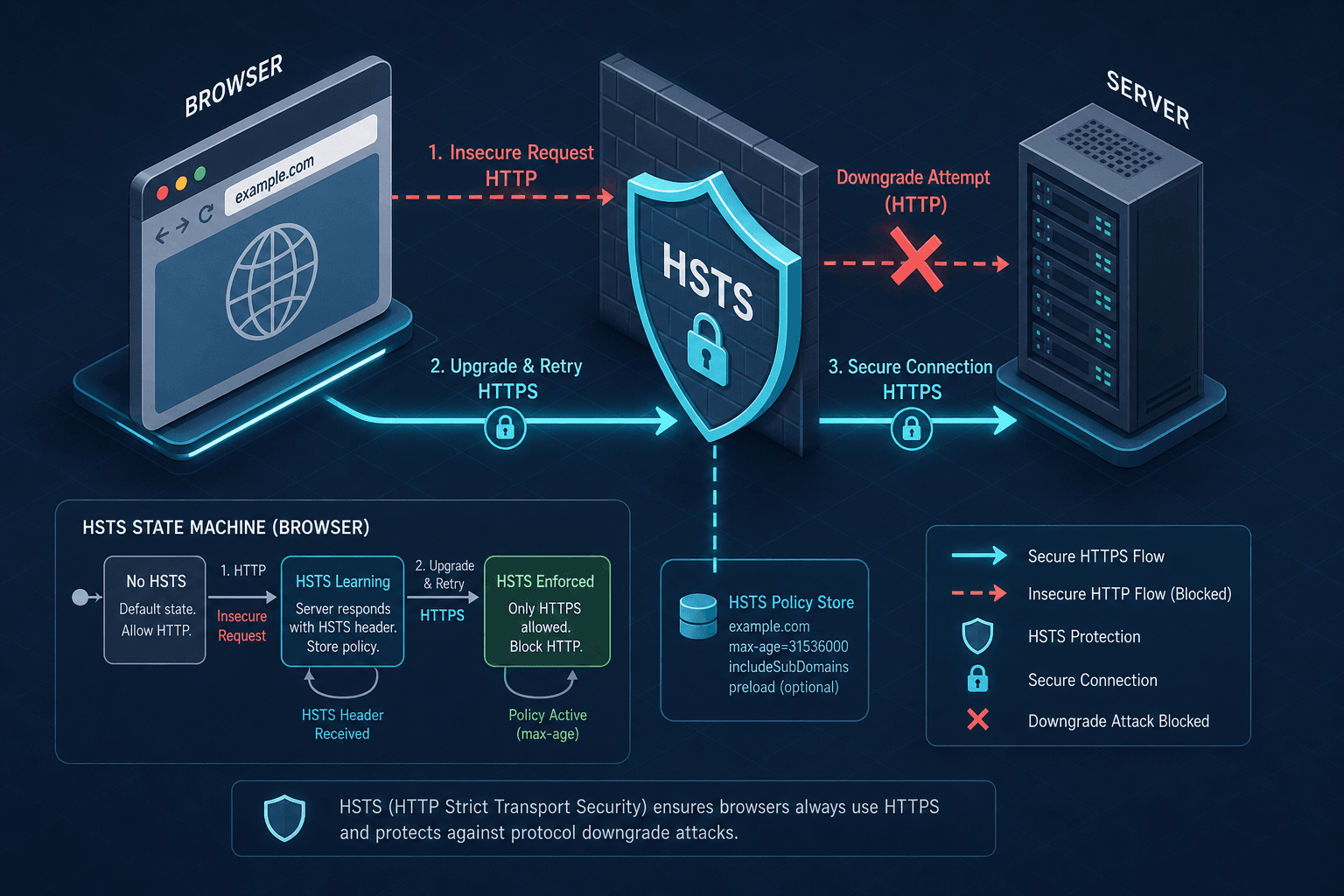
Before diving into specific attack vectors, it is essential to understand the core mechanism of HTTP Strict Transport Security (HSTS). This protocol relies on a client-side state store maintained by the browser. When a server responds to a secure HTTPS request with the Strict-Transport-Security header, the browser records the domain and the associated policy duration (max-age). This ensures that for the specified period, all future connections to that domain are automatically upgraded to HTTPS, preventing protocol downgrade attacks. However, this mechanism inherently requires at least one successful HTTPS handshake to initialize the state, highlighting the necessity of the Preload List for the initial "zero-trust" connection.
The Mechanism of Downgrade Attacks
The vulnerability of identity applications often begins at the "first visit." When a user types a URL without the https:// prefix, the browser defaults to HTTP. If the server is configured to redirect HTTP traffic to HTTPS, this redirection happens over the insecure channel. A man-in-the-middle (MitM) attacker can simply drop the 301 response code. The browser, receiving no instruction to switch protocols, proceeds to send the login credentials over the unencrypted HTTP connection.
HSTS acts as a countermeasure by shifting the security logic from the server to the client's state machine. Once a browser receives the Strict-Transport-Security header, it enters a "secure" state for that domain. In this state, the browser automatically rewrites any future HTTP requests to HTTPS before they are even sent over the network. This eliminates the "first visit" vulnerability window because the browser no longer trusts the initial HTTP request to be safe; it assumes the server must be served via HTTPS.
Browser State Machine & Preload Lists
The core of HSTS is the browser's internal HSTS store. When a valid Strict-Transport-Security header is received, the browser updates its store with the domain, the max-age duration, and flags like includeSubDomains. This data persists across browser sessions and restarts. The max-age directive dictates the retention period. If a browser encounters a request for the domain within this window, it silently upgrades the protocol. If the request occurs after the max-age expires, the browser reverts to standard behavior, potentially exposing the user to the downgrade attack again.
The includeSubDomains flag is a propagation mechanism. If set to true, the browser applies the HSTS policy not just to the specific domain (e.g., example.com) but to all its subdomains (e.g., mail.example.com, api.example.com). This is vital for identity providers where authentication might occur on a subdomain while the main application resides on the root domain. However, enabling this flag requires that all subdomains are secured with HTTPS, as the browser will block access to any subdomain attempting to use HTTP during the max-age period.
Despite the robustness of the HSTS store, the very first visit to a new site remains a blind spot. The browser has no prior knowledge of the site's security requirements. This is where the HSTS Preload List becomes essential. This list is a static dataset embedded directly into browser source code. Before making any network request, a modern browser checks if the target domain exists in this list. If it does, the browser enforces HTTPS immediately, bypassing the need to wait for the server to send the HSTS header. This protects the "zero-trust" window for the initial connection.
Spring Boot Implementation Mechanics
For an identity application built with Spring Boot, implementing HSTS requires configuring the security filter chain to inject the appropriate HTTP response header. Unlike standard redirects which rely on client-side logic, HSTS is enforced by the browser based on the server's explicit signal. In a Spring Boot application, this is typically achieved by extending the WebSecurityConfig and adding a HeaderWriter within the SecurityFilterChain.
The configuration must ensure that the header is only sent over secure channels. Sending an HSTS header over an insecure HTTP connection is logically contradictory and often ignored by browsers, as the browser would not have received the header securely in the first place to begin the state update.
@Configuration
@EnableWebSecurity
public class SecurityConfig {

    @Bean
    public SecurityFilterChain filterChain(HttpSecurity http) throws Exception {
        http
            .headers(headers -> headers
                .strictTransportSecurity(hsts -> hsts
                    .directives("max-age=31536000; includeSubDomains; preload")
                )
            )
            .authorizeHttpRequests(auth -> auth
                .requestMatchers("/login", "/register").permitAll()
                .anyRequest().authenticated()
            );
        return http.build();
    }
}
In this configuration, the Strict-Transport-Security header is constructed with the specific values: max-age=31536000; includeSubDomains; preload. The includeSubDomains directive is particularly significant for identity providers. If a user logs in at auth.example.com and the application relies on a subdomain like api.auth.example.com for token exchange, omitting this flag could allow an attacker to downgrade the connection to the API subdomain while the main domain remains protected. By enabling includeSubDomains, the browser applies the strict transport policy to *.example.com. However, this introduces a dependency risk: if the subdomain is not properly secured, the entire parent domain's HSTS policy forces the browser to block access to the broken subdomain.
The Identity Application Tradeoff
The operational tradeoff for identity applications is severe. If an administrator sets max-age too high without verifying that all subdomains are fully HTTPS-compliant, they risk locking out users globally. Consider a scenario where identity.example.com is the login portal, but status.identity.example.com is an internal monitoring dashboard still running on HTTP due to legacy infrastructure. If the main domain sends an HSTS header with includeSubDomains and a high max-age, the browser will refuse to connect to the HTTP status dashboard for the duration of the age period. For an identity application, where user access is the primary business function, this is a denial-of-service event.
Therefore, the implementation strategy must be iterative. Start with a lower max-age (e.g., 30 days) and includeSubDomains: false to test the environment. Monitor logs for 403 Forbidden errors or connection failures, verify that no subdomains are left behind, and only then increase the max-age and enable subdomain propagation.
Furthermore, the interaction between HSTS and session management in Spring Security requires careful alignment. Identity applications often rely on HttpSession objects which, by default, may be created during an unauthenticated request. If the application logic allows the creation of a session object over HTTP before the HSTS header is processed, the session ID could be leaked. While HSTS prevents the transport from being downgraded, it does not retroactively encrypt a session ID that was already transmitted. The server must ensure that any session creation or token issuance happens strictly after the TLS handshake is verified. In Spring Boot, this is implicitly handled by the container when the request arrives over HTTPS, but the application logic must not explicitly redirect to HTTP or allow HTTP endpoints to persist session state.
The preload flag in the configuration is a declaration of intent, not an immediate enforcement mechanism for the current browser cache. It informs the browser that the site intends to be added to the preload list, but enforcement only occurs if the domain is already present in the browser's internal preload database. It is a best practice to set preload=true in the code immediately upon verifying the domain meets the criteria (e.g., a valid certificate, no mixed content, and a minimum max-age of 157680000 seconds), but the actual security benefit for new users only materializes once the browser vendor updates their preload list.
Conclusion
Ultimately, HSTS transforms the security model of an identity application from a reactive defense to a proactive state. It removes the reliance on the user's browser version or the network's integrity for the initial handshake. By embedding the security policy into the browser's state machine, the application ensures that the identity flow—login, token issuance, and session validation—remains within the encrypted tunnel regardless of network conditions. For Spring Boot applications, this is a minimal configuration change that yields a disproportionate security gain, provided the operational risks of subdomain coverage and max-age duration are managed with precision. Failure to manage these parameters correctly can turn a security feature into a reliability blocker, so the deployment strategy must prioritize visibility and gradual rollout over aggressive configuration.
FAQ
What happens if I set max-age too high?
If you set max-age too high without ensuring all subdomains are secured, you risk a denial-of-service event. Browsers will block access to any unsecured subdomains for the duration of the max-age, potentially locking out users from critical internal tools or legacy services.
How do I add my domain to the preload list?
You can submit your domain to the HSTS Preload List via the official website (hstspreload.org). The submission process validates that your domain meets specific criteria, including a valid max-age of at least 157680000 seconds (5 years), the includeSubDomains flag, and no mixed content.
Does HSTS work on subdomains by default?
No, HSTS does not apply to subdomains by default. You must explicitly set the includeSubDomains flag in the Strict-Transport-Security header. Without this flag, the policy applies only to the exact domain specified in the header.
Takeaways
- Use a
max-ageof 157680000 seconds (5 years) for production environments intended for the preload list. - Always test with a low
max-age(e.g., 30 days) before increasing the duration to avoid locking out users. - Ensure all subdomains are HTTPS-compliant before enabling the
includeSubDomainsflag.
Pitfalls
- Locking out users with high
max-agevalues before all infrastructure is migrated to HTTPS. - Leaving unsecured subdomains exposed or blocked due to missing
includeSubDomainsconfiguration. - Confusing standard HSTS behavior with Preload List behavior, assuming the
preloadflag enforces immediate HTTPS on the first visit without actual list inclusion.
Related posts
Content Security Policy for Identity Applications
An examination of Content Security Policy implementation to prevent XSS attacks within identity applications.
Spring Security 6 and Spring Boot 3: Migration Guide
A practical walkthrough for migrating applications to Spring Security 6 and Spring Boot 3, covering Jakarta EE transitions and essential security steps.
JWT Expiration, Rotation, and Revocation: A Lifecycle Guide
A guide to JWT expiration, rotation, and revocation strategies for secure token lifecycle management.