Writing a Keycloak Custom User Storage Provider
A technical guide for Java developers on implementing a Keycloak custom user storage provider to integrate legacy databases and manage user federation.
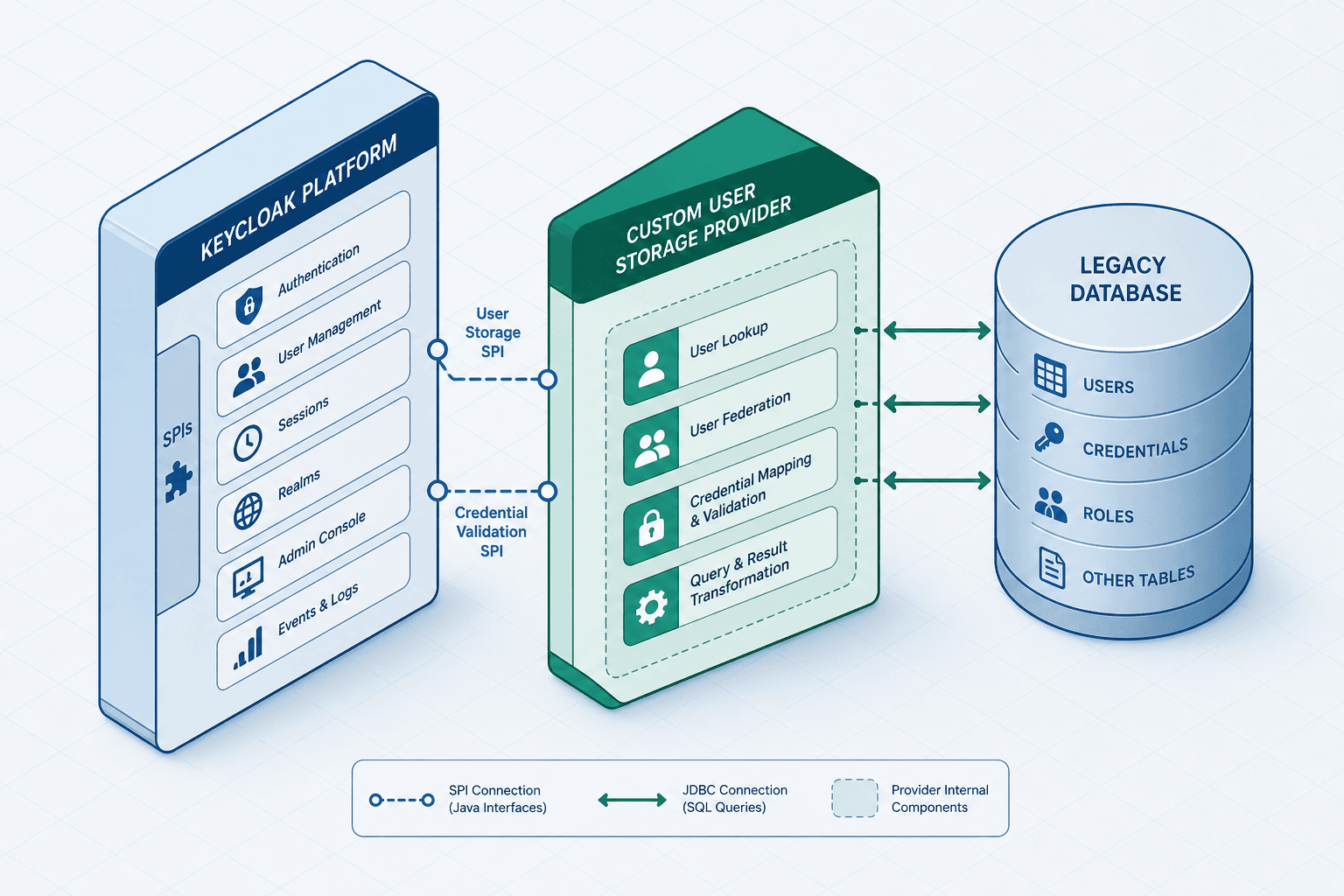
Integrating a legacy database with Keycloak requires a robust abstraction layer via the keycloak user storage spi. Keycloak expects a standardized UserModel interface, indifferent to whether the underlying data originates from LDAP, SQL, or flat files. The engineer’s task is to implement a Java Service Provider Interface (SPI) that translates legacy schema concepts into Keycloak’s identity model. This guide details the mechanism for building a UserStorageProvider, focusing on the critical distinction between federation (reading data) and credential validation (authenticating data). For more on the SPI structure, see the Keycloak User Storage SPI docs.
The SPI Entry Point
Keycloak loads providers via Java’s standard ServiceLoader mechanism. You do not register your provider in a web.xml or a Spring context. Instead, you provide a META-INF/services file.
Create META-INF/services/org.keycloak.storage.UserStorageProviderFactory containing the fully qualified class name of your factory:
com.example.keycloak.legacy.LegacyUserStorageProviderFactoryThe factory class implements UserStorageProviderFactory<UserStorageProvider>. Its responsibility is purely instantiation. When Keycloak needs a provider, it calls create(KeycloakSession session, ComponentModel model). This custom provider acts as the bridge between Keycloak's internal models and your external data source.
public class LegacyUserStorageProviderFactory implements UserStorageProviderFactory<UserStorageProvider> {
    @Override
    public UserStorageProvider create(KeycloakSession session, ComponentModel model) {
        // Parse config to get JDBC URL, credentials, etc.
        String dbUrl = model.getConfig().getFirst("jdbcUrl");
        return new LegacyUserStorageProvider(dbUrl);
    }

    @Override
    public String getId() {
        return "legacy-jdbc-provider";
    }
}
Mechanism Note: The getId() method is crucial. It must be unique across all providers in the Keycloak instance. Keycloak uses this ID to cache the provider instance per realm. If you return duplicate IDs, Keycloak will fail to initialize or overwrite configurations unpredictably.
Bridging the Data Model
Keycloak does not query your database directly when it needs user attributes. It uses a UserAdapter that wraps your legacy user object. This adapter implements UserModel.
Why wrap? Because Keycloak caches user attributes in memory during a request lifecycle to avoid N+1 query problems. The UserAdapter must implement getFirstAttribute(String name) and getAttribute(String name).
public class LegacyUserAdapter implements UserModel {
    private final LegacyUser legacyUser;
    private final RealmModel realm;
    private final UserAdapterDelegate delegate; // Used for caching

    public LegacyUserAdapter(LegacyUser legacyUser, RealmModel realm) {
        this.legacyUser = legacyUser;
        this.realm = realm;
        this.delegate = new UserAdapterDelegate(this);
    }

    @Override
    public String getFirstAttribute(String name) {
        // Map legacy column 'email_addr' to Keycloak attribute 'email'
        if ("email".equals(name)) {
            return legacyUser.getEmail();
        }
        return delegate.getFirstAttribute(name);
    }

    // ... other UserModel methods ...
}
Critical Mechanism: The UserAdapterDelegate manages the local Keycloak cache, not the legacy DB. The provider must explicitly implement logic (e.g., overriding updateAttribute) to propagate changes to the legacy database, rather than relying on the delegate to do it automatically. If your legacy system allows updates, you must persist changes back to the database in these methods. If the legacy system is read-only, throw UnsupportedOperationException.
Credential Validation: The Security Boundary
This is the most common point of failure. Legacy systems often use weak hashing algorithms (MD5, SHA-1) or custom salted hashes. Keycloak’s default credential storage uses PBKDF2. You cannot simply store the legacy hash in Keycloak’s CREDENTIALS table because Keycloak will try to verify it using its own strong default algorithms.
You must implement a CredentialProvider<CredentialModel>. This provider tells Keycloak: "When this specific credential type is submitted, use my logic to verify it."
public class LegacyCredentialProvider implements CredentialProvider<CredentialModel>, CredentialInputValidator {

    @Override
    public boolean isValid(RealmModel realm, UserModel user, CredentialInput input) {
        if (!(input instanceof UserCredentialModel)) {
            return false;
        }

        UserCredentialModel credential = (UserCredentialModel) input;

        // 1. Retrieve the stored hash from our legacy DB via the UserAdapter
        String storedHash = user.getFirstAttribute("legacyPasswordHash");
        if (storedHash == null) {
            return false;
        }

        // 2. Apply legacy hashing logic
        String computedHash = LegacyHashUtil.md5WithSalt(credential.getChallenge(), user.getFederationLink());

        // 3. Compare securely
        return MessageDigest.isEqual(storedHash.getBytes(), computedHash.getBytes());
    }
}Opinion: Do not attempt to migrate the hash to a stronger algorithm during login. This creates a race condition and breaks idempotency. Instead, implement CredentialInputUpdater if you must upgrade the hash, but only after successful validation. For legacy systems, sticking to verification-only is safer and simpler.
Synchronization and Federation
Keycloak supports two modes of federation: Lazy and Sync.
- Lazy (Default): The user is created in Keycloak’s internal DB only when they first log in. The
UserStorageProvider’sgetUserByUsernameorgetUserByIdmethods are called on demand. - Sync: You implement
ImportSynchronization. Keycloak periodically scans your legacy DB and pushes changes to its internal cache.
For a legacy database, lazy loading is usually preferred to avoid locking the legacy system during full syncs. The code example below demonstrates a Lazy-only implementation, removing the ImportSynchronization interface and the sync method to align with this recommendation.
public class LegacyUserStorageProvider implements UserStorageProvider, CredentialProvider<CredentialModel> {

    @Override
    public UserModel getUserByUsername(RealmModel realm, String username) {
        LegacyUser user = legacyDb.findByUsername(username);
        if (user != null) {
            return new LegacyUserAdapter(user, realm);
        }
        return null;
    }

    @Override
    public UserModel getUserById(RealmModel realm, String id) {
        LegacyUser user = legacyDb.findById(id);
        if (user != null) {
            return new LegacyUserAdapter(user, realm);
        }
        return null;
    }

    // ... other UserStorageProvider methods ...
}
Mechanism Note: In lazy mode, Keycloak calls getUserByUsername or getUserById on demand. Always ensure these methods efficiently fetch data from the legacy system without unnecessary overhead.
Configuration and Deployment
Package your implementation as a JAR. Include the META-INF/services file. Deploy it to Keycloak’s providers directory (or use the Quarkus extension approach for newer versions). This backend-development pattern ensures decoupling between Keycloak's core engine and your specific legacy integration logic.
In the Keycloak Admin Console, navigate to Identity Providers or User Federation (depending on Keycloak version, CUSP is often configured under User Federation providers like "Custom"). Configure your custom provider in the Admin Console by following these steps:
- Select your custom provider.
- Set the Import Mode to
IMPORTorLIVEREGISTRATION_ONLY. - Configure the JSON config that matches your
ModelNodeparsing in the factory.
Conclusion
Building a Custom User Storage Provider requires understanding that Keycloak is a caching identity broker. Your provider is a read/write layer that must handle transient objects (UserAdapter) and secure credential verification independently of Keycloak’s default crypto policies. By isolating the legacy hash verification in a dedicated CredentialProvider and using lazy loading for user attributes, you ensure both security and performance without overburdening the legacy database.
Related posts
Writing a Keycloak Custom Authenticator
A guide to building a Keycloak custom authenticator using the Authenticator SPI for Java developers and identity engineers.
Keycloak Architecture Deep Dive: Internal Components and Data Flow
An examination of Keycloak architecture, internal components, SPI extensions, themes, and the core data model for advanced developers.
The Keycloak Service Provider Interface, Explained
A technical examination of the Keycloak Service Provider Interface (SPI), covering custom providers, provider factories, and extension strategies for Java developers.
