Keycloak Performance Tuning and Capacity Planning
A practical guide to Keycloak performance tuning and capacity planning, covering connection pools, hashing iterations, and benchmarking strategies.
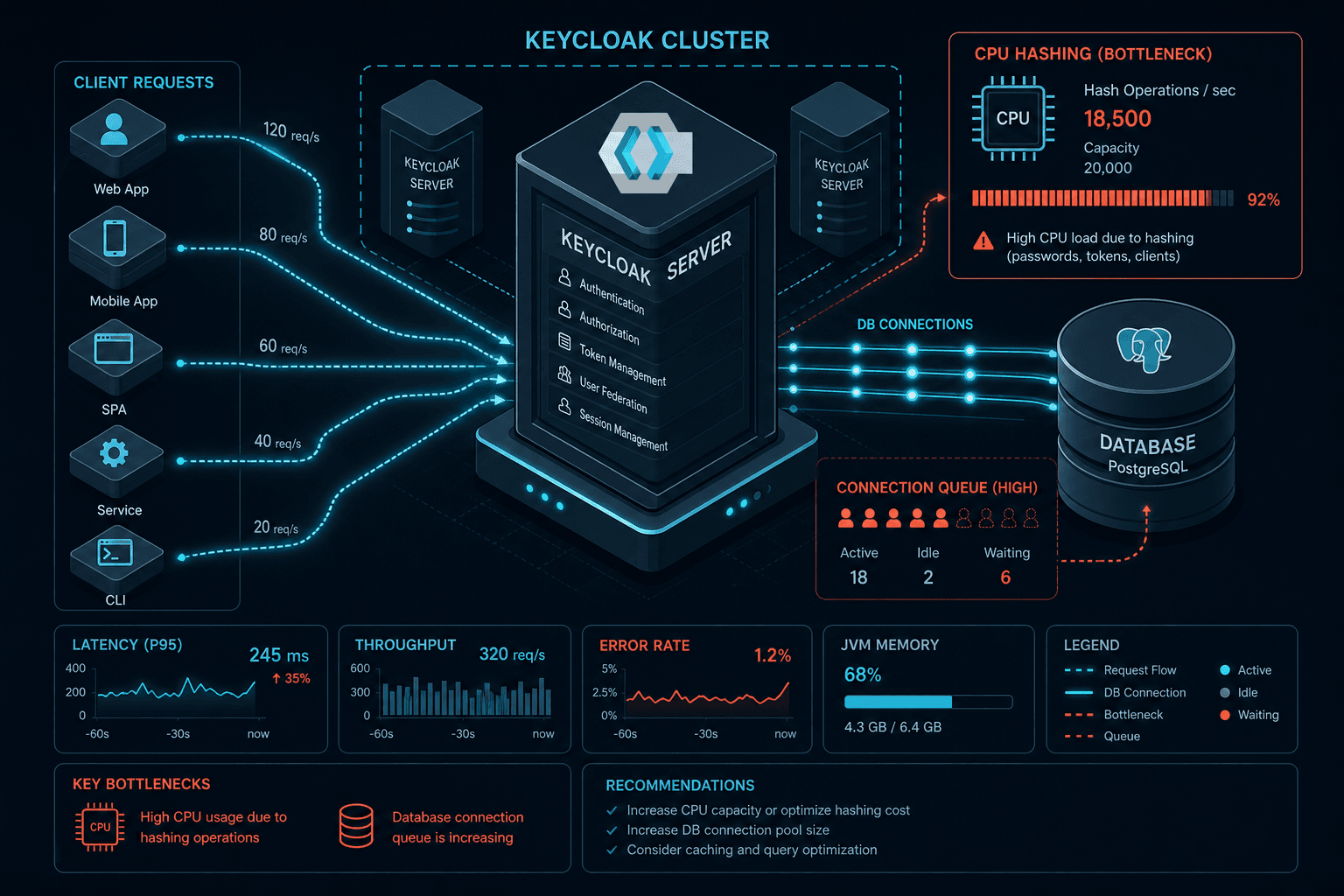
Keycloak is often deployed as a black box: install it, point it at a database, and hope it handles the load. For platform engineers and SREs, this approach fails when authentication latency spikes during peak traffic. Keycloak’s performance is not a single metric; it is a function of three distinct resource constraints: CPU-bound cryptographic hashing, I/O-bound database connectivity, and memory management. To tune Keycloak effectively, you must treat these as separate subsystems with different scaling characteristics. This guide details the mechanisms behind these bottlenecks and provides a structured approach to capacity planning.
The Hashing Bottleneck: CPU as the Ceiling
The most common performance misconception is that Keycloak’s slowness is due to database latency. In reality, the primary bottleneck is often CPU-intensive password hashing. When a user authenticates, Keycloak must verify their password against stored credentials. This involves running a cryptographic hash function (PBKDF2, SCRYPT, or BCRYPT) thousands of times.
The mechanism here is linear CPU consumption per request. If you increase the security iterations to make passwords harder to crack, you directly reduce the number of requests your server can process per second.
Consider PBKDF2 with SHA-256. The configuration parameter hashIterations controls how many times the hash is computed [1]. A default value might be 27,500 iterations. If a single hash operation takes 10 microseconds, 27,500 iterations take 275 milliseconds. If your server has 4 CPU cores, and each core can handle one authentication thread at a time, you are limited to roughly 3.6 requests per second per core (1000ms / 275ms).
To optimize this, you must balance security requirements against throughput. For internal enterprise applications, where threat models are lower, reducing hashIterations to 5,000–10,000 can drastically improve latency without compromising security significantly. For BCRYPT, the same hashIterations parameter [2] sets the log2 cost factor. Increasing this from 10 to 12 quadruples the computational cost.
Actionable Step: Monitor CPU utilization during authentication spikes. If CPU hits 90%+ while response times degrade, hashing is your bottleneck. Reduce iteration counts incrementally until CPU usage stabilizes at 70–80%, leaving headroom for sudden traffic bursts.
Connection Pool Dynamics: The I/O Constraint
While hashing consumes CPU, database interactions consume I/O and thread pools. Keycloak runs on WildFly (or Quarkus in newer versions), which uses a connection pool to manage database connections. The pool acts as a buffer between application threads and the database.
The mechanism at play here is thread blocking. When an application thread needs to query the database, it requests a connection from the pool. If the pool is exhausted (all connections are in use), the thread blocks, waiting for a connection to become available. This creates a queue. As load increases, the queue length grows, causing latency to spike non-linearly.
Conversely, an oversized pool causes its own problems. Each active database connection consumes memory and CPU for context switching. More critically, most databases have a maximum connection limit. If Keycloak’s pool exceeds this, the database may reject new connections or start killing existing ones, leading to cascading failures.
Key parameters to tune are min-pool-size, max-pool-size, and pool-prefill.
min-pool-size: The number of connections maintained even when idle. Setting this too low causes "cold start" latency when new connections are created on demand.max-pool-size: The upper limit. This should be set based on the database’s capacity and the number of Keycloak instances. A common formula is:max_connections_per_instance = (total_db_connections - reserved_for_other_apps) / number_of_keycloak_instances.
Common Pitfalls
When managing connection pools, avoid these frequent errors:
- Oversized Pools: Creating more connections than the database can handle leads to connection exhaustion and increased context-switching overhead, degrading performance for all services sharing the database.
- Ignoring GC Pauses: During benchmarking, large heap sizes can cause long garbage collection pauses that mimic network or database latency. Ensure JVM tuning is stable before attributing latency to connection pools.
- Simultaneous Changes: Never change hashing iterations, connection pool sizes, and JVM arguments simultaneously. This makes it impossible to isolate which change caused a performance regression.
Actionable Step: Enable connection pool monitoring. In WildFly, this is exposed via JMX. Track the AvailableCount and InUseCount. If InUseCount frequently hits MaxSize, you need to either increase the pool size (if the DB allows) or optimize your queries. If AvailableCount is consistently near zero but latency is low, your pool is sufficient. If latency is high and AvailableCount is low, you are blocked.
Benchmarking Strategy: Measuring Reality
Heuristic tuning is dangerous. The only way to determine your capacity is to benchmark under controlled conditions. Keycloak provides a built-in benchmark tool (keycloak-benchmark) that simulates realistic user behavior, including login, token refresh, and user creation.
The mechanism of effective benchmarking is isolation. You must measure the impact of each change independently. Do not change hashing iterations and connection pool sizes simultaneously.
A robust benchmarking workflow involves:
- Baseline: Run the benchmark with default settings. Record Requests Per Second (RPS), average latency, and 95th percentile latency.
- Variable Isolation: Change one parameter (e.g.,
hashIterations). Run the benchmark again. Compare metrics. - Capacity Point Identification: Gradually increase load until you see a sharp increase in latency (the "knee" of the curve). This is your capacity limit.
Use tools like Prometheus and Grafana to visualize these metrics. Focus on the 95th percentile latency, not the average. Average latency can be misleading if a small percentage of requests are extremely slow due to GC pauses or network hiccups. The 95th percentile tells you what most users experience.
Opinion: Many teams skip benchmarking because it feels like extra work. However, without benchmarks, you are flying blind. A simple benchmark script can save hours of debugging production outages. Treat benchmarking as part of your deployment pipeline, not an afterthought.
Practical Takeaways
Adopt these mental models to streamline your performance tuning process:
- Hashing is CPU-bound, DB is I/O-bound: Optimize hashing by adjusting iterations to fit CPU headroom, and optimize DB interactions by tuning connection pools to fit I/O capacity. Do not confuse the two.
- Benchmark one variable at a time: Changing multiple parameters simultaneously obscures the root cause of performance changes. Isolate variables to build a reliable mental model of your system.
- Monitor 95th percentile latency, not average: User experience is defined by the worst-case scenarios they encounter, not the mean. Optimizing for the 95th percentile ensures consistent performance for the majority of users.
FAQ
How do I choose between PBKDF2 and BCRYPT? PBKDF2 is generally faster and less resource-intensive, making it suitable for high-throughput internal systems. BCRYPT is more secure against GPU-accelerated attacks but consumes significantly more CPU. Choose BCRYPT if security is paramount and CPU capacity is sufficient; otherwise, PBKDF2 offers a better balance of security and performance for most enterprise use cases.
What is the ideal connection pool size?
There is no single "ideal" size, but a good starting point is to calculate based on your database's maximum connections. Divide the total available connections (minus reserves for other apps) by the number of Keycloak instances. Start with a max size that utilizes 60-70% of the database's connection capacity, then monitor InUseCount during peak loads to adjust.
How often should I re-benchmark? You should re-benchmark whenever you make significant changes to infrastructure (e.g., scaling nodes, changing database versions), update Keycloak to a new major version, or observe unexpected latency spikes in production. Regular quarterly reviews are also recommended to account for changes in traffic patterns.
Conclusion
Keycloak performance tuning is not about finding a magic configuration file. It is about understanding the trade-offs between security (hashing), data integrity (database connections), and user experience (latency). By isolating these mechanisms and benchmarking systematically, you can build a Keycloak deployment that scales predictably under load. Start with hashing iterations, then optimize your connection pools, and always validate with benchmarks.
References
[1] Keycloak Documentation. "Authentication Flows and Password Storage." https://www.keycloak.org/docs/latest/server_admin/#_password-storage [2] Keycloak Documentation. "Password Policy and Storage Configuration." https://www.keycloak.org/docs/latest/server_admin/#_password-policy [3] WildFly Documentation. "Datasource Configuration and Connection Pools." https://docs.wildfly.org/
Related posts
Keycloak: Multiple IdPs, HRD, and Account Linking
Configure Keycloak for multiple identity providers using Home Realm Discovery and account linking to prevent duplicate accounts and streamline user access.
Integrating Keycloak with Active Directory: LDAP, Kerberos & Group Mapping
A technical walkthrough for integrating Keycloak with Active Directory, covering SAMAccountName, group mapping, and Kerberos configuration.
Keycloak LDAP User Federation: Mechanics, Mapping, and Tuning
A practical guide to configuring Keycloak LDAP user federation, covering sync modes, attribute mappers, and performance tuning for identity engineers.
