Keycloak: Multiple IdPs, HRD, and Account Linking
Configure Keycloak for multiple identity providers using Home Realm Discovery and account linking to prevent duplicate accounts and streamline user access.
Keycloak Multiple IdPs, Home Realm Discovery, and Account Linking
This is Part 5 of the Keycloak Identity Federation series.
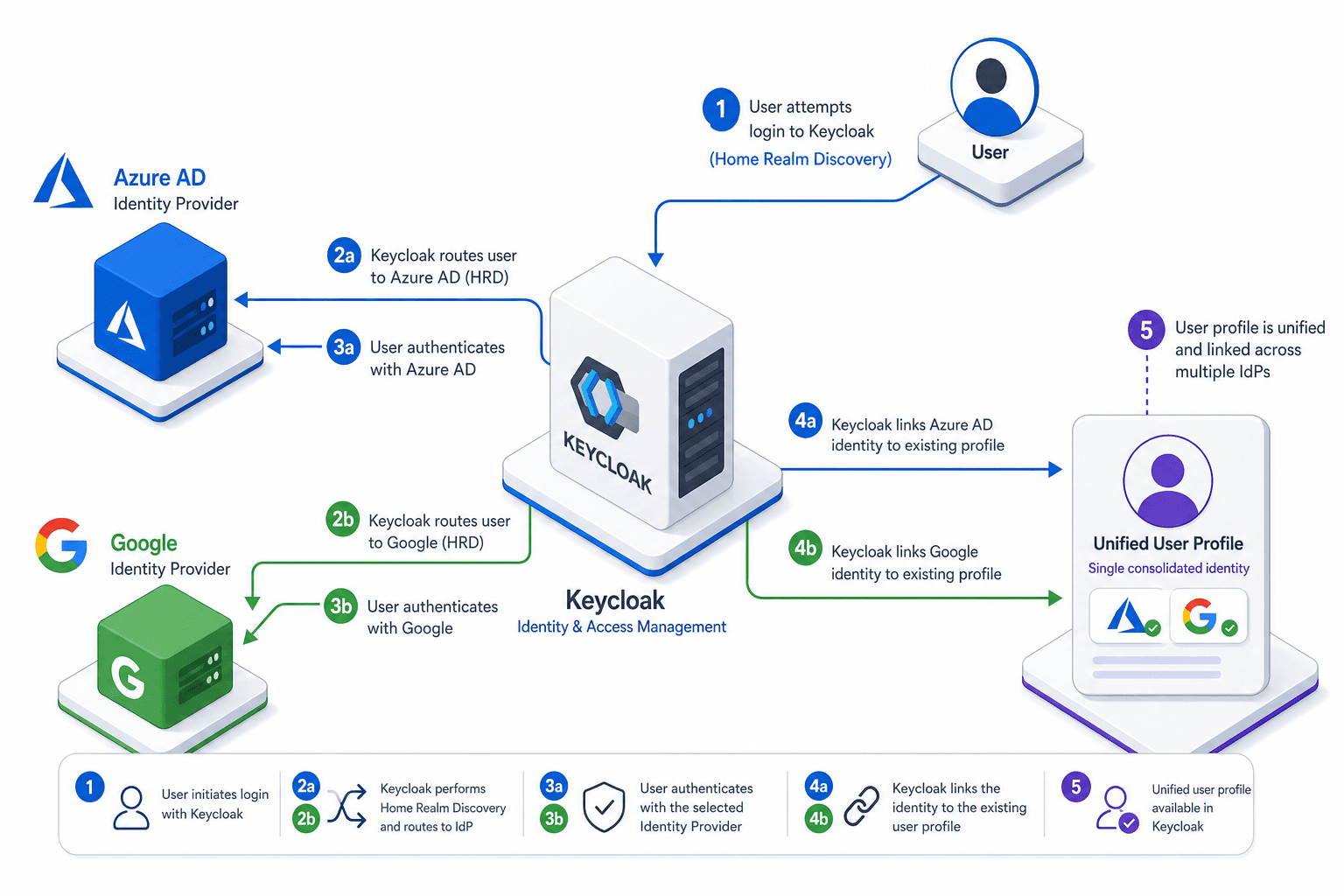
Integrating multiple Identity Providers (IdPs) into a Keycloak realm introduces two distinct engineering challenges: routing and identity resolution. If a user has accounts on both Microsoft Azure AD and Google, how does the system know which IdP to contact? And if that same user logs in via Google after previously logging in via Azure AD, does the system create a duplicate user record or merge them?
Most implementations fail here because they treat authentication (proving who you are) and authorization/identity management (what you are allowed to do and how your data is stored) as a single monolithic step. In Keycloak, these are separate phases. This post explains the mechanisms for Home Realm Discovery (HRD) to handle routing and Account Linking to handle identity resolution. For technical details on HRD, see the Keycloak Documentation on Identity Brokering.
The Routing Problem: Home Realm Discovery
By default, when a user attempts to authenticate via a social login or enterprise IdP in Keycloak, Keycloak presents an "Identity Provider Picker." This UI lists all enabled external IdPs. This is a poor user experience for enterprise applications where the IdP is determined by the organization or the email domain.
Keycloak solves this via a query parameter called kc_idp_hint. This parameter tells the Keycloak authentication flow to skip the picker and redirect the user directly to the specified IdP’s authorization endpoint.
Mechanism of kc_idp_hint
The kc_idp_hint is not a magic token; it is simply a string that matches the alias of an Identity Provider defined in the Keycloak Admin Console.
Consider a Keycloak realm with two external IdPs configured:
azure-ad(alias:azure)google(alias:google)
When a client application redirects a user to Keycloak’s authentication endpoint, the URL structure is:
GET https://keycloak.example.com/auth/realms/myrealm/protocol/openid-connect/auth?client_id=myapp&redirect_uri=https://myapp.com/callback&response_type=code&kc_idp_hint=azureHow it works internally:
- The Keycloak Authentication Flow intercepts the
kc_idp_hintparameter. - It validates that an IdP with the alias
azureexists and is enabled. - The Identity Provider Redirector authenticator in the browser flow matches the hint and skips directly to the
azureIdP, bypassing the login form that would otherwise list all enabled IdPs. - Keycloak generates the OAuth 2.0 authorization request and redirects the user’s browser to the Azure AD login page.
If the kc_idp_hint is missing or invalid, Keycloak falls back to the Identity Provider Picker.
Implementing HRD in Client Applications
You should never rely on the user selecting their IdP from a list. Instead, your application should determine the correct IdP based on context. Common strategies include:
- Email Domain Parsing: If the user enters
john@contoso.com, your app detects thecontoso.comdomain and passeskc_idp_hint=azure. - Explicit Selection: Your app presents a branded button ("Sign in with Google"). When clicked, the redirect URL includes
kc_idp_hint=google.
Example in a Node.js/Express middleware:
function addIdpHint(req, res, next) {
  const email = req.query.email; // Assume collected from a previous step
  if (email && email.endsWith('@google.com')) {
    req.url += '&kc_idp_hint=google';
  } else if (email && email.endsWith('@microsoft.com')) {
    req.url += '&kc_idp_hint=azure';
  }
  next();
}
The Data Problem: Account Linking
Routing is only half the battle. What happens when a user logs in via Google, and later tries to log in via Azure AD using the same email address?
Without proper configuration, Keycloak treats these as two separate users. You now have:
- User A:
user123(linked to Google) - User B:
user456(linked to Azure AD)
Both have the same email. This breaks single sign-on (SSO) consistency and creates data silos. Account Linking is the mechanism that merges these identities into a single Keycloak user record. For configuration details, refer to the Keycloak Documentation on Account Linking.
How Keycloak Resolves Conflicts
When a user authenticates via an external IdP, Keycloak checks for an existing user with matching attributes. This is governed by the First Broker Login flow assigned to that Identity Provider (configured under Identity Providers > [provider] > Advanced Settings).
There are three primary behaviors, controlled by which authenticators are enabled in the First Broker Login flow:
- Create User If Unique: Always create a new user for the incoming identity, even if a user with the same email already exists. This leads to duplicates. Avoid relying on this alone when IdPs share a user base.
- Confirm Link Existing Account: If a conflict is detected, prompt the user to link the accounts. This is secure but adds friction.
- Automatically Set Existing User: If a conflict is detected, automatically link the new IdP to the existing Keycloak user. This is the preferred method for most enterprise applications.
The Mechanism of Automated Linking
When the Automatically Set Existing User authenticator is enabled in the First Broker Login flow, Keycloak performs the following steps during the authentication flow:
- Authentication: The user successfully authenticates with the external IdP (e.g., Azure AD).
- Attribute Extraction: Keycloak extracts claims from the IdP response (e.g.,
email,preferred_username,sub). - Lookup: Keycloak queries its internal database for a user with a matching
emailorusername. - Linking:
- If a match is found, Keycloak adds the new IdP’s
identityProvideranduserId(the unique ID from Azure AD) to the existing user’sfederatedIdentitieslist. - The user’s session is established using the existing Keycloak user record.
- Any conflicting attributes (e.g., display name) can be configured to overwrite or preserve the existing value.
- If a match is found, Keycloak adds the new IdP’s
If no match is found, a new user is created, and the IdP is linked to it.
Configuration Steps
- Go to Authentication > Flows, and enable the Automatically Set Existing User execution in the First Broker Login flow (or a copy of it).
- Go to Identity Providers, select the relevant provider, and under Advanced Settings set First Login Flow to that flow.
- Repeat for each external IdP that should participate in linking.
- (Optional) Configure Attribute Mapping to ensure the
emailclaim from all IdPs is mapped to the Keycloak user’semailattribute. This is critical for the lookup to work.
Concrete Scenario: The Duplicate Account Fix
Let’s walk through a real-world failure and fix.
Scenario:
- Alice has an email
alice@corp.com. - Her company uses Azure AD. She logs in via Azure, creating Keycloak User
alice-001. - Alice also has a personal Google account with the same email. She accidentally clicks "Sign in with Google."
- Without Linking: Keycloak creates User
alice-002. Alice is confused why her settings are different. - With Linking: Keycloak finds
alice-001because the email matches. It adds the Google identity toalice-001. Alice sees the same profile.
Implementation Checklist:
- Ensure Email Uniqueness: In Realm Settings > Login, ensure "Email as Username" is enabled if you want to use email as the primary key for linking.
- Map Claims Consistently: In each IdP configuration (Azure, Google), ensure the
emailattribute is mapped to the Keycloakemailattribute. - Enable Automated Linking: Enable the Automatically Set Existing User execution in the First Broker Login flow.
- Handle
kc_idp_hint: Ensure your client app always passeskc_idp_hintto avoid the picker and reduce friction.
Common Pitfalls
- Email Case Sensitivity: Email addresses are often case-insensitive in human perception but case-sensitive in string comparison. Ensure your application normalizes emails to lowercase before passing them to Keycloak or checking against them, otherwise,
Alice@Corp.comandalice@corp.commay be treated as different users. - Race Conditions During Simultaneous Logins: If a user opens two tabs and logs in via different IdPs simultaneously, Keycloak might create two separate accounts before either completes the linking process. Implement idempotency checks or queue authentication requests to mitigate this.
- Overwriting Attributes: If attribute mapping is not strict, automated linking might overwrite critical user data (like a display name or phone number) from one IdP with stale data from another. Review the "Overwrite Existing Attribute" settings in your IdP configuration carefully.
Practical Takeaways
- HRD is for routing, Linking is for identity resolution: Treat these as separate concerns. HRD ensures the user goes to the right door; Linking ensures they end up in the right room.
- Always use
kc_idp_hintto skip the picker: Relying on the user to select their IdP increases friction and error rates. Automate the routing based on email domains or explicit UI choices. - Automated linking requires consistent attribute mapping: The linking mechanism relies on matching attributes (usually email). If your IdPs send inconsistent claim names or formats, linking will fail.
FAQ
Can I use HRD with local Keycloak users?
No. kc_idp_hint specifically targets external Identity Providers. If you want to route users to local authentication, you should use standard authentication flows or custom authentication executions, not kc_idp_hint.
What happens if an IdP changes the user's email?
If the email claim from the IdP changes after the account has been linked, Keycloak may fail to find the existing user during subsequent logins. This can result in a new duplicate account being created. You should implement logic in your application to handle email updates or use a stable identifier like sub if your IdPs support it.
Is kc_idp_hint secure against manipulation?
kc_idp_hint itself is not a security control; it is a routing hint. An attacker cannot force a login to an IdP they don't control. However, you should validate that the kc_idp_hint corresponds to a trusted IdP in your configuration to prevent users from being redirected to malicious or unintended IdPs if your application logic allows arbitrary hints.
Conclusion
Managing multiple IdPs in Keycloak is not just about adding more login buttons. It requires a deliberate architecture for routing (kc_idp_hint) and identity resolution (Account Linking). By automating the routing and linking processes, you prevent duplicate accounts, ensure consistent user profiles, and provide a reliable SSO experience.
The key takeaway is that Keycloak treats external IdPs as federated identities, not separate users. Your job is to ensure the data flows correctly from the IdP to the Keycloak user record, and that the user is directed to the correct IdP from the start.
Related posts
Integrating Keycloak with Active Directory: LDAP, Kerberos & Group Mapping
A technical walkthrough for integrating Keycloak with Active Directory, covering SAMAccountName, group mapping, and Kerberos configuration.
Keycloak LDAP User Federation: Mechanics, Mapping, and Tuning
A practical guide to configuring Keycloak LDAP user federation, covering sync modes, attribute mappers, and performance tuning for identity engineers.
Keycloak User Federation vs Identity Provider
Understand the distinction between Keycloak user federation and identity providers for effective identity management.