Keycloak LDAP User Federation: Mechanics, Mapping, and Tuning
A practical guide to configuring Keycloak LDAP user federation, covering sync modes, attribute mappers, and performance tuning for identity engineers.
Configuring Keycloak to federate with an LDAP directory is not merely about connecting two directories; it is about defining the boundary of truth for user identity. For identity engineers, the most common failure point is misunderstanding how Keycloak handles write operations versus read operations. Unlike a simple proxy, Keycloak’s LDAP User Federation provider introduces a synchronization layer that can cache, translate, and occasionally rewrite data. This guide details the mechanism of this integration, focusing on edit modes, attribute mapping, and performance tuning.
The Federation Abstraction Layer
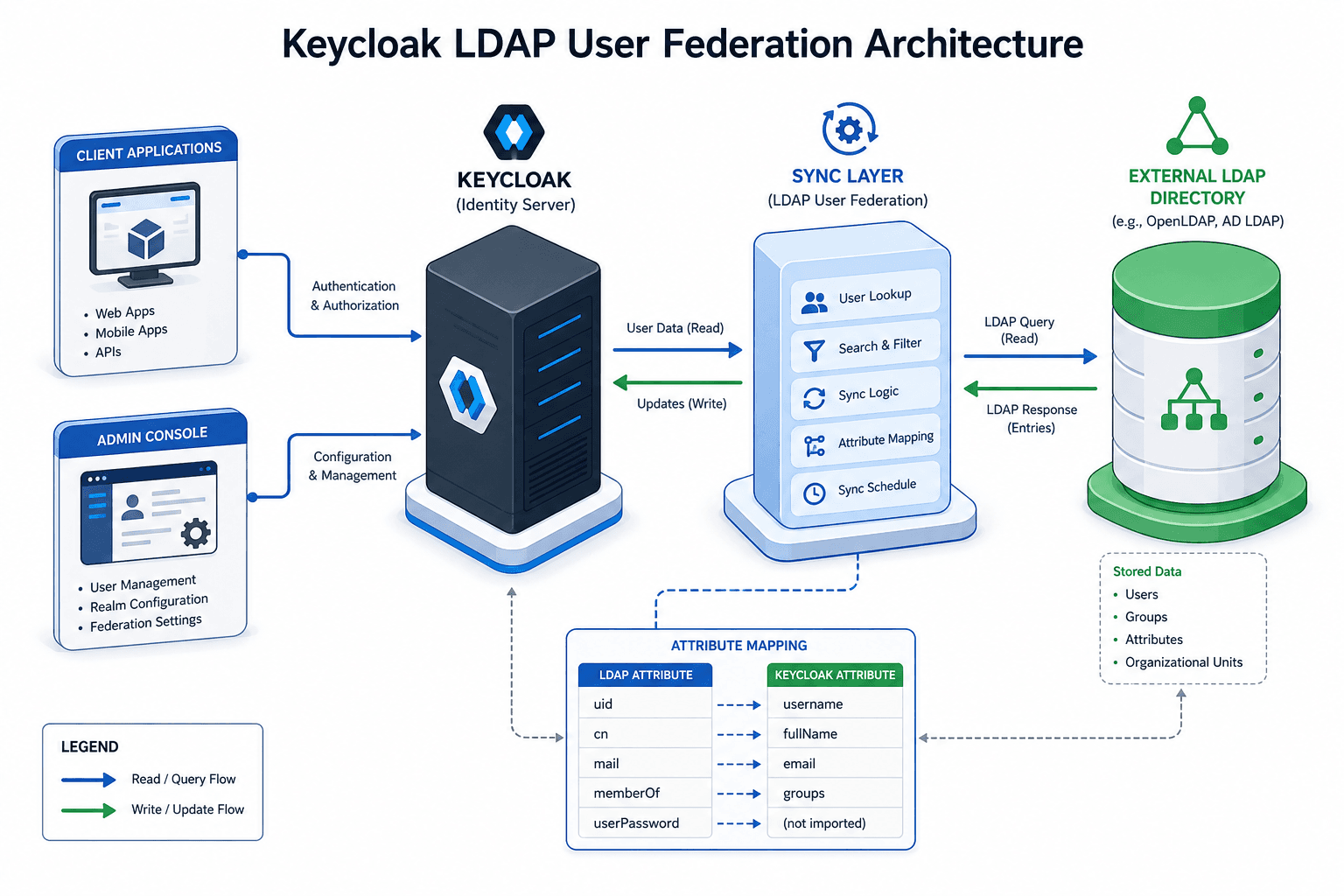
When you configure an LDAP User Federation provider in Keycloak, you are instructing the server to treat an external LDAP directory as a "provider" of user credentials and profile data. Keycloak does not automatically replicate the entire LDAP directory into its internal database (H2/PostgreSQL/Oracle) unless explicitly configured to do so via specific sync modes.
Instead, Keycloak uses the LDAP search mechanism to resolve user identities during authentication. When a user attempts to log in, Keycloak constructs an LDAP search filter based on the configured Username LDAP Attribute (e.g., uid or sAMAccountName) and searches the Search Scope (e.g., Subtree). If a match is found, Keycloak binds using the provided credentials. The user’s profile data is then fetched and cached in Keycloak’s session state or local cache, depending on the configuration.
This mechanism means that Keycloak’s internal database primarily stores the mapping between the Keycloak user ID and the external LDAP distinguished name (DN) or unique identifier, not necessarily the full user profile attributes. This separation is critical for understanding data consistency.
Edit Modes: Defining the Direction of Trust
The most significant configuration decision is the Edit Mode. This setting dictates the direction of data flow and determines which system is the authoritative source of truth for user attributes. There are three distinct modes, each with different mechanical implications.
1. READ_ONLY
In this mode, Keycloak never writes to LDAP. All user profile updates (e.g., changing an email address or first name) are rejected by the LDAP provider. If an application attempts to update a user profile via the Keycloak Admin Console or User Profile SPI, the update fails silently or throws an error, depending on the validation settings.
Mechanism: Keycloak reads from LDAP, caches the result, and serves it. Any write attempt hits the Keycloak database, but the federation provider rejects the sync back to LDAP. Use this when LDAP is the immutable source of truth (e.g., HR system).
2. WRITABLE
This mode allows Keycloak to write updates back to the LDAP directory. When a user updates their profile, Keycloak captures the change, translates it into an LDAP Modify operation, and sends it to the LDAP server.
Critical Risk: WRITABLE assumes that the LDAP schema supports the attributes Keycloak is trying to write. For example, if Keycloak tries to update userPassword or mail, the LDAP server must have those attributes defined in the schema and accessible to the bind DN. If the LDAP schema is rigid or missing attributes, WRITABLE will fail. In such cases, Keycloak throws an exception and the user update in Keycloak is rolled back, ensuring the state remains consistent (both fail). Always validate LDAP schema compatibility before enabling this mode.
3. UNSYNCED
In this mode, user data is imported from LDAP into Keycloak's database, but any subsequent profile updates are stored only in Keycloak and are never written back to LDAP. This differs from READ_ONLY: while both modes prevent Keycloak from modifying LDAP, UNSYNCED allows Keycloak-side profile edits to persist locally, so the Keycloak and LDAP copies of a user's data can diverge over time. Changes made directly in LDAP (e.g., by an HR admin) will not be reflected in Keycloak after the initial import unless a fresh sync is triggered.
Trade-off: Use this when you want to bootstrap identities from LDAP but allow Keycloak to become the authoritative source for profile updates going forward.
Attribute Mappers: Translating LDAP to Keycloak
LDAP attributes (e.g., cn, sn, mail, employeeNumber) are rarely identical to Keycloak’s internal model properties (e.g., firstName, lastName, email, username). Attribute Mappers bridge this gap within the user federation configuration. They are configured in the Keycloak Admin Console under the LDAP provider’s "Mappers" tab.
How Mappers Work
Each mapper defines a transformation rule:
- Source Attribute: The LDAP attribute to read (e.g.,
givenName). - Target Property: The Keycloak user property to populate (e.g.,
firstName). - Template (Optional): A string expression that can combine multiple LDAP attributes.
Example:
If your LDAP uses cn for the full name (e.g., "John Doe") but Keycloak requires separate firstName and lastName fields, you cannot use a simple 1:1 mapper. You must use a template or a custom script. However, Keycloak’s built-in mappers are limited. For complex transformations, you may need to write a custom UserAttributeMapper implementation in Java.
Performance Note: Every attribute mapper adds processing time during authentication. If you have 50 mappers, Keycloak must perform 50 lookups or string manipulations per login. Minimize the number of active mappers and avoid heavy computations in templates.
Performance Tuning and Synchronization
Large LDAP directories can overwhelm Keycloak if synchronization is not tuned. Two key settings control this: Sync Period and Batch Size. Proper ldap tuning is essential to balance load and freshness.
Sync Period
The Sync Period defines the interval for periodic synchronization, updating only users who have changed since the last sync. This relies on LDAP timestamps (e.g., modifyTimestamp) or a custom attribute to detect changes. If your LDAP does not support efficient change detection, periodic sync may degrade to a full sync, causing performance issues.
Note: Full Sync is a separate manual operation or initial import step, not a sub-mode of the sync period setting. It triggers a complete scan of the LDAP directory, importing or updating all users. This is resource-intensive and should only be used during initial setup or major schema changes.
Recommendation: Set the Sync Period to a value that balances freshness with load. For large enterprises, 1–4 hours is typical. Avoid setting it to less than 5 minutes unless you have a highly optimized LDAP setup and dedicated resources.
Batch Size
The Batch Size determines how many users Keycloak processes in a single transaction during synchronization. A large batch size (e.g., 1000+) can improve throughput but increases memory usage and the risk of LDAP timeout errors. A small batch size (e.g., 100) is safer for stability but slower.
Mechanism: Keycloak fetches a batch of users, maps them, and persists them to the database. If the batch is too large, the JVM heap may exhaust, or the LDAP server may drop the connection due to prolonged processing time. Start with a batch size of 500 and monitor GC logs.
Caching Strategies
Enable Cache for the LDAP provider in Keycloak’s server configuration. This ensures that user profiles are cached in memory, reducing LDAP network latency. Configure the cache timeout to align with your Sync Period.
Conclusion
Configuring Keycloak LDAP User Federation is a balance between data consistency, performance, and operational complexity. Start with READ_ONLY to establish connectivity and verify attribute mappings. Only enable WRITABLE if your LDAP schema is compatible and you have a clear strategy for handling write conflicts. Always tune Batch Size and Sync Period based on your directory size and infrastructure capacity. By understanding these mechanisms, you can build a reliable identity layer that scales with your organization’s needs.
Related posts
Keycloak User Federation: LDAP, AD & Custom
An examination of Keycloak user federation configurations for LDAP and Active Directory integration.
Integrating Keycloak with Active Directory: LDAP, Kerberos & Group Mapping
A technical walkthrough for integrating Keycloak with Active Directory, covering SAMAccountName, group mapping, and Kerberos configuration.
Keycloak: Multiple IdPs, HRD, and Account Linking
Configure Keycloak for multiple identity providers using Home Realm Discovery and account linking to prevent duplicate accounts and streamline user access.