Keycloak User Federation: LDAP, AD & Custom
An examination of Keycloak user federation configurations for LDAP and Active Directory integration.
Keycloak User Federation: The Runtime Proxy Mechanism
This article explores the architectural mechanism of Keycloak LDAP federation, focusing on how it functions as a runtime proxy for LDAP and Active Directory integrations rather than a simple data synchronization tool. Part 5 of the Keycloak Masterclass Series.
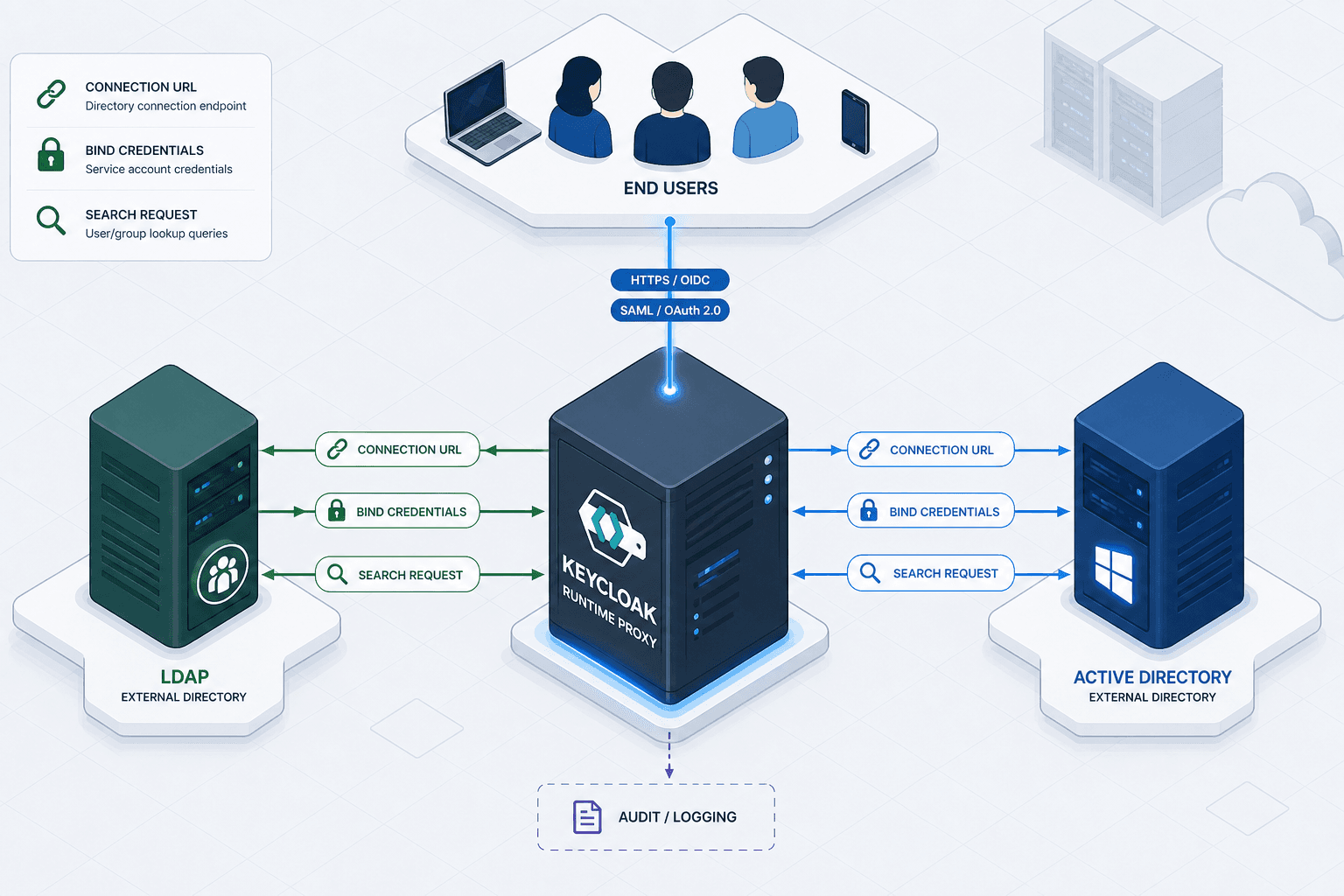
When you configure Keycloak to communicate with an external directory such as LDAP or Active Directory, you are not creating a local copy of the data. You are establishing a runtime proxy. The core mechanism relies on the UserStorageProvider interface, which Keycloak invokes dynamically whenever an authentication attempt or attribute lookup occurs. Unlike traditional synchronization tools that run cron jobs to move data from source A to destination B, Keycloak's federation layer queries the external source in real-time. This distinction is vital for advanced configuration because it means the "source of truth" remains entirely external, and Keycloak merely acts as a protocol adapter.
In a standard setup, the mechanism relies on the Connection URL and Bind Credentials. When a user attempts to log in, Keycloak does not first check its local database for a password hash. Instead, it constructs an LDAP search request based on the provided username and the configured Search Base. It then sends this request over the network to the configured LDAP server. If the server responds with the user entry and a valid password hash (or a successful bind), the authentication succeeds. The local Keycloak database stores only the username and a link to the external provider, not the password itself.
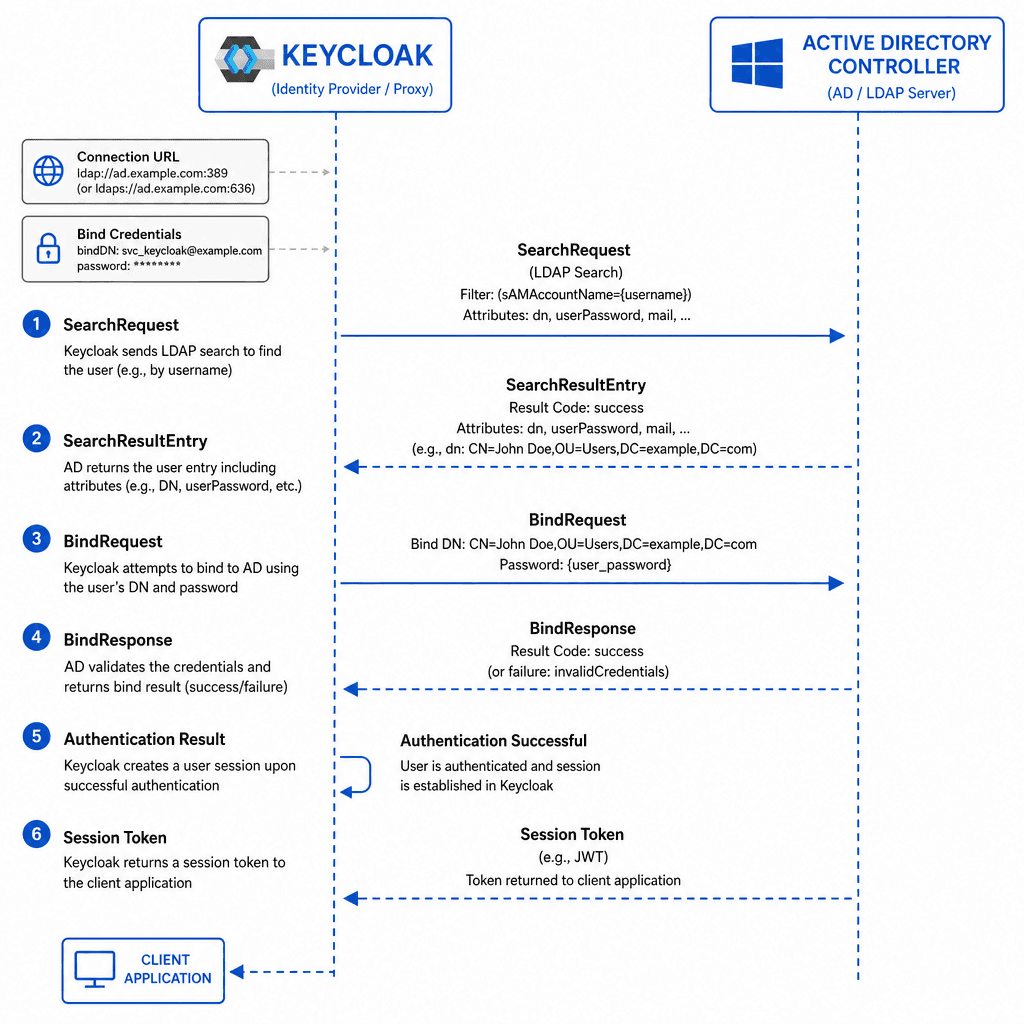
Consider a scenario involving corp-ad (an Active Directory domain) and a Keycloak instance named kc-prod. When alice@example.com logs in, the following sequence occurs at the protocol level:
- Keycloak receives the login request and identifies the
corp-aduser federation provider. - It constructs an LDAP
SearchRequestwithscope=SUBTREE,base=DC=corp,DC=example,DC=com, and a filter like(&(objectClass=user)(sAMAccountName=alice)). - The Keycloak server sends this packet over TCP to the AD Controller.
- AD returns the
userobject without theuserPasswordattribute due to security policies; the password is never exposed in the search result. - Keycloak performs a
BindRequestusingalice's credentials against the AD entry to verify the password hash matches. - Upon success, Keycloak issues a session token without ever storing Alice's password locally.
This mechanism ensures that if alice changes her password in AD, she can immediately log in to Keycloak without any manual sync job running. The latency introduced is purely the network round-trip time and the LDAP query execution time on the directory server.
Active Directory Specifics: Binding and Scope
Configuring Keycloak for Active Directory introduces specific constraints compared to generic LDAP. The primary difference lies in the schema and the security model of AD. In generic LDAP, you might find users in various objectClass definitions. In AD, users are almost exclusively identified by sAMAccountName or userPrincipalName, and the objectClass is strictly defined as user or group.
The mechanism for discovery relies heavily on the Search Scope configuration. If you set the scope to SUBTREE, Keycloak will traverse the entire directory tree starting from the Search Base. While this ensures no users are missed, it creates a heavy load on the AD server, especially in large enterprises with deep organizational unit (OU) structures. Conversely, setting it to ONE_LEVEL restricts the search to immediate children, which is faster but requires precise placement of users in OUs that match your search base.
For the Bind operation, you must provide a service account with Read permissions. This is not an administrative bind; it is a read-only service account. If you attempt to use a user account with write permissions, you risk accidental modifications to the directory structure. The Custom User Attribute Mapper mechanism is where you map AD attributes to Keycloak attributes. For example, mapping the AD attribute mail to Keycloak's email attribute requires a direct string match in the configuration.
A common failure point in this mechanism is the handling of the objectClass filter. If your configuration specifies objectClass=person but the AD entries are objectClass=user, the search returns zero results. The Search Filter in the Keycloak UI allows you to refine this, but it must be constructed to match the AD schema exactly.
# Example of a correct LDAP search filter for Active Directory
(&(objectClass=user)(sAMAccountName={0}))
In this command, {0} is a placeholder replaced by the username provided during login. If the Search Filter is malformed, the Keycloak server will return an "Invalid credentials" error, even if the user exists, because the directory lookup returned no entry.
Custom Federation Providers: Extending the Protocol
Sometimes the built-in LDAP provider is insufficient. Perhaps your organization uses a proprietary directory protocol, or you need to transform attributes in complex ways before passing them to Keycloak. This is where the Custom Federation Provider mechanism comes into play.
The UserStorageProvider SPI (Service Provider Interface) allows developers to implement a Java class that defines how Keycloak interacts with an external system. The mechanism involves implementing specific lifecycle methods: init(), close(), get(), search(), and update(). When Keycloak needs to authenticate a user, it calls the authenticate() method of your custom provider. If your provider returns a valid UserModel, the authentication proceeds.
Consider a scenario where you need to integrate with a legacy HR system that exposes data via a SOAP API instead of LDAP. You would write a custom provider that implements the UserStorageProvider interface. Inside the search() method, you would construct a SOAP request, parse the XML response, and return a list of UserModel objects.
import org.keycloak.models.UserModel;
import org.keycloak.storage.UserStorageProvider;
import org.keycloak.storage.query.Query;
import org.keycloak.storage.user.UserQueryProvider;

import java.util.List;

public class LegacyHRProvider implements UserStorageProvider, UserQueryProvider {
    @Override
    public UserModel get(String username) {
        // Implementation to fetch user details from SOAP API
        // Returns null if user not found
        return null;
    }

    @Override
    public List<UserModel> search(UserQuery query) {
        // Construct SOAP request with query parameters
        // Parse XML response
        // Map SOAP fields to Keycloak UserModel
        return List.of();
    }
}
This mechanism allows you to bypass the LDAP protocol entirely. However, it shifts the responsibility of data consistency and error handling to your code. You must ensure that the update() method correctly handles writes if you enable write-back mode. In a "Read-Only" federation, the update() method is ignored, but in a "Full" federation, it is critical for keeping the external system in sync with Keycloak's view of the user.
While custom providers offer flexibility, they introduce significant maintenance overhead. If your requirement is simply to map a few attributes or handle a non-standard port, the built-in LDAP provider often suffices with careful configuration. Custom providers should be reserved for cases where the underlying protocol or data transformation logic is fundamentally incompatible with standard LDAP operations.
Conclusion
Keycloak's user federation is a sophisticated mechanism that abstracts the complexity of external directory protocols. By understanding the runtime nature of the UserStorageProvider, the specific constraints of Active Directory schemas, and the extensibility of custom providers, you can build an identity management layer. The key to success lies in configuring the search filters and scopes correctly to minimize directory load and ensuring that the custom logic aligns with the actual data flow requirements of your organization.
Common Pitfalls
Even with a solid understanding of the mechanisms, configuration errors frequently occur in production environments. Be vigilant regarding these three common pitfalls:
- ObjectClass Mismatches: A frequent cause of "0 results" is specifying
objectClass=personin the search filter when the Active Directory schema strictly usesobjectClass=userfor user accounts. Always verify the exact schema attributes of your directory. - Scope Overload: Setting the
Search ScopetoSUBTREEon a massive directory can cause severe performance degradation or timeouts. PreferONE_LEVELor specific OUs where possible to limit the search space. - Bind Credential Permissions: Using a domain administrator account for the
Bind Credentialsis a security risk and often unnecessary. Ensure the service account used has onlyReadpermissions to prevent accidental modifications to the directory structure.
Practical Takeaways
To navigate federation configuration effectively, adopt these mental models:
- Runtime vs. Sync: Treat federation as a live window, not a backup. Changes in the source directory are immediately visible (subject to network latency) without a sync job.
- Minimal Privilege: The service account used for binding should be the least privileged account capable of reading user attributes and performing binds.
- Protocol Boundaries: If the external system does not speak LDAP (e.g., REST, SOAP, proprietary), do not force it into the standard LDAP provider; use a custom
UserStorageProviderto maintain clean separation of concerns.
FAQ
Q: Does Keycloak cache user passwords from the directory? A: No. Keycloak acts as a proxy and never stores the actual password hash from the LDAP/AD server. It verifies the password by attempting a bind operation every time.
Q: How does federation affect login latency? A: Login latency includes the network round-trip time to the directory server plus the time required for the LDAP search and bind operations. High latency in the directory server or network will directly impact login times.
Q: Can I write back changes made in Keycloak to the LDAP directory? A: Yes, but only if you configure the provider in "Full" or "Write" mode. In "Read-Only" mode, Keycloak will ignore update requests, and changes made in Keycloak will not propagate to the external directory.
References
- Keycloak User Storage Provider SPI: Keycloak Documentation - User Storage Provider
- LDAP Search Filters: RFC 4511 - Lightweight Directory Access Protocol (LDAP): The Protocol
- Active Directory Schema: Microsoft Docs - AD Schema Reference
Related posts
Integrating Keycloak with Active Directory: LDAP, Kerberos & Group Mapping
A technical walkthrough for integrating Keycloak with Active Directory, covering SAMAccountName, group mapping, and Kerberos configuration.
Keycloak LDAP User Federation: Mechanics, Mapping, and Tuning
A practical guide to configuring Keycloak LDAP user federation, covering sync modes, attribute mappers, and performance tuning for identity engineers.
Keycloak: Multiple IdPs, HRD, and Account Linking
Configure Keycloak for multiple identity providers using Home Realm Discovery and account linking to prevent duplicate accounts and streamline user access.