Keycloak Production: TLS, DB Tuning & K8s
A step-by-step guide to deploying Keycloak in production environments using Docker and Kubernetes with SSL and monitoring.
Setting Up Keycloak in Production: A Step-by-Step Deployment Guide
Deploying Keycloak in production requires more than Docker; it demands architectural rigor in TLS, DB pooling, and K8s lifecycle management.
This is Part 2 of the Keycloak Deployment Series.
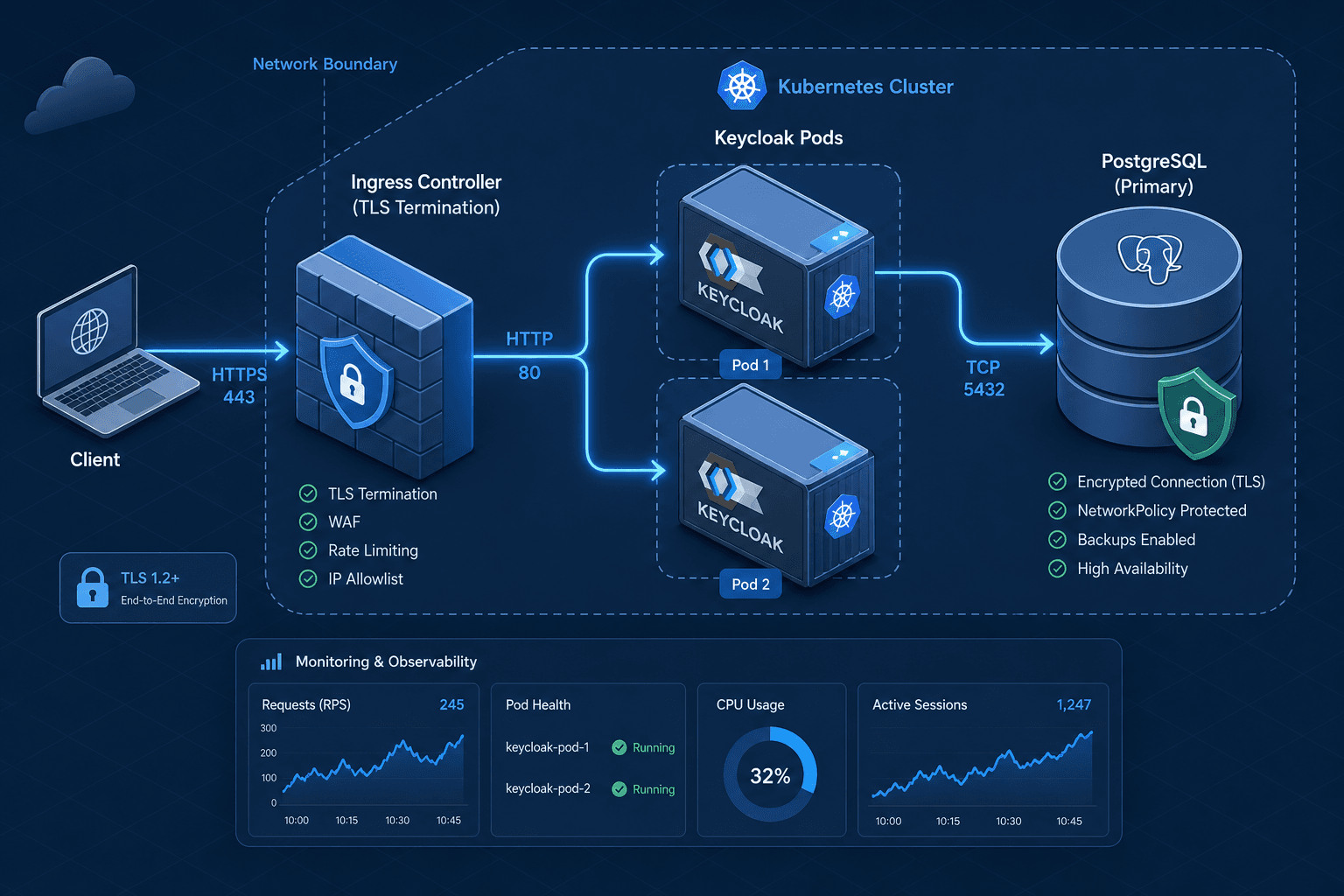
The Network Boundary and TLS Termination
The first mechanism to secure is the transport layer. Keycloak does not inherently terminate TLS if you simply expose a port; it relies on the underlying container runtime or an ingress controller to handle the cryptographic handshake. If you run Keycloak with --https-enabled=true, it expects to manage its own certificates. However, in a Kubernetes environment, it is often safer to terminate SSL at the Ingress Controller (like Nginx or Traefik) and pass traffic over HTTP to Keycloak, using the X-Forwarded-Proto header to inform Keycloak of the original protocol.
If you choose to run Keycloak with internal TLS (common in Docker Compose or bare metal), the mechanism involves the KC_HTTPS_CERTIFICATE_FILE and KC_HTTPS_KEY_FILE environment variables. The critical configuration detail here is the --hostname flag. If Keycloak generates a redirect URL without the correct hostname, users get stuck in a loop.
Consider a scenario where your ingress controller terminates SSL at port 443 and forwards HTTP to Keycloak on port 8080. You must configure the --hostname-strict flag to false and explicitly set --hostname-url or --hostname-admin-url to match the public domain. Without this, the internal OIDC provider logic constructs URLs based on the internal pod IP, causing the browser to reject the redirect.
# Example Docker run command for internal TLS using modern syntax
docker run -d \
  --name keycloak \
  -p 8443:8443 \
  -e KC_ADMIN_USER=admin \
  -e KC_ADMIN_PASSWORD=admin \
  -e KC_HTTPS_CERTIFICATE_FILE=/opt/keycloak/conf/server.crt \
  -e KC_HTTPS_KEY_FILE=/opt/keycloak/conf/server.key \
  -e KC_HTTPS_PORT=8443 \
  -e KC_HTTP_PORT=8080 \
  -e KC_HOSTNAME=my-idp.example.com \
  quay.io/keycloak/keycloak:latest
In this setup, the container reads the certificate files from the mounted volume. If the certificate expires or is invalid, the JVM throws a SSLHandshakeException, and the service becomes unavailable. This is why using a secret management system for certificates is preferred over mounting raw files directly into the container image.
Stateful Persistence and Database Tuning
Keycloak is stateless regarding user sessions but stateful regarding its configuration and user data. The most common production failure is the default use of the embedded H2 database. H2 is an in-process database designed for development; it lacks the durability and concurrency controls required for production. The mechanism of failure here is data corruption during a crash or write lock contention under load.
You must configure Keycloak to use an external relational database, typically PostgreSQL. The connection is established via the JDBC URL and specific driver properties. The critical mechanism here is connection pooling. The default settings often lead to "Connection Pool Exhaustion," where Keycloak waits for a database connection, times out, and returns a 503 error to the user, even if the database is healthy.
To prevent this, you must tune the KEYCLOAK_JDBC_PROPERTIES environment variable. Specifically, you need to configure the preparedStatementsCacheSize and maxLifetime.
# Kubernetes Secret for Database Connection
apiVersion: v1
kind: Secret
metadata:
  name: keycloak-db-config
type: Opaque
stringData:
  jdbc.properties: |
    prepareThreshold=5
    cachePrepStmts=true
    prepStmtCacheSqlLimit=2048
    preparedStatementsCacheSize=256
    maxLifetime=1800000
When deploying this to Kubernetes, you inject these properties into the Keycloak container. The mechanism works by the Keycloak server initializing its Hibernate session factory with these parameters. If you omit maxLifetime, the JDBC driver may keep connections open indefinitely, eventually hitting the database's max_connections limit, causing a cascade failure for all applications relying on the IDP.
Kubernetes Orchestration and Secrets
In a Kubernetes cluster, deploying Keycloak requires a StatefulSet for the database and a Deployment (or StatefulSet) for the application. The primary security mechanism here is the separation of secrets from the container image and command arguments. Passing passwords via kubectl run --env exposes them in the process list (ps -ef), which is a known security vulnerability.
Instead, use Kubernetes Secrets and mount them as environment variables using envFrom. This ensures the secret is only available to the container's runtime environment, not visible in the process tree.
apiVersion: apps/v1
kind: Deployment
metadata:
  name: keycloak
spec:
  replicas: 2
  selector:
    matchLabels:
      app: keycloak
  template:
    spec:
      containers:
      - name: keycloak
        image: quay.io/keycloak/keycloak:latest
        envFrom:
        - secretRef:
            name: keycloak-secrets
        ports:
        - containerPort: 8080
        resources:
          requests:
            memory: "512Mi"
            cpu: "500m"
          limits:
            memory: "2Gi"
            cpu: "1000m"
Notice the resource limits. Keycloak is a Java application, and without explicit memory limits, the JVM's garbage collector can cause significant latency spikes or OOMKilled events if the node runs low on memory. The mechanism of the JVM's heap management requires a defined ceiling to function predictably.
For high availability, you should run at least two replicas. However, Keycloak uses a distributed cache (often Infinispan) which requires a quorum. If you have an odd number of pods (e.g., 3), you ensure that a majority can form a consensus. If you have 2 pods and one fails, the cluster may lose quorum depending on the configuration, leading to write failures. This is why a 3-replica setup is the standard for production.
Observability and Health Checks
Finally, the mechanism of traffic routing depends on accurate health reporting. Kubernetes uses two types of probes: liveness and readiness. A liveness probe determines if the container needs to be restarted. A readiness probe determines if the container can accept traffic.
Keycloak exposes a /health endpoint. In Quarkus-based versions, datasource validation is enabled by default in the /health/ready endpoint, so you do not need to set specific environment variables like KEYCLOAK_HEALTH_ENABLED. You can configure the health check properties directly in the deployment or via the quarkus.datasource.jdbc.health-enabled=true property if customizing the behavior.
apiVersion: v1
kind: ConfigMap
metadata:
  name: keycloak-health-config
data:
  health-enabled: "true"
  health-database-enabled: "true"
In the Kubernetes deployment manifest, you would configure the probe to hit this endpoint.
        livenessProbe:
          httpGet:
            path: /health/ready
            port: 8080
          initialDelaySeconds: 60
          periodSeconds: 10
        readinessProbe:
          httpGet:
            path: /health/ready
            port: 8080
          initialDelaySeconds: 10
          periodSeconds: 5
The initialDelaySeconds for liveness is set high because Keycloak takes time to initialize the database and cache. If the probe triggers too early, Kubernetes might restart the pod repeatedly, preventing startup. The /health/ready endpoint specifically checks if the server is ready to serve traffic, ensuring that no user requests are routed to a pod that is still loading its realm configuration.
Conclusion
Securing Keycloak in production is a matter of understanding the interaction between the JVM, the database, and the orchestrator. By externalizing the database, tuning connection pools, managing secrets via Kubernetes primitives, and configuring precise health checks, you move from a fragile demo setup to a resilient identity infrastructure. The mechanism of failure is often subtle—a connection pool leak, a missing hostname header, or a premature liveness check—but the solution lies in configuring these components to explicitly validate their dependencies before accepting traffic.
Common Pitfalls
- H2 Database Usage: Relying on the default embedded H2 database leads to data loss and corruption in production environments due to lack of durability.
- Missing Health Checks: Failing to configure readiness probes results in traffic being routed to Keycloak instances that cannot yet authenticate users.
- Incorrect Hostname Headers: Misconfiguring
--hostname-strictor omittingX-Forwarded-Protocauses infinite redirect loops when the IDP is behind an ingress controller.
Practical Takeaways
- Externalize State: Always use an external PostgreSQL database; never trust the embedded H2 for production data.
- Validate Dependencies: Ensure your
/health/readyendpoint verifies database connectivity before accepting traffic. - Manage Secrets Securely: Use Kubernetes Secrets and
envFromto avoid exposing credentials in process lists.
FAQ
Q: How do I handle certificate rotation without downtime? A: Configure your ingress controller to handle TLS termination and use a secret management solution (like Vault or AWS Secrets Manager) to rotate certificates. Keycloak can reload certificates if configured with the appropriate file paths, but rolling updates are safer.
Q: Why use an external database instead of the embedded one? A: The embedded H2 database is in-process and does not support the concurrency, durability, or backup mechanisms required for a production identity provider. An external database ensures data integrity and high availability.
Q: What is the difference between liveness and readiness probes? A: Liveness probes determine if a container needs to be restarted (crash recovery), while readiness probes determine if the container is ready to accept traffic. For Keycloak, readiness checks are critical to prevent user authentication failures during startup.
Related posts
Securing Keycloak: Hardening Guide for Production
A technical examination of Keycloak security and hardening strategies for production environments, covering brute force mitigation and Content Security Policy implementation.
Building Identity-Aware Load Balancing with NGINX and Keycloak
Learn how to implement identity-aware load balancing using NGINX and Keycloak for secure authentication routing.
Implementing WebAuthn in Keycloak: Passkey Authentication Setup
A walkthrough for configuring WebAuthn and passkeys within Keycloak to enable passwordless authentication using FIDO2 standards.