Multi-Factor Authentication with OIDC: Implementing MFA
An examination of implementing multi-factor authentication using OIDC, covering Keycloak, WebAuthn, TOTP, and step-up authentication via ACR.
The Architecture of Trust: OIDC MFA via ACR
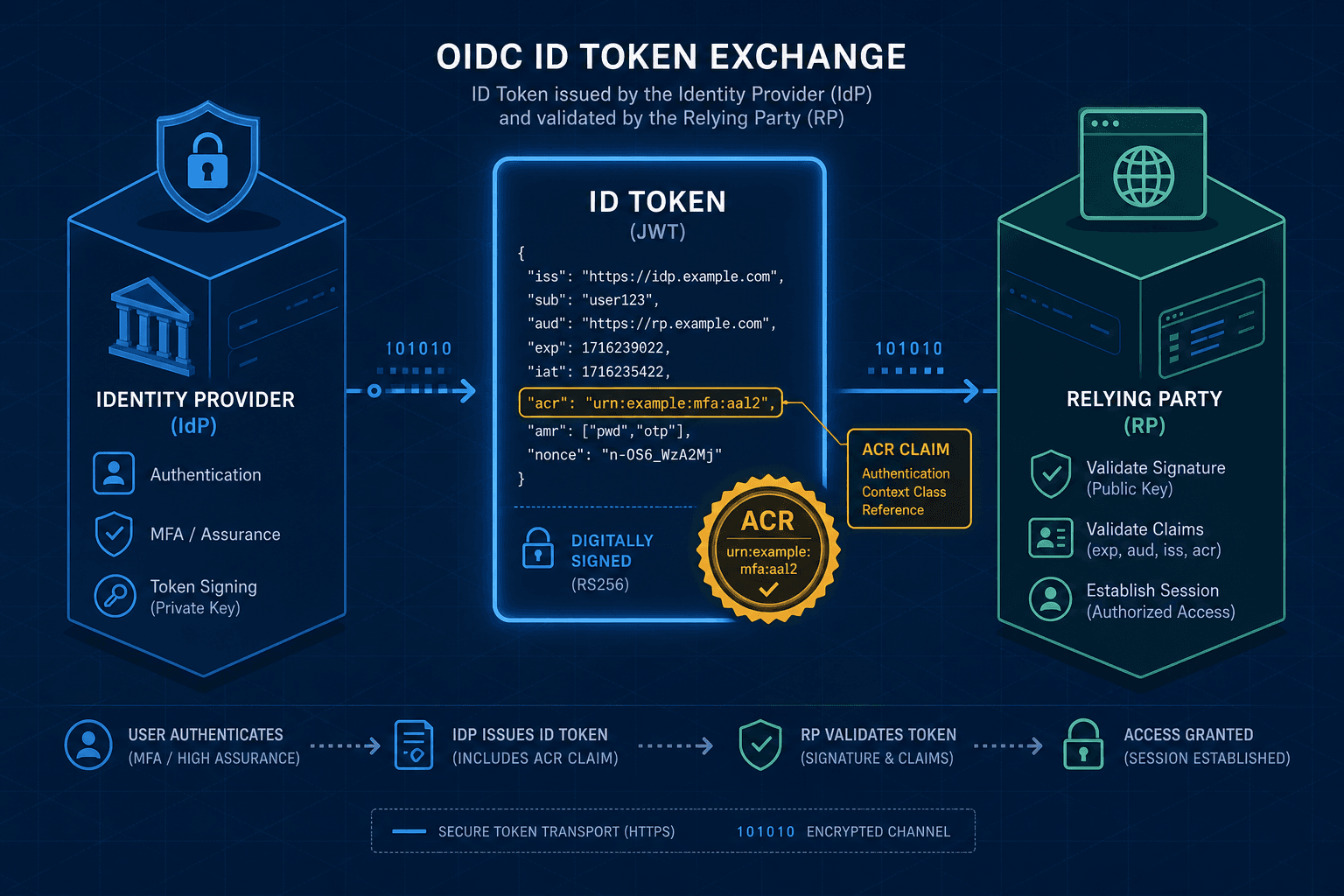
In the OpenID Connect (OIDC) ecosystem, Multi-Factor Authentication (MFA) is often misunderstood as a simple checkbox on the login screen. It is not. Mechanistically, MFA is a negotiation of trust levels between the Identity Provider (IdP) and the Relying Party (RP). The core engine driving this is the Authentication Context Class Reference (ACR). When a user authenticates, the IdP does not merely say "yes"; it issues a cryptographically signed assertion about how that "yes" was established. This assertion lives in the acr claim within the ID Token. If the RP requires a specific level of assurance—say, proof of possession of a hardware token—it checks this claim. If the claim is missing or insufficient, the protocol dictates that the RP must reject the token and initiate a step-up challenge.
This article, Part 7 of the OpenID Connect Deep Dive Series, explores how to architect this mechanism using Keycloak, WebAuthn, and TOTP to enforce granular security policies without compromising the user experience.
The ACR Claim as a Cryptographic Receipt
The standard defines ACRs to categorize the methods used during authentication. However, RFC 8414 defines ACRs as opaque strings and does not standardize specific namespaces like urn:oidc:acrs:pwd or urn:oidc:acrs:webauthn. Implementations like Keycloak define their own custom URNs. A standard password-only login might yield a custom ACR value such as urn:example:acrs:pwd, while an MFA login involving a hardware token might yield urn:example:acrs:webauthn or urn:example:acrs:mfa:totp. The critical mechanism here is that the acr value is part of the ID Token's payload, protected by the JSON Web Signature (JWS). This prevents an attacker from simply modifying the token to claim MFA was used if it wasn't.
When Keycloak processes a login, it assigns an ACR based on the active authentication flow. If the flow includes a "TOTP" or "WebAuthn" authenticator, Keycloak sets the acr claim accordingly using its defined URN namespace. The RP, upon receiving the token, parses the acr claim. If the RP's configuration demands acr_values: urn:example:acrs:mfa, and the received token only contains urn:example:acrs:pwd, the RP knows the authentication is insufficient for the requested scope. This is the fundamental mechanism that decouples the method of login from the requirement of the application.
Configuring Keycloak for ACR Enforcement
To implement this, we must configure Keycloak to distinguish between a standard login and an MFA-enforced login. In Keycloak, authentication is defined by "Flows". We cannot rely on the default "Browser" flow alone for granular MFA control; we need a composite flow.
First, we create a new Authentication Flow named "MFA-Flow". We start with the "Browser" flow (which handles username/password) but append the specific MFA authenticators as required. Unlike the CLI examples which may vary by version, the standard approach involves using the Keycloak Admin REST API to manage these flows programmatically or via the Admin Console.
# Example using Keycloak Admin REST API to update a flow
curl -X PUT 'http://localhost:8080/admin/realms/my-realm/authentication/executions/123' \
  -H 'Authorization: Bearer <admin_token>' \
  -H 'Content-Type: application/json' \
  -d '{
    "authenticator": "idp-email-verification",
    "required": false
  }'
The required flag ensures that if a user has configured TOTP, they must complete it before the flow completes. However, the crucial step for OIDC compliance is binding this flow to a specific ACR value. In Keycloak's realm settings, under "Authentication Flows", we map the "MFA-Flow" to a specific ACR identifier string.
Next, we configure the client (the RP) to request this specific ACR. The acr_values are requested by the RP in the Authorization Request, not configured in the client settings as implied by older documentation. In the Keycloak Admin Console, under the Client -> Settings -> Advanced, we ensure the client is capable of handling the requested values.
// Example OIDC Authorization Request from the RP
GET /auth/realms/my-realm/protocol/openid-connect/auth?
  client_id=my-app&
  redirect_uri=https://my-app.com/callback&
  response_type=code&
  scope=openid%20profile&
  acr_values=urn:example:acrs:mfa
By including acr_values=urn:example:acrs:mfa in the initial request, we tell Keycloak: "Do not let this user log in with just a password. Enforce the MFA-Flow." If the user has not yet enrolled in MFA, Keycloak will present the enrollment screen. If they have, it presents the second factor challenge.
Step-Up Authentication: The Dynamic Challenge
The most powerful application of OIDC MFA is step-up authentication. This occurs when a user logs in with low assurance (e.g., just a password) and then attempts to perform a high-risk action, like changing a credit card or accessing payroll data. The Relying Party (RP) detects this risk and initiates a new OIDC request with a higher acr_values requirement.
Consider the actor "Alice" and the artifact "Payroll-App". Alice logs into the "Corporate-Portal" (RP) using just a password. The Portal receives an ID Token with acr: urn:example:acrs:pwd. She navigates to the "Payroll" section. The Payroll module, running on the server-side, intercepts the request. It sees the current session lacks the necessary assurance.
The server-side logic triggers a new login request, but this time it sends a acr_values hint requiring MFA.
// Server-side logic triggering step-up
async function accessPayrollData(req, res) {
  const currentToken = req.idToken;
  const requiredAcr = 'urn:example:acrs:mfa';

  if (!isAcrSufficient(currentToken.acr, requiredAcr)) {
    // Trigger a new OIDC login with higher ACR requirement
    // The server redirects the user to the IdP
    const redirectUrl =
      `https://keycloak.example.com/auth/realms/corp/protocol/openid-connect/auth?` +
      `client_id=payroll-app&` +
      `acr_values=${encodeURIComponent(requiredAcr)}&` +
      `prompt=login&` +
      `redirect_uri=${encodeURIComponent(req.hostname + '/payroll/callback')}`;

    res.redirect(redirectUrl);
  }
}
The prompt=login parameter is critical here. It forces the IdP to show the login screen again, even if Alice is already authenticated in the browser session. The IdP sees the high ACR requirement, recognizes Alice is already authenticated, but notes her current session only has pwd assurance. It then executes the MFA-Flow, prompting Alice for her TOTP code or WebAuthn signature. Upon success, the new ID Token contains acr: urn:example:acrs:mfa, and the Payroll App accepts it.
This mechanism relies on the IdP maintaining state about the current authentication session while allowing the RP to dynamically adjust the assurance requirements. The IdP does not "log out" the user; it simply re-evaluates the session against the new, stricter policy.
WebAuthn vs. TOTP: The Underlying Mechanisms
While the OIDC layer treats both as "MFA", the underlying mechanisms differ significantly. Keycloak supports both, but the protocol interaction varies.
TOTP (Time-based One-Time Password) relies on a shared secret. During enrollment, Keycloak generates a secret and encodes it into a QR code for the user's authenticator app. During login, the user enters a code generated by the app. The server verifies the code by calculating the expected value based on the current time and the shared secret. This is a challenge-response mechanism based on shared knowledge. In OIDC terms, Keycloak marks this as a successful second factor but the cryptographic binding is weak compared to public key cryptography.
WebAuthn (FIDO2) uses public key cryptography. The user registers a security key (e.g., YubiKey) or a platform authenticator (e.g., TouchID). The registration generates a public/private key pair. The public key is stored in the IdP database; the private key never leaves the device. During login, the IdP sends a challenge. The device signs the challenge with the private key and returns the signature. The IdP verifies the signature using the stored public key.
Keycloak handles WebAuthn by acting as a WebAuthn Server. When the acr_values require WebAuthn, Keycloak initiates the WebAuthn startAssertion ceremony. The response is a PublicKeyCredential object, which Keycloak verifies before issuing the ID Token with the appropriate acr claim.
The tradeoff is clear: WebAuthn provides phishing resistance because the private key is bound to the domain origin. TOTP is susceptible to phishing if the user enters the code on a fake site, though it is more universally accessible. From a security architecture perspective, WebAuthn is the preferred mechanism for high-assurance environments, while TOTP serves as a robust fallback for general use.
Common Pitfalls
Implementing OIDC MFA requires careful attention to how assertions are interpreted and enforced. Several common mistakes can undermine the security posture:
- Misinterpreting ACR as a Login Method: Developers often confuse the
acrclaim with the specific method used (e.g., "WebAuthn"). Remember thatacris an assertion of the assurance level, not the implementation details. The RP should only care about the value, not how it was achieved. - Client-Side vs. Server-Side Enforcement: A critical error is attempting to enforce
acrpolicies solely on the client side (e.g., in JavaScript). A malicious actor can bypass client-side checks. The Relying Party must always validate theacrclaim on the server side before granting access to sensitive resources. - Using Non-Standard URNs Without Documentation: Since RFC 8414 does not standardize specific URNs, organizations often define their own (e.g.,
urn:example:acrs:high). If these are not documented clearly across the IdP and all Relying Parties, inconsistencies arise where one system expectsmfaand another expectswebauthn, causing authentication failures.
Practical Takeaways
To navigate OIDC MFA implementation effectively, keep these mental models in mind:
- ACRs are Opaque Strings: Treat the
acrvalue as a generic label of assurance. Do not hardcode logic that assumes specific string values unless you control both the IdP and the RP. - Server-Side Enforces Policy: The browser and client applications are untrusted. All decisions regarding whether an
acrvalue is sufficient must be made on the backend. - WebAuthn is Phishing-Resistant: For high-value targets, prefer WebAuthn over TOTP because the cryptographic binding to the domain origin prevents credential harvesting via phishing sites.
FAQ
Q: Can I use standard ACR values defined in RFC 8414?
A: RFC 8414 defines the mechanism for ACRs but does not standardize specific URN values. You must define your own namespace (e.g., urn:mycompany:acrs:...) or use vendor-specific values provided by your IdP (like Keycloak's defaults).
Q: Does prompt=login always force MFA?
A: No. prompt=login forces the IdP to present the login screen again. MFA is only triggered if the acr_values in that request require a higher assurance level than the current session holds. If the acr_values match the current session, the user may be logged in directly without re-authentication.
Q: What happens if the RP doesn't support the ACR requested by the IdP?
A: If the RP requests a specific acr_values that the IdP cannot satisfy (e.g., the user hasn't enrolled in the required factor), the IdP will typically return an error response (e.g., access_denied or a specific error code) rather than issuing a token. The RP should handle this gracefully by prompting the user to enroll in the required factor.
Conclusion
Implementing MFA in OIDC is not about adding a login screen; it is about configuring the assertion of trust. By leveraging the acr claim, applications can enforce granular security policies without needing to know the specific implementation details of the second factor. Keycloak acts as the orchestrator, mapping authentication flows to ACR values, while the RP enforces the policy by requesting the correct acr_values. This separation of concerns allows the RP to demand higher assurance dynamically, ensuring that sensitive actions are protected by the strongest available authentication method.
The mechanism is robust because it is protocol-level. The acr claim is signed, immutable, and verifiable. Whether the second factor is a TOTP code or a FIDO2 signature, the RP only cares about the resulting assurance level. This architecture scales from simple password protection to high-assurance enterprise security without changing the fundamental OIDC handshake.
Related posts
Implementing WebAuthn in Keycloak: Passkey Authentication Setup
A walkthrough for configuring WebAuthn and passkeys within Keycloak to enable passwordless authentication using FIDO2 standards.
Implementing OIDC Authentication in Spring Boot with Keycloak
A walkthrough for implementing OIDC authentication in Spring Boot using Keycloak, covering setup and configuration.
Building Identity-Aware Load Balancing with NGINX and Keycloak
Learn how to implement identity-aware load balancing using NGINX and Keycloak for secure authentication routing.