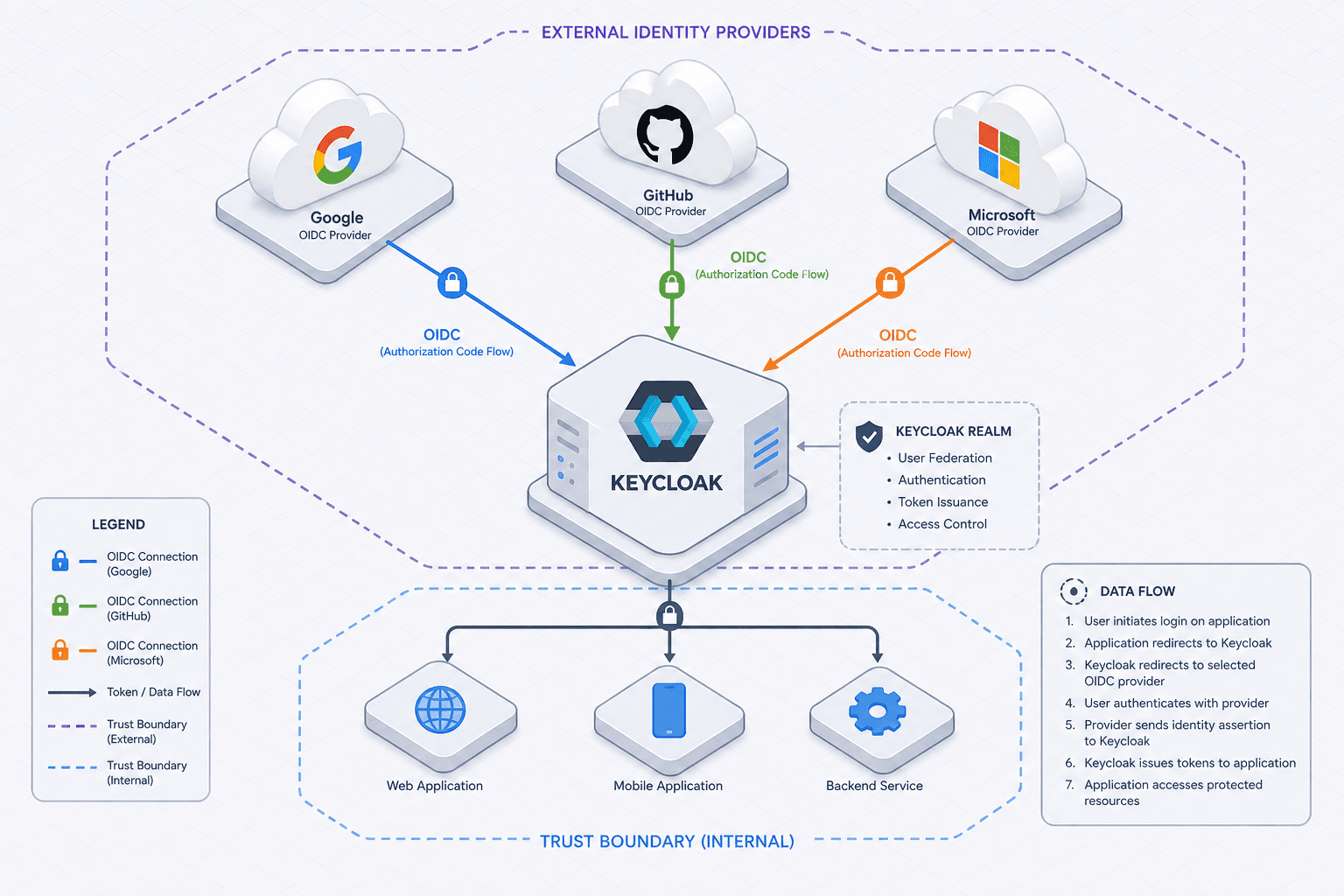
Social Login with OIDC: Google, GitHub & Microsoft
An examination of implementing social login using OpenID Connect with Google, GitHub, and Microsoft via Keycloak for federated identity management.
Social Login with OIDC: Google, GitHub, and Microsoft Integration
Federated identity relies on a precise chain of cryptographic trust and protocol adherence rather than magic. When configuring Keycloak to accept logins from Google, GitHub, or Microsoft, you establish a relationship where Keycloak delegates initial credential verification to an external provider and subsequently validates the resulting assertion. This process is governed by the OpenID Connect (OIDC) specification, which sits atop OAuth 2.0. The core mechanism driving this architecture is the discovery and validation of the Identity Provider (IdP), ensuring that every token presented originates from a trusted source.
Part 8 of the OpenID Connect Deep Dive Series explores how to implement these integrations effectively.
The Trust Boundary: Discovery and Configuration
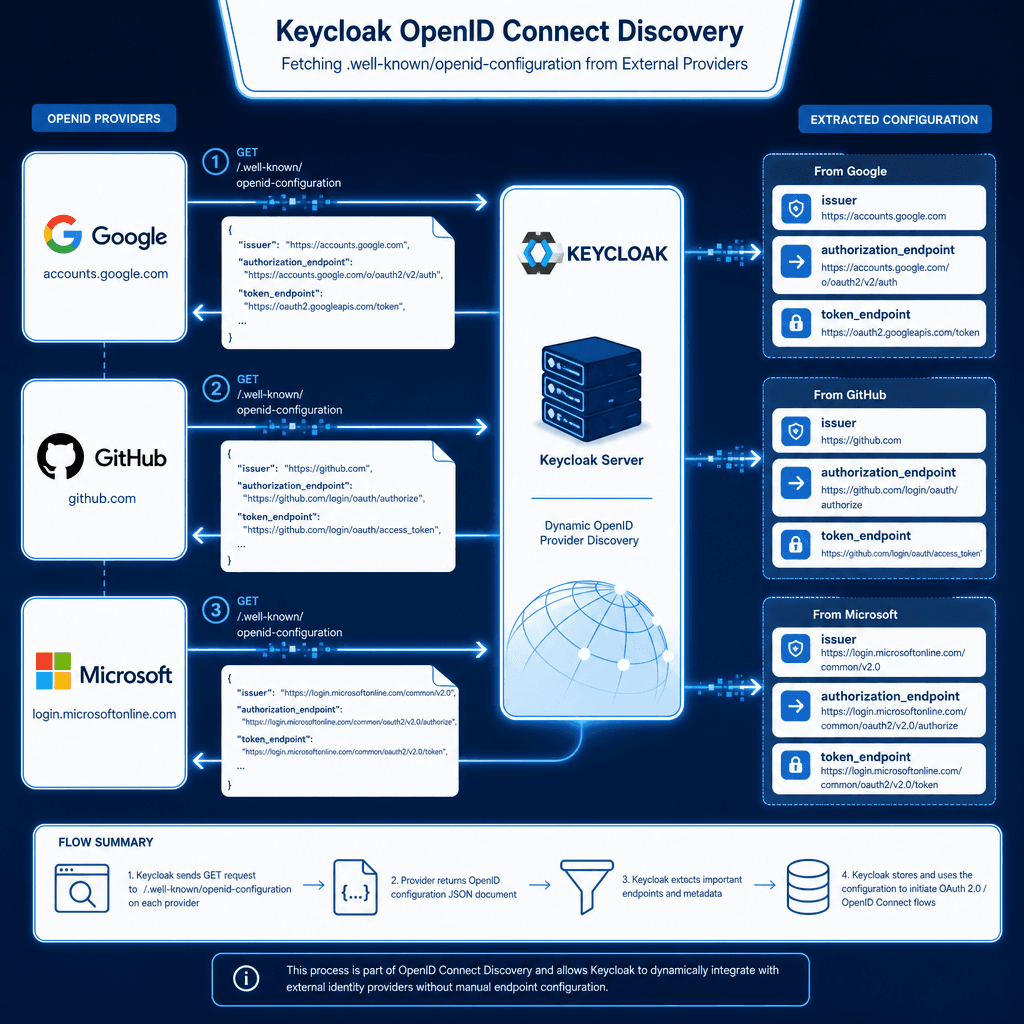
Before a user interacts with the login interface, the system must define the endpoints for authentication. Keycloak avoids hardcoding endpoints for Google, GitHub, or Microsoft. Instead, it performs a dynamic discovery process. When a social provider is added in the Keycloak Admin Console, the system fetches the /.well-known/openid-configuration document from the provider's domain.
This JSON document contains critical URIs: issuer, authorization_endpoint, and token_endpoint. For instance, when Keycloak queries Google, it receives the issuer https://accounts.google.com. This iss claim serves as the anchor of trust. If a subsequent token presented by the user does not match this issuer, the token is rejected immediately. This mechanism prevents an attacker from redirecting a user to a malicious server that mimics Google's interface but issues tokens for a different domain.
Consider a scenario where an engineer configures a "Google" identity provider in Keycloak. They input the Client ID and Client Secret obtained from the Google Cloud Console. The critical mechanism here is the Redirect URI. Keycloak generates a unique callback URL, typically https://keycloak.example.com/realms/myrealm/protocol/openid-connect/callback/google. The external provider (Google) must be configured to allow this exact URL. If the Redirect URI does not match exactly, Google will reject the authentication response, breaking the flow before the token is even issued. This strict matching is the first line of defense against Open Redirect vulnerabilities.
In the context of enterprise authentication, a robust identity provider configuration is essential to ensure seamless user experiences across diverse platforms. A successful open id connect implementation requires meticulous attention to the oauth2 oidc flow to prevent security gaps and ensure data integrity.
The Token Exchange Flow
Once the trust boundary is established, user interaction follows the Authorization Code Grant flow. Imagine a user named Alice attempts to log in. She clicks the "Sign in with GitHub" button on the application frontend. This action triggers a redirect to GitHub's authorization endpoint, carrying a client_id, a redirect_uri, and a random state parameter.
The state parameter acts as a CSRF token. Keycloak generates a random string, stores it in the session, and sends it to GitHub. When GitHub redirects Alice back to Keycloak, it includes the state parameter in the query string. Keycloak compares the returned state with the one stored in the session. If they do not match, the request is discarded. This mechanism ensures that the response is actually intended for the user who initiated the request and has not been tampered with by a third party.
After the state is validated, Keycloak receives an authorization code. This code is temporary and single-use. Keycloak then performs a server-to-server POST request to GitHub's token endpoint, presenting the code along with the client_secret. GitHub verifies the credentials and returns a JSON response containing an access_token and an id_token. The id_token is a JSON Web Token (JWT) signed by GitHub. Keycloak uses the public key retrieved from the discovery document to verify the signature. If the signature is valid, the token is accepted, and the user is considered authenticated.
Provider-Specific Attribute Mapping
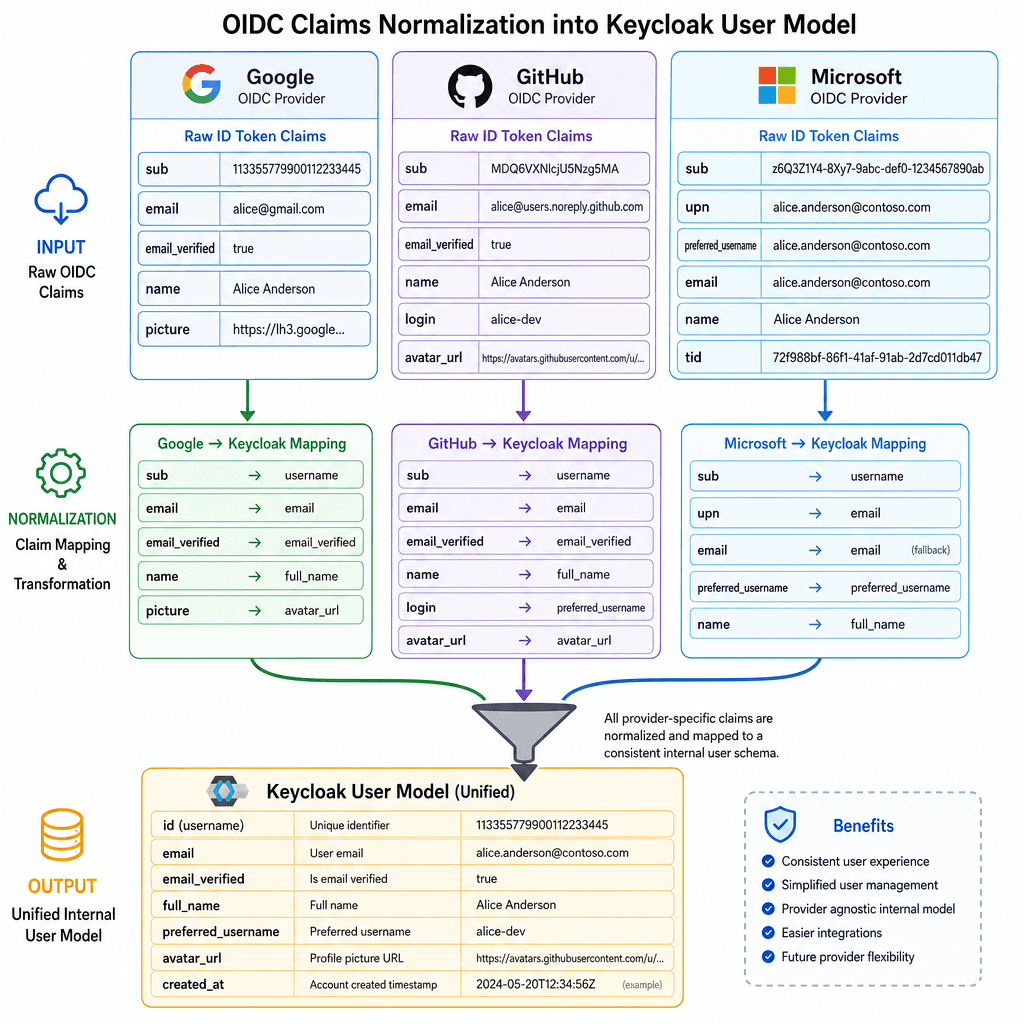
The complexity arises when normalizing the data returned by different providers. While the protocol is standard, the claims (the data inside the JWT) vary significantly between Google, GitHub, and Microsoft. Keycloak must map these disparate attributes to a unified internal user model to ensure consistent behavior across the application.
Google typically returns the email and email_verified claims as standard OIDC attributes. The sub (subject) claim is a unique identifier that changes if the user changes their Google account settings, though it remains stable for a specific user.
GitHub, however, behaves differently. The sub claim in GitHub's OIDC implementation is the user's ID number (e.g., 123456). Crucially, GitHub does not guarantee that the email claim is present or verified unless explicitly requested and configured. If the application relies on email for user lookup, a direct mapping will fail for users who have hidden their email on GitHub.
Microsoft (Azure AD) often returns a tid (tenant ID) and oid (object ID) alongside upn (User Principal Name). The upn might be a corporate email address, while email might be a personal address if the user has multiple accounts linked.
To solve this, Keycloak uses a "Mapper" configuration. When creating the social identity provider in the Admin Console, you define how specific provider claims map to Keycloak's internal attributes. For instance, you can configure a mapper to take the GitHub sub and map it to the internal username, while simultaneously mapping the email claim to the email attribute. If the email claim is missing, you can configure a fallback logic or a default value, though relying on defaults is an opinionated tradeoff that risks data inconsistency.
{
  "mapperName": "GitHub Email Mapper",
  "protocol": "openid-connect",
  "protocolMapper": "oidc-usermodel-attribute-mapper",
  "config": {
    "userinfo.token.claim": "true",
    "user.attribute": "email",
    "id.token.claim": "true",
    "access.token.claim": "true",
    "claim.name": "email",
    "jsonType.label": "String"
  }
}
In this configuration, Keycloak extracts the email claim from the incoming OIDC token and populates the user's email attribute in the Keycloak database. If the provider does not return this claim, the attribute remains null. This mechanism highlights a critical design decision: your application must handle cases where the social provider does not provide an email, or you must enforce a requirement that the user verifies their email with the provider before allowing login.
Security and Configuration Nuances
The final layer of the mechanism involves the handling of the nonce parameter. The nonce is a random value generated by Keycloak and included in the initial authorization request. It is returned in the id_token by the provider. Keycloak verifies that the nonce in the token matches the one it generated. This prevents replay attacks where an attacker captures a valid id_token and attempts to reuse it to authenticate a different user.
Furthermore, the configuration of the Client Scopes in Keycloak is vital. By default, Keycloak might request only the openid scope. To get the user's name or email, you must explicitly request profile and email scopes from the provider. Different providers have different requirements for what scopes are needed to access specific data. For example, Google requires the email scope to be explicitly added to the request parameters to return the email claim, whereas GitHub generally does not return the email claim unless the email scope is explicitly requested, regardless of whether the user has a verified email.
When integrating Microsoft, you often need to configure the tenant parameter. Microsoft supports multi-tenant applications (organizations) and single-tenant applications. If you are building for a specific organization, you set the tenant to that specific ID. If you are building a public-facing application, you use common or organizations. The mechanism here dictates how the iss claim is validated against the expected tenant. If the iss does not match the expected tenant pattern, the token is rejected.
Common Pitfalls
Implementing social login is fraught with edge cases that can halt user registration or cause silent failures.
- Email Verification Mismatches: A frequent failure occurs when a provider returns an
emailclaim that is not marked asemail_verified. If your application logic treats any email as valid without checking this flag, users can potentially register with unverified addresses, leading to spam or account takeover risks. Always enforceemail_verifiedchecks in your custom logic or Keycloak mappers. - Redirect URI Errors: One character mismatch in the
Redirect URIconfiguration between the Keycloak realm and the provider's console will cause the entire flow to fail. The provider will return an error immediately upon redirection, often with no user-facing error message. Always ensure theRedirect URIin Keycloak matches the "Authorized Redirect URIs" in the provider's developer console exactly, including trailing slashes. - Token Expiration and Refresh: Access tokens from social providers often have short lifespans. If your application attempts to use an expired
access_tokenfor downstream API calls without refreshing it, operations will fail. Ensure your backend logic handles token expiration gracefully by implementing a refresh token strategy or re-triggering the authorization flow when necessary.
Practical Takeaways
- Validate Strictly: Never trust the provider's data blindly. Always validate the
issclaim,nonce, andstateparameters to ensure the integrity of the authentication flow. - Handle Missing Claims: Design your user model to handle missing attributes (like
email) gracefully. Implement fallback strategies or require additional user input if critical data is unavailable from the IdP. - Scope Configuration: Explicitly request all necessary scopes (
profile,email, etc.) during the authorization request. Do not rely on defaults, as provider behaviors regarding default claims vary significantly.
FAQ
Q: Can I use the same client ID and secret for Google and GitHub? A: No. Each identity provider requires its own unique set of credentials (Client ID and Client Secret). You must register your application separately with Google Cloud Console, GitHub, and Microsoft Azure to obtain distinct credentials for each.
Q: What happens if a user deletes their Google account after logging in via Keycloak?
A: The user will lose access to the application unless you have a backup authentication method. The sub claim in the token is tied to the external account. If the account is deleted, the token becomes invalid, and the user cannot authenticate. Consider offering alternative login methods for critical users.
Q: How do I handle users who have multiple Google accounts?
A: OIDC handles this by presenting a choice screen to the user before the token is issued. The sub claim will correspond to the specific account selected. Keycloak will treat each distinct sub as a separate user identity unless you implement custom logic to merge accounts based on email addresses.
Conclusion
Implementing social login with Keycloak is not merely about pasting API keys into a configuration file. It is about orchestrating a sequence of cryptographic validations and data mappings. The state parameter protects the user session, the nonce protects the token replay, and the issuer validation ensures the token comes from the trusted source. The variation in claims between Google, GitHub, and Microsoft requires a robust mapping strategy within Keycloak to normalize the user identity.
By understanding these mechanisms, you move beyond surface-level integration. You gain the ability to debug why a user cannot log in (e.g., a mismatched state, a missing email claim, or an invalid iss), and you can design your application to handle the edge cases inherent in federated identity systems. The tradeoff is complexity: you must manage the lifecycle of client secrets, handle potential provider outages, and ensure your application can gracefully degrade if a social provider's API changes its response format. However, the security benefits of delegating credential management to specialized providers usually outweigh these costs.
Related posts
Keycloak Identity Provider Federation: Bridging Multiple IdPs
An examination of Keycloak identity provider federation and how to bridge multiple SAML and OIDC brokers for unified access.
Implementing OIDC Authentication in Spring Boot with Keycloak
A walkthrough for implementing OIDC authentication in Spring Boot using Keycloak, covering setup and configuration.
Multi-Factor Authentication with OIDC: Implementing MFA
An examination of implementing multi-factor authentication using OIDC, covering Keycloak, WebAuthn, TOTP, and step-up authentication via ACR.