OIDC Front-Channel vs Back-Channel Logout: Implementation Guide
A technical examination of OIDC front-channel and back-channel logout mechanisms, comparing implementation strategies for session management.
The Mechanics of Breaking a Session: Front-Channel vs Back-Channel Logout
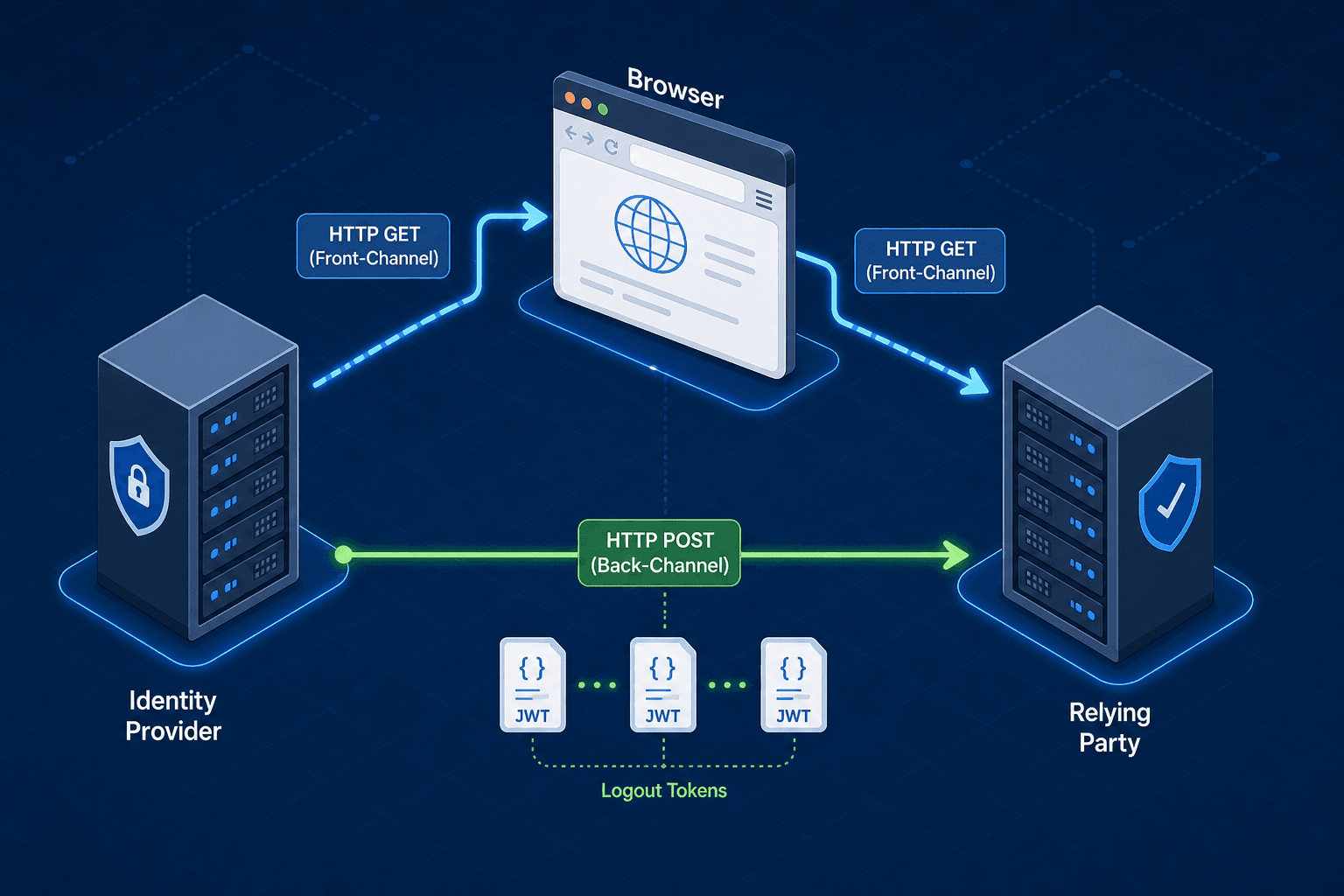
In OIDC (OpenID Connect), logging out is a distributed coordination problem rather than a simple server-side session destruction. When a user clicks "Log Out," three entities must agree on the state: the browser, the Relying Party (RP), and the Identity Provider (IdP). If any link breaks, the user remains authenticated or confused. The protocol defines two distinct paths to resolve this: Front-Channel Logout and Back-Channel Logout. The choice depends on which failure modes your architecture can tolerate.
Front-Channel: The Browser as the Messenger
Front-Channel Logout relies entirely on the user agent (the browser) to carry the message. This mechanism is defined in the OIDC Session Management specification as the primary method for clearing local session state. It does not require the server to initiate a direct connection back to your application.
Imagine Alice logs into your app (https://app.example.com) via an Identity Provider (https://auth.example.org). She has a session cookie at both domains. When she clicks "Logout" in your app, your app redirects her browser to the Identity Provider's logout_endpoint with a specific parameter: logout_hint. Per OpenID Connect Core 1.0 (Section 3.1.2.13), logout_hint acts as a hint about the target (e.g., domain or account), not the session ID. The actual session identifier is passed via the sid parameter in the logout request, as defined in OpenID Connect Session Management 1.0.
The browser navigates to the Identity Provider. The provider sees the request, invalidates the session on its side, and then issues a redirect response pointing to the post_logout_redirect_uri configured in your app. The browser follows this redirect, returning to your application. Your application sees the return and clears its local session cookie for that specific tab.
This flow is simple because it uses standard HTTP GET requests and the browser's native navigation history. However, it has a critical architectural weakness: it assumes the user is currently looking at the login page or that the browser will faithfully follow the redirect chain.
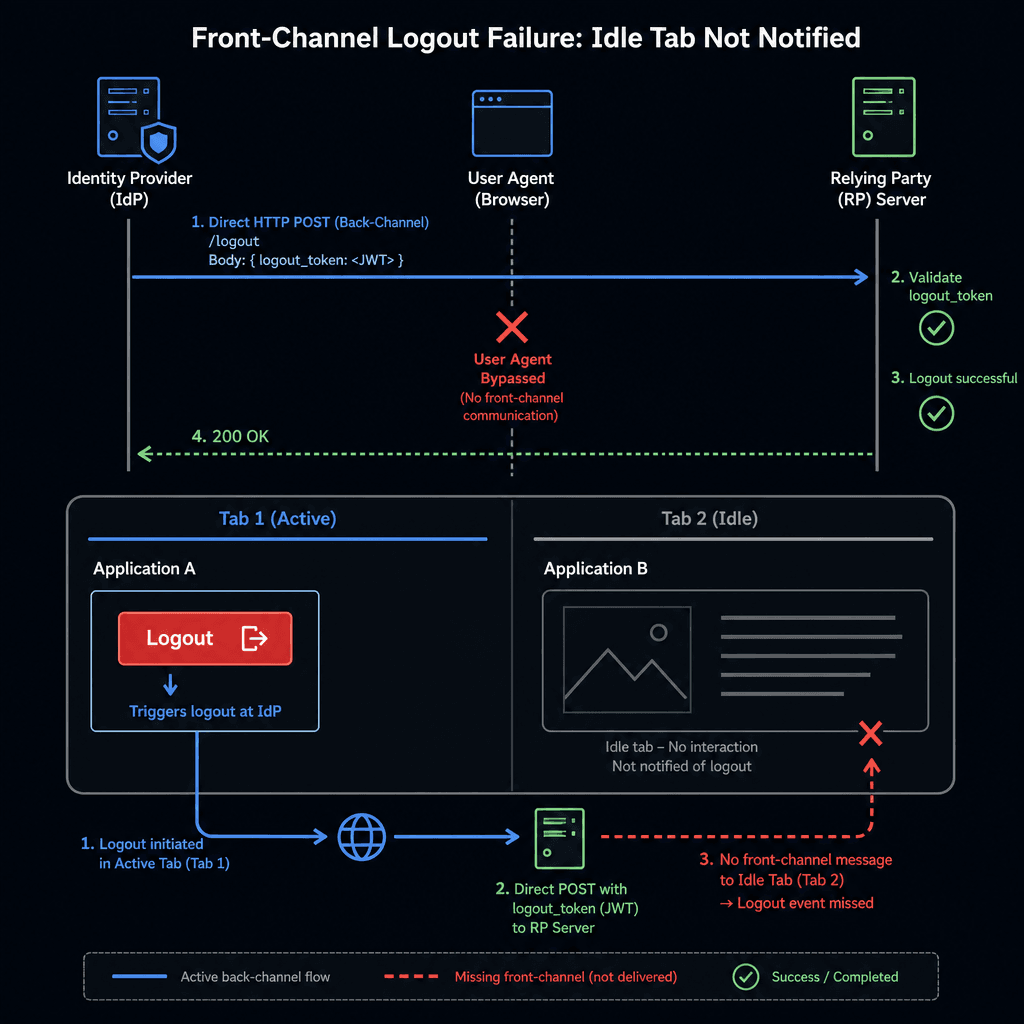
Consider a scenario where Alice has two tabs open. Tab 1 is on your dashboard. Tab 2 is reading a news article on news.example.com. If she logs out in Tab 1, the browser redirects to the Identity Provider, which redirects back to Tab 1. Tab 2, sitting idle on the news site, never receives the logout signal. The session on the Identity Provider is dead, but the browser's local state for that session might persist if the application logic doesn't explicitly check for it. Worse, the user might navigate back to the dashboard in Tab 2 and find they are still logged in. The real issue is the orphaned RP session in Tab 2; the browser's local state isn't the problem, but rather the lack of synchronization between the IdP and the RP for that specific context.
The mechanism here is purely client-side redirection. It works well for single-page applications where the user is actively engaged, but it fails to enforce session invalidation across all active contexts simultaneously.
Back-Channel: The Direct Server Handshake
Back-Channel Logout solves the multi-tab problem by bypassing the browser entirely. Instead of the user navigating to the Identity Provider, the Identity Provider sends an HTTP POST request directly to your application's logout_uri.
In this flow, the Identity Provider and your Relying Party must have previously established a trust relationship. During the initial login or via a specific discovery endpoint, the RP declares its logout_uri (often /oidc/logout). The Identity Provider stores the sid (session ID) and iss (issuer) associated with the user's active sessions.
When the Identity Provider needs to invalidate a session—whether initiated by the user, an admin, or a security event—it constructs a JSON Web Token (JWT) called a logout_token. This token contains:
sid: The session identifier.iss: The issuer (Identity Provider).sub: The subject (user ID).iat: Issued-at time.jti: A unique JWT ID to prevent replay attacks.
The Identity Provider then POSTs this token to your logout_uri. Your application receives the request, verifies the signature using the Identity Provider's public keys (fetched from the JWKS endpoint), and checks the jti to ensure the token hasn't been processed before. If valid, your application destroys the session for that specific sid and returns a 200 OK response.
This mechanism is effective because it does not rely on the user being present. If Alice is on Tab 2 reading the news, and she logs out on Tab 1, the Identity Provider detects that Tab 2 is still holding an active session for the same sid. It immediately fires the POST request to your logout_uri. Your server kills the session for that user, and when Alice eventually tries to refresh Tab 2, the server rejects the request.
The tradeoff is complexity. Your application must be able to accept incoming POST requests without a corresponding user action. You must implement a secure endpoint that validates the signature and handles the sid correctly. If you fail to validate the signature, an attacker could potentially send a forged logout request to log users out of your system (a Denial of Service vector).
Implementation Strategy: The Alice and Bob Scenario
To understand the necessity of combining these mechanisms, let's look at a concrete deployment scenario involving Alice (the user) and Bob (the security administrator).
Alice is logged into SecureBank.com (your app). She has two tabs open. Bob, the admin, decides to revoke Alice's access due to suspicious activity.
Scenario A: Front-Channel Only If your app only supports Front-Channel Logout, Bob's revocation triggers the Identity Provider to wait for a user-initiated logout. Since Alice is just browsing, no logout occurs. Her sessions remain active until the token expires or she manually logs out. The system fails to enforce immediate security.
Scenario B: Back-Channel Only
If your app only supports Back-Channel Logout, Bob revokes access. The Identity Provider sends the logout_token to your logout_uri. Your server destroys the session. However, Alice is still logged in on her mobile device, which is not part of the current browser session context. The Identity Provider might not have pushed the logout to that device if the session management state wasn't synchronized perfectly.
Scenario C: The Hybrid Approach The common practice for robust session management is to implement both.
- User Initiated: When Alice clicks "Logout," the app triggers the Front-Channel flow. This ensures her browser clears local cookies and redirects her to a "You have been logged out" page.
- Admin/Security Initiated: When Bob revokes access, the Identity Provider triggers the Back-Channel flow. It sends the
logout_tokento all registered RPs. Your server processes this, invalidates the session, and optionally triggers a Front-Channel redirect if the user is currently on a page (by sending a response that prompts the browser to clear cookies).
The critical mechanism here is the jti (JWT ID). In the Back-Channel flow, if the Identity Provider accidentally sends the same logout token twice (due to network retries), your application must ignore the second one. Without checking the jti, you might process the logout, then process it again, or worse, fail to track the state correctly.
Your implementation must maintain a short-term cache of processed jti values. If a logout_token arrives with a jti you have already seen, you return 200 OK immediately without re-processing the session destruction logic. This idempotency is essential for reliability.
{
  "logout_token": {
    "iss": "https://auth.example.org",
    "sub": "alice@example.com",
    "sid": "2024-05-21-session-123",
    "iat": 1716240000,
    "jti": "unique-token-id-abc-123",
    "aud": "https://app.example.com",
    "events": {
      "http://openid.net/event/session": {}
    }
  }
}
Common Pitfalls
Implementing OIDC logout often leads to subtle vulnerabilities if specific operational details are overlooked.
- Relying solely on Front-Channel for admin revocation: Front-Channel cannot detect or signal other tabs. If you depend only on this mechanism for administrative revocation, users in other active sessions will remain logged in until they manually navigate away or their tokens expire.
- Failing to validate
jtileading to race conditions: Without checking thejti(JWT ID), an application may process a logout token multiple times or fail to track state correctly during network retries, leading to inconsistent session states. - Not maintaining a list of active sessions for Back-Channel push: If the Identity Provider does not maintain a list of active sessions (or if the RP does not register them correctly), it cannot effectively push logout signals to all relevant contexts, leaving orphaned sessions active.
Practical Takeaways
To ensure a secure and reliable logout implementation, consider these actionable steps:
- Implement both flows: Use Front-Channel for user-initiated exits to ensure a graceful UI experience, and Back-Channel for server-side revocations to handle multi-tab scenarios.
- Enforce Idempotency: Always validate the
jticlaim inlogout_tokenagainst a cache of recently processed tokens to prevent replay attacks and duplicate processing. - Secure the Endpoint: Ensure your
logout_uriaccepts POST requests only, validates the signature using the latest JWKS, and strictly checks theaud(audience) claim.
FAQ
Q: Can Front-Channel Logout work if the user closes the browser? A: No. Front-Channel Logout requires the browser to execute the redirect chain. If the browser is closed, the session persists on the Identity Provider and the Relying Party until the Back-Channel flow is triggered or the session expires.
Q: Do I need to store logout_token in my database?
A: Generally, no. The jti should be stored in a short-term cache (e.g., Redis) with a TTL matching the token's validity window. This allows you to quickly verify if a token has been processed without persisting the entire token.
Q: What happens if the Back-Channel request fails?
A: If your logout_uri returns a non-200 status code, the Identity Provider may retry the request or log an error. It is crucial to ensure your endpoint is highly available and handles errors gracefully to avoid leaving sessions active.
Conclusion
Front-Channel Logout is the default user experience, handling the "I'm done here" case efficiently through browser redirects. Back-Channel Logout is the security enforcement mechanism, ensuring that server-side decisions propagate to all client contexts regardless of user activity.
Relying solely on Front-Channel leaves you vulnerable to stale sessions and multi-tab inconsistencies. Relying solely on Back-Channel leaves you without a graceful user exit flow. The correct implementation combines both: use Front-Channel for the user's explicit request and Back-Channel for administrative revocation and session invalidation events. This dual-path strategy ensures that the session state is consistent, secure, and synchronized across the entire distributed system.
The complexity of managing the logout_uri and validating logout_tokens is the price of trust. But in a security-sensitive application, that price is non-negotiable. You cannot secure a session you cannot control.
Related posts
OpenID Connect Guide: Extending OAuth 2.0 for Identity Verification
An examination of OpenID Connect (OIDC) and how it extends OAuth 2.0 to handle identity verification using ID tokens and discovery protocols.
Angular OAuth2/OIDC: loadDiscoveryDocumentAndTryLogin
Learn how to use loadDiscoveryDocumentAndTryLogin and strict discovery document validation in Angular for secure OAuth2/OIDC authentication.
The AuthConfig Reference: Every Property That Matters
A complete reference for Angular-OAuth2-OIDC AuthConfig properties, covering requireHttps, remoteOnly, and nonceStateSeparator for secure Angular authentication.